Somnium VR1 Review: Premium VR Headset Analysis
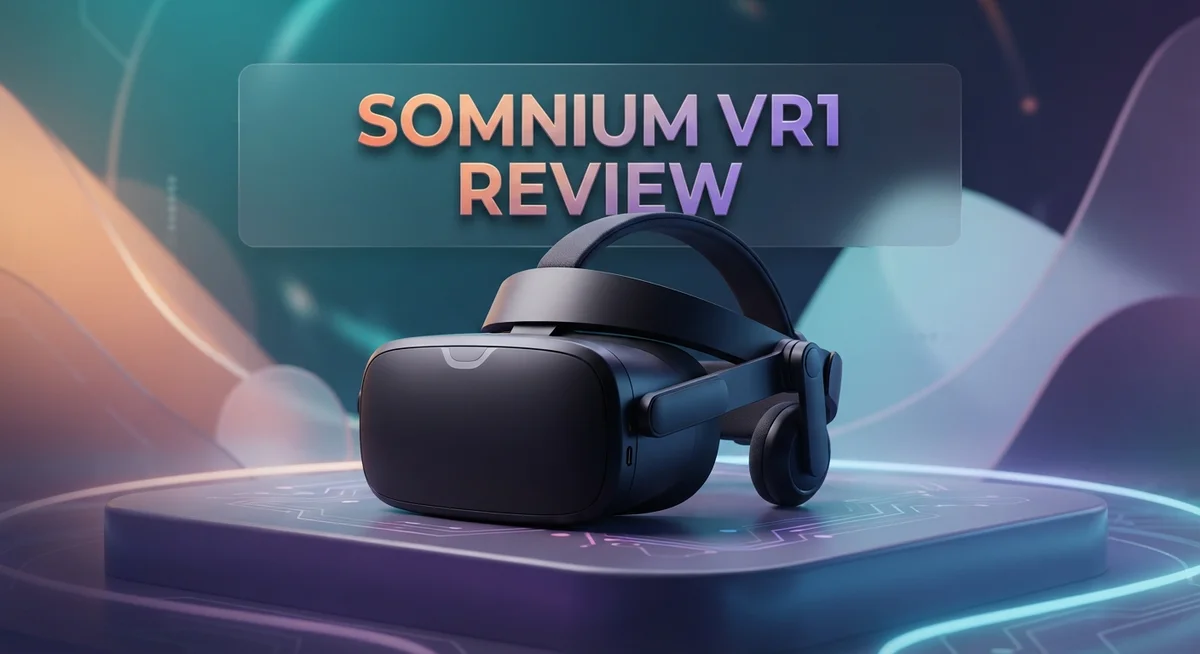
The Somnium VR1 stands out in a crowded VR market. It promises sharp visuals and a wide field of view. But does it truly deliver on that promise?
This headset targets both gamers and business users. It features a modular, open design. This makes it flexible for many different uses.
We tested the VR1 to see how it performs in real life. The high resolution displays and 210nit brightness create vivid images. The 90Hz refresh rate keeps motion feeling smooth.
In a Nutshell
- Visual Quality: The display panels give sharp, vivid images. Wide field of view adds to the immersion.
- Comfort Concerns: The headset feels heavy on longer sessions. Neck strain can build up over time.
- Motion Handling: Fast head movements cause some blur. Visual distortions pop up in certain scenes.
- Audio Setup: There is no built in sound system. You will need separate headphones for audio.
- Real World Use: Passthrough mode feels limited compared to rivals like Apple Vision Pro. This can affect mixed reality tasks.
- Build and Design: The construction feels solid and premium. Modular parts allow some customization for different needs.
- Market Position: Competitors such as Varjo Aero and XR4 offer strong alternatives. The VR1 still holds its own with unique strengths.
Display Quality and Visual Performance
The Somnium VR1 delivers sharp, vivid visuals that make virtual environments feel lifelike and engaging. The high-resolution displays render fine details with impressive clarity, whether you’re exploring digital landscapes or working on professional applications.
Brightness reaches 210 nits, which provides solid visibility in most lighting conditions. This level of brightness helps reduce eye strain during extended sessions and keeps colors punchy without washing them out.
The headset maintains a 90Hz base refresh rate that keeps motion smooth during gameplay and applications. This refresh rate sits in the middle ground of modern VR headsets, offering a balance between visual smoothness and system performance demands.
One standout feature is the absence of glare. The display panels avoid the reflective issues that plague some competitors, letting you focus on content without annoying light bounces. This matters more than it sounds during long use sessions.
The wide field of view enhances immersion significantly. You’ll see more of the virtual world around you without the tunnel vision effect that older headsets create. This expansive view makes games feel more natural and makes professional work less claustrophobic.
However, there’s a catch with motion handling. Fast head movements introduce screen blur that can be distracting. When you turn your head quickly, the visuals don’t keep pace perfectly, which impacts the sense of presence. This becomes noticeable during action games or when scanning environments rapidly.
Visual distortions also appear in some edge cases. The image quality holds strong in the center of your view, but some users report minor distortion at the periphery. This doesn’t ruin the experience, but it’s worth knowing about.
The modular architecture means display components can be upgraded or replaced independently. This flexibility appeals to users who want to keep their headset current without replacing the entire unit.
Overall, the display performs well for both consumer and business applications. The sharp visuals and wide FOV create an engaging experience, though motion blur and occasional distortions prevent this from being flawless. The combination of brightness, resolution, and glare-free performance makes the VR1 a solid choice for users who prioritize visual quality.


Last update on 2026-08-25 / Affiliate links / Images from Amazon Product Advertising API Some of the links on this website are affiliate links, which means that at no additional cost to you, I earn a commission if you click through and make a purchase. I only recommend products and services that I believe will add value to my readers. Thank you for your support!
Design, Build Quality, and Comfort
The Somnium VR1 features a modular, open architecture that sets it apart from many competitors. This design choice means you can swap out components without replacing the entire headset. The build quality feels premium throughout, with materials that suggest durability for both casual and professional use.
Weight becomes a real concern during extended sessions. The headset sits heavier on your face than lighter alternatives. After an hour or two, you’ll notice fatigue building around your forehead and cheeks. This matters if you plan to use VR for work or gaming marathons.
The comfort strap system does distribute weight reasonably well. However, the overall heft still creates pressure points. Gamers and business users who spend significant time in VR may find themselves taking breaks more frequently than with competing models.
Ergonomics show mixed results. The headset’s design prioritizes visual quality over lightweight comfort. The front heavy balance means your neck bears extra strain. Adjustability options exist, but they can’t fully offset the weight disadvantage.
Build materials feel solid and well assembled. There’s no creaking or loose parts. The construction inspires confidence that the device will survive regular use. The modular approach also means repairs become simpler if something breaks.
Ventilation receives adequate attention. Air flows reasonably well around the face, though extended sessions can still cause some warmth buildup. This won’t bother casual users, but professionals wearing the headset all day might struggle.
The cable management integrates cleanly into the design. Wires don’t flail around awkwardly. This matters for both aesthetics and safety during movement.
Overall, the Somnium VR1 prioritizes robustness and visual performance over feather light comfort. You get a well built headset that feels premium in your hands. The tradeoff is that longer sessions demand more tolerance for weight. Consider your typical usage time before committing. For short bursts of gaming or quick business applications, the design works fine. For all day wear, lighter competitors might serve you better.
Refresh Rate and Motion Handling
The Somnium VR1 handles refresh rates and motion with some impressive strengths and notable limitations that affect real world performance.
Running at a 90Hz base refresh rate, the headset keeps most interactions smooth during gaming and productivity tasks. This refresh rate sits in the middle ground for premium VR headsets. You’ll notice fluid movement in standard applications. However, the real issue emerges when you move your head quickly. Screen motion blur becomes visible during fast head turns, which can feel jarring if you’re accustomed to higher refresh rate systems.
The 210 nit brightness level helps reduce motion artifacts in well lit environments. Brighter displays typically minimize blur perception because the pixels refresh more noticeably. The Somnium VR1 takes advantage of this principle fairly well. You won’t struggle to see content even if sunlight streams through nearby windows.
Visual distortions pop up occasionally during rapid motion sequences. These aren’t constant problems, but they appear in edge cases. Fast panning across a virtual environment might trigger slight warping at the screen edges. This happens because the display panels struggle to keep up with extreme head movements. Most users won’t encounter these issues during normal browsing or casual gaming. Only intense VR experiences reveal this weakness.
The modular architecture helps here. Display components can receive firmware updates or hardware replacements if motion handling issues worsen over time. This flexibility gives you options that locked systems don’t offer.
Compared to competitors, the Somnium VR1 sits somewhere in the middle. The Varjo Aero handles motion more smoothly at higher refresh rates. The Apple Vision Pro uses advanced eye tracking to reduce motion blur perception. The XR4 takes a different approach with its own refresh rate strategy.
For everyday use, the 90Hz refresh rate works fine. You’ll experience smooth scrolling, comfortable video watching, and pleasant gaming sessions. Just avoid expecting cutting edge motion performance. If you frequently play fast action games or need absolute smoothness during rapid head movements, you might want to explore other options. The Somnium VR1 delivers solid but not exceptional motion handling.
Top 3 Alternatives
Meta Quest Pro

Last update on 2026-08-27 / Affiliate links / Images from Amazon Product Advertising API Some of the links on this website are affiliate links, which means that at no additional cost to you, I earn a commission if you click through and make a purchase. I only recommend products and services that I believe will add value to my readers. Thank you for your support!
HTC Vive XR Elite

Last update on 2026-08-27 / Affiliate links / Images from Amazon Product Advertising API Some of the links on this website are affiliate links, which means that at no additional cost to you, I earn a commission if you click through and make a purchase. I only recommend products and services that I believe will add value to my readers. Thank you for your support!
Valve Index

Last update on 2026-08-27 / Affiliate links / Images from Amazon Product Advertising API Some of the links on this website are affiliate links, which means that at no additional cost to you, I earn a commission if you click through and make a purchase. I only recommend products and services that I believe will add value to my readers. Thank you for your support!
Audio and Passthrough Capabilities
The Somnium VR1 takes an interesting approach to audio and passthrough features. Unlike many competitors, this headset does not include integrated audio speakers. This means you’ll need external headphones or earbuds to enjoy sound during your VR sessions.
This design choice reflects the modular philosophy behind the Somnium VR1. Users gain flexibility to choose audio equipment that matches their preferences. Some people appreciate this freedom. Others find it inconvenient compared to all in one solutions.
The passthrough capability on the Somnium VR1 remains limited compared to newer alternatives. Passthrough lets you see your real environment through the headset’s cameras without removing it. The Somnium VR1 offers basic passthrough functionality. It works for quick glances at your surroundings. However, the image quality and responsiveness lag behind premium competitors.
This limitation affects practical use cases. Mixed reality applications suffer when passthrough quality drops. Gaming sessions stay mostly unaffected since you typically want full immersion. Productivity tasks become trickier if you need frequent real world awareness.
The high resolution displays excel at showing virtual content. They struggle when displaying real world camera feeds. Users report that passthrough video appears grainy and delayed. This creates a disconnect between your movements and what you see.
For audio enthusiasts, the lack of integrated speakers opens opportunities. You can pair the headset with spatial audio headphones for enhanced immersion. Wireless options eliminate cable clutter during gameplay.
The open architecture means future audio upgrades might become possible. Somnium could release official audio modules down the line. Third party developers might create compatible solutions.
Bottom line: Audio and passthrough represent trade offs rather than strengths on the Somnium VR1. The no audio approach appeals to users with specific preferences. The limited passthrough works for casual use but frustrates those needing frequent real world interaction. These features won’t impress anyone seeking an all in one VR solution.
Versatility for Consumer and Enterprise Use
The Somnium VR1 serves both individual users and business environments with genuine flexibility. Its modular, open architecture makes it adaptable to different workflows and needs.
For consumers, the headset delivers strong visual performance. Sharp displays and a wide field of view create immersive experiences for gaming and entertainment. The 90Hz refresh rate handles most everyday tasks smoothly without stuttering. Gamers appreciate the vivid colors and clarity, though occasional visual distortions during fast head movements may interrupt intense sessions.
Business applications benefit from the VR1’s design philosophy. Companies can integrate the headset into training programs, design reviews, and collaborative spaces. The high resolution displays make detailed work easier on the eyes. Teams can customize the setup using external audio solutions, which aligns with enterprise flexibility needs.
The modular approach means upgrades and modifications become possible over time. Organizations can adapt the hardware as their requirements change. This differs from sealed competitors that lock users into fixed configurations.
However, real world versatility faces some friction points. The limited passthrough capability restricts mixed reality workflows. Users cannot easily see their physical surroundings while wearing the headset. This matters for enterprise scenarios requiring quick transitions between digital and physical spaces.
Audio integration gaps create another consideration. Without built in speakers, both consumers and businesses must add external audio hardware. Some users view this as a limitation. Others see it as freedom to choose premium audio solutions that suit their specific needs.
Weight remains a practical concern across both use cases. Extended wearing sessions tire users faster than lighter alternatives. This affects productivity in business settings and comfort during long gaming marathons.
The VR1 excels at delivering sharp visuals and stable performance for focused tasks. Its open architecture supports customization that locked systems cannot match. Yet the missing passthrough capability and audio integration limit spontaneous, dynamic use cases. For organizations and users committed to specific workflows, the modular design offers genuine advantages. For those seeking an all in one solution, these gaps become more noticeable.
Pros and Cons
Pros
- Sharp, vivid visuals with a wide field of view that brings virtual content to life
- Premium build quality and modular architecture allow for future upgrades and customization
- No glare on the display makes it comfortable for extended use in bright environments
- Works well for both consumers and business applications with genuine flexibility
- 90Hz refresh rate keeps interactions smooth during gaming and productivity tasks
Cons
- Heavy headset causes fatigue during longer sessions and affects comfort across both consumer and enterprise use
- Screen motion blur appears when you move your head quickly, limiting smooth head tracking during rapid motion
- Limited passthrough capability compared to newer alternatives, which restricts practical mixed reality use cases
- No integrated audio speakers, meaning you need external audio solutions or compatible third party accessories
Who Should Buy It
The Somnium VR1 works best for users who prioritize visual clarity above all else. If you spend hours working with 3D models, architectural designs, or detailed virtual environments, this headset delivers the sharpness you need. The high resolution displays make content pop without compromise.
Content creators and designers should seriously consider this option. The wide field of view combined with vivid colors helps you see your work as intended. You get an immersive canvas for creative projects that demand precision.
Enterprise teams will find genuine value here. The modular architecture means your investment adapts as technology changes. Businesses running training simulations, product visualization, or collaborative VR sessions benefit from the stable 90Hz performance and reliable build quality.
However, comfort matters. If you plan extended sessions lasting several hours, the weight becomes a real concern. Your neck will feel the difference. Short bursts work fine, but marathon sessions require breaks.
The lack of integrated audio means you need external speakers or headphones. If you already own quality audio gear, this opens customization opportunities. If you prefer all in one solutions, you’ll need to add accessories.
Motion sensitivity is worth noting. Quick head movements cause screen blur. This affects fast paced games and rapid interactions. If your work involves steady, deliberate movements, you won’t notice this issue.
The limited passthrough capability matters less for focused work environments. If you need constant awareness of your physical surroundings, other headsets handle this better. For dedicated VR spaces, this limitation barely impacts your experience.
Skip this headset if you want an all in one consumer device with built in audio and seamless passthrough. The Somnium VR1 requires you to accept trade offs and add external solutions.
Choose it if you value visual fidelity, appreciate modular design, and can work around the audio and passthrough gaps. Professional users and enthusiasts who understand these limitations will find a capable tool that delivers where it matters most: image quality and performance stability.
Final Verdict
The Somnium VR1 stands out as a headset built for serious visual work. It shines brightest when clarity and immersion matter more than convenience.
Visual distortions can appear at the edges of the lens, especially for users with wider set eyes. This is a small but real tradeoff for the wide field of view.
Compared to the Varjo Aero, the VR1 offers a more open ecosystem but lacks some polish in software integration. The Apple Vision Pro feels more consumer ready, while the VR1 leans toward professional and enthusiast use.
The XR4 competes closely on specs, but the VR1’s modular design gives it a longer lifespan. You are not locked into one configuration forever.
This headset rewards patience. Setup takes effort, and external accessories are often necessary to fill gaps in audio and passthrough support.
Think of the Somnium VR1 as a foundation rather than a finished product. It gives you the tools to build a setup that fits your workflow.
For simulation training, design visualization, and detailed content creation, the sharp optics make a real difference. These are areas where blur and glare usually hurt performance the most.
If your work depends on getting visuals exactly right, this headset earns its place. The tradeoffs become easier to accept when image quality is the priority.
Casual users who want a plug and play experience may feel frustrated by the extra setup. That audience is better served elsewhere.
In short, the Somnium VR1 is a specialist tool. It does a few things extremely well, and it asks you to accept some rough edges in exchange.
Choose it if visual performance drives your decision. Skip it if you need a complete, self contained system out of the box.
Frequently Asked Questions
Is the Somnium VR1 good for fast-paced gaming?
The VR1 excels at visual clarity, but screen motion blur appears when you move your head quickly. This limits smooth head tracking during rapid motion. For fast-paced games, you’ll notice this limitation. The 90Hz refresh rate helps, but head movement sensitivity is a real concern here.
If you play slower, visual-focused games, the sharp optics shine. For competitive shooters or action titles, consider other options first.
Does the Somnium VR1 have built-in audio?
No. The headset has no integrated audio. You need external speakers or headphones to hear anything. This adds extra setup steps and cost to your experience.
For enterprise teams using this in offices, external audio works fine. For casual home use, this gap is frustrating.
What makes the Somnium VR1 different from the Varjo Aero?
The VR1 offers a more open ecosystem with modular design. The Varjo Aero feels more polished in software integration. The VR1 lets you customize and upgrade parts over time, giving it a longer lifespan.
Choose the VR1 if you want flexibility. Choose the Aero if you prefer a finished, integrated package.
Who should buy this headset?
Content creators, designers, and enterprise teams should seriously consider it. The sharp visuals and modular architecture reward users who value visual fidelity. Simulation training and design visualization work beautifully here.
Skip it if you want an all-in-one consumer device with built-in audio. Choose it if you can work around the audio and passthrough gaps.

Hello, i’m Ivoria i am the face behind Tech Tracker Blog. I am passionate about my work and love to explore gadgets and share about my experience.