Canary View Indoor Security Camera Review 2026: Worth It?
Are you looking for a simple, affordable indoor security camera that just works? The Canary View has been on the radar of budget home security shoppers for years.
It promises 1080p HD video, a 147 degree wide angle lens, and smart home integration all at a competitive price point. But does it hold up in 2026 against the growing wave of cheaper, feature packed alternatives?
In this detailed review, we break down every feature, every flaw, and every reason you might love or skip the Canary View. We tested its video quality, app experience, night vision, and subscription plans.
Key Takeaways:
- The Canary View records in 1080p HD and uses a 147 degree wide angle lens, which means it covers a large room with clear, sharp video both day and night using its 12 infrared LEDs.
- The camera costs $99 upfront with a free basic plan, or you can bundle it with a Premium Service subscription starting at $19.99/month, which adds 30 day video history, desktop streaming, and full length video recording.
- Two way talk is included, but some features like desktop streaming and video downloads require the Premium Service subscription, which may frustrate users who expect those basics for free.
- Smart home compatibility is solid. The Canary View works with Amazon Alexa and Google Assistant. Apple Watch users can arm, disarm, and check activity right from their wrist.
- Setup is fast and simple. There is no hub required. You plug it in, connect it to Wi Fi through the app, and you are ready to go in minutes.
- The camera lacks local storage and outdoor capability. It is an indoor only, plug in only device. If you need outdoor coverage or SD card storage, you will need a different camera.

Canary View Indoor Security Camera Overview
The Canary View is an indoor home security camera made by Canary, a company that has been in the home security space since 2013. It sits as the most affordable option in the Canary camera lineup, which also includes the Canary Pro ($169) and the Canary Flex ($199).
This camera is built for people who want a simple, no fuss security setup. You place it on a shelf, table, or counter. You plug it in. You connect it to your Wi Fi. That is the entire installation process.
The Canary View records in 1080p HD resolution with a 147 degree wide angle lens. This wide field of view means a single camera can cover most of a standard room. It also features automatic infrared night vision with 12 IR LEDs that provide visibility up to 25 feet in the dark.
The camera connects through 2.4GHz Wi Fi (802.11 b/g/n) and also uses Bluetooth Low Energy for setup. It stands 6 inches tall with a 3 inch diameter and weighs just 0.82 pounds, making it compact and easy to place anywhere.
Design and Build Quality
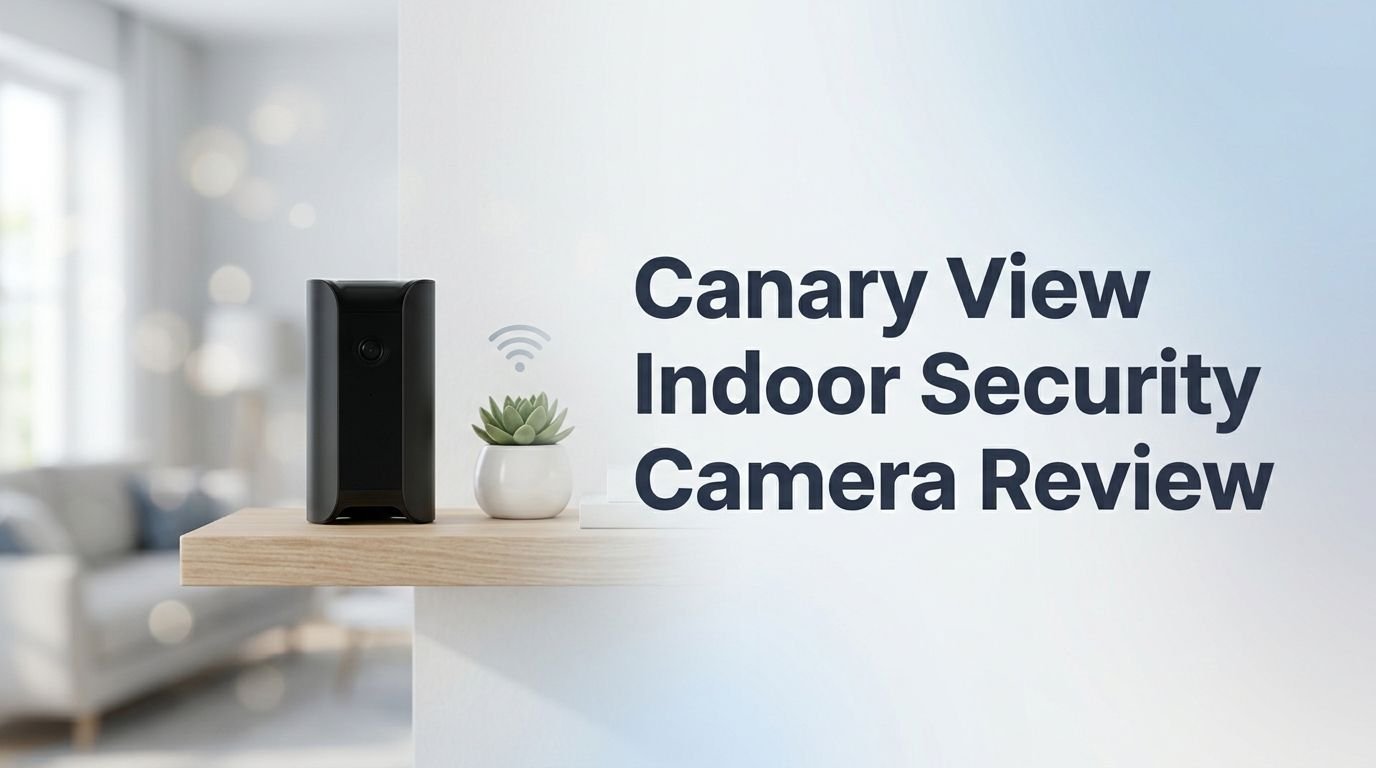
The Canary View has a sleek, cylindrical design in a matte black finish. It does not look like a traditional security camera. This is a deliberate design choice by Canary. The camera blends into most home decor without drawing attention.
At just 6 inches tall and 3 inches wide, it takes up minimal space on a shelf or nightstand. The build quality feels solid for its price range. The base has an LED ring that glows white in Away mode and green in Home mode. This gives you a quick visual indicator of the camera’s status.
The camera has a capacitive touch sensor on top and an ambient light sensor that adjusts the IR LEDs automatically. There is no pan or tilt function. The camera points wherever you place it, so you need to position it carefully to cover the area you want.
Overall, the design is minimalist and modern. It will not clash with your furniture, and most guests will not even notice it sitting on a bookshelf. For people who value aesthetics alongside function, the Canary View scores well.
Video Quality and Night Vision
The Canary View delivers 1080p Full HD video that looks sharp and detailed during the day. Colors appear accurate, and the wide angle lens captures a full room without much distortion at the edges. You can also use the 10x digital zoom to get a closer look at specific areas in the frame.
Night vision performance is solid. The camera uses 12 infrared LEDs that illuminate objects up to 25 feet away. The IR footage is black and white, which is standard for cameras in this price range. Objects and faces are recognizable in the dark, though fine details like text on a shirt may be hard to read.
The camera adjusts between day and night modes automatically using its ambient light sensor. You do not need to toggle anything manually. This is a small but appreciated convenience for a camera that is supposed to work 24/7.
One thing worth noting: there is no color night vision. Some newer budget cameras from competitors like Wyze now offer color night vision. If that feature matters to you, the Canary View will fall short.
Top 3 Alternatives for Canary View Indoor Security Camera
1. Blink Mini Indoor Security Camera

2. Ring Indoor Cam (2nd Gen)

3. Wyze Cam v3

Setting Up the Canary View
Setting up the Canary View is one of the easiest experiences you will find in the home security camera market. There is no separate hub or base station required. The camera connects directly to your Wi Fi network.
Here is what the process looks like. You download the Canary app on your iOS or Android device. You create an account, plug in the camera, and the app walks you through connecting it to your 2.4GHz Wi Fi network. The entire process takes about five to ten minutes.
The app uses Bluetooth Low Energy for the initial pairing, which makes the connection step smooth. Once the camera is online, you can start watching live video right away.
One limitation to note: the Canary View only supports 2.4GHz Wi Fi. If your router broadcasts a combined 2.4GHz and 5GHz network, you may need to separate them or ensure the camera connects to the correct band. This is a common issue with many budget cameras, not just the Canary View.
The Canary App Experience
The Canary app serves as your central control hub for the camera. It is available on both iOS and Android. The interface is clean, straightforward, and easy to learn.
From the app, you can watch live video 24/7, receive motion alerts, and use two way talk. You also get access to the camera’s timeline, which shows recorded events. On the free Basic plan, you can view the last 24 hours of video clips. Premium users get 30 days of full length video history.
The app lets you switch between three modes: Away, Home, and Night. In Away mode, the camera is fully armed and sends push notifications for any detected motion. In Home mode, you can customize what the camera does. Night mode works similarly with its own set of customizable rules.
Motion alerts are quick and reliable. In our research, users report receiving push notifications within seconds of detected movement. The app also supports person detection, which helps reduce false alerts from pets or shadows.
One frustration that users mention is that desktop streaming requires a Premium subscription. If you want to watch your camera feed on a computer, you will need to pay for the monthly plan.
Audio and Two Way Talk
The Canary View includes a built in speaker and high quality microphone. This allows you to use two way talk directly through the Canary app on your phone.
The audio quality is decent for a camera at this price. You can clearly hear conversations happening in the room, and the person on the other end can hear you through the camera’s speaker. This makes it useful for checking in on kids, elderly family members, or pets.
You can also use two way talk to deter intruders. If you see someone in your home who should not be there, you can speak through the camera to let them know they are being watched and recorded.
The microphone picks up sound from across a standard sized room without much trouble. Background noise can sometimes make voices harder to understand, but overall the audio does its job. For quick conversations and monitoring, the two way talk feature works well and adds real value to the camera.
Smart Home Integration
One of the Canary View’s strong points is its compatibility with popular smart home platforms. The camera works with Amazon Alexa, Google Assistant, and Apple Watch.
With Alexa, you can view your camera’s live feed on an Echo Show or other Alexa enabled screen. Just say something like “Alexa, show me the living room” and the feed appears. This hands free access is useful when you are busy cooking, working, or just relaxing.
Google Assistant integration lets you stream the camera feed to a Nest Hub, Nest Hub Max, or even an Android TV. You can also ask Google to show you the camera by voice command.
For Apple Watch users, the Canary app lets you arm and disarm the camera, view recent activity, and switch modes directly from your wrist. This is a nice touch that many competing cameras do not offer.
The camera does not support Apple HomeKit or IFTTT, which may be a drawback for users who rely on those platforms. But for Alexa and Google users, the integration is smooth and adds real convenience to daily use.
Subscription Plans and Pricing
The Canary View costs $99 upfront with the free Basic plan. You can also get it bundled with a Premium subscription. Here is a breakdown of the available plans.
The Basic plan is free and includes live streaming, motion notifications, two way talk, and 24 hours of video clip storage. However, video clips are limited to 30 seconds each, and you lose access to desktop streaming and video downloads.
The Premium Service costs $12.99 per month (or about $129.90 per year if you pay annually). It adds 30 day video history, full length video recording, desktop streaming, video downloads, custom modes, and incident support. It also extends your device warranty from one year to two years.
Canary also offers Premium Bundle options. The Premium Bundle 24 includes the camera for free with a 24 month commitment at $21.99 per month. The standard Premium Bundle costs $99 for the camera plus $19.99 per month for the service.
For those who want professional monitoring, you can add it for an additional $9.99 per month. This gives you 24/7 monitoring and emergency dispatch.
One important detail: each additional camera on the Premium plan costs an extra $2.99 per month. This can add up quickly if you have multiple cameras.
Privacy and Security Features
Canary takes privacy seriously, and the camera includes several features that protect your data and personal space.
All video data is protected with AES 256 bit encryption. Data transfers between the camera, cloud servers, and your app use SSL/TLS secure web transfer. This means your video footage is encrypted both in storage and in transit.
The camera also offers a Privacy Mode that lets you completely disable video and audio recording. This is useful when you are home and do not want the camera watching you. You can set this up automatically through the app’s Home mode so the camera turns off recording when your phone is detected at home.
There is no local storage option on the Canary View. All footage goes to Canary’s encrypted cloud servers. While this means your data is secure in the cloud, it also means you depend entirely on Canary’s servers and your internet connection to access recordings.
For users who want full control over their data with local SD card storage, the Canary View may not be the best fit. But for those comfortable with cloud storage, the encryption standards are solid and trustworthy.
Performance in Different Lighting Conditions
The Canary View performs well across a range of lighting situations. In bright daylight or well lit rooms, the 1080p sensor captures vibrant, sharp footage. Colors look natural, and the 147 degree lens provides excellent room coverage.
In low light conditions, the camera automatically switches to infrared night vision. The transition is smooth and happens without any user input. The 12 IR LEDs provide clear black and white footage up to 25 feet away.
In mixed lighting situations, such as a room lit only by a TV screen or dim lamp, the camera does a reasonable job. Some graininess may appear, but faces and movement remain clearly visible.
The biggest limitation is the lack of color night vision. Newer cameras from Wyze, TP Link, and Blink now offer color night vision using onboard spotlights. The Canary View sticks with traditional IR night vision, which is functional but not cutting edge in 2026.
Canary View vs. Canary Pro: Which One Should You Pick?
If you are deciding between the Canary View ($99) and the Canary Pro ($169), the choice comes down to what extra features you need.
The Canary Pro includes everything in the View plus a 90 decibel built in siren and HomeHealth technology. HomeHealth monitors your room’s air quality, temperature, and humidity in real time. This is useful for nurseries, bedrooms, or any space where environmental conditions matter.
The Canary View skips the siren and environmental monitoring. It focuses purely on video, audio, and motion detection. If you just need a basic camera to watch over a room, the View gives you the core security features at a lower price.
For most users, the Canary View offers better value. The siren on the Pro is helpful, but many users prefer smart home sirens that can be placed in different locations. The HomeHealth feature is nice but not essential for pure security use.
If you want environmental monitoring and an alarm in one device, go with the Pro. If you want a clean, affordable camera that does the basics well, the Canary View is the smarter pick.
Pros and Cons of the Canary View
What we like about the Canary View:
The 1080p HD video with a 147 degree lens covers large rooms with ease. The setup process is simple and takes under ten minutes. Smart home integration with Alexa, Google Assistant, and Apple Watch adds real convenience. The free Basic plan lets you use the camera without any monthly fees. The sleek design blends into home decor. Person detection is free on all plans, which reduces false alerts.
What we do not like about the Canary View:
The camera locks desktop streaming and video downloads behind a paywall. There is no local storage option via microSD card. Night vision is infrared only with no color night vision. The camera only works indoors and must be plugged in. Adding multiple cameras to the Premium plan gets expensive fast at $2.99 per extra camera. It only supports 2.4GHz Wi Fi, which is slower and more congested than 5GHz.
Who Should Buy the Canary View?
The Canary View is a good fit for renters, apartment dwellers, and anyone who wants a simple plug and play indoor camera. If you need to monitor a single room like a living room, nursery, or hallway, this camera does the job at a reasonable price.
It is also a good choice for first time security camera buyers. The setup is easy, the app is clean, and you do not need any technical knowledge to get started. The free Basic plan gives you live streaming and motion alerts without any monthly commitment.
Pet owners will appreciate the two way talk feature and wide angle lens. You can check on your pets from work and even talk to them through the camera.
However, the Canary View is not the best choice for people who need outdoor coverage, local storage, or the latest features like color night vision. Power users who want advanced AI detection, 2K or 4K resolution, or pan and tilt will want to look at other options.
Final Verdict: Is the Canary View Worth It in 2026?
The Canary View remains a solid budget indoor security camera in 2026. Its combination of 1080p HD video, a 147 degree wide angle lens, two way talk, and smart home integration delivers real value at $99.
The free Basic plan makes it accessible to anyone on a tight budget. And the Premium Service, while not cheap, adds meaningful features like 30 day storage and incident support.
That said, the competition has grown fierce. Cameras from Blink, Wyze, and Ring offer similar or better specs at similar or lower prices. The lack of color night vision and local storage puts the Canary View at a slight disadvantage against 2026’s latest offerings.
Our recommendation: If you already use Canary products or want a clean, simple camera with free person detection, the Canary View is still a worthy purchase. If you are starting from scratch and want the most features for your dollar, compare it closely with the Blink Mini, Wyze Cam v3, and Ring Indoor Cam before making your final decision.
Frequently Asked Questions
Does the Canary View require a monthly subscription?
No, the Canary View works with a free Basic plan that includes live streaming, motion alerts, and two way talk. However, the free plan only stores video clips for 24 hours and limits recordings to 30 seconds. The Premium Service at $12.99/month unlocks full length recordings, 30 day storage, and desktop streaming.
Can the Canary View be used outdoors?
No. The Canary View is an indoor only camera. It does not have weather resistance or an IP rating for outdoor use. If you need an outdoor Canary camera, the Canary Flex ($199) is built for both indoor and outdoor use.
Does the Canary View have local storage?
No. The Canary View does not support microSD cards or any form of local storage. All video footage is stored on Canary’s encrypted cloud servers. You get 24 hours of free cloud storage on the Basic plan or 30 days with the Premium Service.
Is the Canary View compatible with Alexa and Google Assistant?
Yes. The Canary View works with Amazon Alexa and Google Assistant. You can view the live feed on Alexa enabled screens or Google Nest Hub devices using voice commands. It also works with Apple Watch for arming, disarming, and viewing activity.
How wide is the Canary View’s field of view?
The Canary View features a 147 degree wide angle lens. This is one of the widest fields of view available in the budget indoor camera category. It can cover most standard sized rooms with a single camera placement.
Does the Canary View have a siren?
No. The Canary View does not include a built in siren. If you want a Canary camera with a siren, you will need the Canary Pro, which has a 90 decibel alarm built into the device.