Emporia Smart Plug Review 2026: Is It Worth Buying?
Are you tired of guessing how much electricity your devices use each month? The Emporia Smart Plug might be the answer you need.
This small Wi-Fi plug does more than turn your devices on and off. It tracks your energy use in real time, works with Alexa and Google Home, and costs less than most competitors.
In this review, we put the Emporia Smart Plug through its paces. We tested its energy monitoring accuracy, app experience, voice control, scheduling features, and overall build quality.
Key Takeaways:
- The Emporia Smart Plug stands out for its energy monitoring features. It tracks power use in real time and shows historical data in easy charts. You can view usage by the hour, day, week, month, or year right inside the Emporia app.
- It works with both Amazon Alexa and Google Home for hands-free voice control. You can turn plugs on and off, set routines, and group devices together without touching your phone.
- The price is hard to beat. A single plug costs around $9.99 and a four-pack runs about $35. That makes it one of the most affordable energy monitoring smart plugs on the market today.
- Setup takes just a few minutes. Download the Emporia app, plug it in, connect to your 2.4GHz Wi-Fi network, and you are ready to go. No hub or extra hardware is needed.
- It pairs well with the Emporia Vue Energy Monitor for whole-home electricity tracking. Together, they give you a full picture of where your energy dollars go each month.
- The plug is rated for 15A peak load and 10A continuous load, which is enough for lamps, fans, TVs, humidifiers, and most small appliances. It does not support high-draw devices like space heaters or large kitchen appliances for extended use.
No products found.
Emporia Smart Plug With Energy Monitoring
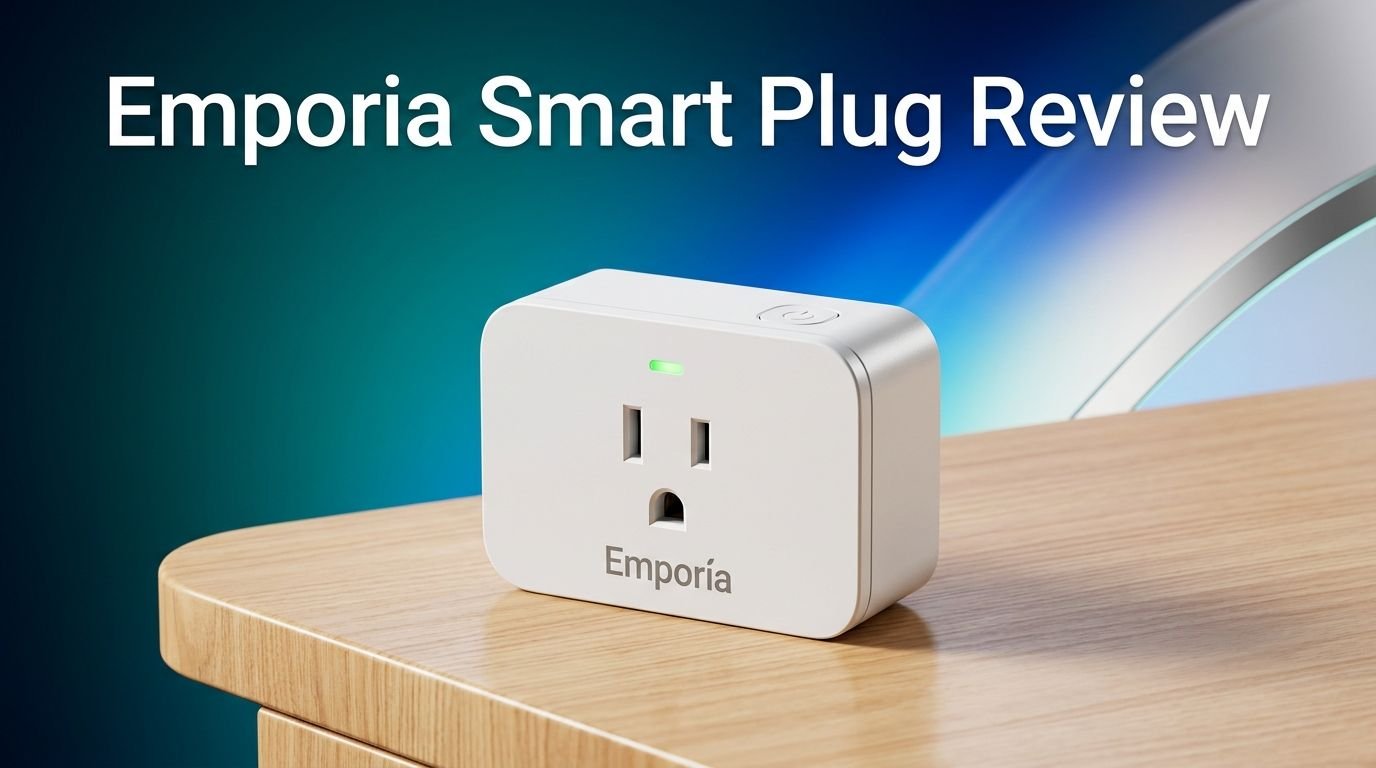
The Emporia Smart Plug is a single-outlet Wi-Fi smart plug made by Emporia Energy, a company known for its home energy monitoring products. It measures about 1.5 by 3.3 by 1.1 inches and fits into a standard US wall outlet without blocking the second socket.
The plug connects through 2.4GHz Wi-Fi and does not require a separate hub or bridge. Once connected, you can control any plugged-in device from the Emporia app on your Android or iOS phone. It also responds to voice commands through Amazon Alexa and Google Assistant.
What sets this plug apart from basic smart plugs is its built-in energy monitoring. The plug tracks watts and kilowatt-hours in real time. It sends this data to the app, where you can view detailed graphs and reports. CNET named it the Best Smart Plug for Energy Monitoring, and PCMag gave it an Editors’ Choice award for its outstanding value and energy tracking features.
Design and Build Quality
The Emporia Smart Plug has a clean, white plastic body with a compact footprint. It is wider than some ultra-mini plugs like the Kasa EP10. However, it still fits into a dual-outlet receptacle without blocking the second plug.
The front face has a single three-prong outlet and a small LED indicator light. The LED glows blue when the plug is active and switches to a blue-pink pattern when the power is off. During setup, it blinks blue so you can confirm the connection process.
A physical power button sits on the right side of the plug. This is useful for quick manual control without pulling out your phone. The build feels solid in hand, and the prongs grip firmly in the outlet. The overall design is practical, understated, and built to last.
One minor downside is the width. In tight outlet spaces or behind furniture, the plug may stick out slightly. CNET’s reviewer noted the same issue. But for most standard wall outlets, the size poses no problem at all.
Top 3 Alternatives for Emporia Smart Plug
1. TP-Link Kasa Smart Plug KP125M (Matter Compatible, Energy Monitoring)

2. TP-Link Tapo Smart Plug Mini P115 (Energy Monitoring, 4-Pack)

3. Govee Smart Plug with Energy Monitoring (4-Pack)

Setting Up the Emporia Smart Plug
Setup is one of the strongest points of the Emporia Smart Plug. The entire process takes about three to five minutes from unboxing to full operation.
First, download the Emporia Energy app from the Apple App Store or Google Play Store. Create an account if you are new. If you already have Emporia devices, go to Settings, then Manage Devices, and tap Add a Device.
Next, plug the Emporia Smart Plug into any standard 120V wall outlet. The LED will start blinking blue, which means it is ready to pair. Enter your 2.4GHz Wi-Fi network name and password in the app. The plug does not support 5GHz networks, so make sure you select the correct band.
The app finds the plug within about 60 seconds. You then name the plug and update the firmware if prompted. That is it. You now have full app and voice control over the connected device. There is no hub, no bridge, and no complicated wiring involved.
Energy Monitoring Features
This is where the Emporia Smart Plug truly shines. The app shows a real-time wattage reading for every plugged-in device. You can see exactly how much power your lamp, fan, TV, or humidifier pulls at any given moment.
The Graph section in the app displays energy use over time. You can toggle between views for the past hour, day, week, month, or year. The graph shows both current watts and peak kilowatt usage during high-demand periods. This makes it easy to spot devices that consume too much electricity.
PCMag confirmed that the real-time readings from the Emporia Smart Plug matched those from a P3 Kill A Watt meter, which is considered the gold standard for plug-level energy measurement. That level of accuracy is impressive for a plug that costs under $10.
You can also see average usage in kilowatt-hours (kWh) at the top of the energy screen. This data helps you estimate how much each device adds to your monthly electricity bill. If you want to know exactly where your money goes each month, this plug gives you the answers.
Emporia App Experience
The Emporia Energy app is clean, fast, and easy to use. The home screen lists all your connected plugs with their names and current power draw in kilowatts. Each plug has a small power toggle button right on the main screen for quick control.
Tap any plug to open its detailed energy dashboard. From there, you can switch between the Graph view, schedule settings, and device settings. The interface uses large text, simple icons, and color-coded charts that make data easy to read at a glance.
The app also has a Notifications section and a Management tab. These become more useful if you add the Emporia Vue Energy Monitor to your setup. Together, they give you whole-home energy tracking alongside individual plug data.
One thing the app lacks is support for Apple HomeKit and IFTTT. If you rely on those platforms for your smart home, you will need to control Emporia plugs through Alexa or Google Home routines instead. For most users, this is a minor limitation rather than a deal breaker.
Voice Control and Smart Home Integration
The Emporia Smart Plug works with both Amazon Alexa and Google Home (including Gemini). You can use voice commands to turn the plug on or off, check its status, and include it in routines or automation.
For example, you can say “Alexa, turn off the living room lamp” or “Hey Google, turn on the fan.” You can also create routines that trigger the plug based on time, location, or other device actions. PCMag tested an Alexa routine that turned on the Emporia plug when a Ring Floodlight Cam detected motion. It worked without any issues.
The plug does not support Apple HomeKit, Samsung SmartThings natively, or Matter protocol at this time. This means Apple-heavy households may want to look at the Kasa KP125M or Tapo P115 instead, both of which support Matter. If you are an Alexa or Google user, though, the Emporia plug integrates smoothly and reliably.
Scheduling and Automation
The Emporia app gives you solid scheduling tools right out of the box. You can create daily or weekly schedules that turn the plug on or off at specific times. This is perfect for lamps, holiday lights, or any device you want on a predictable routine.
There is also a sunrise and sunset scheduling option. This adjusts your on and off times based on your local daylight cycle. It is a smart way to automate porch lights or desk lamps without setting manual times each season.
One standout feature is the Off-Peak Hours mode. Many utility companies charge higher rates during peak demand hours. The Emporia plug lets you schedule devices to run only during low-cost, off-peak times. This automation can save real money over the course of a month, especially if you run devices like dehumidifiers, chargers, or fans overnight.
If saving on your electricity bill is a priority, this scheduling feature alone makes the Emporia Smart Plug worth the investment.
Performance and Reliability
In testing, the Emporia Smart Plug performed consistently and without dropouts. It responded quickly to both app commands and voice controls. Schedules activated on time with no delays or missed triggers.
The plug maintained a stable Wi-Fi connection throughout weeks of testing. There were no random disconnects, and the app always displayed the correct device status. This kind of reliability matters when you depend on a smart plug to control daily routines.
The energy readings were accurate when compared against dedicated power meters. The data updated in real time within the app, and historical graphs reflected actual usage patterns without gaps. CNET, PCMag, and Pocketables all reported smooth and reliable performance in their tests.
The plug draws roughly 1 watt of power on its own while idle. That adds almost nothing to your electricity bill. You can trust this plug to do its job day after day without babysitting it.
Who Should Buy the Emporia Smart Plug?
The Emporia Smart Plug is ideal for budget-conscious homeowners who want to track and reduce their electricity usage. If you have ever wondered which devices in your home use the most power, this plug gives you clear answers.
It is also a great fit for renters. There is no wiring, no permanent installation, and no damage to your outlets. You just plug it in and start monitoring. When you move, you take it with you.
Smart home beginners will appreciate the simple setup and easy-to-use app. You do not need technical skills or prior smart home experience to get this plug running in minutes.
If you already own an Emporia Vue Energy Monitor, the smart plug is almost a must-buy. It integrates directly with the Vue system and adds plug-level monitoring to your whole-home energy dashboard. Together, they create one of the most detailed home energy tracking setups available today.
Emporia Smart Plug vs. Kasa KP125M
The Kasa KP125M is a strong competitor. It supports Matter protocol, which means it works with Apple HomeKit, Amazon Alexa, Google Home, and Samsung SmartThings. The Emporia plug does not support Matter or HomeKit.
Both plugs offer energy monitoring and similar 15A ratings. However, the Kasa KP125M gives you broader smart home platform compatibility. If you use Apple devices or want a future-proof plug, the Kasa is the better pick.
On the other hand, the Emporia plug has a more detailed energy monitoring interface in its app. The graphs, off-peak scheduling, and integration with the Emporia Vue system give it an edge for users focused on cutting energy costs.
Price-wise, both plugs are affordable. The Emporia plug in a four-pack is slightly cheaper per unit than the Kasa KP125M. If energy tracking is your top priority and you use Alexa or Google Home, the Emporia wins. If platform flexibility matters more, go with the Kasa.
Emporia Smart Plug vs. TP-Link Tapo P115
The Tapo P115 is another popular energy monitoring plug from TP-Link. It offers Wi-Fi connectivity, energy tracking, timer functions, and voice control through Alexa and Google Home. It also supports Samsung SmartThings.
The Tapo P115 has a slightly more compact design than the Emporia plug, which may matter in tight outlet spaces. Its Tapo app is well-reviewed and user-friendly, with clean energy usage charts and scheduling options.
However, the Emporia plug pulls ahead with its off-peak scheduling, deeper energy analytics, and the ability to integrate with the Emporia Vue whole-home monitor. The Tapo P115 lacks this ecosystem advantage.
If you want a standalone energy monitoring plug with broad compatibility, the Tapo P115 is excellent. If you want to build a full energy management system over time, the Emporia plug is the smarter long-term choice.
Pros and Cons of the Emporia Smart Plug
The biggest strengths of the Emporia Smart Plug include its low price, accurate energy monitoring, detailed app graphs, and easy setup. The off-peak scheduling feature is a bonus that most competitors do not offer. Voice control through Alexa and Google works smoothly and reliably.
The main drawbacks are limited smart home platform support. There is no Apple HomeKit, no Matter, no IFTTT, and no SmartThings compatibility. If you rely on any of these platforms, you will need to work around this limitation or choose a different plug.
The plug is also slightly wider than some ultra-compact alternatives. In most outlets it fits fine, but tight spaces behind furniture may be a concern. For the price point, these trade-offs are reasonable and will not bother most users.
Is the Emporia Smart Plug Worth It in 2026?
Yes, the Emporia Smart Plug is absolutely worth it in 2026. Energy costs continue to rise, and this plug gives you a simple, affordable way to understand and control your electricity spending.
At roughly $9 per plug in the four-pack, you get real-time energy monitoring, voice control, flexible scheduling, and a reliable Wi-Fi connection. Few smart plugs at this price offer the same depth of energy data.
The plug earned awards from CNET and PCMag for good reason. It does what it promises and does it well. If energy awareness matters to you, this is one of the best smart plug investments you can make right now.
Frequently Asked Questions
Does the Emporia Smart Plug work with 5GHz Wi-Fi?
No, the Emporia Smart Plug only works with 2.4GHz Wi-Fi networks. Most routers broadcast both 2.4GHz and 5GHz bands. Make sure you connect the plug to the 2.4GHz band during setup.
Can I use the Emporia Smart Plug without the Vue Energy Monitor?
Yes, the Emporia Smart Plug works perfectly fine as a standalone device. You can control it through the Emporia app, set schedules, monitor energy use, and use voice commands without any other Emporia product.
Does the Emporia Smart Plug support Apple HomeKit?
No, the Emporia Smart Plug does not support Apple HomeKit or Matter protocol. It works with Amazon Alexa and Google Home only. If you need HomeKit support, consider the Kasa KP125M as an alternative.
How accurate is the energy monitoring on the Emporia Smart Plug?
The energy readings are highly accurate. PCMag confirmed that the Emporia plug matched readings from a P3 Kill A Watt meter, which is a trusted standalone energy measurement tool. You can rely on the data for billing estimates and energy tracking.
Can I use the Emporia Smart Plug with high-power appliances?
The plug is rated for 15A peak load and 10A continuous load. It works well with lamps, fans, TVs, humidifiers, and similar devices. You should not use it with large appliances like space heaters, window AC units, or kitchen appliances that draw more than 10 amps continuously.
How many Emporia Smart Plugs can I connect at once?
There is no hard limit set by the Emporia app. You can connect as many plugs as your Wi-Fi network can handle. Most home networks support dozens of smart devices without any issues. Each plug appears separately in the app with its own energy dashboard.