Garmin Dash Cam Live Review 2026: Worth the Hype?
Do you want a dash cam that watches your car even when you are away? The Garmin Dash Cam Live promises exactly that. It connects to LTE networks and lets you check your car from your phone anytime.
This dash cam records in 1440p resolution with a 140° field of view. It captures clear footage of the road and nearby surroundings.
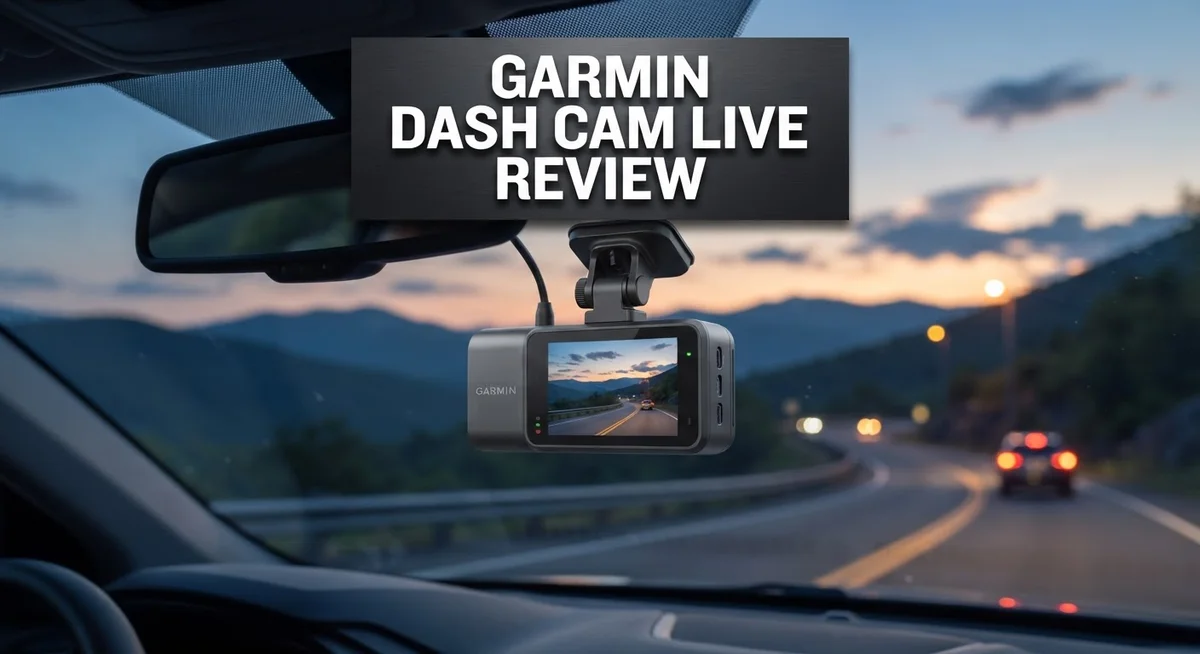
A 3 inch LCD screen with a built in polarizer helps you view footage without glare. The compact design keeps it out of your line of sight while driving.
In a Nutshell
- Real time alerts land on your phone the moment something happens near your car.
- Recording continues even after you park, so your car stays watched around the clock.
- The magnetic mount makes it simple to snap the camera on or off in seconds.
- Video stays clear during the day, though low light footage is only decent, not amazing.
- Live streaming depends on a steady LTE signal, so weak coverage can hurt performance.
- Safety alerts sometimes work great, other times they miss events completely, users report mixed results.
- This camera skips built in GPS, so you need a separate module for speed tracking.
- Compared to VIOFO or Thinkware, Garmin leans harder into live monitoring but trims other extras.
Video Quality and Resolution
The 1440p resolution captures fine details that matter when you need evidence. License plates stay readable, and road signs come through clearly during daylight hours. The 140 degree field of view means you catch what happens on the sides of your vehicle, not just straight ahead.
The 3 inch LCD screen with built in polarizer lets you review footage right there on the dash cam. Glare from sunlight won’t wash out your view. You can check what the camera recorded without pulling out your phone every time.
Daytime video quality shines. Colors look accurate, and contrast stays balanced even in bright sun. Roads and surroundings appear sharp and detailed. You’ll see what’s happening clearly when you need to settle disputes about accidents or parking lot incidents.
Low light performance is where things get softer. Night footage holds up okay but lacks the crispness of daylight recordings. Street lights help, but dark parking lots show more grain than you might want. It’s still usable for identifying vehicles and general events, just not as crisp as premium 4K competitors offer.
The live streaming feature lets you watch your car’s surroundings from your phone in real time. This depends on a steady LTE signal, so weak coverage areas will struggle. When the signal holds strong, you get a useful remote eye on your vehicle.
Frame rate and stability work well during normal driving. Video doesn’t stutter or skip. Vibrations from the road don’t create unwanted blur. The magnetic mount keeps the camera steady even on bumpy surfaces.
The included 16GB microSD card handles continuous recording, though you’ll want to upgrade to larger storage for extended trips. The camera loops recordings automatically, so old footage gets replaced by new material.
Overall, the video quality sits in the solid middle ground. It delivers what you need for most situations without reaching the ultra high end of the dash cam market. Daytime footage is your strongest asset here.


Last update on 2026-11-03 / Affiliate links / Images from Amazon Product Advertising API Some of the links on this website are affiliate links, which means that at no additional cost to you, I earn a commission if you click through and make a purchase. I only recommend products and services that I believe will add value to my readers. Thank you for your support!
Live Monitoring and Connectivity
The Garmin Dash Cam Live connects to your smartphone through LTE, which means you can check on your car from anywhere. This feature sets it apart from basic dash cams that only store footage locally.
When motion or impact events happen near your parked vehicle, real time alerts land directly on your phone. You get notified instantly, so you can take action fast. The live feed streams your car’s surroundings right to your screen, giving you eyes on your vehicle even when you’re miles away.
Setting up the connection is straightforward. You download the Garmin app, create an account, and link your dash cam. The process takes just a few minutes for most users. Once connected, the app shows your vehicle’s location on a map and displays recorded footage.
Live streaming depends heavily on your LTE signal strength. If you’re in an area with weak coverage, the feed may lag or drop. Users in rural zones report frustration with inconsistent performance. Urban areas typically deliver better results.
The app interface feels intuitive. You can play back videos, check timestamps, and review location history without hassle. The dashboard layout puts essential controls where you need them.
One thing to note: the safety alert system shows mixed results. Sometimes alerts catch every event perfectly. Other times they miss incidents that clearly happened. This inconsistency frustrates some owners who expect reliable notifications every time.
The continuous recording feature keeps your car monitored around the clock. Footage uploads to the cloud, so even if someone damages the camera, your evidence stays safe. This backup system adds real peace of mind for many users.
Battery drain on your phone can happen during extended live viewing sessions. The app uses data actively, so watch your mobile data limits if you don’t have unlimited plans.
Overall, the connectivity features work well when conditions are right. Strong LTE signals and good app stability make this system reliable. Weak coverage areas and occasional alert misses are the main drawbacks to consider before purchasing.
Design and Installation
The Garmin Dash Cam Live features a compact, low profile design that sits discreetly on your windshield. Its small footprint means it won’t block your view or distract from the road ahead.
The magnetic mount system is one of the standout features here. You can snap the camera on in seconds and remove it just as fast. This makes it simple to take the device with you when you leave your car, which adds a layer of security.
Installation takes just a few minutes for most drivers. The micro USB power cable runs along your headliner and down to your 12V outlet or USB port. No special tools or technical knowledge is required. The included 16GB microSD card comes pre formatted, so you can start recording immediately after mounting the camera.
The 3 inch LCD display has a built in polarizer, which reduces glare from sunlight. This makes it easier to review footage right on the dash cam without squinting. The screen is bright enough to see details even in daylight conditions.
One thing to keep in mind: the camera relies on LTE connectivity for its live monitoring features. This means you’ll need a strong cellular signal in your area for the app to work smoothly. In areas with weak coverage, the connection may lag or drop.
The device connects to your smartphone through an intuitive app. Setup is straightforward, and once connected, you can access live feeds and receive alerts remotely. The app guides you through each step, so even first time users shouldn’t struggle.
The overall build quality feels solid. The magnetic mount is durable, and the camera body resists vibration during normal driving. The compact design doesn’t add bulk to your dashboard, which many drivers appreciate.
Installation and setup happen quickly because Garmin kept the process simple. You won’t need to visit a professional installer. The included cable management makes the final result look clean and organized inside your vehicle.
Top 3 Alternatives
Viofo A119 Mini

Last update on 2026-11-03 / Affiliate links / Images from Amazon Product Advertising API Some of the links on this website are affiliate links, which means that at no additional cost to you, I earn a commission if you click through and make a purchase. I only recommend products and services that I believe will add value to my readers. Thank you for your support!
The Viofo A119 Mini offers excellent video quality for drivers who want clarity on the road. This camera captures footage in high resolution and performs well in different lighting conditions. You get a compact design that doesn’t block your windshield view.
The device records smoothly without interruptions. It handles fast movements and sudden stops effectively. Many users appreciate how easy it is to install and use the basic controls. The footage remains clear even during nighttime driving.
Thinkware Q800 Pro

Last update on 2026-11-03 / Affiliate links / Images from Amazon Product Advertising API Some of the links on this website are affiliate links, which means that at no additional cost to you, I earn a commission if you click through and make a purchase. I only recommend products and services that I believe will add value to my readers. Thank you for your support!
The Thinkware Q800 Pro brings advanced safety features to your vehicle. This model includes dual-channel recording, which means it captures both front and rear views simultaneously. You get better coverage of incidents happening around your car.
The camera system connects to your phone for live monitoring. This lets you check on your vehicle remotely. The video quality stays sharp in various weather conditions. The intelligent parking mode activates automatically when your car is parked, adding extra protection.
70mai Dash Cam Pro

Last update on 2026-11-03 / Affiliate links / Images from Amazon Product Advertising API Some of the links on this website are affiliate links, which means that at no additional cost to you, I earn a commission if you click through and make a purchase. I only recommend products and services that I believe will add value to my readers. Thank you for your support!
The 70mai Dash Cam Pro delivers reliable performance at a straightforward price point. This camera records in high definition with good detail capture. The interface is simple, so you won’t struggle with complicated menus.
It handles different driving scenarios without lagging. The night vision works decently for low-light situations. The device stores footage efficiently on memory cards. Setup takes just minutes, and you can start recording right away. The camera maintains steady video even on bumpy roads.
Safety Features and Theft Alerts
The theft alert system on the Garmin Dash Cam Live uses LTE connectivity to send notifications straight to your phone when motion or impact events occur near your parked vehicle. You get real time alerts so you know immediately if something happens while you’re away.
The camera continuously records your car’s surroundings around the clock. This means every moment gets captured, whether you’re parked at home, work, or anywhere else. The continuous recording feature works as your digital witness when you need it most.
Remote monitoring through the smartphone app lets you check on your vehicle from anywhere. You can watch live footage of your car’s surroundings in real time, giving you peace of mind during your commute or while you’re at the office. The app interface stays intuitive so you don’t struggle with complicated menus.
One important consideration: the safety alert system shows mixed results according to user feedback. Some drivers report reliable notifications, while others experience inconsistent performance. Your experience may vary depending on your specific situation and LTE coverage in your area.
LTE signal strength directly affects how well the theft alerts and live streaming work. In areas with strong coverage, you’ll get fast alerts and smooth video feeds. Weak signal areas may cause lag or delays in notifications reaching your phone.
The location tracking feature works alongside continuous recording to give you a complete picture of your vehicle’s movements. You can see exactly where your car was and when events happened. This information proves valuable if you need to file a claim or review what occurred.
The compact, low profile design means the camera stays discreet on your windshield. Thieves won’t immediately spot an obvious recording device, which adds to the deterrent effect. The magnetic mount lets you remove the camera quickly if needed.
The included 16GB microSD card stores your recordings, though upgrading to larger storage makes sense for extended monitoring periods. Larger capacity cards ensure you don’t lose footage due to storage limits.
App Experience and User Interface
The app that powers the Garmin Dash Cam Live makes remote monitoring feel natural and accessible. You open the app on your phone and see a live feed of your vehicle’s surroundings in real time. The interface responds quickly to your taps and swipes, making navigation smooth even if you’re not tech savvy.
The dashboard within the app shows your car’s location on a map. You can track exactly where your vehicle is parked and review its movement history. Event clips appear automatically when the camera detects motion or impact. Scrolling through your footage library takes just a few taps.
One standout feature is how the app organizes your recordings. Recent events appear at the top, and you can filter by date or alert type. The app also lets you adjust settings without touching the camera itself. You can enable or disable certain recording modes, check battery status, and manage your microSD card storage right from your phone.
The user interface uses clear icons and simple menus. Buttons are large enough to tap accurately, even while driving. Text labels explain what each feature does. Most drivers figure out the core functions within minutes of first opening the app.
However, the app’s performance depends heavily on your internet connection. A strong LTE signal keeps everything running smoothly, but weak coverage causes delays. Live feed may freeze or buffer in areas with poor connectivity. This limitation affects both the live monitoring and the speed of receiving theft alerts.
The app also handles cloud storage options. You can upload important clips automatically or manually save them for later review. This backup system protects your footage in case something happens to your camera.
Overall, the app experience leans toward simplicity over flashy features. Garmin focused on making essential functions easy to access rather than overloading you with options. The clean design means you spend less time learning the app and more time using it. Most users appreciate this straightforward approach to smartphone integration.
Pros and Cons
Pros
- Live monitoring and theft alerts send notifications straight to your phone via LTE
- 1440p video with 140° field of view captures clear footage in most driving conditions
- Compact design with magnetic mount installs in minutes without fuss
- Continuous recording with location tracking gives you a complete picture of your vehicle’s movements
- 3 inch LCD display with built in polarizer reduces windshield glare effectively
Cons
- Safety alert system shows mixed results according to user feedback, so reliability varies
- No GPS onboard means you need the app for speed tracking and location features
- LTE signal strength directly affects how well theft alerts and live streaming perform
- Requires smartphone app for all remote monitoring and live feed access, limiting offline functionality
Who Should Buy It
The Garmin Dash Cam Live works best for drivers who want real time monitoring of their vehicles. If you park your car in busy areas or worry about theft, this camera gives you peace of mind through smartphone alerts.
Commuters and delivery drivers benefit most from the continuous recording feature. You get automatic footage of every trip with location data attached. The LTE connectivity means you can check on your vehicle from work or home without visiting your car.
This dash cam suits people who value simplicity in setup. Installation takes just minutes with the magnetic mount. You don’t need technical skills to get it working. The straightforward app interface makes it accessible even if you’re not tech savvy.
Fleet managers and business owners find value in the remote monitoring capabilities. You can track multiple vehicles and receive theft alerts instantly. The location tracking feature helps you understand where your fleet travels throughout the day.
However, this camera isn’t ideal if you want GPS built into the device itself. You’ll rely on the app for speed tracking and location features. This means LTE signal strength becomes critical to your experience.
Urban drivers who need live feed access will appreciate the smartphone integration. You can monitor your parked car during meetings or errands. The app dashboard shows your vehicle’s location on a map in real time.
Skip this camera if you’re in areas with poor cellular coverage. LTE connectivity is essential for all the premium features. Without strong signal, theft alerts and live streaming become unreliable.
The Garmin Dash Cam Live appeals to drivers seeking modern connected features. You want more than just video recording. You need the ability to check on your vehicle remotely and receive instant notifications when something happens.
This camera works well for people willing to embrace smartphone apps for their dash cam experience. If you prefer standalone devices without app dependency, other options might suit you better.
Ultimately, choose this camera if remote monitoring and theft alerts matter most to your driving routine.
Final Verdict
The Garmin Dash Cam Live stands out as a smart pick for drivers who want more than basic recording. It brings your car online, turning a simple dash cam into a connected safety tool.
This device shines brightest for people who already lean on smartphones for daily tasks. If you check apps often, this camera fits your lifestyle.
Traditional dash cams just record and stop there. This model adds live alerts and remote access, giving you a new layer of awareness about your vehicle.
Still, no gadget suits everyone. Drivers who prioritize raw video sharpness alone should look at VIOFO models, known for strong footage without extra connectivity layers.
Those who want built in GPS tracking might prefer the Thinkware F200 Pro or U1000 4K. These options skip app dependency and handle location data on their own.
If cloud based storage matters more to you, BlackVue offers a solid alternative with its own ecosystem. It handles footage differently but serves similar connected goals.
For drivers who want a smaller footprint from Garmin itself, the Garmin Mini 3 trims down features but keeps the brand’s reliability intact.
Our final take: this dash cam works best in areas with dependable cellular service. Weak signal areas will limit what makes this camera special in the first place.
Business owners and fleet operators get the most return from this system, since remote monitoring directly supports their daily operations.
Casual drivers who rarely need live updates might find simpler cameras more practical for their needs.
In short, this camera rewards drivers who value connection and real time awareness. It asks for stable internet access in return.
Weigh your daily driving habits and signal reliability before deciding. That choice will shape how much value you get from this connected dash cam experience.
Frequently Asked Questions
Does the Garmin Dash Cam Live work without cellular service?
The device relies on LTE connectivity for its main features. Live monitoring and theft alerts need a strong cellular signal to function. If you’re in an area with poor or no cellular coverage, you lose access to remote smartphone monitoring.
The camera still records continuously even without LTE. However, you won’t get real time alerts or live feed access. Think of it as a traditional dash cam in areas with weak signals.
Can I use this dash cam if I don’t have a smartphone?
You can, but you’ll miss out on key features. The live monitoring system works through a mobile app. Without a smartphone, you get basic recording only.
The 3 inch LCD display lets you review footage directly on the device. You can still access your videos later through the microSD card. The app simply enhances the experience for those who want remote access.
What’s the difference between this and the Garmin Mini 3?
The Mini 3 is more compact and costs less in Garmin’s lineup. It skips the LTE connectivity and live monitoring features. Choose the Mini 3 if you want a smaller, simpler dash cam without remote capabilities.
The Dash Cam Live adds smartphone integration and theft alerts. It’s the premium option for drivers who want connected features and real time monitoring.
How often does the microSD card need replacement?
The included 16GB card handles continuous recording for several days. Replacement depends on your driving habits and video quality settings. Heavy daily drivers may need a new card every few weeks.
You can purchase replacement microSD cards separately. The device loops and overwrites old footage automatically. Regular card replacement keeps your storage fresh and reliable.

Hello, i’m Ivoria i am the face behind Tech Tracker Blog. I am passionate about my work and love to explore gadgets and share about my experience.