Logitech C920x HD Pro PC Webcam Review 2026: Worth Buying?
Are you tired of looking grainy and washed out on Zoom calls? The Logitech C920x HD Pro has been a go-to webcam for millions of users around the world.
It offers Full HD 1080p video at 30fps, dual stereo microphones, and automatic light correction at a price that doesn’t break the bank. But in 2026, with so many new webcams on the market, does the C920x still hold its own?
In this review, we put the Logitech C920x HD Pro through its paces. We tested its video quality, microphone performance, software features, and build quality.
Key Takeaways:
- The Logitech C920x records in Full HD 1080p at 30 frames per second. This resolution is sharp enough for professional video calls, online meetings, and casual streaming. Most viewers and colleagues will notice a clear upgrade from a built-in laptop webcam.
- Dual stereo microphones capture clear audio from multiple angles. While they won’t replace a dedicated USB microphone for podcasting, they are more than adequate for daily video calls on Zoom, Microsoft Teams, or Google Meet.
- HD auto light correction adjusts your image brightness in real time. This feature helps you look natural even in dim rooms or spaces with harsh overhead lighting. It reduces shadows and keeps skin tones accurate.
- The 78-degree field of view gives you a wide enough frame to include your upper body and part of your background. It strikes a good balance between showing too much of your room and cutting off your shoulders.
- The C920x includes a 3-month XSplit VCam license for background removal and replacement. This is a nice bonus if you don’t want to invest in a green screen. However, it does not come with a built-in privacy shutter, unlike the C920s model.
- Priced around $69.99, the C920x remains one of the most affordable Full HD webcams from a reputable brand. It is compatible with Windows, macOS, and Chrome OS, and works with all major video conferencing platforms.

Logitech C920x HD Pro PC Webcam: Overview and First Impressions
The Logitech C920x HD Pro arrives in a clean, simple box. Inside, you get the webcam, a USB-A cable, and documentation. There is no tripod included, but the universal clip mount attaches to almost any monitor or laptop screen.
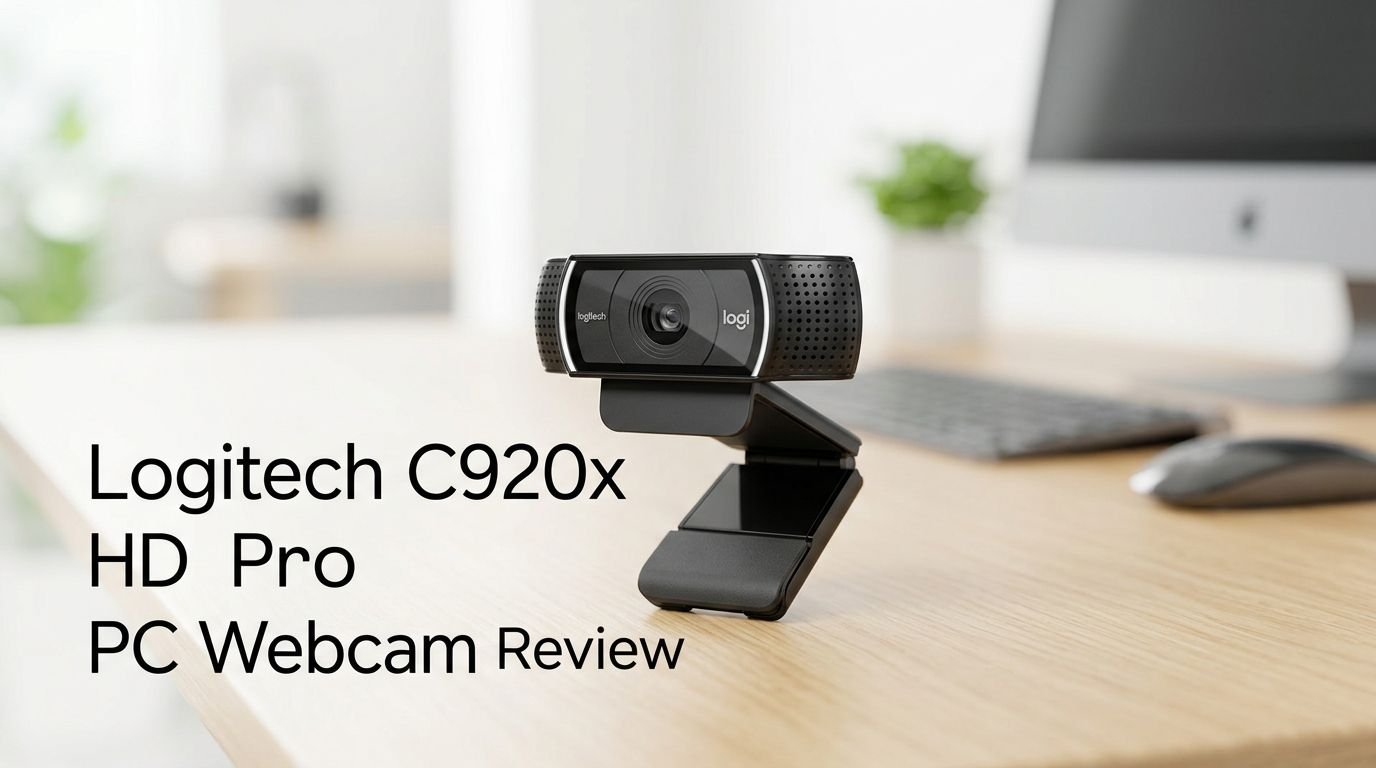
First impressions are solid. The webcam has a familiar Logitech design with a glossy black finish. It feels lightweight but not cheap. The glass lens sits front and center, flanked by two microphone grilles on either side.
Setup takes less than two minutes. You plug the USB cable into your computer, and the webcam is ready. There are no extra drivers to install on most modern systems. Windows, macOS, and Chrome OS all recognize it instantly.
The adjustable clip mount is sturdy. It grips the top edge of your monitor and stays in place during calls. A small rubber pad on the bottom prevents it from scratching your screen. You can also fold the base flat and use it on a desk or a tripod with a standard thread.
Video Quality: How Sharp Is the 1080p Image?
The C920x records and streams at Full HD 1080p resolution with 30 frames per second. This is the standard for most video calls and casual streaming. The image looks crisp and detailed with accurate colors in good lighting.
Autofocus works well in most conditions. It locks onto your face quickly and adjusts smoothly when you move closer or farther from the camera. There is minimal hunting or pulsing, which can be distracting during calls.
In well-lit rooms, skin tones look natural and warm. The camera handles contrast well, separating you from your background with decent clarity. Text on whiteboards or documents behind you is readable, though not perfectly sharp at a distance.
However, the 30fps limit is noticeable compared to newer 60fps webcams. Fast hand movements or quick head turns can look slightly blurry. If you stream games or create fast-paced content, this could be a drawback. For standard meetings and calls, 30fps is perfectly fine.
Audio Performance: Are the Built-In Microphones Good Enough?
The C920x features dual omnidirectional stereo microphones. These microphones sit on either side of the lens and capture your voice from a wide area. The result is clear, audible speech for most video calls.
Audio quality is above average for a webcam microphone. Your voice sounds full and present at a normal speaking distance of about two feet. Background noise is picked up but stays manageable in a quiet room.
The stereo separation adds a slight spatial quality to your audio. Callers on the other end will notice your voice sounds more natural compared to a single mono microphone found on budget webcams.
That said, the microphones do pick up keyboard clicks, fan noise, and ambient sounds. If you work in a busy environment, a dedicated headset or external microphone will give you much better audio isolation. The built-in mics are a convenient fallback, not a replacement for professional audio gear.
Top 3 Alternatives for Logitech C920x HD Pro
1. Logitech Brio 500

2. Razer Kiyo Pro

3. Elgato Facecam MK.2

HD Auto Light Correction: Does It Actually Work?
One of the standout features of the C920x is its HD auto light correction. This technology analyzes the lighting in your environment and adjusts exposure and brightness automatically.
In practice, it makes a real difference. If you sit in front of a bright window, the camera compensates to keep your face visible. It reduces the blown-out look that plagues many webcams in backlit situations.
In dim rooms, the light correction boosts brightness without adding too much grain. Your image stays usable even in a room with just a single desk lamp. Colors do fade slightly in low light, but your face remains clearly visible and recognizable.
The correction happens in real time. If a cloud passes over the sun or someone turns on an overhead light, the camera adjusts within a second or two. There is no lag or dramatic flickering during the transition. For everyday use, this feature is one of the best reasons to choose the C920x over cheaper webcams.
Build Quality and Design: How Durable Is the C920x?
The C920x has a compact and lightweight plastic body. It measures roughly 3.7 x 2.8 x 1.7 inches and weighs about 5.71 ounces. You can toss it in a laptop bag without noticing the extra weight.
The full HD glass lens is the highlight of the build. Glass lenses deliver sharper images than the plastic lenses found on budget webcams. The lens surface is also more resistant to scratches over time.
The adjustable clip mount uses a simple hinge design. You fold it out, place it over your monitor, and push the rubberized grip into position. It holds firmly on screens up to about an inch thick. The tripod thread on the bottom is a standard 1/4-inch size.
One notable absence is a privacy shutter. The C920x does not have a physical cover for the lens. If privacy matters to you, you will need to buy a small stick-on cover or choose the C920s model instead. This is a minor but important detail for security-conscious users.
Software and Compatibility: What Platforms Does It Support?
The Logitech C920x works with Windows 7 or later, macOS 10.10 or later, and Chrome OS. It connects through USB-A and is plug-and-play on all three platforms.
Logitech offers the Logi Tune app for additional camera controls. Through Logi Tune, you can adjust brightness, contrast, white balance, zoom, and field of view. The app also lets you update the firmware on the webcam.
The C920x is certified for use with Zoom, Microsoft Teams, Google Meet, Skype, and other major platforms. It works out of the box with OBS Studio for streaming and with most recording software.
One limitation is the USB-A connection. Many modern laptops only have USB-C ports. You will need a USB-A to USB-C adapter or a hub if your computer lacks a USB-A port. This is a minor inconvenience but worth noting for users with newer devices.
Streaming and Content Creation: Can You Use It for Twitch or YouTube?
The C920x is a popular entry-level webcam for streamers. Many Twitch and YouTube creators started with this camera. It delivers acceptable video quality for facecam overlays in game streams.
At 1080p/30fps, the C920x provides a clean image when used in a well-lit scene. It pairs well with OBS Studio, Streamlabs, and XSplit. You can crop, resize, and overlay the video feed without much quality loss.
The included 3-month XSplit VCam license adds virtual background capabilities. You can blur your background or replace it with an image without needing a green screen. This is a useful feature for streamers who don’t have a dedicated studio.
However, serious content creators will eventually outgrow this webcam. The lack of 60fps means motion looks less smooth. Manual exposure and white balance controls in Logi Tune are limited compared to cameras like the Elgato Facecam MK.2. If streaming is your primary goal, the C920x is a great starting point but not a long-term solution.
Low Light Performance: How Does It Handle Dark Rooms?
Low light performance is where the C920x shows its age. The sensor size and lens aperture were solid when this webcam first launched. In 2026, newer cameras handle darkness much better.
In a moderately dim room, the C920x produces a usable but noisy image. The auto light correction boosts exposure, but you will notice visible grain in shadows and dark areas. Colors become muted and skin tones can lean toward yellow or orange.
In very dark rooms, the image quality drops further. Details get lost in the noise, and the autofocus may struggle to lock onto your face. You will need at least a desk lamp or a ring light to get a good picture.
If you work in a well-lit office or have a window nearby, low light performance is less of a concern. The C920x performs best with natural or strong artificial light. Budget-friendly ring lights or LED panels can dramatically improve the image and are a worthwhile investment alongside this webcam.
Logitech C920x vs. C920s: What Is the Difference?
Many buyers get confused between the C920x and the C920s. The two webcams share the same core hardware. Both record at 1080p/30fps, both have dual stereo mics, and both use the same glass lens.
The main difference is the privacy shutter. The C920s includes a built-in plastic privacy cover that slides over the lens. The C920x does not have this feature. If you want a physical way to block the camera, the C920s is the better pick.
The C920x comes with a 3-month XSplit VCam license, while the C920s does not include this software bundle. XSplit VCam lets you remove or replace your background without a green screen.
Price differences between the two are usually small, often within $5 to $10. Both models are widely available on Amazon. Your choice comes down to whether you value a privacy shutter more than virtual background software. For most users, the privacy shutter on the C920s offers more lasting value.
Who Should Buy the Logitech C920x in 2026?
The C920x is ideal for remote workers and students who need a reliable webcam for daily video calls. It delivers consistent 1080p quality at a fair price. The plug-and-play setup means you spend zero time troubleshooting drivers.
It is also a good choice for casual streamers and hobbyist content creators. If you are just starting out on Twitch or YouTube, the C920x gives you a solid facecam without a big upfront investment.
People who value simplicity will appreciate this webcam. There are no complex menus to configure. You plug it in, open your video app, and start talking. The auto light correction and autofocus handle most adjustments for you.
However, the C920x is not the best fit for professional streamers, videographers, or anyone who needs 4K resolution, 60fps, or advanced manual controls. If you fall into that category, consider the Elgato Facecam MK.2 or the Razer Kiyo Pro Ultra for a significant upgrade in image quality and features.
Pros and Cons of the Logitech C920x HD Pro
What we liked about the C920x:
The Full HD 1080p image is sharp and colorful in good lighting conditions. Autofocus locks onto your face reliably and adjusts smoothly. The dual stereo microphones deliver clear audio for everyday calls. Setup is effortless with true plug-and-play functionality. The price point around $69.99 makes it accessible to almost anyone.
What could be better:
The webcam lacks a built-in privacy shutter. The 30fps cap feels dated in 2026 when many competitors offer 60fps. Low light performance produces noticeable grain. The USB-A connection requires an adapter for many newer laptops. Manual camera controls through Logi Tune are limited compared to enthusiast-grade webcams.
Overall, the strengths outweigh the weaknesses for the average user. The C920x does its core job very well. It captures clear video and audio for video calls and basic streaming without fuss.
Final Verdict: Is the Logitech C920x Still Worth It in 2026?
The Logitech C920x HD Pro remains a solid, dependable webcam in 2026. It won’t blow you away with cutting-edge features or 4K resolution. What it will do is deliver consistent, reliable 1080p video quality for everyday use.
For remote workers, students, and casual streamers, the C920x offers excellent value. The combination of a glass lens, autofocus, auto light correction, and dual microphones covers all the basics. The price stays competitive at around $69.99.
If you need better low light performance, higher frame rates, or USB-C connectivity, newer webcams like the Logitech Brio 500 or Elgato Facecam MK.2 are better options. They cost more but deliver noticeable improvements in image quality and features.
The bottom line: the C920x earns its reputation as one of the best budget-friendly Full HD webcams on the market. It is a safe purchase for anyone who wants to upgrade from a built-in laptop camera without overspending.
Frequently Asked Questions
Does the Logitech C920x work with Mac computers?
Yes. The Logitech C920x is fully compatible with macOS 10.10 and later. It is a plug-and-play device, so you simply connect the USB-A cable to your Mac. The camera works with FaceTime, Zoom, Google Meet, and all other major video apps on Mac. You can also download Logi Tune for macOS to adjust camera settings like brightness and zoom.
Can you use the Logitech C920x for streaming on Twitch?
Absolutely. The C920x is one of the most popular starter webcams for Twitch streamers. It works with OBS Studio, Streamlabs, and XSplit. The 1080p resolution provides a clean facecam overlay. Many successful streamers began their channels with this exact webcam before upgrading to higher-end models.
Does the Logitech C920x have a privacy shutter?
No. The C920x does not include a built-in privacy shutter. If you want a physical lens cover, you can buy a small adhesive webcam cover online for a few dollars. Alternatively, the Logitech C920s model comes with a built-in sliding privacy shutter and shares the same core specs.
What is the difference between the Logitech C920x and C920?
The C920x and the original C920 share the same hardware and design. The key difference is that the C920x includes a 3-month XSplit VCam license for virtual background removal. The original C920 does not include this software. In terms of video quality, microphone performance, and build, they are identical.
Is the Logitech C920x good for low light?
The C920x provides usable video in moderately dim rooms thanks to its HD auto light correction. However, low light performance is not its strong suit. You will see grain and muted colors in dark environments. For the best results, pair the webcam with a desk lamp or an affordable ring light to improve your video quality significantly.
Does the Logitech C920x support 4K video?
No. The C920x maxes out at Full HD 1080p resolution at 30 frames per second. It does not support 4K or 2K recording. If you need 4K video, consider the Logitech Brio 4K, the Elgato Facecam Pro, or the Razer Kiyo Pro Ultra, all of which offer 4K resolution at various price points.