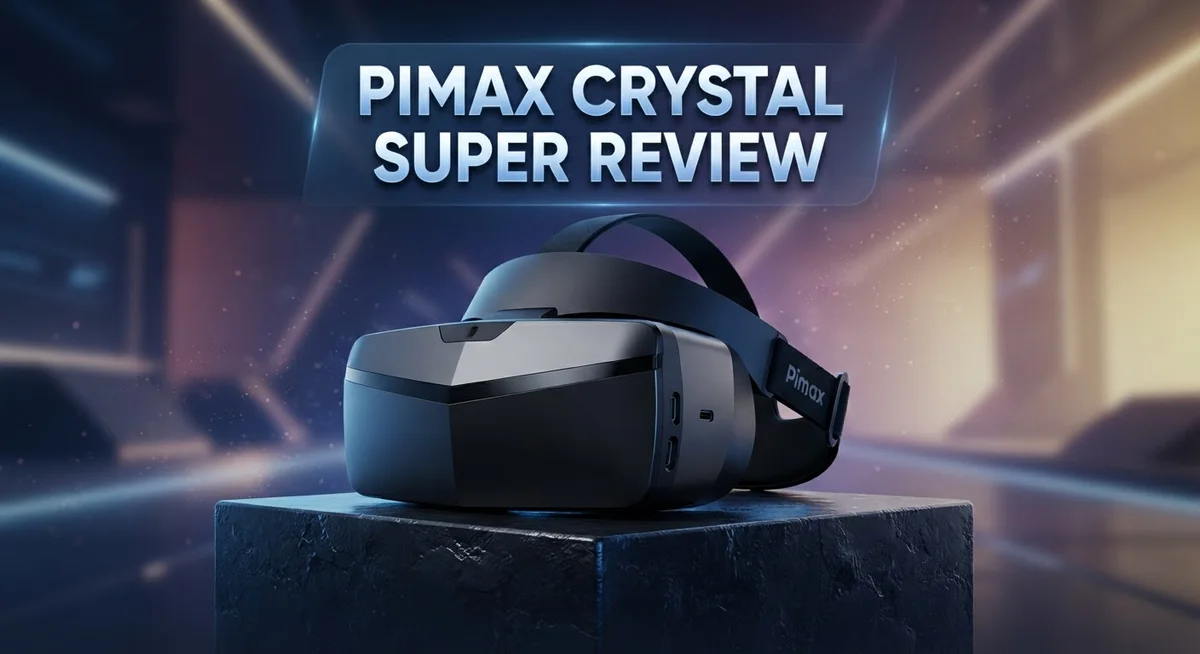
Pimax Crystal Super Review: Worth the Hype In 2026?
The Pimax Crystal Super is here, and it changes what you expect from a VR headset. This device pushes visual clarity to a new level. Gamers and sim enthusiasts are already taking notice.
Imagine a screen so sharp that pixels disappear. With 3840 x 3840 resolution per eye, this headset delivers stunning detail. Every scene looks crisp and lifelike.
The 140° field of view wraps around your vision. You feel present in every virtual world. This wide view sets the Crystal Super apart from many rivals.
In a Nutshell
- Stunning clarity: The 3840 x 3840 resolution per eye delivers nearly 29 million pixels total, giving you crisp detail in every scene.
- Bright and vivid: High brightness output makes colors pop, even in tricky lighting conditions.
- Comfort tradeoff: This headset feels heavy on your head and runs hot during longer sessions.
- Plug and play: OpenXR support means you can jump into most VR platforms without extra hassle.
- Sound needs help: The built-in audio feels weak, so you’ll likely want external headphones.
- Power hungry: You need a high-end PC to unlock this headset’s full potential.
- Strong rival: It stands toe to toe with headsets like the Varjo Aero and Bigscreen Beyond 2, especially for sharpness.
Display Quality and Resolution
The display panel inside the Pimax Crystal Super represents a major leap forward in VR visual fidelity. Pimax equipped this headset with QLED and Micro-OLED technology, which means you get exceptional contrast and color accuracy. The panels work together to deliver images that feel lifelike and immersive.
Resolution sets this headset apart from most competitors. Each eye receives a 3840 x 3840 pixel display, totaling nearly 29 million pixels across both screens. This density eliminates the screen door effect that plagues many VR headsets. When you look at text, distant objects, or fine details, everything appears crisp and defined without visible pixelation.
The brightness output deserves special attention. The Pimax Crystal Super produces high luminance levels, which means colors remain vibrant even in challenging lighting environments. Dark scenes stay dark without losing detail, and bright scenes don’t wash out. This balance matters significantly when you’re exploring virtual worlds with mixed lighting conditions.
The refresh rate options give you flexibility. You can choose between 72Hz and 90Hz depending on your PC hardware and the application you’re running. Higher refresh rates reduce motion blur and create smoother head tracking. Lower rates preserve performance on systems that can’t push maximum power.
The glass aspheric lenses contribute substantially to image quality. These lenses create a large sweet spot, meaning the image stays sharp across a wider viewing area. You don’t need to position your head in one exact spot to see clear visuals. This makes the headset more forgiving during active gameplay or exploration.
Glare performance stands out in low-light scenarios. Many VR headsets struggle with internal reflections and glare, but the Pimax Crystal Super handles dark environments well. The optical design minimizes stray light bouncing inside the display cavity, so you get cleaner blacks and better contrast overall.
The combination of high resolution, brightness, refresh rate options, and quality optics makes the display system genuinely impressive. This headset targets users who prioritize visual excellence above all other factors.

Last update on 2026-08-27 / Affiliate links / Images from Amazon Product Advertising API Some of the links on this website are affiliate links, which means that at no additional cost to you, I earn a commission if you click through and make a purchase. I only recommend products and services that I believe will add value to my readers. Thank you for your support!
Field of View and Optical Design
The optical design of the Pimax Crystal Super sets a new standard for immersive viewing. Glass aspheric lenses form the core of this system, and they work hard to eliminate distortion across your entire field of view. These lenses create a large sweet spot, meaning you get sharp images even when your eyes move around inside the headset.
The 140 degree horizontal field of view wraps your vision in a way that feels natural and engaging. This ultrawide perspective lets you see more of your virtual environment without turning your head. You notice peripheral details that standard VR headsets simply miss. The horizontal expansion makes games and simulations feel less like looking through a window and more like actually being there.
Brightness output plays a bigger role than most people realize. The QLED and Micro OLED panels inside produce vibrant colors that don’t wash out under bright lighting. Scenes stay vivid whether you’re in a dark room or near a window. This matters because traditional VR displays often look dim and flat in comparison.
The refresh rate flexibility deserves attention here. You can run the headset at 72Hz or 90Hz depending on what your PC can handle. Higher refresh rates reduce motion blur during fast head movements, which many users find critical for comfort. Lower refresh rates let you push visual quality higher if your system needs the breathing room.
One standout feature is the minimal glare in low light scenes. The optical stack manages internal reflections well, so you won’t see annoying reflections bouncing around inside the lenses. This keeps your focus on the content rather than on optical artifacts.
The combination of these elements creates a viewing experience that feels genuinely advanced. The aspheric lenses keep everything sharp, the wide field of view pulls you in, and the bright panels make colors sing. This optical system represents real progress in how VR displays can perform. You get clarity, brightness, and a wide perspective all working together seamlessly.
Comfort and Build Quality
The Pimax Crystal Super weighs noticeably more than many competitors. Your neck will feel the difference during extended play sessions. The headset’s mass concentrates toward the front, which can create pressure points on your forehead and cheeks.
Heat generation is a real concern here. The display panels and processing components pump out significant warmth. After 30 to 45 minutes of use, you’ll notice the faceplate warming up considerably. This can make longer VR sessions uncomfortable, especially in warm rooms.
The headstrap design offers decent adjustability. You get multiple velcro attachment points and a rear dial for tightening. The padding feels soft initially, but it compresses over time. Many users upgrade to aftermarket straps to improve long term comfort.
The front faceplate uses quality materials that feel durable. The plastic construction resists scratches and impacts well. Lens covers attach magnetically, which is convenient for storage and transport. The overall build quality suggests this headset can handle regular use without falling apart.
Cable management deserves mention here. The connection between the headset and PC uses a standard DisplayPort cable. The length gives you reasonable freedom of movement. However, the cable weight adds to overall strain on your head during active sessions.
Ventilation ports exist on the sides and rear. Air flows through these openings, but heat still builds up. The design prioritizes optical performance over cooling efficiency. Users in hot climates may experience more discomfort than those in cooler environments.
The faceplate interface feels intuitive. Button placement is logical and easy to find without looking. The controller grip feels natural in your hands. Setup involves standard VR calibration steps that take about 10 to 15 minutes.
Build quality stands above average for premium VR headsets. The materials feel solid, and assembly quality appears consistent. However, the weight and heat issues create a genuine comfort tradeoff. This headset works best for shorter sessions or stationary experiences. If you plan extended multiplayer gaming or active movement, you’ll want to factor in regular breaks.
Top 3 Alternatives
Meta Quest Pro

Last update on 2026-08-27 / Affiliate links / Images from Amazon Product Advertising API Some of the links on this website are affiliate links, which means that at no additional cost to you, I earn a commission if you click through and make a purchase. I only recommend products and services that I believe will add value to my readers. Thank you for your support!
HTC Vive XR Elite

Last update on 2026-08-27 / Affiliate links / Images from Amazon Product Advertising API Some of the links on this website are affiliate links, which means that at no additional cost to you, I earn a commission if you click through and make a purchase. I only recommend products and services that I believe will add value to my readers. Thank you for your support!
Valve Index

Last update on 2026-08-27 / Affiliate links / Images from Amazon Product Advertising API Some of the links on this website are affiliate links, which means that at no additional cost to you, I earn a commission if you click through and make a purchase. I only recommend products and services that I believe will add value to my readers. Thank you for your support!
System Requirements and Setup
The Pimax Crystal Super demands a high-performance PC setup to operate effectively. Your graphics card should be at least an RTX 4080 or RTX 4090 equivalent to handle the 3840 x 3840 resolution per eye without stuttering.
Your processor matters too. An Intel i7 or AMD Ryzen 7 processor will give you smooth performance. Pair this with 32GB of RAM for optimal stability during extended gaming sessions.
Connection requirements are straightforward. The headset uses DisplayPort 2.1 for video transmission and USB 3.0 for tracking data. Make sure your PC has these ports available before purchase.
Initial setup takes roughly 30 to 45 minutes. The process includes headstrap adjustment, lens calibration, and software installation. Pimax provides clear on screen instructions that walk you through each step. The user friendly interface makes this accessible even for VR newcomers.
You’ll need adequate space for the setup. A 2×2 meter play area works for seated experiences, but standing and room scale activities benefit from larger spaces. Clear any obstacles before your first session.
Power consumption is significant. The Pimax Crystal Super draws substantial electricity during operation. Ensure your PC power supply exceeds 1000 watts for stable performance. Underpowered supplies can cause crashes or performance drops.
Ventilation deserves attention in your setup. The headset generates noticeable heat during use. Position your PC in a well ventilated area and avoid blocking the headset’s cooling ports. This prevents thermal throttling and extends component lifespan.
Software installation is simple. Download the PiTool software from Pimax’s official website. This application handles firmware updates, tracking calibration, and headset settings. OpenXR support is built in, so most modern VR applications work without additional configuration.
Cable management helps prevent tangling during gameplay. Route your DisplayPort and USB cables carefully. Consider using cable clips or management sleeves for longer sessions.
The headset pairs easily with SteamVR once configured. Your library of existing VR games becomes immediately accessible. No special drivers or workarounds are needed for most titles.
Audio and Immersion Features
The Pimax Crystal Super delivers audio that requires some attention from users who want full immersion. Out of the box, the built-in speakers provide basic sound, but they lack the depth and spatial accuracy that serious VR enthusiasts expect. The audio reproduction feels flat compared to what the visual experience offers.
Many users upgrade to external audio solutions to match the headset’s visual quality. Wireless earbuds or dedicated VR audio headsets pair well with the Crystal Super. This combination elevates your sense of presence in virtual environments. Sound positioning becomes more accurate when you add quality audio hardware.
The headset’s ventilation design actually helps with audio in an unexpected way. Air flows through the sides and rear, which prevents audio buildup and maintains clarity during extended sessions. This matters more than it sounds for immersive gameplay.
Spatial audio support exists through OpenXR compatibility. Your PC can process directional sound information and send it to compatible audio devices. This creates convincing 3D soundscapes where audio sources feel like they’re coming from specific locations around you. Games and applications that support spatial audio shine on this headset.
The weak audio situation isn’t a deal breaker. It’s simply a limitation you should know about before purchase. Think of it as an opportunity to customize your audio experience rather than a flaw. Many VR users appreciate having control over their audio setup anyway.
For immersion purposes, the visual experience compensates significantly. The 140 degree field of view combined with high brightness and minimal glare creates such convincing environments that audio becomes secondary initially. However, once you add quality audio, the immersion multiplies dramatically.
Haptic feedback through compatible controllers works well with the Crystal Super. This tactile response adds another dimension to immersion beyond sight and sound. Your hands receive physical feedback that matches on screen actions, making interactions feel genuinely real.
The overall immersion package ranks highly despite audio limitations. The exceptional visuals, smooth refresh rates, and haptic integration create experiences that feel remarkably convincing. Audio upgrades simply complete what the hardware already does exceptionally well.
Pros and Cons
Pros
- Crystal clear visuals at 3840 x 3840 per eye make text and details pop like few headsets can
- 140° ultrawide field of view pulls you deeper into immersive experiences than standard VR
- Variable refresh rates at 72Hz and 90Hz let you balance smoothness with PC performance
- OpenXR support gives you flexibility across multiple VR platforms and apps
- Minimal glare in low light scenes keeps your focus sharp during darker game moments
Cons
- Heavy weight causes neck fatigue during extended play sessions compared to lighter alternatives
- Significant heat generation means you need proper ventilation and may feel warm during gameplay
- Demands high end PC hardware to unlock the full visual potential, limiting accessibility
- Weak audio out of the box forces most users to invest in external speakers or headphones for immersion
Who Should Buy It
The Pimax Crystal Super works best for specific types of VR enthusiasts. If you spend hours in VR every week, this headset rewards your commitment with exceptional visual fidelity that standard headsets simply cannot match.
Professional users benefit significantly from this device. Motion designers, architects, and engineers use the 3840 x 3840 resolution per eye to examine fine details. Text rendering appears crisp and readable, which matters when you work inside virtual environments all day.
Sim racing fans find real value here too. The 140° ultrawide field of view creates a convincing sense of speed and presence on the track. Variable refresh rates let you maintain smooth performance even on demanding racing circuits.
Content creators should consider this headset seriously. If you produce VR content, testing on high resolution displays ensures your work looks polished across all platforms. OpenXR support means your creations work on multiple VR systems without compatibility headaches.
Hardcore gamers with powerful PCs belong in this category. You need a high-end processor and graphics card to push those pixels effectively. If your PC struggles with demanding games, this headset won’t solve that problem.
Casual VR users should look elsewhere. The significant heat generation and weight mean extended play sessions become uncomfortable quickly. Neck fatigue sets in faster than with lighter alternatives. The weak audio also requires upgrading to external speakers or headphones, adding extra expense to your setup.
Budget conscious buyers should skip this device. Your money goes toward visual performance, not affordability. The demanding setup process and calibration requirements need patience and technical knowledge.
People with limited space face challenges too. You need adequate room for the 140° field of view to shine. Cramped spaces waste the headset’s main advantage.
Summary: Buy this headset if you’re a professional user, sim racing enthusiast, content creator, or hardcore gamer with a powerful PC and enough space. Skip it if you play casually, have a modest gaming PC, or prefer lightweight headsets for comfort during long sessions.
Final Verdict
The Pimax Crystal Super stands out as a serious contender in the high-end VR space. Its display quality and field of view set a new benchmark for clarity in this category.
When you compare it to rivals like the Varjo Aero or Bigscreen Beyond 2, the Crystal Super holds its own. It offers a wider view than most competitors while keeping visual sharpness intact.
Samsung Galaxy XR and Meta headsets focus on different priorities like portability or ecosystem lock in. The Crystal Super takes a different path. It puts raw visual performance first.
That said, this headset asks a lot from you. Calibration takes time and patience during initial setup. You will need to fine tune settings to get the best results.
A strong PC setup isn’t optional here. Your system needs real power to keep up with the resolution and refresh rates this headset demands.
Think of the Crystal Super as a tool for serious work or serious play. It rewards users who invest effort into getting the setup right.
If you already own capable hardware, the learning curve feels worth it. The payoff comes through in every session once everything clicks into place.
This headset does not try to please everyone. It targets people who want top tier visuals without compromise.
Some users may find the setup process frustrating at first. Others will see it as a small price for exceptional image quality.
The Crystal Super shines brightest for those who already understand VR hardware. Newcomers might feel overwhelmed by the calibration steps involved.
In the end, this headset earns its place among premium options. It delivers where it matters most for its target audience.
Your decision comes down to your specific needs and technical comfort level. For the right user, the Crystal Super offers an experience that few headsets can match today.
Frequently Asked Questions
Does the Pimax Crystal Super work with my existing VR games?
Yes, it does. The headset supports OpenXR, which means most modern VR games and apps recognize it automatically. You don’t need special versions or workarounds for popular titles.
Older games built only for SteamVR may need a compatibility layer. The good news? Steam handles this conversion in the background most of the time.
What PC specs do I actually need to run this headset smoothly?
You need a high-end graphics card. Think RTX 4090 or RTX 4080 for smooth gameplay at full resolution. The 29 million pixels per eye demand serious GPU power.
Your CPU should be current generation or recent. DDR5 RAM helps too. Budget gaming PCs will struggle here. This headset pairs best with workstation-class hardware.
Is the audio quality good enough, or do I need external speakers?
The built-in audio is weak out of the box. Most users add external headphones or earbuds for better sound quality. This is a known limitation you should plan for.
Some people use wireless earbuds for convenience. Others prefer wired options for lower latency during competitive games.
How long can I wear this headset comfortably?
The weight makes extended sessions difficult. Most users report neck fatigue after 1 to 2 hours of continuous wear. Heat buildup compounds this problem.
Taking 15-minute breaks helps. Lighter headsets offer better comfort for marathon gaming sessions. The Pimax Crystal Super suits shorter, focused sessions better.
Can I use this for professional work like 3D design or simulation training?
Absolutely. The exceptional clarity and large field of view make it excellent for professional applications. Content creators, architects, and engineers benefit significantly.
The high resolution shows fine details clearly. This matters when you’re reviewing designs or training on complex systems.

Hello, i’m Ivoria i am the face behind Tech Tracker Blog. I am passionate about my work and love to explore gadgets and share about my experience.