HTC Vive Focus Vision Review 2026: Is It Worth Buying?
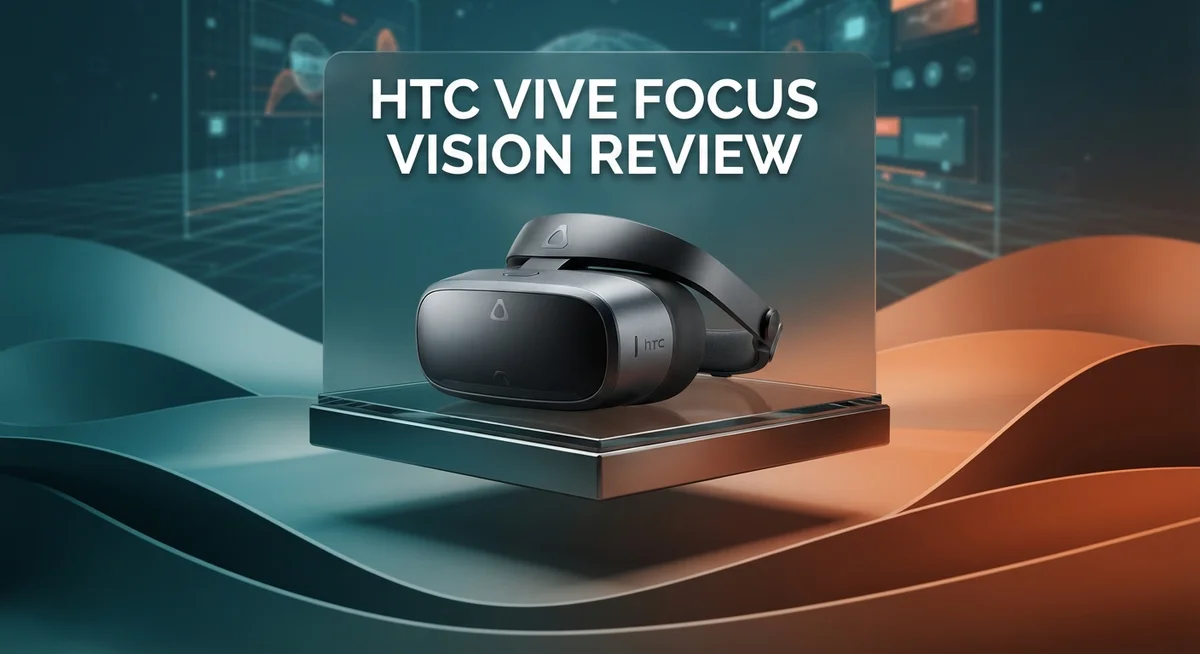
The HTC Vive Focus Vision brings fresh energy to the VR headset market. It promises sharp visuals and smart tracking features in one device. But does it truly stand out from the crowd?
This headset offers a 5K resolution display that makes text and images crisp. You get dual fast switch LCD panels working at a smooth 90 Hz refresh rate. Screen door effect becomes almost invisible here.
Eye tracking and hand tracking add a layer of smart interaction. Auto IPD adjustment means less fiddling and more comfort. The stereo color passthrough opens doors to mixed reality experiences too.
In a Nutshell
- Visual quality stands out. The dual LCD panels show minimal screen door effect. Sharp visuals make this headset great for detailed work and immersive games.
- Comfort meets function. The modular build lets you adjust fit easily. Long sessions feel less tiring compared to older models.
- Tracking performs well overall. Movement feels natural and responsive. This applies to both room scale play and standalone use.
- Mixed reality features add value. Stereo color passthrough blends real and virtual worlds smoothly. Eye and hand tracking bring smarter interaction, though use cases are still growing.
- Flexibility is a major plus. You can use this headset as a standalone device or connect it to a PC. This hybrid setup suits different play styles.
- Some limits exist. Brightness levels fall short of certain rivals. Compared to competitors like Meta Quest Pro, tracking tech has room to grow.
Display Quality and Resolution
The display on the HTC Vive Focus Vision represents a significant leap forward in visual clarity. Each eye receives a 2448 x 2448 pixel image, which combines to create a 5K resolution experience. This pixel density means text appears sharp and readable, even when you lean in close to examine details.
The dual fast-switch LCD panels work together to eliminate the screen door effect that plagued older VR headsets. You won’t see the grid pattern that once made virtual worlds feel pixelated. Instead, images blend smoothly across your entire field of view.
Refresh rate matters for smooth motion, and this headset delivers 90 Hz performance. Your eyes perceive movement as fluid rather than stuttering. Fast-paced games and interactive experiences feel natural and responsive.
Color accuracy shines through the stereo color passthrough system. When you switch to mixed reality mode, the real world blends with digital elements in full color. This capability opens doors for productivity tasks and creative work that earlier VR headsets couldn’t handle well.
One area where brightness falls slightly behind some competitors is worth noting. The display doesn’t reach the peak brightness levels of certain rival headsets. In very bright rooms, you might notice reduced contrast compared to using the device in dimmer environments.
The auto-IPD adjustment feature works silently in the background. This system detects your interpupillary distance and optimizes the image accordingly. You get a personalized viewing experience without manual tweaking.
The overall visual experience strikes a strong balance between sharpness, color reproduction, and comfort. Whether you’re reading text in a virtual office, exploring immersive games, or mixing real and digital content, the display performs admirably. The 5K resolution combined with fast-switch LCD technology creates a viewing experience that justifies this headset’s position among today’s premium VR options.


Last update on 2026-08-27 / Affiliate links / Images from Amazon Product Advertising API Some of the links on this website are affiliate links, which means that at no additional cost to you, I earn a commission if you click through and make a purchase. I only recommend products and services that I believe will add value to my readers. Thank you for your support!
Tracking Capabilities and Mixed Reality Features
The HTC Vive Focus Vision excels at tracking your eyes and hands in real time. This capability opens doors for more natural interaction within virtual spaces. You look at objects and the headset knows exactly where your attention goes.
Hand tracking works without controllers. Your fingers become the input device. You can grab, point, and gesture naturally. This feels intuitive compared to traditional button pressing.
Eye tracking serves multiple purposes beyond interaction. It enables foveated rendering, which sharpens the area you’re looking at while reducing detail elsewhere. This technique improves performance without sacrificing visual quality. Your gaze also powers menu selection and object focus in apps.
The stereo color passthrough camera system brings the real world into your virtual experience. Unlike monochrome passthrough on older headsets, you see colors as they actually appear. This means you can work with real documents, reference physical objects, or simply see your surroundings while wearing the headset. The blend between digital and physical feels seamless.
Mixed reality applications remain limited but growing. Developers are still discovering what works best with eye and hand tracking. Current use cases include productivity apps, design tools, and educational software. Gaming applications are slower to adopt these features, but the potential is clear.
The tracking system performs reliably during normal use. Occlusion occasionally happens when your hands move out of the camera’s view, but this rarely disrupts your experience. Recovery is instant when your hands return to the visible area.
Auto-IPD adjustment eliminates manual tweaking. The headset measures the distance between your pupils automatically. This ensures optimal image alignment for your eyes without you lifting a finger.
The combination of eye and hand tracking with color passthrough creates something special. You’re not locked into a purely virtual world. You can work, create, and play while staying aware of your physical environment. This hybrid approach represents where VR is heading. The Focus Vision demonstrates that mixed reality can feel natural and useful, not gimmicky.
Design, Comfort, and Build Quality
The HTC Vive Focus Vision feels solid in your hands. The build uses quality materials that resist wear and tear. The headset sits light on your face, which matters during long sessions.
Weight distribution works well here. Most of the mass sits toward the back, so your neck doesn’t strain. The front panel doesn’t pull down or tilt awkwardly. This balance keeps you comfortable for hours.
The modular design is a real strength. You can swap out facial interfaces easily. Different face cushions fit various head shapes. Straps adjust without tools or complicated steps. This flexibility means you find your perfect fit quickly.
Ventilation keeps things cool. Air flows around the faceplate naturally. Your face doesn’t get hot or sweaty during active sessions. The design prevents heat buildup that plagues many VR headsets.
The controllers feel responsive and well made. Buttons sit where your thumbs naturally rest. Grip texture prevents slipping during movement. Haptic feedback gives you clear signals when you interact with objects.
The headset’s durability stands out. The LCD panels are more robust than OLED screens. They resist burn in and handle everyday use better. The overall construction suggests this device will last through years of regular use.
Adjustment features work smoothly. The auto IPD system calibrates without you thinking about it. Head straps tighten with one hand. The front visor lifts easily when you need to see the real world quickly.
The stereo color passthrough cameras mount securely. They don’t rattle or shift during movement. Image quality from these cameras stays clear and stable. This matters when you switch between virtual and mixed reality modes.
Weight feels balanced during active games. You can move your head fast without discomfort. The headset tracks your motion without lag. Longer play sessions don’t cause neck fatigue.
Overall, the design reflects practical thinking. Every element serves a purpose. Comfort doesn’t sacrifice durability. The build quality suggests HTC listened to user feedback from previous models. This headset proves that VR devices can be both capable and comfortable to wear.
Top 3 Alternatives
Meta Quest Pro

Last update on 2026-08-27 / Affiliate links / Images from Amazon Product Advertising API Some of the links on this website are affiliate links, which means that at no additional cost to you, I earn a commission if you click through and make a purchase. I only recommend products and services that I believe will add value to my readers. Thank you for your support!
Apple Vision Pro

Last update on 2026-08-25 / Affiliate links / Images from Amazon Product Advertising API Some of the links on this website are affiliate links, which means that at no additional cost to you, I earn a commission if you click through and make a purchase. I only recommend products and services that I believe will add value to my readers. Thank you for your support!
Pico 4 Enterprise

Last update on 2026-08-27 / Affiliate links / Images from Amazon Product Advertising API Some of the links on this website are affiliate links, which means that at no additional cost to you, I earn a commission if you click through and make a purchase. I only recommend products and services that I believe will add value to my readers. Thank you for your support!
Hybrid Performance: Standalone and PC VR Modes
The HTC Vive Focus Vision shines when you switch between standalone mode and PC VR mode. This flexibility means you get two devices in one headset.
In standalone mode, the headset runs games and apps directly from its built-in processor. You don’t need a PC or external cables. Apps launch quickly, and performance stays smooth at 90 Hz. This mode works great for casual gaming, fitness apps, and social experiences. You have complete freedom to move around your space without tethering.
PC VR mode opens up more demanding experiences. Connect the headset to your computer via DisplayPort, and you unlock access to Steam VR and other PC libraries. Graphics get richer. Frame rates hold steady. Complex simulations and AAA titles run without compromise. The switch between modes happens seamlessly without restarting or reconfiguring anything.
The real advantage here is flexibility. Start your day with standalone apps. Later, dock your headset to your PC when you want deeper, more graphically intense sessions. No need to choose one or the other.
Eye tracking and hand tracking work in both modes. These features don’t degrade when you switch. Foveated rendering still sharpens your focus area in PC mode. Hand interactions remain responsive whether you’re standalone or tethered.
Battery life matters for standalone users. The headset keeps going for several hours on a single charge. This gives you enough time for a gaming session or productivity work without hunting for a charger immediately.
The DisplayPort connection provides reliable data transfer. Latency stays low, so responsive games feel natural. You won’t notice lag between your movements and what appears on screen.
This hybrid approach appeals to different user types. Casual users enjoy standalone convenience. Power users appreciate PC VR access. Business professionals can use both modes for training and collaboration. The HTC Vive Focus Vision refuses to lock you into one ecosystem, making it a genuinely flexible platform for VR exploration.
Real-World Use Cases and Content Ecosystem
The HTC Vive Focus Vision opens doors to practical applications beyond gaming. Enterprise training programs benefit from the sharp 5K display and eye tracking features. Workers can learn complex tasks in simulated environments while the system monitors their attention and comprehension through gaze data.
Medical professionals use this headset for surgical simulation. The clarity matters here because precision training demands accurate visual feedback. Hand tracking lets surgeons practice delicate movements without holding physical controllers, making the experience more intuitive.
Content creation is another growing use case. Designers and artists appreciate the high resolution for detailed work. The stereo color passthrough lets creators see their real workspace while building virtual objects. This mixed reality workflow reduces the friction between digital and physical design processes.
Educational institutions are adopting the Focus Vision for immersive learning. Students explore historical sites, molecular structures, and architectural designs in 3D space. The eye tracking feature helps educators understand which elements capture student attention, providing valuable insights for curriculum improvement.
The content ecosystem continues expanding. VivePort, HTC’s app store, offers titles across fitness, productivity, and entertainment. While the selection is smaller than mainstream VR platforms, quality is improving. Developers increasingly optimize apps for eye and hand tracking, creating more natural interactions.
Retail and real estate professionals use the headset for virtual showrooms. Clients can tour properties or explore product configurations in immersive detail. The passthrough cameras help maintain spatial awareness, preventing disorientation during walkthroughs.
Social VR applications are emerging slowly. The hand tracking and eye contact simulation create more human-like avatars, though this space remains underdeveloped compared to other platforms.
The real strength lies in specialized applications rather than mainstream entertainment. Industries like healthcare, manufacturing, and design find genuine value in the Focus Vision’s tracking capabilities and visual clarity. As developers discover new ways to leverage eye tracking and hand recognition, the use case library will continue growing beyond today’s offerings.
Pros and Cons
Pros
- Sharp 5K visuals deliver minimal screen door effect and excellent text clarity
- Eye tracking and hand tracking work seamlessly in both standalone and PC VR modes
- Comfortable, modular design with balanced weight distribution and smart ventilation
- Hybrid flexibility lets you run games standalone or connect to PC for demanding experiences
- Stereo color passthrough opens mixed reality possibilities for creative work and practical applications
Cons
- Eye and hand tracking features lack abundant software support right now
- Display brightness falls short compared to some competing headsets
- Limited mainstream entertainment content library versus larger VR platforms
Who Should Buy It
The HTC Vive Focus Vision works best for specific user groups who need its unique features. Let’s break down who should consider this headset.
Professional and Enterprise Users benefit most from this device. Medical students and surgeons use it for training simulations. The sharp 5K visuals help them see fine details during virtual procedures. Educational institutions find value in immersive learning experiences. Teachers can create interactive lessons that students explore in VR. Real estate agents and retail professionals use the stereo color passthrough for virtual property tours and product showcases.
Content Creators should take a close look. The mixed reality capabilities let you blend digital elements with your real environment. Designers and architects can visualize projects in actual spaces. The hand tracking and eye tracking features add new creative possibilities. You can build experiences that respond to user gaze and gestures.
PC VR Enthusiasts who want flexibility will appreciate the hybrid design. You get demanding games and experiences when connected to your computer. You also enjoy standalone freedom when you want portability. This appeals to people who don’t want to choose between power and convenience.
Enterprise Teams developing specialized applications should consider this headset. The eye tracking and hand tracking open doors for innovative software. Your developers can build apps that track where users look and how they gesture. The 90 Hz refresh rate keeps experiences smooth and comfortable.
NOT the right choice for casual gamers seeking mainstream entertainment. The software library doesn’t match larger VR platforms. Social VR applications remain limited. If you want quick, fun gaming experiences with many title options, other headsets serve you better.
The Focus Vision shines when you need specialized features over broad entertainment. It’s built for professionals, educators, and developers who want cutting edge technology and flexibility. Choose this headset if your work or projects demand eye tracking, hand tracking, and mixed reality capabilities. It’s an investment in professional VR, not casual gaming.
Final Verdict
The HTC Vive Focus Vision stands out as a headset built with purpose. It brings sharp visuals and smart tracking together in one package.
This device makes sense for people with clear goals. If you train surgeons, teach students, or build virtual spaces, this headset fits your needs well.
Casual users looking for weekend gaming fun might feel underwhelmed. The software library still needs growth to match bigger VR platforms.
Professionals see the real value here. Doctors practice procedures safely. Teachers create lessons that feel real. Architects show clients spaces before they exist.
The hybrid design gives you freedom. You can use it alone or plug into a powerful PC. This flexibility helps teams switch between quick tasks and demanding projects.
Eye tracking and hand tracking add real promise. These tools will grow stronger as more developers build for them. Early adopters get a head start on this technology.
Comfort matters during long sessions. The modular build spreads weight evenly across your head. This design choice makes sense for people who wear headsets for hours, not minutes.
Compared to rivals like the Meta Quest Pro or Apple Vision Pro, the Focus Vision carves its own space. It focuses on specific tasks rather than broad appeal.
Should you buy this headset? Ask yourself one question first. Do you need specialized tools for work or study?
If yes, this headset delivers strong value for your specific case. If you just want fun games and movies, other options might serve you better.
The bottom line is simple. The Focus Vision rewards focused use cases. It shines brightest in hands of professionals, educators, and creators who push VR beyond entertainment.
This headset proves that VR has room for specialized tools. Not every device needs to please everyone. Sometimes doing one thing well beats trying to do everything.
Frequently Asked Questions
Can the HTC Vive Focus Vision work without a PC connection?
Yes, absolutely. The headset runs as a standalone device right out of the box. You get full access to apps, games, and experiences without needing a PC. The onboard processor handles everything smoothly.
However, you can also plug it into a PC via DisplayPort when you want more power. This hybrid approach gives you flexibility. Want to play a demanding PC VR game? Connect it. Need portability? Use it standalone.
What makes the eye tracking and hand tracking useful?
Both features work seamlessly in standalone and PC VR modes. Eye tracking lets apps respond to where you look. Hand tracking means you can interact without controllers.
The catch? Software support is still growing. Developers are building more apps that take advantage of these features, but the library isn’t massive yet. Over time, expect more creative uses for mixed reality work and specialized applications.
How clear is the display for reading text?
The 5K resolution delivers excellent text clarity. You can read small text comfortably up close without pixelation. The dual LCD panels minimize the screen door effect most VR users notice.
This makes the headset ideal for productivity tasks, design work, and any application where text matters. The sharp visuals hold up during extended sessions.
Is this headset good for casual gaming?
Not really. The Focus Vision targets professionals and enthusiasts with specific needs. Casual gamers seeking mainstream entertainment options might feel limited by the app selection.
If you need eye tracking, hand tracking, or hybrid PC flexibility for work or creative projects, this headset shines. For weekend fun and popular titles, other platforms offer broader libraries.

Hello, i’m Ivoria i am the face behind Tech Tracker Blog. I am passionate about my work and love to explore gadgets and share about my experience.