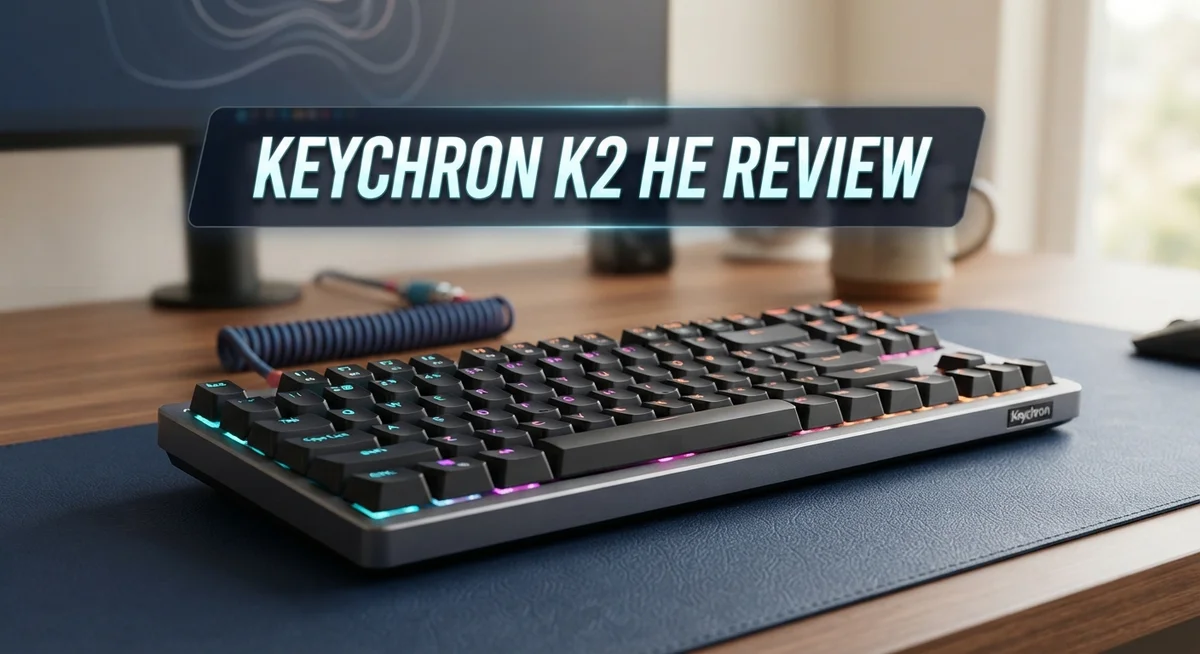
Keychron K2 HE Review: Keyboard Performance & Features
The Keychron K2 HE brings something fresh to wireless keyboards. It mixes a furniture like design with serious typing performance. This combo makes it stand out in a crowded market.
This keyboard uses Gateron double rail magnetic Hall Effect switches. These switches come pre-lubed for a smooth feel right away. Advanced TMR sensors add stability and quick responsiveness to every keystroke.
Gamers and typists both get something special here. The adjustable actuation and rapid trigger features let you customize your experience. You can fine tune the keyboard to match your exact play style or typing rhythm.
In a Nutshell
- Design: The concrete edition gives this keyboard a unique, premium look. It feels different from typical plastic keyboards.
- Switches: Magnetic Hall Effect switches use TMR sensors for better stability. These switches also allow adjustable actuation and rapid trigger settings.
- Compatibility: These switches are proprietary. You cannot swap in standard mechanical switches here.
- Feel: Typing feels smooth and sounds great. Testers praised the overall sound quality during use.
- Quirks: Some users noticed minor switch wobble. Opinions on Hall Effect tech remain mixed across the community.
- Competition: The Keychron Q1 HE and K2 Max offer similar features. Budget brands like Royal Kludge provide simpler alternatives.
Key Features and Specifications
The Keychron K2 HE packs impressive specifications into a compact form factor. This 75% layout wireless keyboard runs on QMK firmware, giving you full customization power. You get Gateron double rail magnetic Hall Effect switches that arrive pre lubed straight from the box.
Advanced sensor technology sits at the heart of this keyboard. The TMR sensors deliver stability and responsiveness that traditional mechanical switches simply cannot match. You can adjust the actuation point on the fly, which means you customize how quickly the keyboard registers your keypress. The rapid trigger feature lets you fine tune performance even further.
The magnetic Hall Effect switches use contactless sensing. This approach eliminates the physical contact wear that mechanical switches experience over time. Your keystrokes stay consistent and reliable through thousands of hours of typing or gaming. The concrete edition showcases Keychron’s design philosophy beautifully, offering a furniture like aesthetic that works on any desk.
Sound and feel deserve special attention here. Users consistently praise the typing experience and audio feedback. The pre lubed switches glide smoothly across the key travel distance. You hear a satisfying, controlled sound with each press. Neither the clack nor the thud feels harsh or fatiguing during long sessions.
One consideration stands out: these switches are proprietary to Keychron. You cannot swap them for standard mechanical switches from other brands. This limits customization options compared to hot swap keyboards that accept universal switches. Some users have reported minor switch wobble, though this varies by individual unit.
The keyboard excels for both gaming and productivity work. Gamers benefit from adjustable actuation and rapid trigger features. Writers and coders appreciate the smooth, consistent typing experience. The compact 75% layout saves desk space while keeping dedicated arrow keys and function row intact.
Build quality throughout the keyboard reflects premium construction standards. The wireless connectivity pairs quickly and maintains stable connection. Battery life easily lasts weeks between charges. This keyboard delivers a complete package for users seeking something beyond standard mechanical keyboards.

Last update on 2026-08-31 / Affiliate links / Images from Amazon Product Advertising API Some of the links on this website are affiliate links, which means that at no additional cost to you, I earn a commission if you click through and make a purchase. I only recommend products and services that I believe will add value to my readers. Thank you for your support!
Design and Build Quality
The Keychron K2 HE showcases a furniture-like aesthetic that sets it apart from typical gaming keyboards. The concrete edition delivers a sophisticated, minimalist appearance that works well on any desk setup. The overall construction feels solid and intentional.
The 75% layout strikes an excellent balance. You get a full number row and function keys without the bulk of a full-size board. The compact design saves desk space while keeping essential keys within reach. This form factor appeals to both office workers and gamers alike.
The keyboard’s chassis uses premium materials throughout. The frame construction resists flex during typing or gaming sessions. Key stabilizers remain consistent across the board, preventing rattle or instability. The overall fit and finish reflect attention to detail during manufacturing.
The Gateron double-rail magnetic switches represent the most distinctive design choice. These switches use contactless Hall Effect sensing rather than traditional mechanical contacts. The TMR sensors detect key presses through magnetic proximity. This approach eliminates contact wear and extends switch lifespan significantly.
One important consideration emerges here: these switches are proprietary to Keychron. You cannot swap them with standard mechanical switches from other brands. This design choice locks you into Keychron’s ecosystem for replacements or future upgrades. Existing mechanical switch collections won’t work with this keyboard.
Some users reported minor switch wobble in reviews. The double-rail design generally minimizes lateral movement, but occasional units showed slight side-to-side play. This wobble doesn’t affect typing performance for most users, though enthusiasts may notice it during extended sessions.
The keyboard’s weight and materials contribute to stability on your desk. The design prevents unwanted movement during intense gaming or rapid typing. Cable management integrates cleanly into the chassis design.
Overall, the K2 HE demonstrates excellent build quality that justifies its premium positioning. The design philosophy prioritizes durability and typing experience over flashy aesthetics. The magnetic switch technology represents a genuine innovation in wireless keyboard design. This keyboard appeals to users seeking something beyond standard mechanical keyboards.
Switch Technology and Typing Experience
The Keychron K2 HE uses Gateron double-rail magnetic Hall Effect switches with advanced TMR sensors. These switches work differently than traditional mechanical switches because they use contactless sensing technology. Your keypress triggers a sensor without any physical contact, which creates a unique typing experience.
The actuation point is adjustable on this keyboard. You can set it to trigger at different depths based on your preference. This means the keyboard adapts to how you type rather than forcing you to adapt to it. The rapid trigger feature lets you register multiple keypresses faster, which appeals to competitive gamers.
Typing feel stands out as a major strength of the K2 HE. The switches feel smooth and responsive under your fingers. The sound profile is clean and satisfying without being loud or distracting. Many users report that typing on this keyboard feels premium compared to standard mechanical options.
However, some users noticed minor switch wobble during use. This doesn’t affect performance, but it’s worth knowing if you prefer rock solid stability. The wobble appears in certain switch positions rather than across the entire keyboard. Most users find it negligible during actual typing sessions.
The proprietary nature of these switches matters if you like customization. You cannot swap in standard mechanical switches from other brands. Keychron designed these switches specifically for the K2 HE, so replacement parts come directly from Keychron. This limits your options compared to keyboards using universal switch types.
The keyboard excels for both gaming and productivity work. The adjustable actuation works great for fast-paced games. The smooth typing feel makes long writing sessions comfortable. The contactless sensing means there’s no physical wear on the switches over time, so they should last longer than traditional mechanical switches.
The overall typing experience balances speed with comfort. The Hall Effect technology eliminates the scratchy feeling some people experience with standard switches. This keyboard delivers a modern take on mechanical typing that feels genuinely different from conventional keyboards.
Top 3 Alternatives
Keychron K2 Pro

Last update on 2026-08-31 / Affiliate links / Images from Amazon Product Advertising API Some of the links on this website are affiliate links, which means that at no additional cost to you, I earn a commission if you click through and make a purchase. I only recommend products and services that I believe will add value to my readers. Thank you for your support!
Nuphy Air75

Last update on 2026-08-31 / Affiliate links / Images from Amazon Product Advertising API Some of the links on this website are affiliate links, which means that at no additional cost to you, I earn a commission if you click through and make a purchase. I only recommend products and services that I believe will add value to my readers. Thank you for your support!
Lofree Dot Pro

Last update on 2026-08-31 / Affiliate links / Images from Amazon Product Advertising API Some of the links on this website are affiliate links, which means that at no additional cost to you, I earn a commission if you click through and make a purchase. I only recommend products and services that I believe will add value to my readers. Thank you for your support!
Wireless Connectivity and Battery Performance
The Keychron K2 HE connects wirelessly via a 2.4GHz USB receiver or Bluetooth. You get stable, lag-free performance for both gaming and typing. The wireless connection responds instantly to your inputs without noticeable delay.
Battery life is where this keyboard truly shines. A single charge lasts for weeks of regular use. The keyboard enters a low-power sleep mode when idle, which extends battery longevity significantly. You’ll rarely need to charge it if you use it casually.
Charging is convenient and fast. The keyboard uses a USB-C port for quick top-ups. Most users report reaching a full charge in under two hours. The battery indicator shows your remaining power directly on the keyboard, so you always know when to plug in.
The wireless performance remains consistent across different rooms and distances. The 2.4GHz connection penetrates walls and obstacles better than older wireless standards. Bluetooth connectivity offers flexibility if you want to switch between multiple devices. The keyboard remembers up to three paired devices, making it easy to hop between your computer, tablet, or phone.
Real-world battery performance impresses most users. Heavy gamers report getting 4 to 5 days between charges. Casual typists easily stretch this to 2 to 3 weeks. The battery capacity is substantial enough to handle extended work sessions without interruption.
One advantage of the wireless setup is the clean desk aesthetic. No cables clutter your workspace. The compact 75% layout combined with wireless freedom creates an unobstructed typing environment.
The keyboard maintains connection stability even when moving around your desk. Signal dropout is virtually nonexistent with the 2.4GHz receiver. If you switch to Bluetooth mode, connection remains reliable within typical room distances.
Battery performance aligns with what premium wireless keyboards deliver today. The combination of wireless convenience and extended battery life makes the K2 HE practical for both office and gaming setups. You get freedom from cables without sacrificing reliability or needing constant charging.
Customization and Software
The Keychron K2 HE gives you powerful customization options through QMK firmware. You can reprogram every key to match your workflow. The software lets you create custom layers and macros without any coding knowledge required.
Actuation point adjustment stands out as a game changer here. You can lower or raise the trigger point between 1.0mm and 4.0mm. This means you adapt the keyboard to your typing style, not the other way around. Gamers benefit from faster actuation, while typists prefer a longer travel distance.
The rapid trigger feature adds another dimension to customization. This function lets you press and release keys faster than standard mechanical keyboards allow. You gain a competitive edge in fast paced games. The feature toggles on or off based on your needs.
QMK compatibility opens up endless possibilities for power users. You access a massive community of developers who share custom firmware. You can download pre made configurations or build your own from scratch. The learning curve exists, but resources are abundant online.
One limitation you should know about involves the proprietary Gateron switches. You cannot swap them with standard mechanical switches from other brands. This restricts your customization to what Keychron offers officially. Your switch options remain limited compared to keyboards with standard switch mounting.
The software interface feels intuitive once you explore it. You navigate layers and macros through a clean dashboard. Saving profiles takes just a few clicks. You can store multiple configurations and switch between them instantly.
Firmware updates arrive regularly to add new features and fix bugs. Keychron actively develops the software experience. You stay current without purchasing new hardware. The company listens to user feedback and implements improvements.
The customization depth appeals to enthusiasts who want control. Casual users find the basic setup works perfectly out of the box. You decide how deep to dive into advanced options. The flexibility ensures the K2 HE grows with your needs over time.
Pros and Cons
Pros
- Beautiful, furniture-like design that looks great on any desk
- Exceptional typing feel with responsive Hall Effect switches that excel for gaming and productivity
- Solid build quality throughout the keyboard with consistent wireless performance
- Adjustable actuation point and rapid trigger features give you real control over how the keyboard responds
- Fast USB-C charging and impressive battery life between charges
Cons
- Proprietary Gateron magnetic switches mean you cannot swap in standard mechanical switches for customization
- Some users reported minor switch wobble during intensive typing or gaming sessions
- Premium positioning puts it in a higher tier compared to basic wireless keyboards on the market
- Mixed opinions exist about Hall Effect technology overall, so it may not suit everyone’s preferences
Who Should Buy It
The Keychron K2 HE is perfect for competitive gamers who need rapid response times. The adjustable actuation point and rapid trigger features let you fine-tune exactly how fast the keyboard reacts to your inputs. Hall Effect switches give you the precision that matters in fast-paced games.
Content creators and writers will love the exceptional typing feel this keyboard delivers. The pre-lubed Gateron switches produce a smooth, satisfying keystroke. Many users report that typing sessions feel less fatiguing compared to standard mechanical keyboards. The sound quality is crisp without being distracting in quiet environments.
This keyboard suits power users and enthusiasts who want deep customization control. QMK firmware compatibility opens up endless programming possibilities. You can remap keys, create macros, and adjust switch behavior to match your exact workflow. The software interface remains intuitive, so you don’t need technical expertise to make changes.
If you spend long hours at your desk, the wireless convenience matters. The clean desk aesthetic and reliable connection stability reduce cable clutter. Battery life stretches to 4 to 5 days for heavy users, so you charge less often than traditional wireless keyboards.
Professionals who value aesthetics will appreciate the furniture-like design. This keyboard looks premium on any desk setup. The concrete edition adds a modern, sophisticated touch to your workspace.
However, skip this keyboard if you need budget-friendly options. The Keychron Q1 HE or K2 Max offer similar features at different price points. Royal Kludge and other brands provide more affordable alternatives if wireless connectivity isn’t essential.
Also avoid this model if you want standard switch compatibility. The proprietary Gateron magnetic switches mean you cannot swap in custom keycaps or switches from other brands. This limits personalization if you love experimenting with different switch types.
Some users reported minor switch wobble during intensive use. If you prefer absolutely rock-solid switches without any movement, test this keyboard first before committing.
The K2 HE shines for gamers, writers, and customization enthusiasts who value wireless performance and premium build quality.
Final Verdict
The Keychron K2 HE earns its spot among the best wireless Hall Effect keyboards today. It blends smart engineering with a design that feels at home in any setup.
If you want a keyboard that pushes magnetic switch technology forward, this model delivers. The TMR sensor system adds a layer of precision that many competitors still lack.
Compared to the Keychron Q1 HE QMK, the K2 HE feels more approachable for daily use. The Q1 HE leans toward a heavier, full metal build, while the K2 HE keeps things lighter and more portable.
Against the Keychron K2 Max, the choice comes down to switch technology. The Max sticks with traditional mechanical switches, so pick that model if you want swappable switch freedom.
The Keychron V5 Max offers a different layout for users who want more keys. The K2 HE stays compact with its 75% design, which suits minimal desk setups better.
Outside the Keychron lineup, brands like SteelSeries and Corsair offer their own Hall Effect options. However, the K2 HE stands out through its unique concrete edition finish and overall build character.
This keyboard isn’t for everyone, and that’s fine. Some users may find the learning curve with magnetic switches unfamiliar at first.
Give it a week of regular use, and the adjustment period fades quickly. Most users adapt fast once they feel the consistent keypress response.
Overall, the Keychron K2 HE represents a smart step forward in wireless keyboard design. It combines thoughtful engineering with a typing experience that feels genuinely refined.
Final take: pick this keyboard if you value cutting edge switch technology paired with strong build quality. Skip it only if switch compatibility matters more to your setup than performance gains.
For most users chasing a premium wireless typing experience, the K2 HE delivers real, lasting satisfaction.
Frequently Asked Questions
Can I swap the switches on the Keychron K2 HE?
No, you cannot swap the switches easily. The keyboard uses proprietary Gateron magnetic switches that don’t work with standard mechanical switch replacements. This is a trade-off for the Hall Effect technology and precision the keyboard offers.
If switch swapping matters to you, look at other models instead. The proprietary design keeps costs down and ensures reliability, but it limits your customization options.
Is the Keychron K2 HE good for gaming?
Yes, absolutely. The adjustable actuation point and rapid trigger feature make it excellent for competitive gaming. You can set the switches to respond exactly how you want them to.
The Hall Effect sensors provide fast, consistent performance during intense gaming sessions. Many gamers report smooth, responsive gameplay without lag or delay.
What’s the difference between the K2 HE and the Q1 HE?
The K2 HE feels more approachable for everyday typing and work. The Q1 HE offers a more premium, minimalist design if you want something more high-end.
Both use Hall Effect switches, but the K2 HE’s 75% layout gives you more desk space. Choose the K2 HE if you want practicality with excellent performance.
Does the keyboard have any reported issues?
Some users mentioned minor switch wobble during heavy typing or gaming. This doesn’t affect most people, but intensive users should know about it.
Overall, the build quality remains solid. Most users experience no problems with daily use.
How long does the battery last?
The wireless battery lasts a long time between charges. You get impressive battery life for a keyboard this size and power level.
Fast USB-C charging means you’re back to full power quickly when needed.

Hello, i’m Ivoria i am the face behind Tech Tracker Blog. I am passionate about my work and love to explore gadgets and share about my experience.