How To Fix Motorized Projector Screen Curling At The Edges?
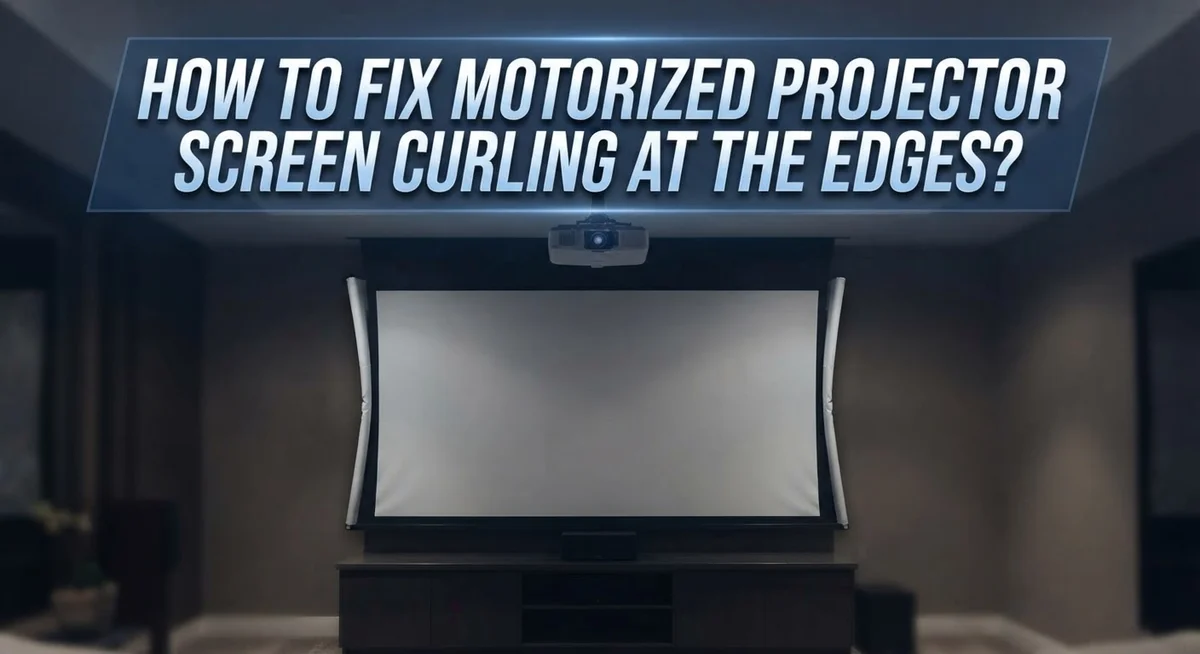
Do the edges of your projector screen curl up like an old photograph? You are not alone. This is a common issue with motorized projector screens, especially new ones.
Curling can ruin your movie nights. It creates a distorted picture and casts weird shadows. But do not worry, this problem is usually easy to solve.
In most cases, temperature is the main culprit. Non-tensioned screens react to cold air. They tend to curl when the room gets below 65°F.
The good news? You do not need to buy a new screen. Simple fixes can flatten your screen fast.
In a Nutshell
- Check the room temperature first. Screens curl when the room gets colder than 65°F. Keep the space between 65°F and 85°F for a flat screen.
- Add some weight to the bottom bar. Small barbell weights add extra tension. This pulls the material down and stops the curl.
- Use gentle heat to relax the material. A blow dryer on low heat softens the PVC. Always apply heat to the back of the screen, never the front.
- Try the needle trick for a cheap fix. Threading a black needle through the edges holds the material flat. This is the most budget friendly option.
- Avoid high heat at all costs. Too much heat can warp or damage the screen. Low heat is always the safer choice.
- Consider a tensioned screen for the future. These models resist curling much better than non-tensioned ones. They stay flat no matter the season.
Why Motorized Projector Screens Curl At The Edges
Motorized projector screens curl at the edges for one main reason: temperature changes. When your room drops below 65°F, the material contracts and loses its flat shape. Non-tensioned screens are especially vulnerable to this problem.
The PVC material used in most screens has memory. It wants to return to its original rolled state from the factory. Cold air speeds up this curling process significantly. Once temperatures drop, the material becomes stiff and refuses to stay flat.
Humidity also plays a role. Dry air can make the edges brittle and more prone to curling. Moisture in the air helps keep the material flexible. This is why your screen might curl more in winter months when heating systems run constantly.
Bottom bar tension matters greatly. If your screen’s bottom bar does not have enough tension, the weight of the material pulls the edges upward. Gravity works against you here. The fabric naturally wants to curve back into a roll shape.
Non-tensioned screens curl more easily than tensioned models. Tensioned screens have special mechanisms that keep the material stretched tight. This constant tension prevents the edges from lifting. The extra support holds the material flat even when temperatures fluctuate.
Location makes a difference too. Screens placed near windows, doors, or air vents experience more temperature swings. These areas get colder faster than the rest of your room. A screen mounted in a stable, climate-controlled space curls far less often.
The first two weeks after installation show the worst curling. This is normal. The material is adjusting to its new environment. Most screens settle down once they acclimate to your room’s conditions.
Tensioned vs Non-Tensioned Screens: Understanding the Difference
Tensioned and non-tensioned screens work very differently. Understanding this difference helps you pick the right screen and know what to expect.
Non-tensioned screens have a simple design. The material rolls up and down on motorized bars. Nothing pulls the fabric tight on the sides. This means the edges have room to move and curl, especially when temperature drops. These screens cost less upfront. They work fine in stable room temperatures between 65 and 85 degrees Fahrenheit.
Tensioned screens use side rails that pull the material tight. Springs or cables keep constant pressure on the edges. This tension holds the fabric flat even when temperatures change. The material cannot curl because the sides are locked in place. These screens cost more but solve the curling problem naturally.
The key difference is side pressure. Non-tensioned screens rely only on the bottom bar weight. Tensioned screens use the entire frame to hold flatness. Think of it like stretching a canvas. Loose canvas wrinkles. Tight canvas stays smooth.
Temperature affects both types differently. Non-tensioned screens become wavy below 65 degrees Fahrenheit. Tensioned screens resist this because the side tension fights the material’s natural contraction. Even in cold rooms, tensioned screens stay mostly flat.
Humidity matters too. Both types absorb moisture from the air. Tensioned screens handle this better because the frame keeps everything in place. Non-tensioned screens expand and contract more freely, which causes curling.
If your room temperature varies a lot, a tensioned screen prevents problems before they start. If your room stays warm and stable, a non-tensioned screen works fine. Both types need proper bottom bar tension to perform their best.
Step-by-Step: Fixing Curled Screen Edges With Weights
Adding weights to your screen’s bottom bar is one of the most effective ways to flatten curled edges. This method works because extra weight increases tension on the material, pulling it down and keeping it smooth.
Start by checking what your bottom bar can support. Most motorized screens have weight limits listed in the manual. Never exceed this limit, as it can damage the motor or mounting hardware.
You will need small barbell weights or similar objects. 3 pound weights work well for most screens. Place them evenly on both ends of the bottom bar. This balanced distribution prevents uneven tension that could twist the screen.
Before adding weights, inspect the bar itself. Make sure it moves freely and sits level. If the bar is bent or misaligned, weights alone will not fix the problem. Adjust the bar position first using the motorized controls.
Add weights gradually. Start with one weight on each end, then observe the screen for 24 hours. If curling persists, add another weight to each side. This slow approach lets you find the right tension without overdoing it.
Check the edges daily as you add weight. You should see improvement within a few days. The material needs time to relax and settle into its new position.
Keep the room temperature between 65 and 85 degrees Fahrenheit while using this method. Temperature changes can undo your progress. Consistent warmth helps the PVC material stay flexible and flat.
If curling returns after a few weeks, the material may have shifted. Simply reposition or add more weight as needed. This method requires occasional adjustments but remains one of the cheapest fixes available.
Using Heat To Relax and Flatten Curled PVC Material
Heat works well for relaxing curled PVC material. The goal is to soften the plastic so it returns to a flat shape. Start with a low heat source like a blow dryer set to medium or low temperature.
Hold the blow dryer 6 to 8 inches away from the back of the screen. Move it slowly across the curled edges in a sweeping motion. Spend about 30 seconds on each problem area. The heat gradually relaxes the material’s tension.
Never use high heat settings. Extreme temperatures can permanently warp or damage the PVC. You want gentle warmth, not intense heat. A heat gun on its lowest setting also works, but requires more care and distance from the screen.
Apply heat in short sessions. Let the material cool for a few minutes between applications. This cooling period helps the PVC settle into its new flat position. Repeat this process once or twice daily if needed.
The best results come when you combine heat with other methods. Use heat first to relax the material, then add weights to the bottom bar while it cools. This combination keeps the edges flat as the PVC hardens again.
Timing matters too. Apply heat during warmer parts of the day when your room temperature is already between 65 and 85 degrees Fahrenheit. Heating a cold screen works better than heating one in a cold room.
Watch for signs of damage like discoloration or brittleness. These indicate the heat was too strong. If you see these signs, stop immediately and let the material rest for several hours before trying again.
The Needle Threading Method Explained
The needle threading method is a low cost way to flatten curled screen edges. This technique works by adding gentle pressure along the screen’s perimeter without requiring special equipment or heat.
Here’s how the method works. You thread a black needle through the fabric at the curved edge of your screen. The needle should go through the material itself, not just along the surface. Start at one corner and work your way across the bottom edge where curling happens most often.
Make your stitches small and close together. Space them about half an inch apart. This creates distributed tension that pulls the curl flat gradually. The black needle blends into most screen materials, so it won’t show during projection.
Work slowly and carefully to avoid puncturing the screen material too deeply. You want just enough penetration to hold tension without damaging the PVC. If you push too hard, you risk creating holes that could affect image quality.
This method works best on non tensioned screens with mild curling. For severe curling, combine needle threading with the weight method or gentle heat application.
The advantage is simplicity. You need only a needle and thread from your home. No special tools or expensive equipment required. Results typically appear within 24 to 48 hours as the material adjusts to the new tension.
Check your work daily and adjust as needed. If curling returns after a few weeks, rethread the edges. This method is temporary but effective for maintaining a flat screen surface between deeper maintenance sessions.
Preventing Curling Through Proper Room Temperature and Tension
Room temperature plays a critical role in preventing your motorized screen from curling. Screens perform best between 65 and 85 degrees Fahrenheit. Below 65 degrees, the PVC material becomes stiff and prone to curling at the edges.
Keep your room temperature consistent throughout the day and night. Sudden temperature drops are especially problematic for non tensioned screens. If your room gets cold during winter months, use a space heater to maintain steady warmth. Avoid placing your screen near air conditioning vents or windows where temperature swings occur.
Humidity also affects screen behavior, though temperature is the primary factor. Dry air combined with cold temperatures accelerates curling. If you live in a dry climate, consider using a humidifier to maintain balanced moisture levels in your room.
Proper tension on the bottom bar prevents most curling issues before they start. The bottom bar holds the screen material flat against gravity. Check that your bottom bar tension is correct according to your screen’s manual. Loose tension allows the material to sag and curl naturally.
Combine temperature control with correct tension for best results. If your room temperature cannot stay above 65 degrees consistently, consider upgrading to a tensioned screen model. Tensioned screens have side rails that keep material pulled tight, making them resistant to curling even in cooler environments.
Monitor your screen daily during seasonal temperature changes. Early detection helps you address curling before it becomes severe. Make small adjustments to tension or temperature as needed. This preventive approach saves you time and effort compared to fixing curling after it develops.
Common Mistakes That Make Screen Curling Worse
When your motorized projector screen starts curling, certain actions can make the problem significantly worse. Understanding these mistakes helps you avoid them.
Exposing non tensioned screens to cold environments is the biggest error. Non tensioned screens have no internal support system. They curl naturally when temperatures drop below 65 degrees Fahrenheit. Many people store or use screens in unheated basements, garages, or outdoor spaces. This temperature shock causes rapid curling that becomes harder to fix later.
Adding too much weight too quickly creates another common problem. When you add heavy objects to the bottom bar, the screen material can stretch unevenly. This uneven stretching causes permanent waves and ripples. The material loses its ability to flatten properly. Always add weight gradually and check the edges daily as you make changes.
Using high heat settings on the screen material causes serious damage. Many people think more heat means faster results. High temperatures can permanently warp the PVC material, causing discoloration and brittleness. The screen becomes fragile and may tear easily afterward. Short heat sessions at low temperatures work much better.
Ignoring humidity changes alongside temperature shifts makes curling worse. Moisture affects how PVC material behaves. A dry room combined with cold temperatures accelerates curling problems.
Neglecting to check your bottom bar tension regularly allows curling to develop unchecked. Loose bars cannot hold the screen flat. By the time you notice the curling, the material has already set into curved positions.
Finally, mixing multiple fix methods without waiting between applications confuses the material. Your screen needs time to respond to each adjustment. Patience produces better results than rushing through multiple fixes at once.
Troubleshooting Persistent or Severe Curling Issues
When curling becomes persistent or severe, your screen needs more aggressive intervention than basic fixes. The material has likely developed memory from prolonged cold exposure or insufficient tension. Start by checking your room temperature immediately. If it’s below 65°F, bring it up gradually to 70°F. Sudden temperature jumps can shock the material and worsen curling.
For severe cases, apply gentle heat to the back of the screen fabric. Use a low setting on a heat gun or blow dryer. Keep the tool 12 inches away and move it slowly across the curved areas. This relaxes the PVC material without causing damage. Never use high heat, as it can permanently warp or discolor the screen.
Add weight to your bottom bar if you haven’t already. Proper tension is critical for persistent curling. The bar should feel snug but not overly tight. Weights distributed evenly on both ends work better than weight on one side only.
If curling returns after these steps, your screen may have developed permanent deformation. This happens when non-tensioned screens stay in cold environments for weeks. At this point, the needle threading method combined with heat application offers your best chance for improvement.
Monitor humidity levels too. Dry air below 30% humidity can intensify curling alongside cold temperatures. Use a humidifier if needed to maintain 40 to 60% humidity in your room.
If the screen remains severely curled after two weeks of consistent temperature control and tension adjustment, the material may need replacement. Document the curling pattern with photos. This information helps when discussing options with your screen manufacturer or installer.
Final Thoughts
Fixing a curled projector screen does not need to feel like a big challenge. Most curling problems come from temperature swings or weak tension on the bottom bar.
Simple fixes work best. Try the needle threading method first since it costs almost nothing. Adding small weights or using gentle heat also helps flatten stubborn edges.
Patience matters during this process. Give each fix method time to work before trying another approach. Rushing between methods often confuses the material and delays results.
Remember that non tensioned screens curl more easily than tensioned ones. If you keep buying non tensioned screens, expect some curling during the first few weeks. This is normal and usually fixes itself with proper care.
Room temperature remains your best defense against future curling. Keep your space between 65 and 85 degrees Fahrenheit whenever possible. This simple habit prevents most curling issues before they start.
Check your bottom bar tension every few weeks. Loose tension lets curling develop even in stable temperatures. A quick inspection saves you from bigger problems later.
If your screen still curls badly after two weeks of consistent care, the material may have permanent damage. At that point, professional repair or replacement becomes your only real option.
Most screens respond well to the fixes covered here. Combine steady temperature control with proper tension and you will see real improvement. Small weights, gentle heat, and simple threading methods solve the vast majority of curling problems.
Stay consistent with your maintenance routine. Your screen will reward you with a flat, clear viewing surface for movie nights and presentations alike. Fixing curling takes patience but rarely requires expensive solutions.
Frequently Asked Questions
Is curling normal for new motorized projector screens?
Yes, curling is completely normal during the first two weeks of ownership, especially with non-tensioned screens. The material needs time to settle and adjust to your room’s environment. Temperature fluctuations cause this behavior more than anything else. Most screens flatten out naturally as they acclimate to stable conditions.
Why does my screen curl more in winter?
Cold temperatures below 65°F cause the PVC material to contract and curl at the edges. Non-tensioned screens are especially vulnerable during winter months. Your room’s heating system creates temperature swings that make curling worse. Keeping your space consistently between 65 and 85°F prevents most curling problems from developing.
What’s the cheapest way to fix edge curling?
Threading a black needle through the screen edges works as an affordable solution. This method adds gentle tension without requiring tools or weights. It takes patience but costs almost nothing. Many people find this approach effective for mild curling cases.
Which type of screen curls less?
Tensioned screens resist curling much better than non-tensioned models. The built-in tension system keeps edges flat even during temperature changes. If you’re buying a new screen, tensioned options offer better performance long-term. However, non-tensioned screens still work fine with proper maintenance.
How long should I wait before trying multiple fixes?
Wait at least 3 to 5 days between applying different methods. Your screen material needs time to respond to each adjustment. Mixing fixes too quickly confuses the fabric and prevents proper settling. Patience gives you better results than rushing through multiple solutions at once.

Hello, i’m Ivoria i am the face behind Tech Tracker Blog. I am passionate about my work and love to explore gadgets and share about my experience.