
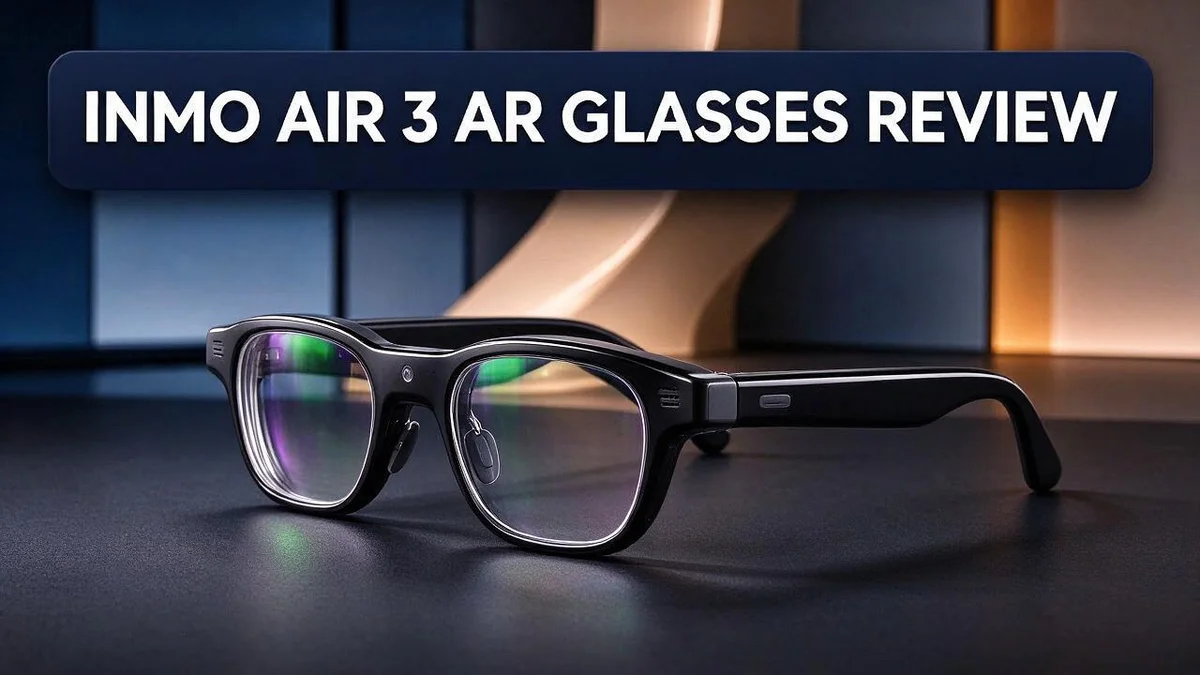
INMO Air 3 AR Glasses Review: Is It Still Worth It in 2026?
Smart glasses are getting lighter and easier to wear. The INMO Air 3 AR glasses bring a clear, full-color view right in front of your eyes.
Here is why it stands out. It has a 1080P full-color display for both eyes. The lens design looks like regular sunglasses, so you can wear them for hours.
The best part is that you do not need a phone or cables. The glasses run on their own onboard compute and use Android. You can even stream Netflix and use Google Play apps.
Many people also care how others see them. The display is nearly invisible from the outside, so it avoids awkward moments. You can check notifications, take calls, and use AI features without pulling out your phone.
Ready to see if this fits your daily life? Keep reading for a full breakdown of the design, the display, and how it compares to rivals like the Meta Ray-Ban Display and Xreal Air 2 Pro.
In a Nutshell
-
Standalone freedom: The INMO Air 3 runs on its own onboard computer. You can stream Netflix or download apps from Google Play right away. This means you can start watching or working without setup hassles.
-
Kickstarter roots: The glasses first launched on Kickstarter. Early backers helped build interest in this new style of AR wear. Their support shows that many people want smart glasses that feel practical.
-
A direct comparison: INMO matches the Air 3 against Meta’s display glasses. This gives shoppers a clear side by side choice. You can compare features like comfort, screen quality, and everyday use before you decide.
-
Options for different eyes: The Viture Pro XR suits people who need myopia adjustment. The Xreal Air 2 Pro fits users with perfect vision. Your eyesight plays a big role in which model feels right.
-
A narrower view: One user found the 36 degree field of view a bit limiting. Bulkier options like Microsoft HoloLens and Magic Leap are not direct rivals. They serve a different purpose entirely.
-
Smart tools in your line of sight: AI tools, alerts, and calls all live right in the frames. You can check updates quickly without breaking your flow. It feels like having a helpful assistant nearby.
Display Quality and Field of View

Last update on 2026-11-02 / Affiliate links / Images from Amazon Product Advertising API Some of the links on this website are affiliate links, which means that at no additional cost to you, I earn a commission if you click through and make a purchase. I only recommend products and services that I believe will add value to my readers. Thank you for your support!
The display matters more than most specs on paper. The screen shows full color images to both eyes at 1080P. Since both eyes see the picture, it feels more natural to look at.
Field of view describes how much of the screen fills your sight. Users report that the INMO Air 3 sits at 36 degrees. That number sets the size of the virtual screen you see.
Think of it like looking through a window. A wide window shows more of the room. A narrow window shows less, so you may move your head more often.
Watching Netflix shows this difference most clearly. Standalone Android support lets you stream shows without a phone. With a smaller view, the picture may feel smaller than you expect.
Text and alerts work in a different way. Notifications and AI prompts sit in your line of sight, so small text must stay easy to read. Short messages and simple menus usually fit well inside the view.
Clarity also depends on your eyesight. Some people may need extra lens support, so check the fit before you decide. Xreal Air 2 Pro is another option for users with perfect vision.
The display almost disappears when others look at you. Its nearly invisible design keeps the glasses looking like sunglasses. You get a private screen without drawing attention in a café or office.
Comfort plays a role too. Light frames reduce strain on your nose and ears during long sessions. A clear image paired with a steady view helps you stay focused for longer.
Your own test matters most. Try the glasses in a store if you can, or read reviews from people with similar eyes. Look for sharp text and a view that feels comfortable after several minutes.
Design and All-Day Wearability
Wearing smart glasses for hours asks a lot from your face. The INMO Air 3 needs to feel easy from morning to night.
Balance matters as much as weight. A light frame can still feel heavy if the weight sits in the wrong spot. Pay attention to how the front and arms feel after a few minutes.
Fit is the next step. Try the glasses on and move your head from side to side. If they slide or pinch, they will not feel good after a long session.
If you already wear prescription glasses, check the fit first. Some frames need extra room to sit comfortably over your own lenses. Test a pair in person if you can.
Think about your daily routine. Glasses you can slip on and off quickly suit people who move between meetings, errands, and home. Short breaks help too. Take the glasses off every hour or so to rest your eyes and face.
Heat and pressure build up over time. Long sessions can make the skin feel warm where the frame touches. Notice any spots that feel tight, then adjust the fit or take a short break.
Hairstyle and headwear also play a role. Hats, headbands, or ponytails can change how the arms rest. Test the glasses with the items you wear most often.
Keep the lenses clean so the picture stays sharp during long days. Store the glasses in a case when you are not using them. This protects the frame from bumps and scratches.
Your neck and shoulders can feel the difference after a full day. Good balance keeps the load off your head, so you can focus on your work or entertainment instead of how the glasses feel.
Your daily habits decide the final verdict. A pair that feels great during a quick demo may feel different during a full workday. Plan a longer test if you can.
Standalone Performance and Android Software
The INMO Air 3 works without a phone or cables. Its Android software gives it a familiar feel. Many people already know how Android works, so getting started feels easy.
Google Play brings a wide range of apps. You can download tools for work, learning, and fun. This makes the glasses useful beyond a single task.
Familiar menus make setup simpler. Anyone who has used an Android phone will recognize the layout. You can explore the options without reading a long manual.
Software shapes daily comfort too. A clear menu saves time when you want a quick answer. Less searching means less frustration during long sessions.
The glasses can handle tasks without your phone nearby. Leaving your phone in a pocket feels natural. Your hands stay free for other work.
Simple controls matter when your hands are busy. Carrying bags, tools, or a coffee cup makes complex steps annoying. Easy navigation keeps the experience pleasant.
Wireless use keeps your setup clean. With no cables to manage, there is less to tangle or trip over. This makes the glasses easier to carry from room to room.
Check your favorite apps before you commit. Not every app may work the same way on smart glasses. Look for app lists or reviews from people who use similar tools.
Updates help the software stay useful. Android systems can receive improvements over time. Staying current helps the glasses keep pace with new features.
Think about your daily routine. Start with short tasks to learn the menus. Build up to longer sessions once the layout feels natural.
Compatibility is a key question. Ask whether the apps you use every day run on Android. A quick check now saves frustration later and helps you decide with confidence.
Strong software makes the hardware more useful. The display and onboard processing only matter if the apps run smoothly. Think about how you plan to use the glasses each day, and let that guide your expectations.
Top 3 Alternatives
XREAL Air 2

Last update on 2026-11-04 / Affiliate links / Images from Amazon Product Advertising API Some of the links on this website are affiliate links, which means that at no additional cost to you, I earn a commission if you click through and make a purchase. I only recommend products and services that I believe will add value to my readers. Thank you for your support!
Want a light and easy way to watch videos? The XREAL Air 2 gives you a large virtual screen wherever you sit. Its slim frame feels comfortable during long movie nights.
It connects to many phones, laptops, and gaming devices. Setup takes only a few minutes. You can then enjoy private viewing without disturbing anyone nearby.
Best for: Watching videos and casual gaming on the go.
RayNeo Air 3s
Last update on 2026-11-02 / Affiliate links / Images from Amazon Product Advertising API Some of the links on this website are affiliate links, which means that at no additional cost to you, I earn a commission if you click through and make a purchase. I only recommend products and services that I believe will add value to my readers. Thank you for your support!
The RayNeo Air 3s delivers a bright and clear picture. Many users notice smooth motion, which helps during fast action scenes. Colors look vivid, so shows and games feel more lively.
It also works well for daily tasks. You can open documents, browse websites, or watch presentations on a large screen. Its simple design keeps the experience fun and easy to use.
Best for: Users who want smooth visuals and everyday flexibility.
Viture Luma

Last update on 2026-11-04 / Affiliate links / Images from Amazon Product Advertising API Some of the links on this website are affiliate links, which means that at no additional cost to you, I earn a commission if you click through and make a purchase. I only recommend products and services that I believe will add value to my readers. Thank you for your support!
The Viture Luma focuses on comfort and clear viewing. Its wide display creates a home theater feel. Many people enjoy it for streaming shows and playing games.
It also suits reading and online meetings. Many users feel less eye strain during longer sessions. You get a calm, private space wherever you relax.
Best for: Home viewing and relaxed entertainment sessions.
AI Features, Notifications and Calls
Smart glasses do more than show pictures. The INMO Air 3 also brings AI features, alerts, and calls right in front of your eyes.
Think of the AI features as a helper that sits on your face. You can ask questions and get quick answers without pulling out a phone. This saves time when your mind is busy with work or travel.
Notifications arrive in your line of sight. You can glance at a message, check who is calling, and decide what needs attention now. Nothing needs to leave your pocket for these moments.
Calls can feel simple too. Voice commands may help you answer without touching anything, so your hands stay free. That matters when you carry a bag, hold a tool, or walk through a busy street.
Keep one more point in mind. Alerts only help when you can read them quickly. Check whether short messages stay easy to scan during a busy moment.
Consider your daily habits first. If you often check directions, reminders, or messages during the day, these features can fit well. If you rarely use alerts, you may not need every option turned on.
Privacy deserves thought as well. Read the privacy options before you start using the glasses. Some people may feel uneasy when a device listens or speaks in public. Choose the settings that fit your comfort level, and turn off features you rarely use.
Good habits make a big difference. Set up only the alerts you truly need. Mute repeat pings, and let important contacts come through. A calm setup keeps your focus on the day ahead rather than constant interruptions.
The AI features, alerts, and calls give you quick help without a phone in hand. Used well, they can make busy days feel lighter. Start small, learn the controls, and add more as you feel ready, one step at a time.
Launch History and Availability
The INMO Air 3 began its journey on Kickstarter. Crowdfunding let the company test interest before a wide release. This launch path shows a lot about the brand’s approach.
Early backers often receive the first units and share their feedback. That feedback helps makers refine software, comfort, and display quality. You can read these comments to learn how the glasses perform in daily use.
Crowdfunding also gives a company resources to build units before full shipping starts. Early supporters often wait longer for delivery. Plan for a possible delay.
Where can you buy the INMO Air 3 today? The research does not list every sales channel. Visit the official INMO website first, since it shares the latest stock updates. Other retailers may carry the glasses too, so compare listings carefully.
Stock can change after a crowdfunding campaign ends. Check availability before you plan your purchase. Shipping times may vary by region, so confirm delivery details at checkout.
How does the launch compare with rivals? INMO compares the Air 3 directly with the Meta Ray-Ban Display. That side by side view helps you judge features.
Viture Pro XR suits people who need myopia adjustment. Xreal Air 2 Pro fits users with perfect vision. Each product targets a different need, so match the choice to your eyesight.
Microsoft HoloLens and Magic Leap sit in another group. These bulkier headsets are not direct rivals for everyday wear. Their size makes them better suited to specialized tasks.
Newer models often bring small upgrades over earlier versions. Look at release notes to see what changed. Compare the display, weight, and software support side by side before you decide. Each area affects daily use.
Quick tip for buyers: Read the return policy and warranty terms before you order. Save your order confirmation in a safe place. Good records make support requests much easier.
Pros and Cons
Pros
- The 1080P full color display shows content to both eyes.
- The display is nearly invisible, so people around you may not notice it.
- The light frame looks like sunglasses on your face.
- The design suits people who want smart glasses that blend in.
- You can stay hands free while you check information.
Cons
- The 36 degree field of view feels narrow to some users.
- One reviewer called the viewing area limited.
- Reviews list few other drawbacks, so test the fit for your needs.
- Vision needs differ, so confirm the display suits your eyes.
Who Should Buy It
Some people will get more from the INMO Air 3 than others. Frequent travelers are a strong fit. A train seat or airport gate can feel slow, and these glasses let you watch a show or check a file without holding a tablet.
Students and commuters can also benefit. Many people read notes or follow a map while walking. The glasses keep both hands free for bags, notebooks, or a railing.
Busy parents may like quick checks of schedules and messages while they handle the day.
Remote workers can use them too. A quick glance at messages can save time between calls. Your hands stay free for coffee or notes.
Android fans have an easy path. The system supports Google Play, so familiar apps are ready to use. People who already live in the Android world will feel at home quickly.
Early adopters also enjoy new tools. If you love testing fresh gadgets, the Air 3 gives you a chance to explore what smart glasses can do.
Movie lovers and gamers who want a huge screen may feel let down. In that case, compare other glasses before you commit.
Wearers of strong prescriptions should check the fit. Confirm how the display works with your glasses or lenses.
People who want a full headset for long work sessions may prefer a bulkier device. Microsoft HoloLens and Magic Leap fit that need, though they are not everyday wear.
Think about your daily routine first. Ask where you will wear the glasses most. If the answer is on trains, at desks, or on walks, this model could suit you well. Heavy video fans may want more screen space, while light users may feel satisfied. Try them on before wearing them for hours, because comfort matters most. Make your choice based on your habits, not hype. Take your time and read real feedback from other owners.
Final Verdict
The INMO Air 3 earns a solid place in the smart glasses market. It offers a clear display, a light frame, and simple wireless use.
Overall, these glasses suit people who want quick information without a heavy headset. Think of them as a helpful sidekick rather than a full screen replacement.
Comfort stands out as the biggest win for daily use. Long sessions feel easy, so you can keep them on through a full day.
The narrow view is the main trade off. If you want a wide cinema style image, look at other options first.
Who should say yes? People who want glanceable alerts, calls, and AI help will likely feel pleased with this pair.
Who should pause? Shoppers who need a large screen or own a strong prescription should test the fit before committing.
Other devices serve different goals. The Viture Pro XR may suit people who need myopia adjustment, while the Xreal Air 2 Pro fits users with perfect vision.
Microsoft HoloLens and Magic Leap are bulkier headsets. They serve different jobs, so they are not direct rivals for daily wear.
Try before you commit. Check how the display sits in your line of sight. Clarity matters more than any spec sheet.
The INMO Air 3 suits everyday users who value simple tools. Its standalone setup means you can leave your phone in your pocket for quick tasks.
Think about your daily routine. Map out where you need quick answers. Walks, errands, and short desk breaks are good test cases.
Reading return policies also helps. A clear refund window lets you try the glasses at home without pressure.
Final thought: The INMO Air 3 rewards people who want simple, glanceable help. Expect a clear display with a narrower view.
If that trade fits your life, these glasses could become a daily companion you reach for often.
Frequently Asked Questions
Do the INMO Air 3 glasses need a phone?
No, they do not. The glasses run on their own onboard compute. You can set them up and use them without any cables.
Can I watch Netflix on the INMO Air 3?
Yes, you can. The system runs Android and supports Netflix. The view is small, so short clips work better than long films.
How does the INMO Air 3 compare to Meta Ray-Ban Display?
INMO compares its glasses directly with the Meta Ray-Ban Display. Think about your daily routine first. Check how each pair sits on your face and which features matter most to you.
Which other AR glasses should I consider?
Some shoppers look at the Viture Pro XR, which suits people who need myopia adjustment. The Xreal Air 2 Pro suits people with perfect vision. Compare each option against your eye needs before you choose.
Where did the INMO Air 3 first launch?
The INMO Air 3 launched on Kickstarter. That early release gave backers a first look at the design. Check the current availability to see where you can buy it today.

Hello, i’m Ivoria i am the face behind Tech Tracker Blog. I am passionate about my work and love to explore gadgets and share about my experience.