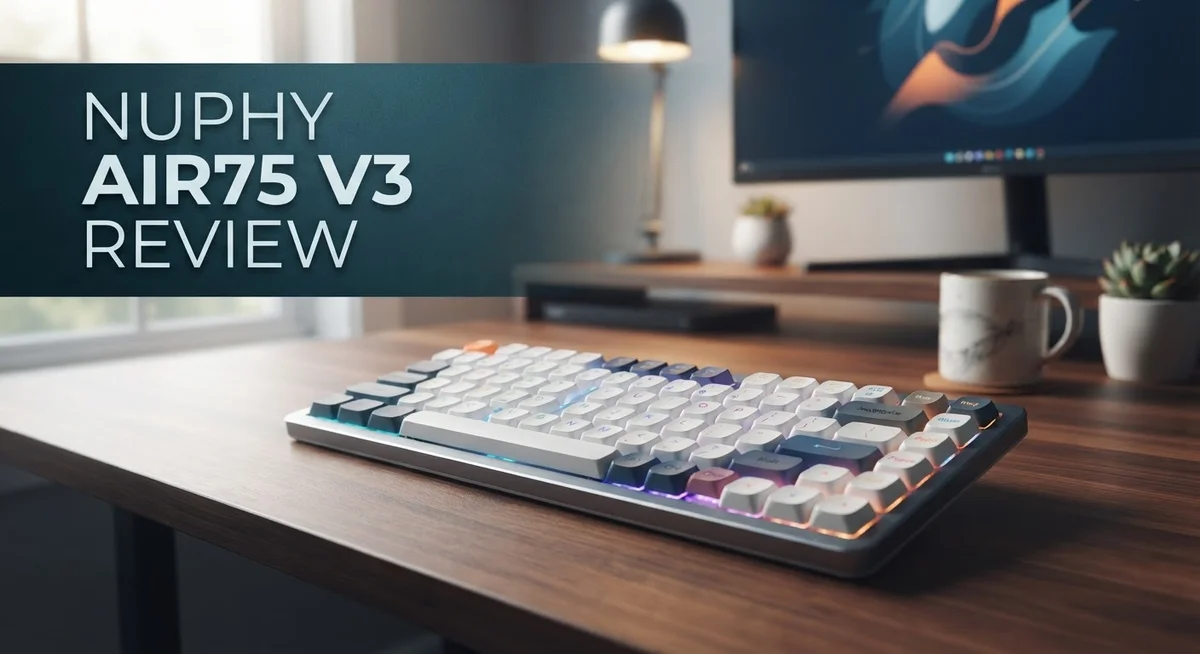
NuPhy Air75 V3 Review: 65% Wireless Mechanical Keyboard
Looking for a keyboard that feels good and works hard? The NuPhy Air75 V3 might be your answer. This keyboard blends a sleek design with smart features.
It uses a 65% layout with 68 keys. That means you get all the essentials without extra bulk. The low profile switches feel smooth under your fingers.
Battery life is where this keyboard truly shines. NuPhy claims around 1200 hours on a single charge. That is a huge number for anyone who hates constant charging.
In a Nutshell
- Smooth typing feel thanks to low profile 3.0 switches. They feel quiet and consistent with every press.
- Hot swappable sockets let you swap switches easily. This makes customizing your typing feel simple.
- The gasket mount design adds a soft, cushioned bounce to each keystroke. Typing feels less harsh on your fingers.
- Plate mounted stabilizers keep larger keys steady. You get less wobble and more accuracy.
- A handy volume control knob sits on board. Adjusting sound levels takes just a twist.
- One small catch: the opaque keycaps block RGB lighting from shining through. Fans of glowing keyboards might miss this effect.
- It works smoothly with both Mac and Windows systems. Switching between devices is effortless.
Design and Build Quality
The NuPhy Air75 V3 feels premium in your hands from the moment you pick it up. The aluminum frame delivers a solid, professional look that resists wear and tear. This isn’t a flimsy keyboard that will feel cheap after a few months of use.
The 65% layout keeps things compact without sacrificing functionality. You get all the keys you need in a smaller footprint. The 68 key design strikes a smart balance between portability and usability.
Build quality shines through the details. The gasket mount system works beautifully with the plate mounted stabilizers. This combination creates a typing experience that feels smooth and responsive. Each keystroke has a soft, cushioned bounce that makes long typing sessions more comfortable.
The low profile 3.0 switches are hot swappable. This means you can pull out switches and replace them whenever you want. No soldering required. Customization becomes simple and stress free. Want to try different switch types? Just swap them out in seconds.
The volume control knob adds a practical touch to the design. It sits naturally on the keyboard without looking out of place. Adjusting volume becomes quick and intuitive instead of fumbling with software controls.
One design choice worth noting: the keycaps are opaque. They don’t let RGB lighting shine through underneath. If backlighting visibility matters to you, this is something to consider. The trade off is that these keycaps feel durable and hold up well to daily use.
The overall construction prioritizes function over flash. Everything about the Air75 V3 suggests a keyboard built to last. The ABS plastic base provides stability without adding unnecessary weight. The aluminum frame protects the internal components while keeping the keyboard portable.
This keyboard works with both Mac and Windows systems seamlessly. The wireless connectivity options give you flexibility in how you set up your desk. Whether you prefer Bluetooth or the 2.4GHz connection, the Air75 V3 adapts to your needs.
The design philosophy here is clear: build something that works reliably every single day.
No products found.
Key Features and Specifications
The NuPhy Air75 V3 packs impressive specs into a compact form factor. This 65% keyboard features 68 keys that deliver full functionality without taking up your entire desk. You get a complete typing experience in a space-saving design.
Under the hood, the Air75 V3 uses low-profile 3.0 switches that are hot-swappable. This means you can replace switches whenever you want without soldering. The gasket mount system provides a soft, cushioned feel with each keystroke. Plate-mounted stabilizers keep your spacebar, shift, and enter keys rock solid during heavy typing sessions.
The build quality reflects premium materials throughout. An aluminum frame combines with an ABS plastic base to create a durable, lightweight keyboard. The overall weight and construction feel substantial without being heavy.
Connectivity options give you flexibility. You can pair this keyboard via Bluetooth or use the fast 2.4GHz wireless connection for gaming and demanding tasks. A USB-C cable provides a wired option when you need it. The battery lasts approximately 1200 hours, which means you’ll charge it infrequently. Both Mac and Windows systems recognize it instantly.
A built-in volume control knob sits on the keyboard for quick audio adjustments. This practical touch eliminates the need to reach for your device. The knob integrates seamlessly into the design without feeling like an afterthought.
One design consideration: the keycaps are opaque. This means RGB lighting won’t shine through the keys if you prefer illuminated switches. Some users love this clean aesthetic, while others prefer transparent keycaps for light effects.
The Air75 V3 balances form and function effectively. Every component serves a purpose. The 65% layout keeps things compact while maintaining everything you need for work and play. This keyboard rewards both casual typists and serious enthusiasts who value customization and reliability.
Typing Experience and Switch Performance
When you start typing on the Air75 V3, you immediately notice how smooth and quiet the keystrokes feel. The low profile 3.0 switches deliver a responsive typing experience without the loud clacking you get from standard mechanical keyboards. Each key press registers instantly, making this keyboard perfect for fast typists who need consistent feedback.
The gasket mount system plays a huge role in how this keyboard performs. Instead of rigid mounting, the gasket design lets the board flex slightly with each keystroke. This creates a soft, cushioned bounce that reduces fatigue during long typing sessions. Your fingers feel less impact stress compared to traditional rigid mounts.
The hot swappable switches mean you’re not locked into one switch type forever. If you want to experiment with different switches later, you can swap them out without soldering or special tools. This flexibility lets you fine tune your typing experience over time. The plate mounted stabilizers keep your spacebar, shift, and enter keys stable and consistent. Larger keys don’t wobble or feel mushy, which matters for typing accuracy.
Switch responsiveness is genuinely impressive on the 2.4GHz wireless connection. The latency is so low that you won’t notice any delay between pressing a key and seeing the character appear on screen. This matters if you game or do fast typing work. Bluetooth connectivity also works smoothly for Mac and Windows users, though the 2.4GHz option gives you the fastest response times.
The volume control knob adds practical functionality without taking up extra space. You can adjust audio levels without reaching for your computer, which feels natural during work sessions. The keycaps are durable and hold up well to daily use, even though they’re opaque and block RGB lighting underneath.
Overall, the Air75 V3 strikes an excellent balance between comfort and performance. The typing experience feels premium, responsive, and satisfying whether you’re writing documents, coding, or just browsing. Every aspect of the switch and mount design works together to create a keyboard that simply feels good to use.
Top 3 Alternatives
Keychron Q1 Pro

Last update on 2026-10-28 / Affiliate links / Images from Amazon Product Advertising API Some of the links on this website are affiliate links, which means that at no additional cost to you, I earn a commission if you click through and make a purchase. I only recommend products and services that I believe will add value to my readers. Thank you for your support!
EPOMAKER HE80 Hall Effect Gaming Keyboard

Last update on 2026-10-28 / Affiliate links / Images from Amazon Product Advertising API Some of the links on this website are affiliate links, which means that at no additional cost to you, I earn a commission if you click through and make a purchase. I only recommend products and services that I believe will add value to my readers. Thank you for your support!
Leopold FC750R

Last update on 2026-10-28 / Affiliate links / Images from Amazon Product Advertising API Some of the links on this website are affiliate links, which means that at no additional cost to you, I earn a commission if you click through and make a purchase. I only recommend products and services that I believe will add value to my readers. Thank you for your support!
Wireless Connectivity and Battery Life
The NuPhy Air75 V3 gives you three solid ways to connect. You get Bluetooth, 2.4GHz wireless, and USB-C options all built in. This means you can switch between your devices without unplugging anything.
The 2.4GHz connection feels snappy and responsive. Your keystrokes register instantly without lag. Many users prefer this option for gaming or fast typing sessions. The connection stays rock solid even across a crowded room.
Bluetooth adds flexibility for people who juggle multiple devices. You can pair the keyboard with your phone, tablet, or laptop easily. The connection pairs quickly and stays connected reliably. This works great if you move between different workspaces throughout your day.
USB-C wired mode keeps things simple when you want a direct connection. You get zero latency this way. Some people prefer this setup for maximum stability during important work.
Battery life stands out as genuinely exceptional on the Air75 V3. The keyboard delivers roughly 1200 hours of runtime. That breaks down to about 50 days of continuous use. Most people charge this keyboard maybe once every couple of months.
Real world usage shows even better results. Light typists report going three to four months between charges. Heavy users who type all day still get several weeks per charge. The battery indicator helps you track remaining power.
Charging happens through USB-C, which takes just a couple hours for a full top up. You can use the keyboard while it charges. This means you never face downtime waiting for power.
The combination of wireless flexibility and marathon battery life makes this keyboard incredibly practical. You get freedom from cables without worrying about constant recharging. The three connectivity options let you pick what works best for each situation. Whether you prefer Bluetooth’s convenience, 2.4GHz’s responsiveness, or USB-C’s directness, the Air75 V3 handles it all smoothly.
Customization and Ease of Use
Customizing the Air75 V3 is straightforward because NuPhy designed this keyboard with user control in mind. The hot-swappable switch design means you can swap out switches without soldering or special tools. Simply pull out a switch and insert a new one. This flexibility lets you experiment with different switch types until you find your perfect typing feel.
The keycap situation offers room for personalization too. You can replace the stock keycaps with aftermarket options from the mechanical keyboard community. Many users appreciate this because it opens up endless aesthetic possibilities. Just keep in mind the opaque keycaps won’t showcase RGB lighting if that matters to your setup.
Software customization depends on your needs. The keyboard works seamlessly with both Mac and Windows, so you’re not locked into one ecosystem. The built-in volume control knob requires no software at all—it just works immediately. For deeper customization like remapping keys, check if NuPhy offers companion software for the Air75 V3.
Getting started with the Air75 V3 is genuinely easy. Unbox it, charge the battery, and you’re ready to go. Pairing via Bluetooth takes seconds, and the 2.4GHz connection establishes instantly. The keyboard remembers your connection preferences, so switching between devices feels natural.
The gasket mount system needs no tweaking from you. NuPhy pre-configured it at the factory, so you get that premium typing feel right out of the box. If you want to customize the gasket mounting later, you can, but most users find the default setup excellent.
Maintenance stays simple with this keyboard. The hot-swappable design makes cleaning around switches easy. You can remove switches to access hard-to-reach spots. The aluminum frame wipes down quickly, and the durable keycaps resist wear from daily typing.
Overall, the Air75 V3 balances ease of use with customization potential. Beginners can enjoy it immediately without tweaking anything. Enthusiasts have plenty of options to personalize their experience. This flexibility makes it appealing to both groups.
Pros and Cons
Pros
- Smooth and quiet keystrokes deliver a satisfying typing feel with every press
- Exceptional battery life reaches around 1200 hours on a single charge
- Three connectivity options (2.4GHz, Bluetooth, USB-C) let you work how you want
- Hot swappable switches mean you can customize your setup without replacing the entire keyboard
- Built in volume control knob gives you quick audio adjustments right at your fingertips
Cons
- Opaque keycaps block RGB lighting from shining through, limiting visual customization
- Gasket mount and stabilizer setup leaves limited room for fine tuning if you want to adjust feel
- Limited software customization compared to some competitor keyboards on the market
Who Should Buy It
The NuPhy Air75 V3 works best for people who want a wireless keyboard that just works. You don’t need to be a keyboard enthusiast or tinkerer to enjoy this one.
Remote workers and students will find this keyboard especially useful. The exceptional battery life means you charge it once and forget about it for months. You can switch between your laptop, tablet, and phone using Bluetooth without any hassle. The 2.4GHz connection stays responsive even when you’re in video calls or working on tight deadlines.
If you spend long hours typing, the smooth and quiet keystrokes make a real difference. Your wrists stay comfortable thanks to the low profile design. The built in volume knob lets you adjust audio without reaching for your device. This matters when you’re juggling multiple tasks throughout the day.
Content creators and office workers benefit from the hot swappable switches. You can swap out switches to match your typing preference without buying a new keyboard. Some people prefer clicky switches for feedback. Others want silent switches for shared spaces. The Air75 V3 lets you experiment and find what feels right.
Mac and Windows users both get full compatibility. You won’t run into driver issues or connection problems. Setup takes minutes, not hours.
However, this keyboard isn’t ideal for RGB enthusiasts. The opaque keycaps block lighting effects, so visual customization is limited. If you want to fine tune every aspect of your keyboard’s feel and sound, other options offer more flexibility for modifications.
People who value simplicity over customization will love this keyboard. You get a solid typing experience without spending time on complex adjustments. The gasket mount and stabilizer setup arrives ready to use.
Professionals on the go appreciate the lightweight design and reliable wireless connection. The USB-C charging keeps you connected to standard cables you already own. Whether you’re at a coffee shop, office, or home, the Air75 V3 adapts to your setup without requiring special equipment or extensive configuration.
Final Verdict
The NuPhy Air75 V3 stands out as a smart choice for anyone who wants a keyboard that just works. It combines smooth typing with strong wireless performance. This makes it a solid pick for daily use.
Build quality feels solid right from the first keystroke. The aluminum frame gives it a sturdy feel without adding too much weight. You can carry it between home and office with ease.
When you compare it to other keyboards in this space, like the Iqunix Magi65 or Keychron O2, the Air75 V3 holds its own. Each option brings something different to the table. But NuPhy focuses on making wireless typing simple and dependable.
This keyboard shines when reliability matters most. You won’t worry about dead batteries mid task. You won’t fuss with complicated setup steps either.
The Air75 V3 does have some tradeoffs. RGB fans might feel limited by the opaque keycaps. Power users who love deep software tweaks may want more options too.
Still, these are minor points compared to what this keyboard delivers overall. Most people care about typing feel and reliability first. The Air75 V3 checks both boxes without any fuss.
Think about your daily typing habits before you decide. If you switch between devices often, the multiple connectivity options will serve you well. If you type for hours each day, the quiet keystrokes will keep you comfortable.
This keyboard fits well into many different lifestyles. Students juggling assignments, professionals managing emails, and creators drafting content will all find something to like here.
The NuPhy Air75 V3 earns its place among solid keyboard choices today. It handles the basics extremely well and adds thoughtful extras like the volume knob. For anyone who wants dependable performance without extra hassle, this keyboard delivers exactly that.
Frequently Asked Questions
Can I swap out the switches on the NuPhy Air75 V3?
Yes, you can. The keyboard uses hot-swappable switches, so you remove and replace them without soldering or opening the case. This lets you experiment with different switch types and find what feels best for your typing style.
How long does the battery last?
The Air75 V3 delivers approximately 1200 hours on a single charge. That means you can go months between charging sessions if you use it daily. This exceptional battery life keeps you working without constant cable hunts.
Does this keyboard work with Mac and Windows?
Absolutely. The NuPhy Air75 V3 is fully compatible with both Mac and Windows systems. You can switch between devices using Bluetooth or the 2.4GHz connection without any setup hassle. Just connect and start typing.
What connectivity options does it have?
The keyboard offers three ways to connect. You get Bluetooth for wireless freedom, a fast 2.4GHz connection for responsive gaming or work, and USB-C for wired use when you need it. Pick whichever method fits your situation best.
Will RGB lighting shine through the keycaps?
No, the opaque keycaps block RGB light from passing through. If you love customizable lighting effects, this keyboard won’t deliver that visual experience. However, the solid keycap design adds durability and a professional look to your setup.

Hello, i’m Ivoria i am the face behind Tech Tracker Blog. I am passionate about my work and love to explore gadgets and share about my experience.