Razer DeathAdder V3 Pro Wireless Gaming Mouse Review 2026
Are you searching for a lightweight wireless gaming mouse that delivers precision, comfort, and top tier performance? The Razer DeathAdder V3 Pro has been a favorite among gamers and esports professionals since its release.
But in 2026, does it still hold up against newer competitors? This review covers every detail you need to know. We tested the sensor, the battery life, the build quality, and the ergonomic design.
By the end of this post, you will know if the DeathAdder V3 Pro deserves a spot on your desk. Whether you play competitive FPS titles or casual RPGs, this mouse promises a lot. Let’s find out if it delivers.
Key Takeaways:
- Ultra lightweight at just 63g (black) or 64g (white), the DeathAdder V3 Pro is one of the lightest ergonomic wireless gaming mice you can buy today. This weight reduction gives you faster flick shots and less fatigue during long sessions.
- The mouse uses the Focus Pro 30K Optical Sensor, which supports up to 30,000 DPI and 750 IPS tracking speed. This sensor tracks flawlessly on almost every surface without spin outs or jitter.
- Razer Gen 3 Optical Switches provide a crisp click feel with zero double click issues. These switches use light based actuation, so they respond faster than traditional mechanical switches.
- Battery life reaches up to 90 hours on a single charge via HyperSpeed Wireless. You can game for weeks without reaching for the USB C charging cable.
- The ergonomic right handed shape fits medium to large hands perfectly. Razer worked with professional esports players to refine the curves and contours of this mouse.
- HyperSpeed Wireless technology offers a stable, low latency 2.4 GHz connection. It performs just as well as a wired connection in competitive games.


Last update on 2026-08-31 / Affiliate links / Images from Amazon Product Advertising API Some of the links on this website are affiliate links, which means that at no additional cost to you, I earn a commission if you click through and make a purchase. I only recommend products and services that I believe will add value to my readers. Thank you for your support!
Razer DeathAdder V3 Pro Wireless Gaming Mouse: Design and Build Quality
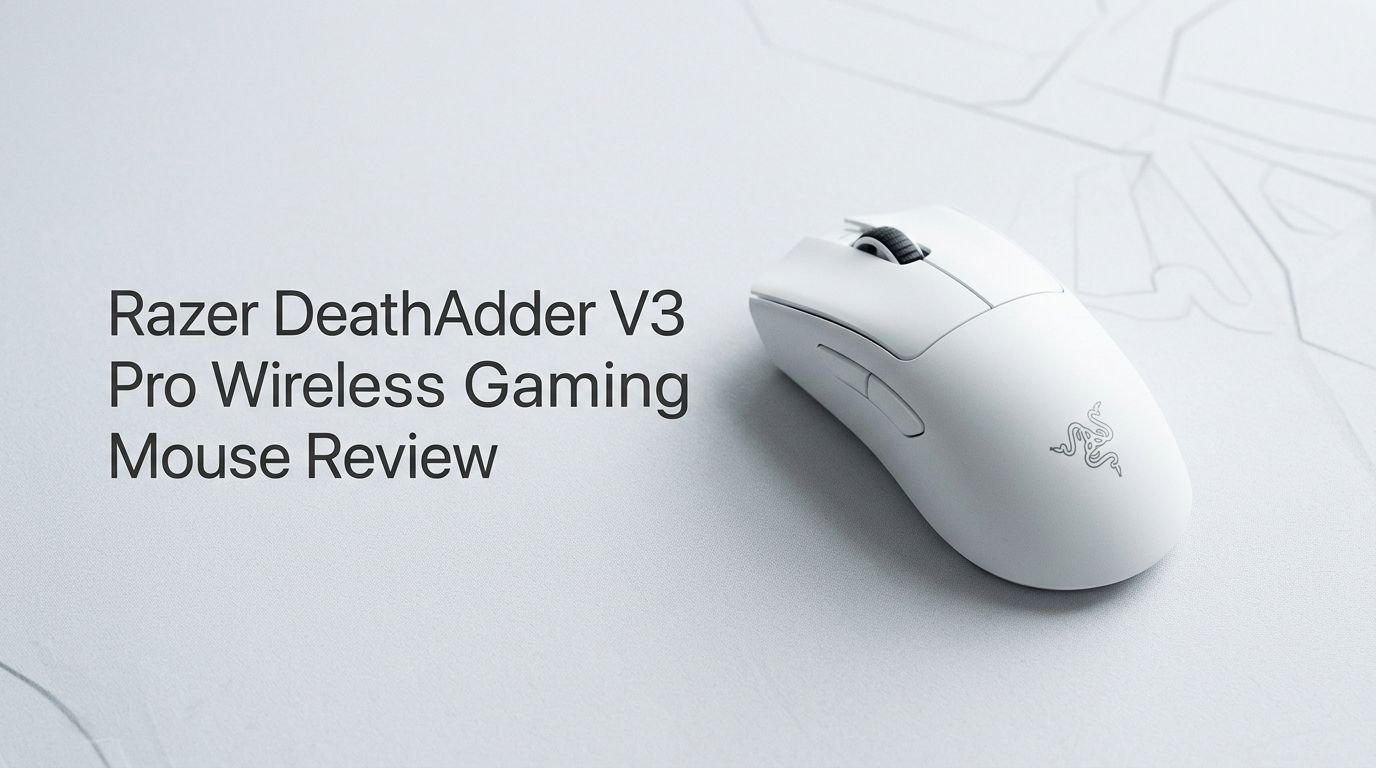
The Razer DeathAdder V3 Pro looks different from its predecessors. Razer removed the iconic rubber side grips and the aggressive curves. The result is a sleeker, more refined silhouette. The shell uses a smooth matte finish that feels premium under your fingers.
The mouse measures 128 x 68 x 44 mm and weighs only 63 grams in the black version. The white version comes in at 64 grams. Razer achieved this low weight by using a thinner shell material and a smaller battery. The build quality remains solid despite the reduced weight. There is no flex or creaking anywhere on the shell.
The bottom of the mouse features large PTFE skates that glide smoothly across any mousepad. These feet are pre applied and feel buttery right out of the box. A small power switch and the USB C charging port sit underneath the front edge.
Overall, the design feels mature and purpose driven. Razer clearly prioritized function over flashy aesthetics. There is no RGB lighting on this mouse. That decision saves weight and battery life. For competitive gamers, that is a smart trade off.
Focus Pro 30K Optical Sensor Performance
The Focus Pro 30K sensor sits at the heart of the DeathAdder V3 Pro. It supports DPI values from 100 all the way up to 30,000 in 50 DPI increments. Most competitive players use a DPI between 400 and 1600. The sensor handles every setting with perfect accuracy.
Tracking speed reaches 750 IPS with 70G acceleration. That means no matter how fast you swipe the mouse, the cursor follows your hand perfectly. There are no spin outs during aggressive flick shots or quick 180 degree turns.
Smart Tracking is another feature built into this sensor. It adjusts the lift off distance automatically based on the surface you use. You can also set the lift off distance manually in Razer Synapse software. Most users set this to the lowest option for maximum control.
The sensor also includes Asymmetric Cut Off, which lets you set different lift off and landing distances. This feature gives you more control over how the cursor behaves during fast repositioning. In real world testing, the sensor tracks cleanly on cloth pads, hard pads, and glass surfaces.
Razer Gen 3 Optical Switches: Click Feel and Durability
Razer equipped the DeathAdder V3 Pro with Gen 3 Optical Switches. These switches use an infrared light beam to register clicks. The moment the button breaks the light beam, the click registers. There is no metal contact involved.
This design eliminates debounce delay entirely. Traditional mechanical switches need a few milliseconds of debounce time to prevent accidental double clicks. Optical switches skip that step. The result is a faster, more responsive click.
The click feel is crisp and satisfying. It has a defined tactile bump with a short travel distance. The actuation force sits around 45 grams, which feels natural for rapid clicking during intense gunfights. The sound is moderate and clean without being too loud.
Durability is rated at 90 million clicks. That means these switches will last years of heavy use. Many users who have owned this mouse since 2022 report zero switch issues. This reliability makes the DeathAdder V3 Pro a long term investment for serious gamers.
Top 3 Alternatives for Razer DeathAdder V3 Pro
1. Logitech G Pro X Superlight 2

Last update on 2026-08-31 / Affiliate links / Images from Amazon Product Advertising API Some of the links on this website are affiliate links, which means that at no additional cost to you, I earn a commission if you click through and make a purchase. I only recommend products and services that I believe will add value to my readers. Thank you for your support!
2. Razer Viper V3 Pro

Last update on 2026-08-31 / Affiliate links / Images from Amazon Product Advertising API Some of the links on this website are affiliate links, which means that at no additional cost to you, I earn a commission if you click through and make a purchase. I only recommend products and services that I believe will add value to my readers. Thank you for your support!
3. Pulsar X2V2 Wireless Gaming Mouse

Last update on 2026-08-31 / Affiliate links / Images from Amazon Product Advertising API Some of the links on this website are affiliate links, which means that at no additional cost to you, I earn a commission if you click through and make a purchase. I only recommend products and services that I believe will add value to my readers. Thank you for your support!
HyperSpeed Wireless Technology: Latency and Connection
The DeathAdder V3 Pro uses Razer HyperSpeed Wireless for its 2.4 GHz connection. This technology provides sub 1 millisecond latency. In practice, you cannot feel any delay between your hand movement and the cursor response.
HyperSpeed uses adaptive frequency technology. It scans available wireless channels and picks the one with the least interference. This keeps the connection stable even in crowded environments like LAN events or apartments with many Wi Fi networks.
The mouse connects through a small USB A dongle. The dongle fits snugly into the included USB extender cable. Placing the dongle closer to the mouse on your desk reduces latency even further. Razer recommends keeping it within 20 cm of the mouse.
This wireless technology has been tested by multiple esports organizations. Professional players use it during live tournaments without issues. The connection feels identical to a wired mouse. There is no perceptible lag, stuttering, or signal drops during fast paced gameplay.
Battery Life: How Long Does It Really Last?
Razer claims up to 90 hours of battery life on the DeathAdder V3 Pro. Real world testing shows that number is accurate under typical use conditions. If you game for about 4 hours per day, you can expect roughly 3 weeks of use before needing a charge.
The mouse charges through a USB C port located at the front. A full charge takes about 2 to 3 hours. You can also use the mouse while it charges, so you never need to take a break from gaming.
Battery life depends on your polling rate. At the standard 1000 Hz polling rate, you get the full 90 hours. If you upgrade to the optional HyperPolling Wireless Dongle for 4000 Hz polling, battery life drops significantly. Most users stick with 1000 Hz for the best balance of performance and battery.
Razer Synapse software displays the remaining battery percentage in real time. You also get a low battery notification before the mouse dies. This gives you enough warning to plug in the cable and keep gaming without interruption.
Ergonomic Shape and Comfort for Long Sessions
The DeathAdder series is famous for its ergonomic right handed shape. The V3 Pro continues that tradition with a few refinements. The hump sits slightly more toward the rear of the mouse. This change better supports your palm during a relaxed grip.
The side curves are gentler compared to the DeathAdder V2. This makes the mouse compatible with more grip styles. Palm grip users will love the natural arch. Claw grip users will appreciate the lower profile at the front. Fingertip grip is possible but less ideal due to the size.
Razer worked with professional esports players to refine this shape. Players from teams like Team Liquid and Gen.G provided feedback during the design process. The goal was to create a shape that reduces hand strain during 8 to 12 hour practice sessions.
The smooth matte coating resists sweat buildup. Your fingers will not slip even during intense gaming moments. After extended sessions, the mouse still feels comfortable and secure in your hand. The DeathAdder V3 Pro is one of the most comfortable wireless gaming mice available today.
Razer Synapse Software: Customization Options
The DeathAdder V3 Pro works with Razer Synapse 3, Razer’s configuration software for Windows. This software lets you customize every aspect of the mouse. You can adjust DPI settings, assign button functions, set up macros, and configure the lift off distance.
Five onboard DPI stages can be stored directly in the mouse’s memory. You can switch between these stages using a button on the bottom of the mouse. Once saved, the settings travel with the mouse to any computer without needing Synapse installed.
The software also includes surface calibration. This feature optimizes the sensor’s tracking for your specific mousepad. It takes only a few seconds to complete and can improve cursor accuracy on certain surfaces.
Macro creation is straightforward in Synapse. You can record sequences of inputs and assign them to any button. You can also remap buttons to different functions or disable buttons entirely. The interface is clean and easy to understand, even for first time users.
Razer DeathAdder V3 Pro vs Razer Viper V3 Pro
Choosing between these two mice comes down to shape preference. The DeathAdder V3 Pro has an ergonomic right handed shape. The Viper V3 Pro uses a symmetrical ambidextrous design. Both mice perform at the highest level.
The Viper V3 Pro weighs 54 grams, about 9 grams lighter than the DeathAdder V3 Pro. It also features a newer 35K DPI sensor and native 8K Hz polling without an extra dongle. On paper, the Viper V3 Pro offers better specifications.
However, the DeathAdder V3 Pro excels in comfort. Its ergonomic shape supports your hand better during long sessions. Many palm grip users prefer the DeathAdder because it fills the hand naturally. The Viper suits claw and fingertip grip users better.
Price is another factor. The DeathAdder V3 Pro has dropped in price since its launch. The Viper V3 Pro costs more due to its newer features. If ergonomic comfort is your top priority and you want to save money, the DeathAdder V3 Pro is the smarter choice.
Who Should Buy the Razer DeathAdder V3 Pro?
This mouse is perfect for FPS gamers who want a lightweight, wireless, ergonomic option. If you play titles like Valorant, Counter Strike, Apex Legends, or Overwatch, the DeathAdder V3 Pro will serve you well. The sensor and wireless performance meet professional esports standards.
Palm grip users with medium to large hands will find this mouse most comfortable. If your hand length falls between 18 cm and 21 cm, the shape should fit perfectly. Smaller hands may find the mouse too wide or too tall.
Content creators and professionals who spend long hours at the computer will also benefit. The ergonomic shape reduces wrist and hand fatigue. The 90 hour battery life means fewer interruptions. The smooth glide makes precise cursor movements easy.
This mouse is not ideal for left handed users. The asymmetric shape favors right handed use only. It also lacks Bluetooth connectivity. You must use the 2.4 GHz dongle at all times. If you need Bluetooth for travel, consider other options.
Pros and Cons of the Razer DeathAdder V3 Pro
The DeathAdder V3 Pro has clear strengths. Its 63 gram weight is impressive for an ergonomic wireless mouse. The sensor tracks perfectly. The optical switches feel great and will last for years. The 90 hour battery life is exceptional. The wireless connection has zero perceptible lag.
The ergonomic design remains one of the best in the industry. Razer refined it to perfection with input from professional gamers. The PTFE skates glide smoothly. The matte finish resists fingerprints and sweat.
On the downside, there is no Bluetooth support. You rely entirely on the USB dongle for wireless connectivity. If you lose the dongle, the mouse becomes a wired only device. The lack of RGB lighting may disappoint users who want a flashy setup.
The price at launch was high at around $150. While it has dropped over time, some newer competitors offer similar performance at lower prices. The optional HyperPolling dongle also costs extra if you want higher polling rates. These additional costs add up.
Is the Razer DeathAdder V3 Pro Still Worth It in 2026?
Last update on 2026-08-31 / Affiliate links / Images from Amazon Product Advertising API Some of the links on this website are affiliate links, which means that at no additional cost to you, I earn a commission if you click through and make a purchase. I only recommend products and services that I believe will add value to my readers. Thank you for your support!
Yes, the DeathAdder V3 Pro remains a strong choice in 2026. Newer mice like the Razer DeathAdder V4 Pro and Viper V4 Pro offer incremental upgrades. But the V3 Pro still delivers top tier sensor performance, excellent battery life, and unmatched ergonomic comfort.
The price has become more attractive over time. You can often find it on sale below its original retail price. This makes it a great value for gamers who want professional grade performance without paying for the latest model.
If you already own the DeathAdder V3 Pro, upgrading is not necessary. The improvements in newer models are minor. The Focus Pro 30K sensor and Gen 3 optical switches still perform at the highest level. Your mouse will continue to serve you well.
For new buyers who prefer an ergonomic shape and want a proven, reliable wireless gaming mouse, the DeathAdder V3 Pro is an excellent purchase. It has stood the test of time. Thousands of positive reviews and professional endorsements back it up. This mouse delivers exactly what it promises.
How Does the DeathAdder V3 Pro Handle Different Game Genres?
In FPS games, the mouse shines brightest. The lightweight body allows quick flick shots. The sensor tracks every micro adjustment. The low latency wireless connection keeps your aim consistent. Pros use this mouse in tournaments for good reason.
MOBA and RTS games also work well with the DeathAdder V3 Pro. The five programmable buttons provide enough options for ability bindings. The ergonomic shape keeps your hand relaxed during long matches. The smooth glide helps with map scrolling and precise unit selection.
For MMO games, the mouse may feel limited. It only has five programmable buttons compared to dedicated MMO mice with 12 or more side buttons. If you play games that require many keybinds, a different mouse might serve you better.
Casual gaming and everyday use feel natural with this mouse. The comfortable shape and long battery life make it a great daily driver. Browsing the web, editing documents, and light creative work all feel smooth. The DeathAdder V3 Pro is versatile enough for work and play.
Final Verdict: Razer DeathAdder V3 Pro Wireless Gaming Mouse
The Razer DeathAdder V3 Pro earns its reputation as one of the best ergonomic wireless gaming mice ever made. It combines a 63 gram lightweight body with a flawless 30K sensor, responsive optical switches, and 90 hours of battery life. The ergonomic shape fits right handed users perfectly.
Razer’s HyperSpeed Wireless technology eliminates any concerns about wireless lag. The build quality is excellent. The PTFE skates provide a smooth, consistent glide. Razer Synapse offers deep customization without confusion.
The mouse does lack Bluetooth and RGB lighting. It only suits right handed users. The button count is low for MMO players. These are minor drawbacks for its target audience of competitive FPS gamers.
In 2026, the DeathAdder V3 Pro still competes with the best. Its price has dropped to a reasonable level. Its performance remains top tier. If you value comfort, precision, and reliability in a wireless gaming mouse, the Razer DeathAdder V3 Pro is a purchase you will not regret.
Frequently Asked Questions
Does the Razer DeathAdder V3 Pro support Bluetooth?
No, the DeathAdder V3 Pro does not have Bluetooth. It connects only through Razer’s HyperSpeed 2.4 GHz wireless dongle or a USB C wired connection. You need the included dongle for wireless use.
What is the polling rate of the Razer DeathAdder V3 Pro?
The standard polling rate is 1000 Hz. You can upgrade to 4000 Hz by purchasing the Razer HyperPolling Wireless Dongle separately. An 8000 Hz wired option is also available with the compatible dongle bundle.
Is the Razer DeathAdder V3 Pro good for small hands?
The mouse is best suited for medium to large hands. If your hand length is under 17 cm, you may find the mouse too large. Consider the Razer Viper V3 Pro or a smaller mouse for a better fit.
Can I use the Razer DeathAdder V3 Pro on Mac?
Yes, the mouse works on Mac as a basic plug and play device. However, Razer Synapse software is only available for Windows. You will not be able to customize DPI stages or button assignments on Mac without Synapse.
How long does the Razer DeathAdder V3 Pro battery last?
Battery life reaches up to 90 hours at the standard 1000 Hz polling rate. Real world usage typically matches this claim. A full charge takes about 2 to 3 hours through the USB C cable.
Is the Razer DeathAdder V3 Pro worth buying in 2026?
Yes, it remains a strong option in 2026. The sensor, switches, and wireless technology still perform at a professional level. The ergonomic design is among the best available. With its reduced price, it offers excellent value for competitive gamers.

Hello, i’m Ivoria i am the face behind Tech Tracker Blog. I am passionate about my work and love to explore gadgets and share about my experience.