How To Fix Electric Unicycle Gyroscope Mounting Bracket Loosening?
Do you feel a strange wobble under your feet when riding your electric unicycle? That shaky feeling often points to a loose gyroscope mounting bracket. This small part plays a big role in keeping your ride smooth and safe.
Many riders face this issue, especially with popular models. Bolts often ship hand tight from the factory. Over time, vibrations from daily riding loosen them even more.
This wobbling is not just annoying. It can affect your balance and control. In some cases, it even leads to sudden pedal dipping during turns.
In a Nutshell
- Grab an Allen key and check every bolt on the motor and suspension bracket. Most looseness starts here.
- Tighten bolts in a systematic pattern. Do not just twist one bolt tight and stop. Work around the bracket evenly.
- Inspect battery connections and phase wires too. Sometimes a wobble is not the bracket at all. It could be an electrical issue mimicking the same symptom.
- Avoid over tightening your bolts. This sounds helpful, but it actually causes damage. Snug and secure is the goal, not crushed.
- Never grip the wheel sides when you feel wobbly. This natural reaction actually makes instability worse. Stay relaxed instead.
- Check pedal screws regularly too. Loose screws at the bottom and end points often get ignored. They contribute to that shaky feeling just as much as bracket bolts do.
Understanding the Gyroscope Mounting Bracket and Its Role
Your electric unicycle relies on a gyroscope mounting bracket to keep everything balanced and stable. This bracket holds the motor and suspension system in place. When it loosens, your ride becomes shaky and unsafe.
The gyroscope mounting bracket serves one main job: it keeps the motor perfectly aligned with your wheel. Any movement in this bracket throws off your balance. You will feel wobbling under your feet when riding.
The bracket connects to your unicycle frame through several bolts. These fasteners can loosen over time from vibration and regular use. Some brackets arrive hand-tight from the factory, meaning they were never fully secured in the first place.
Understanding how this bracket works helps you fix problems faster. The motor spins inside the wheel rim. The bracket holds this motor at the correct angle. If bolts slip even slightly, the motor shifts position. This shift causes your gyroscope to malfunction.
Battery connections and phase wires attach near the bracket area too. When the bracket moves, these wires can bend or disconnect. A loose bracket might seem like a gyroscope problem when the real issue is a loose wire connection.
Regular inspection prevents most bracket problems. Check your bolts every few weeks if you ride often. Look for any visible gaps between the bracket and frame.
The bracket sits in a specific position for a reason. Moving it even a little disrupts your unicycle’s balance system. This is why tightening the bracket properly matters so much. A secure bracket means smooth, confident riding every time.
Signs and Symptoms of a Loosening Mounting Bracket
Your electric unicycle sends clear signals when the gyroscope mounting bracket starts to loosen. Learning to recognize these signs helps you catch the problem early before it gets worse.
Wobbling sensations are the most obvious symptom. You’ll feel an unsteady side to side motion under your feet, especially when riding slowly or standing still. This wobble intensifies when you try to balance in one spot. The feeling is distinctly different from normal riding instability.
Rattling or clicking sounds come next. Listen carefully while riding on smooth ground. You may hear metal parts knocking against each other. These noises often happen when you go over bumps or uneven surfaces. The sounds typically come from the motor area or suspension points.
Pedal dipping during turns signals bracket movement. Your pedal drops lower than normal when you lean into a corner. This happens because the bracket has shifted slightly out of alignment. The gyroscope cannot maintain its proper angle anymore.
Uneven wheel alignment becomes visible if you look closely. The wheel may sit at a slight angle to the frame. Compare how it looks to photos of a properly assembled unicycle. Even small tilts indicate bracket loosening.
Difficulty maintaining balance develops gradually. Riding feels more tiring and less responsive to your weight shifts. You need extra concentration to stay upright. Your usual riding techniques suddenly feel ineffective.
Visible gaps between components appear around the motor and suspension areas. Look for space where parts should sit flush together. Bolts may look slightly raised or rotated out of position.
Catching these signs early makes repairs much simpler. Address them immediately before the loose bracket causes damage to other parts.
Tools and Preparation Needed Before You Begin
Before you start fixing your electric unicycle’s gyroscope mounting bracket, gather the right tools and prepare your workspace. Having everything ready saves time and prevents frustration.
You will need an Allen key set with multiple sizes. Most electric unicycles use metric Allen keys, typically ranging from 2mm to 6mm. Start by checking your unicycle’s manual to identify the exact bolt sizes. Keep these keys organized so you can grab the correct one quickly.
A torque wrench helps you tighten bolts to the manufacturer’s specifications. This tool prevents both under tightening and over tightening. If you don’t have one, a regular wrench works, but apply steady, moderate pressure without forcing bolts.
Grab a flashlight or headlamp to inspect tight spaces around the motor and suspension bracket. Good lighting lets you spot loose bolts, bent components, and disconnected wires easily.
Clean rags are essential. Wipe away dirt and debris from the bracket area before you work. Dust can hide bolt positions and make it harder to see what you’re doing.
Find a stable, flat work surface to place your unicycle. A workbench or sturdy table works well. Position the unicycle so the motor and bracket area face you directly. This angle gives you better access and control while tightening.
Put on safety glasses to protect your eyes from falling debris. Work in good lighting conditions, preferably during daytime or with additional lamps.
Take a photo of the current bracket setup with your phone. This reference image helps you remember bolt positions if you need to disassemble components later. Clear preparation makes the actual repair process straightforward and efficient.
Step-by-Step Guide to Tightening the Mounting Bracket
Start by placing your electric unicycle on a flat, stable surface. Make sure the wheel cannot roll. Position yourself so you have clear access to the motor and suspension bracket area.
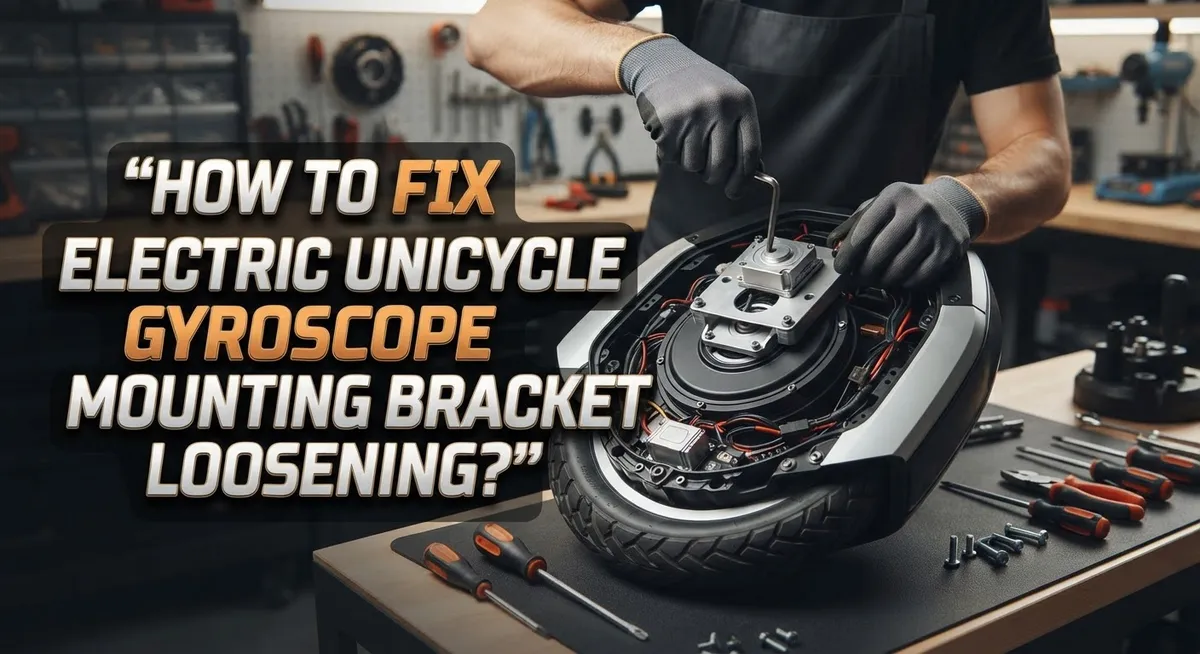
Locate all the mounting bolts that connect the gyroscope bracket to your unicycle frame. These bolts typically sit around the motor housing and suspension points. Use your Allen key set to check each bolt systematically. Begin with the larger bolts first, then move to smaller fasteners.
Gently turn each Allen key clockwise to tighten. You want firm resistance, not extreme force. If a bolt turns freely, it needs tightening. Stop when you feel solid resistance. Over tightening can crack the bracket or strip the bolt holes, so proceed with patience.
Work in a cross pattern if multiple bolts exist. Tighten the top bolt, then the bottom one. Next, tighten the left side, then the right side. This method distributes pressure evenly and prevents uneven stress on the bracket.
Check the suspension bracket bolts separately. These connect the motor assembly to your frame. Apply the same tightening technique here. Verify that the motor sits perfectly aligned with the wheel after each bolt tightens.
Inspect the battery connections and phase wires near the bracket. Ensure these wires sit securely in their connectors. Loose wires can cause electrical issues that feel like balance problems.
Test your work by gently rocking the unicycle side to side. The wheel should not shift or wiggle. Listen for any rattling sounds. If you hear clicking or feel movement, identify which bolt needs more attention.
Repeat this process every month as part of regular maintenance. Vibration from riding naturally loosens fasteners over time.
Checking Related Components: Battery, Phase Wires, and Pedals
When your gyroscope mounting bracket loosens, related components often develop problems too. You need to check these carefully to fix the root cause.
Start with your battery connections. A loose bracket can shift the motor position and strain electrical wires. Open your battery compartment and look for any wires that appear bent or pulled. Push each connector firmly into its socket. Loose battery connections can actually mimic gyroscope problems, so verify these first. If connections are corroded, gently clean them with a dry cloth.
Phase wires deserve special attention. These wires connect your motor to the control board. When the mounting bracket moves, phase wires can twist or loosen at both ends. Trace each wire from the motor to the battery area. Feel along the wire for any sections that seem loose or disconnected. Gently wiggle each wire connection to confirm it holds firm. Do not pull hard, as this can damage the wires.
Check your pedal screws next. A vibrating unicycle from a loose bracket makes pedal fasteners work loose too. Look at the bottom screws where pedals attach to the frame. Also inspect the end screws on each pedal. Use your Allen key to tighten these gently. Loose pedals add to your instability and make the bracket problem feel worse.
Test everything together. After checking these components, rock your unicycle side to side. The frame should feel solid with no movement. If wobbling continues, the bracket tightening may not have worked fully. Return to the main bracket bolts and verify each one is secure. Proper tension on all these parts prevents future loosening and keeps your ride smooth and safe.
Preventive Maintenance Tips to Avoid Future Loosening
Regular maintenance stops your gyroscope mounting bracket from loosening in the first place. Check your bolts every month before problems start. This simple habit saves you time and keeps your ride stable.
Inspect all mounting bolts during calm weather when you’re not riding. Use your Allen key set to verify each bolt feels snug. Don’t wait until wobbling appears. Early checks catch looseness before it affects your ride quality.
Clean the bracket area regularly. Dirt and debris can work their way between bolts and loosen fasteners over time. Wipe the mounting points with a clean rag. Remove any mud or grime that builds up around the motor and suspension bracket.
Store your unicycle indoors when possible. Temperature changes and moisture cause metal to expand and contract. This movement gradually loosens bolts. A dry storage space reduces this natural loosening process.
Tighten bolts with consistent pressure using your torque wrench. Uneven tension causes some bolts to loosen faster than others. Follow a cross pattern when multiple bolts exist. This spreads pressure evenly across the bracket.
Check your pedal screws alongside bracket maintenance. Loose pedals vibrate more, which transfers movement to nearby bolts. Tighten both the bottom and end point screws on each pedal.
Verify battery connections stay secure. A shifting motor from a loose bracket strains electrical wires. Loose wires create voltage problems that damage your control board.
After tightening everything, rock your unicycle gently side to side. The bracket should feel rock solid with no movement. Your wheel should sit centered and stable. This quick test confirms your maintenance work was successful.
Common Mistakes to Avoid During the Repair
Many people make critical errors when fixing their electric unicycle gyroscope mounting bracket. Understanding these mistakes helps you avoid damage and repair problems correctly.
Over tightening is the biggest mistake. Cranking your Allen key too hard can strip bolt threads or crack the bracket itself. Your goal is snug, not forceful. Apply steady pressure until resistance stops, then pause. A torque wrench helps if you have one available.
Gripping the wheel sides during looseness makes wobbling worse. When your unicycle feels unstable, tensing your legs and squeezing the wheel actually increases the problem. Your body weight shifts unpredictably, which makes the gyroscope work harder. Instead, relax your posture and let the system stabilize itself naturally.
Ignoring pedal screws causes ongoing vibration. Many people tighten the main bracket but forget about pedal fasteners. Loose pedal screws at both the bottom and end points create vibration. This vibration then loosens your bracket bolts again. Always check pedals during bracket repairs.
Skipping battery and wire checks leads to confusion. A loose bracket can shift your motor position and strain electrical connections. If wobbling persists after tightening bolts, your battery terminals or phase wires might be loose too. Check these components before assuming your bracket repair failed.
Rushing through the process causes repeating problems. Take your time inspecting each bolt carefully. Work systematically in a cross pattern if multiple bolts exist. Hurrying means you’ll miss loose fasteners and repeat this repair soon.
Not testing your work properly wastes effort. After tightening, gently rock your unicycle side to side on flat ground. Feel for any movement or instability. This simple test confirms your repair actually worked before you ride.
Troubleshooting Persistent Wobbling and Instability
Persistent wobbling and instability in your electric unicycle usually points to a loose gyroscope mounting bracket. This problem feels worse than it actually is. Your bracket may have loosened from vibrations during riding or from improper initial assembly.
Start by identifying where the wobbling happens. Does your unicycle shake side to side? Does it feel unstable when you turn? These symptoms confirm bracket issues rather than other mechanical problems. Stop riding immediately when you notice instability. Continuing to ride can loosen other components and create safety hazards.
Grab your Allen key set and inspect every mounting bolt on your gyroscope bracket. Look for bolts that turn easily without resistance. These are your culprits. Tighten each bolt slowly and deliberately. Apply steady pressure without forcing the key. Your goal is snug and secure, not crushing force.
Work systematically around the bracket. Tighten the motor bolts first, then move to suspension bracket bolts. Check bolts multiple times because they often need a second pass. After tightening, test your unicycle on flat ground. Rock it gently side to side to feel for remaining movement.
If wobbling persists after bracket tightening, relax your riding posture. Many riders tense their legs during instability, which actually intensifies the problem. Keep your legs loose and let the gyroscope do its job. Your body should stay calm and centered.
Verify your battery connections while you’re checking the bracket. Loose electrical connections can cause similar instability symptoms. Confirm all phase wires are fully seated in their connectors. A complete inspection of both mechanical and electrical components ensures you address the real cause of your wobbling issue.
Final Thoughts
A loose gyroscope mounting bracket does not have to ruin your rides. Most fixes need just an Allen key and a bit of patience.
Regular checks keep your electric unicycle safe and stable. Make bolt inspection part of your normal routine, not a one time fix.
Remember that wobbling often signals a mechanical issue, not a riding mistake. Your body position matters, but hardware problems need hardware solutions.
Tightening bolts correctly protects your investment. Skip the shortcuts and work through each connection point with care.
Battery and wire checks matter just as much as bolt tightening. A gyroscope malfunction sometimes traces back to power issues rather than loose hardware.
Pedal screws deserve attention too. Many riders fix the main bracket but forget these smaller fasteners, leading to repeat problems.
Avoid over tightening at all costs. Stripped threads and cracked brackets cost more time and money than the original problem.
Stay calm if wobbling continues after your repair. Tensing up makes instability worse, so relax your posture and trust your adjustments.
Think of bracket maintenance as ongoing care, not a single task. Weather, storage, and riding habits all affect how quickly bolts loosen again.
Consistency wins here. Riders who check their unicycle regularly catch problems early, before they turn into safety hazards.
If you follow these steps and still notice wobbling or gyro errors, consider professional inspection. Some issues need expert diagnostic tools you might not have at home.
Your electric unicycle can serve you well for years. Simple maintenance habits, proper tightening technique, and quick troubleshooting keep it running smoothly.
Take these steps seriously, but do not stress over them. A few minutes of checking now saves hours of frustration later. Ride safe and stay steady.
Frequently Asked Questions
Why does my gyroscope bracket keep loosening after I tighten it?
Fasteners naturally loosen during riding due to vibration and movement. Your unicycle experiences constant motion, which causes bolts to gradually shift. Hand tight bolts from the factory are especially prone to this problem. You should check your bracket bolts every few weeks during regular use.
How do I know which bolts need tightening?
Start with your Allen key set and inspect every bolt on the gyroscope mounting bracket. Work systematically around the bracket so you don’t miss any fasteners. Pay special attention to the motor bolts and suspension bracket bolts. These two areas loosen most frequently. Gently try to move each bolt with your key. If it turns even slightly, it needs tightening.
Can a loose bracket cause wobbling during rides?
Yes, absolutely. A loose gyroscope mounting bracket directly causes instability and wobbling. Your motor sits in this bracket, so any looseness throws off your balance. The bracket shifts slightly with each movement, making your unicycle feel unpredictable. Tightening the bracket usually eliminates wobbling immediately.
What should I check besides the bracket bolts?
Verify your battery connections are secure. Loose phase wires can create electrical problems that feel similar to mechanical issues. Also inspect your pedal screws at both the bottom and end points. Many riders forget about these smaller fasteners, but loose pedals create vibration throughout your entire unicycle.
How tight should I make the bolts?
Snug them firmly, but do not over tighten. You want them secure enough that they won’t move during riding. Over tightening strips threads or cracks the bracket material. If you feel strong resistance, stop turning. The bolt should be tight without requiring extreme force.

Hello, i’m Ivoria i am the face behind Tech Tracker Blog. I am passionate about my work and love to explore gadgets and share about my experience.