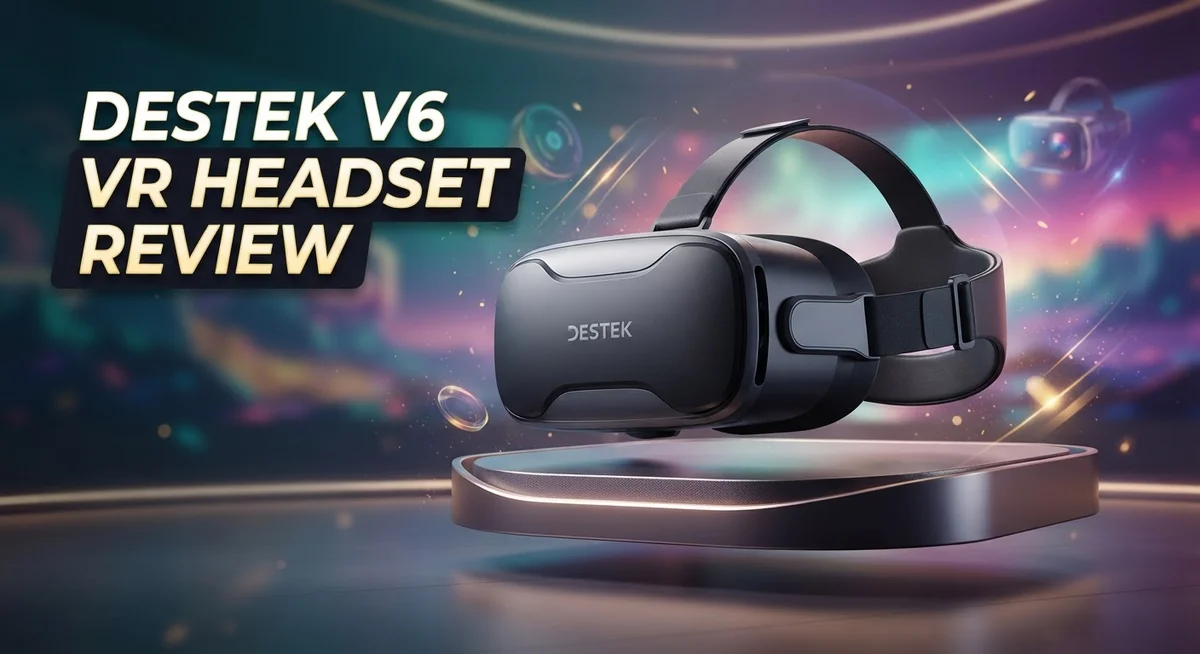
Destek V6 VR Headset Review: Features, Performance & Value
Want to turn your smartphone into a virtual reality machine? The Destek V6 VR Headset might catch your eye. This device works with most iPhones and Android phones between 4.7 and 6.8 inches.
It offers a 110 degree field of view. This gives you a wide and immersive picture. The anti-blue light lenses also protect your eyes during long sessions.
Many users like the comfortable design. The focus adjustment is simple too. You just twist a dial until the image looks sharp.
In a Nutshell
- Phone fit: Works with most phones between 4.7 and 6.8 inches, covering many popular iPhone and Android models.
- Lens quality: The anti-blue light HD lenses aim to reduce eye strain during longer viewing sessions.
- Focus control: You get easy focus adjustment, so getting a sharp picture takes just seconds.
- Build concerns: Some users report clamp mechanism issues and occasional light leak, which can affect immersion.
- Platform limits: This headset ties into the now defunct Google Cardboard and Daydream platform. That means app support keeps shrinking.
- Controller option: A Bluetooth controller is available separately for those who want more interactive control.
- User feedback: Reviews are mixed. Some love the comfort and simple setup, while others point out durability issues.
Optical Design and Lens Quality
The optical system in the Destek V6 sits at the heart of your viewing experience. Let’s explore what makes these lenses tick and whether they truly deliver clear, comfortable visuals.
Anti-blue light technology works by filtering out harsh blue wavelengths that tire your eyes during extended VR sessions. This matters because smartphone screens already emit significant blue light. The V6’s HD lenses incorporate this protection, meaning you can spend more time in virtual worlds without feeling drained. Your eyes will thank you after a long gaming marathon.
The 110 degree field of view creates an immersive window into digital environments. This angle sits in the sweet spot for smartphone VR. It’s wide enough to feel immersive without causing the distortion you’d get from pushing too far. You’ll notice peripheral vision in your virtual space, which boosts presence and engagement.
Focus adjustment on the V6 deserves special mention. Rather than fixed optics, you get a manual dial that lets you dial in sharpness instantly. This flexibility matters because phone screens vary in pixel density. A quick twist gives you crisp text and sharp details tailored to your specific device and eyesight.
The lens coatings also reduce glare and reflections internally. This keeps stray light from bouncing around inside the headset and washing out your image. Cleaner optics mean better contrast and more vibrant colors when you’re exploring VR apps.
One trade off exists here. Smartphone based VR inherently limits optical complexity compared to standalone headsets. The V6 works within these boundaries, but you won’t get the same level of edge clarity or advanced aberration correction found in premium systems.
Lens durability is another consideration. The optical elements resist scratches reasonably well, though you should store the headset carefully. Avoid placing it lens down on rough surfaces. A protective case becomes a practical investment for long term use.
Overall, the optical design balances practical usability with real eye care features. The anti blue light protection and easy focus adjustment show thoughtful engineering. These elements combine to create a viewing experience that stays comfortable even during extended sessions.

Last update on 2026-10-18 / Affiliate links / Images from Amazon Product Advertising API Some of the links on this website are affiliate links, which means that at no additional cost to you, I earn a commission if you click through and make a purchase. I only recommend products and services that I believe will add value to my readers. Thank you for your support!
Comfort and Fit
When you slip on the Destek V6, the first thing you notice is how it sits on your head. The headset uses a soft front cushion that rests against your face. This design choice keeps pressure points minimal during extended sessions.
The adjustable head strap wraps around your head securely. You can loosen or tighten it to match your head shape. Most users find this system intuitive and quick to adjust. The strap material feels soft against your skin without causing irritation.
Phone mounting matters for comfort too. The V6 accepts phones ranging from 4.7 to 6.8 inches. This wide range means your device sits centered in the frame. A balanced phone position reduces neck strain significantly. The clamp mechanism holds your phone steady, though some users report occasional loosening over time.
Weight distribution plays a key role in comfort. The headset doesn’t feel heavy when worn for short periods. However, extended use beyond 30 minutes may cause mild fatigue. This is common with smartphone VR headsets in general. The front weight sits mostly on your cheeks and nose area rather than your forehead.
Padding quality makes a real difference here. The soft foam cushioning absorbs pressure evenly. You won’t experience hot spots or sharp discomfort during normal use. The materials feel durable and maintain their softness after repeated wear.
Fit flexibility is another strength. Glasses wearers can use the V6 comfortably if their frames aren’t too large. The internal space accommodates most standard eyeglass sizes. However, very thick frames may feel snug. Contact lens users experience no restrictions at all.
Light leaks around the edges can affect comfort indirectly. When external light enters, your eyes work harder to focus. This causes faster eye fatigue. The seal around your face could be tighter to prevent this issue. Blocking light leaks with tape or fabric strips helps some users extend their comfortable viewing time.
Overall, the Destek V6 prioritizes comfort for casual VR sessions. It works well for 20 to 30 minute experiences. Longer sessions require breaks to avoid discomfort.
Compatibility and Setup
Setting up the Destek V6 takes just a few minutes. You download a VR app, insert your phone, and you’re ready to explore virtual worlds. The process feels straightforward for most users.
Phone compatibility works with devices between 4.7 and 6.8 inches. This range covers popular iPhones and Android phones. You simply slide your phone into the mount and secure it with the clamp mechanism. The headset holds your device safely during use.
The clamp system has received mixed feedback from users. Some report it grips phones securely without issues. Others mention that the mechanism can feel loose or unstable over time. Testing your specific phone model first helps you understand how well it fits your device.
Getting the focus right matters for clear visuals. The Destek V6 includes an easy focus adjustment dial. You turn it until the image sharpens. Most people find this takes less than a minute. The anti-blue light HD lenses then do their job, filtering harsh light that can tire your eyes.
One setup challenge involves light leaks. Some users notice light entering around the edges of the headset. This reduces immersion and can feel distracting. Adjusting the fit or positioning the device closer to your face sometimes helps minimize this problem.
Controller setup is optional. The Destek V6 works without a controller for basic experiences. If you purchase the separate Bluetooth controller, pairing it to your phone adds interaction options. The controller connects like any standard wireless device.
The headset connects to the Google Cardboard and Daydream platforms. These services are no longer actively updated, which limits available content. You can still access older apps and experiences, but new releases are rare. Checking what apps work before purchasing helps set realistic expectations.
Overall, the Destek V6 setup process stays simple. Most people complete it without frustration. The main variables involve your specific phone model and how well the clamp holds it. Testing your device before extended use ensures you get the best experience possible.
Top 3 Alternatives
Meta Quest 3


Last update on 2026-10-18 / Affiliate links / Images from Amazon Product Advertising API Some of the links on this website are affiliate links, which means that at no additional cost to you, I earn a commission if you click through and make a purchase. I only recommend products and services that I believe will add value to my readers. Thank you for your support!
HTC Vive XR Elite

Last update on 2026-10-18 / Affiliate links / Images from Amazon Product Advertising API Some of the links on this website are affiliate links, which means that at no additional cost to you, I earn a commission if you click through and make a purchase. I only recommend products and services that I believe will add value to my readers. Thank you for your support!
PlayStation VR2

Last update on 2026-10-18 / Affiliate links / Images from Amazon Product Advertising API Some of the links on this website are affiliate links, which means that at no additional cost to you, I earn a commission if you click through and make a purchase. I only recommend products and services that I believe will add value to my readers. Thank you for your support!
Immersion and Field of View
The Destek V6 delivers a viewing experience that centers on two key factors: how wide you can see and how immersive that view feels. Let’s explore what makes this headset stand out in these areas.
The 110 degree field of view opens up a genuinely expansive window into VR environments. This width matters because it determines whether you feel like you’re looking at a screen or actually stepping into another world. Most users find this angle sufficient for casual VR experiences without feeling boxed in by narrow borders.
What makes the V6 particularly interesting is its anti-blue light lens technology. These lenses filter harsh blue wavelengths that normally cause eye strain during extended sessions. If you spend hours in VR, your eyes will thank you for this feature. The coating also reduces internal glare and reflections, which keeps the image crisp and prevents annoying light bounces inside the headset.
Focus adjustment on the V6 deserves attention here. Getting the right focal distance takes just seconds, and this directly impacts how sharp everything appears. When you nail the focus, text becomes readable and distant objects stay clear.
However, immersion does face some real challenges. Light leaks around the edges can break your sense of presence in the virtual environment. Even small gaps let ambient light seep in, which pulls your attention back to the physical world. This is one area where the V6 shows its budget category roots.
The clamp mechanism that holds your phone also plays a role in immersion consistency. Some users report that this system doesn’t grip phones as securely as they’d like, which can shift your view mid-session and ruin the experience.
Despite these limitations, the V6’s optical design strikes a reasonable balance. The combination of wide viewing angles, eye protection, and quick focus adjustment keeps most casual users satisfied. The field of view feels spacious enough for entertainment, and the lens quality supports that spaciousness well. For someone dipping into smartphone VR without serious expectations, the immersion level proves adequate.
Controller Options and Usability
The Destek V6 offers an optional Bluetooth controller that expands how you interact with VR content. This controller pairs wirelessly with your smartphone. It gives you hands-free navigation through menus and games.
Setting up the controller is straightforward. You enable Bluetooth on your phone and connect the device. Most users complete pairing in under a minute. The wireless connection stays stable during typical VR sessions.
The controller works best with apps that support Bluetooth input. Many Google Cardboard and Daydream apps recognize the controller automatically. You get point-and-click functionality similar to traditional VR remotes. This makes selecting menu items much easier than using your phone’s touch screen while wearing the headset.
However, not all VR apps support external controllers. Some games and experiences rely only on head tracking or phone touchscreen controls. You’ll want to check app compatibility before purchasing the controller. The headset functions perfectly fine without it, so the controller remains truly optional.
The physical design of the controller feels comfortable in your hand. The button layout is intuitive. Most people adapt to it immediately. Battery life typically lasts several hours per charge, which suits casual VR sessions well.
Usability improves noticeably when you add the controller. Your hands stay free instead of fumbling with your phone’s screen. This matters especially during longer VR experiences. You can focus on the immersive environment rather than managing controls.
The controller does have limitations. It works only with compatible apps. Older Cardboard apps may not recognize it. You’ll encounter some games that simply ignore controller input.
Overall, the optional Bluetooth controller enhances the V6 experience significantly. It transforms casual phone VR into something closer to dedicated headset usability. For users who plan regular VR sessions, the controller becomes a worthwhile addition. For occasional users, the headset alone provides sufficient control options. Either way, the V6 adapts to your preferred interaction style.
Pros and Cons
Pros
- Comfortable fit that works well for casual VR sessions without pressure points
- Anti-blue light lenses protect your eyes during extended use
- Easy focus adjustment lets you dial in sharp visuals quickly
- Works with phones from 4.7 to 6.8 inches, covering most devices
- Optional Bluetooth controller adds hands-free interaction for supported apps
Cons
- Clamp mechanism receives mixed reviews for reliability and consistency
- Light leaks around the edges reduce immersion and can cause distractions
- Limited to Google Cardboard and Daydream platforms, which are largely discontinued
- Not all VR apps support external controller input, limiting functionality
Who Should Buy It
The Destek V6 works best for people who want to explore VR without committing to expensive standalone headsets. If you own a smartphone between 4.7 and 6.8 inches, this headset fits your device perfectly.
Casual VR enthusiasts will appreciate the V6’s straightforward setup. You slip your phone into the device, adjust the focus dial, and you’re ready to explore. No complicated installation. No software downloads beyond standard VR apps. This simplicity appeals to newcomers who want to test VR before investing further.
Parents looking for family entertainment should consider the V6 carefully. The comfortable design works well for casual 30 to 60 minute sessions. Kids can use it without discomfort. However, the clamp mechanism receives mixed feedback, so test it with your specific phone model first.
Mobile gamers benefit from the optional Bluetooth controller. Games that support external controllers become much more enjoyable. Your hands stay free. You control the action without touching your phone. This feature transforms the experience for action games and interactive apps.
The V6 suits people with light sensitivity concerns. The anti-blue light lenses reduce eye strain during extended viewing. Your eyes stay protected. This matters if you spend hours in digital environments regularly.
However, the V6 isn’t ideal for everyone. Serious VR fans seeking cutting edge graphics and performance should look elsewhere. The platform limitation to Google Cardboard and Daydream apps restricts your content options significantly. Many modern VR experiences don’t support these older platforms anymore.
Social VR users face challenges too. Multiplayer gaming and social VR platforms often require standalone headsets or PC based systems. The V6 won’t connect to those ecosystems.
People sensitive to light leaks should be aware. The V6 has documented light leak issues around the edges. This breaks immersion during dark scenes. You’ll notice sunlight or room light seeping in.
The V6 shines for budget conscious users wanting a low risk VR introduction. It works for casual entertainment and light gaming. It suits people with specific phones in the compatible range. For anyone wanting modern VR content or serious gaming, this headset falls short. Consider your actual VR goals before purchasing.
Final Verdict
The Destek V6 offers a simple way to try VR without a huge commitment. It works well for short sessions and casual exploration. But it comes with real tradeoffs you should know about.
The lens quality stands out as a genuine strength. Your eyes stay protected during longer sessions, and focus adjustments happen fast. This makes the headset practical for everyday use.
Build quality tells a different story. The clamp mechanism doesn’t always hold steady, and light leaks can pull you out of the experience. These issues affect immersion more than specs suggest.
Platform support is the biggest concern here. Google Cardboard and Daydream are no longer active platforms. This limits what content you can actually access today.
Despite this, the headset still holds value for specific users. If you want a low pressure way to test VR, the V6 delivers that experience. It doesn’t ask you to invest heavily upfront.
Families exploring VR together will find it approachable. Mobile gamers who add the Bluetooth controller get a more complete setup. Both groups gain something meaningful from this device.
However, users chasing cutting edge VR should look elsewhere. Standalone headsets offer better tracking, wider app support, and fewer hardware quirks. The V6 simply can’t compete on that level.
Think of the V6 as a starting point, not a long term solution. It answers the question “do I even like VR?” without asking for a big leap of faith. That’s where it earns its place.
If light sensitivity or immersion breaks bother you, weigh the cons carefully. The clamp and light leak issues aren’t dealbreakers for everyone, but they matter for some.
In short, the Destek V6 works best as an entry point. It’s comfortable, easy to use, and simple to set up. Just go in knowing its platform limits and hardware quirks upfront.
For casual users and first time VR explorers, it still makes sense. For serious enthusiasts, it’s better as a stepping stone toward something more advanced.
Frequently Asked Questions
Is the Destek V6 compatible with my phone?
Yes, the V6 works with most modern phones. The clamp fits devices between 4.7 and 6.8 inches. This covers most iPhones and Android phones currently in use. Before buying, measure your phone’s width to confirm it falls within this range.
What makes the lenses special?
The V6 uses anti-blue light HD lenses. These lenses reduce eye strain during longer VR sessions. They also protect your eyes from harmful blue light that screens emit. The focus adjustment wheel lets you get crystal clear visuals in seconds without fiddling with settings.
Can I use a controller with the V6?
Yes, an optional Bluetooth controller is available separately. The controller adds hands-free interaction for compatible apps. However, not all VR apps support external controllers. You’ll want to check which games or experiences work with controller input before purchasing one.
What VR apps work with the Destek V6?
The V6 relies on Google Cardboard and Daydream platforms. These platforms are no longer actively updated by Google. Many apps have moved to other VR ecosystems. You can still find some working experiences, but your app selection will be limited compared to newer headset types.
Who should buy the Destek V6?
The V6 works best for people trying VR for the first time. Casual users and families exploring together will find it approachable. People with light sensitivity concerns benefit from the eye-protection features. However, if you want cutting edge experiences or plan to use VR regularly, you may outgrow this headset quickly.

Hello, i’m Ivoria i am the face behind Tech Tracker Blog. I am passionate about my work and love to explore gadgets and share about my experience.