Rexing V1 Dash Cam Review: Features, Performance, and Comparison
Want a dash cam that actually keeps up with you on the road? The Rexing V1 might be your answer. It records in stunning 4K Ultra HD, so every detail stays sharp and clear.
This dash cam packs a punch for its size. A 2.4 inch LCD touchscreen lets you check footage fast. You get a clean view without fuss.
GPS tracking comes built in too. Your trips get logged with location data automatically. This adds real value for insurance claims or trip logs.
In a Nutshell
- 4K Ultra HD recording captures sharp details on every drive. You get clear footage of license plates and road signs. This matters most when you need proof after an incident.
- The 2.4 inch touchscreen makes settings easy to adjust. You tap through menus without hunting for buttons. Small size means it stays out of your sightline.
- Built in GPS logs your location and speed automatically. This data backs up your footage with hard facts. Insurance claims become simpler with this extra layer.
- The polarizing lens filter reduces glare and reflections. Your footage stays clear even in bright sunlight. This feature often costs extra with other brands.
- No voice control is included, so you rely on touch inputs only. This could feel limiting if you prefer hands free operation.
- Compared to the Vantrue E1 Pro and Garmin models, the Rexing V1 holds its own. It balances video quality and practical features without unnecessary bulk.
Key Features and Specifications
The Rexing V1 delivers solid performance across its core technical capabilities. 4K Ultra HD recording captures sharp, detailed footage that helps you identify license plates and road signs with confidence. Every frame comes through crisp, which matters when you need evidence after an accident.
The 2.4 inch touchscreen gives you quick access to settings without fumbling through menus. You can review clips, adjust recording preferences, and check GPS data right on the display. The screen size works well for a compact dash cam design.
Built in GPS automatically logs your location, speed, and direction as you drive. This data gets saved with your video files, so you have a complete record of your journey. Insurance companies and law enforcement appreciate this level of detail when reviewing incidents.
The polarizing lens filter reduces glare from sunlight bouncing off your windshield. This feature prevents washed out footage during bright days or when driving toward the sun. You get clearer video in challenging lighting conditions.
One limitation stands out: no voice control. You cannot record notes or control functions hands free. All adjustments require you to touch the screen, which means taking your eyes off the road. This matters if you like voice activated features in other devices.
The USB port uses a Mini B connector, which is older technology. You may need to find the right cable in your drawer or purchase one separately. Modern dash cams often use USB C for faster data transfer.
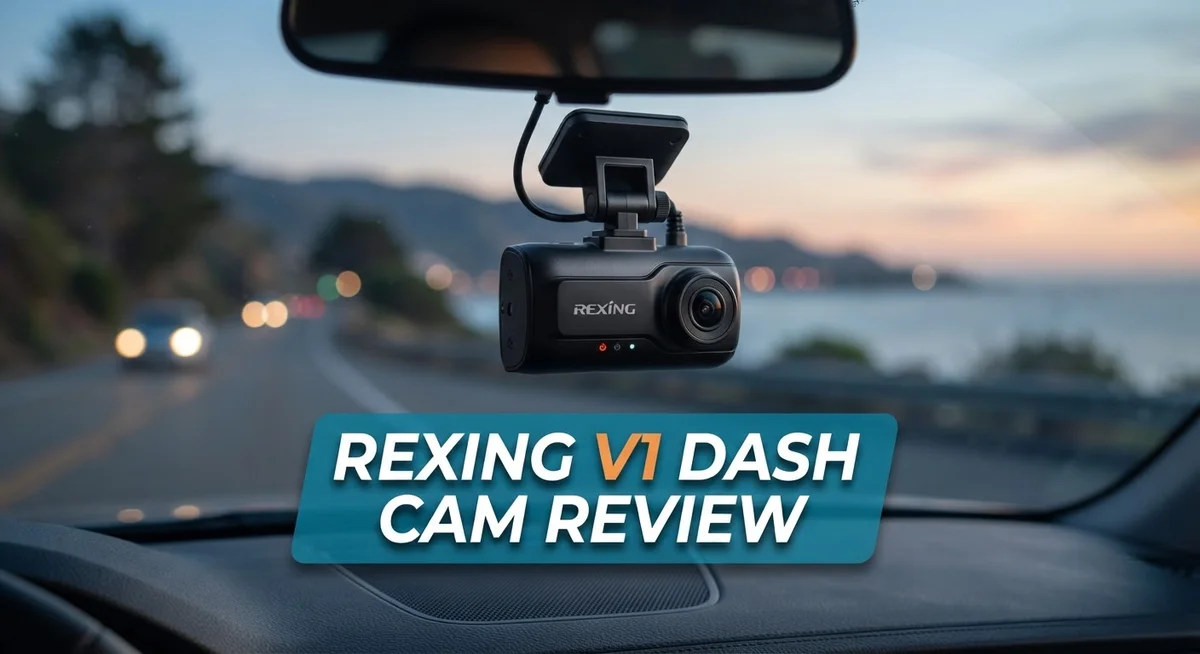
The compact form factor means this camera fits discreetly behind your rearview mirror. It does not block your view of the road ahead. The small size also makes installation straightforward in most vehicles.
The Rexing V1 focuses on reliability and straightforward operation. It skips fancy features and delivers the essentials: clear video, location tracking, and glare reduction. Drivers who want dependable recording without unnecessary complexity find this dash cam appealing.
No products found.
Video Quality and Recording Performance
The Rexing V1 captures video in 4K Ultra HD resolution. This means you get sharp, detailed footage that clearly shows license plates and road signs even during daytime driving. The sensor performs well in bright sunlight and handles typical highway speeds without dropping frames.
Recording happens continuously once you start the engine. The dash cam loops older footage automatically when the memory card fills up. This keeps your storage from overflowing while maintaining a rolling backup of your recent drives.
Frame rate stability matters for dash cams. The V1 maintains smooth playback without stuttering or jerky motion. You won’t see the typical lag that cheaper models produce when capturing fast lane changes or sudden stops.
Low light performance is where things get interesting. The camera switches to a lower resolution mode at night to gather more light. You still get usable footage in dark conditions, though not with the same clarity as daylight recordings. Street lamps and oncoming headlights help illuminate the road ahead.
The polarizing lens filter deserves special mention here. It cuts through glare that bounces off your windshield and reflects from other cars. This means fewer washed out or overexposed frames during sunrise and sunset drives.
Audio recording captures road sounds and cabin conversations. Microphone quality is decent for a compact unit. Wind noise can be noticeable at highway speeds, but dialogue remains clear.
File management works smoothly on the touchscreen. You can review clips immediately after recording them. The GPS data stamps each video with location and speed information, which proves helpful if you need to reference exactly where something happened.
The Mini B USB port connects to your computer for file transfers. Download speeds are reasonable, though older USB technology means transfers take longer than newer models. You can access footage quickly when insurance companies or authorities need evidence from your drive.
Overall, video performance matches what you’d expect from a mid range dash cam. The 4K resolution and stable frame rates handle most real world driving scenarios reliably.
Design, Build, and Installation
The Rexing V1 comes with a thoughtful design that prioritizes simplicity and discretion. The camera body stays compact, fitting neatly behind your rearview mirror without blocking your view of the road.
The build quality feels solid throughout. The housing uses durable materials that withstand temperature changes and vibrations from regular driving. The lens sits recessed slightly, protecting it from dust and accidental damage. The overall construction suggests this camera is built to last through years of daily use.
Installation takes just a few minutes for most drivers. You’ll mount the camera to your windshield using the included adhesive bracket. The mounting system feels secure once locked in place. The cable runs down the side of your windshield and hides behind your headliner or trim pieces.
Power comes from your vehicle’s 12V outlet or USB port. The Mini B USB connection links to your car’s existing power source. This keeps the dashboard clean without extra wires hanging loose. The cable length gives you enough slack to route it safely away from airbag deployment zones.
The touchscreen interface sits on the front of the unit. You can reach it easily to adjust settings or review footage. The 2.4 inch display shows menus clearly without taking up much space. Buttons respond quickly to your taps, making navigation straightforward.
The polarizing lens filter comes pre installed on the camera. This feature reduces glare from sunlight bouncing off your windshield, which improves video clarity during bright daylight hours. You won’t need to remove or adjust this filter yourself.
Cable management stays organized with the included clips and adhesive holders. These accessories help you route wires along your headliner and down the sides of your doors. The result is a clean installation that looks professional.
The Rexing V1 prioritizes a hassle free setup experience without requiring special tools or technical knowledge. Most drivers complete installation in under 15 minutes. The design keeps the interior of your vehicle looking uncluttered and maintains good sightlines while driving.
Top 3 Alternatives
VIOFO A119 Mini

Last update on 2026-10-18 / Affiliate links / Images from Amazon Product Advertising API Some of the links on this website are affiliate links, which means that at no additional cost to you, I earn a commission if you click through and make a purchase. I only recommend products and services that I believe will add value to my readers. Thank you for your support!
The VIOFO A119 Mini offers compact design without sacrificing video quality. This camera records in 1600p resolution, which gives you clear footage during day and night. The wide-angle lens captures what happens on both sides of your vehicle.
This model uses a Sony sensor that performs well in low light. You get reliable night vision for incidents that occur after dark. The small form factor means the camera stays discreet on your windshield. Setup is straightforward, and the menu system is easy to navigate.
Thinkware U1000

Last update on 2026-10-18 / Affiliate links / Images from Amazon Product Advertising API Some of the links on this website are affiliate links, which means that at no additional cost to you, I earn a commission if you click through and make a purchase. I only recommend products and services that I believe will add value to my readers. Thank you for your support!
The Thinkware U1000 brings advanced features to dash cam recording. This camera includes cloud connectivity, so you can access your footage remotely. The 4K resolution captures fine details that matter in accident investigations.
The built-in GPS tracks your location and speed automatically. The camera uses a dual-channel system to monitor both front and rear views. Night vision technology ensures you capture clear images in darkness. The parking mode feature records even when your car is parked, protecting against hit-and-runs.
70mai Dash Cam Pro


Last update on 2026-10-18 / Affiliate links / Images from Amazon Product Advertising API Some of the links on this website are affiliate links, which means that at no additional cost to you, I earn a commission if you click through and make a purchase. I only recommend products and services that I believe will add value to my readers. Thank you for your support!
The 70mai Dash Cam Pro delivers budget-friendly performance with solid specs. This camera records in 1944p resolution, providing sharp video quality. The wide field of view means fewer blind spots during recording.
The camera includes a built-in GPS module for location tracking. Night vision performs decently in low-light conditions. The compact size keeps the camera hidden from view. Easy installation takes just minutes, and the app lets you review footage on your phone. The camera stores video on a microSD card, giving you flexibility with storage options.
GPS and Navigation Capabilities
The Rexing V1 includes a GPS receiver that tracks your location in real time. This feature works quietly in the background while you drive, capturing your coordinates automatically.
GPS data gets stored alongside your video footage. When you review recordings later, you can see exactly where you were on a map. This proves helpful if you need evidence from a specific route or intersection.
The GPS logs your speed as you drive down the road. Insurance companies and law enforcement can use this information to understand what happened during an incident. Speed data adds credibility to your account of events.
Direction tracking rounds out the navigation capabilities. The camera records which way you were heading, whether north, south, east, or west. Combined with location and speed, this creates a complete picture of your journey.
One thing to note: the GPS receiver requires a clear view of the sky to work properly. If you park your car in a garage or under heavy tree cover, the GPS may take longer to acquire a signal. Once moving on open roads, it locks on quickly.
The touchscreen displays your GPS information right on the unit. You can see your current speed and location without pulling out your phone. This adds convenience during your drive.
File organization becomes easier with GPS data included. When you search through recordings, the location information helps you find the right clip faster. No more guessing which video happened where.
The GPS integration keeps things simple. You don’t need to install extra apps or buy additional hardware. Everything works within the camera itself.
Weather and temperature don’t affect GPS performance. Rain, snow, or sunshine won’t stop the receiver from working. This reliability matters when you need accurate data from any driving condition.
The Rexing V1’s navigation features focus on practical usefulness rather than flashy extras. You get what you need to document your drives accurately. This straightforward approach fits the camera’s overall design philosophy of reliability and simplicity.
Display and User Interface
The Rexing V1 features a 2.4-inch LCD touchscreen display that puts all your controls right at your fingertips. This compact screen sits on the front of the unit and gives you quick access to settings without taking your eyes off the road for long.
Navigating the menu system feels straightforward and intuitive. The touchscreen responds well to your taps and swipes. You can adjust recording settings, view GPS information, and access your video files directly from this interface. The display shows real-time data like speed, location, and direction as you drive.
The screen size strikes a good balance. It’s large enough to see what you need without being bulky or distracting. The LCD technology keeps the display visible even in bright sunlight, though a slight glare is normal on very sunny days. The interface doesn’t overwhelm you with unnecessary buttons or complicated menus.
One helpful feature is how GPS information displays right on the screen. You can monitor your location and speed without pulling out your phone. The touchscreen makes it easy to scroll through recorded videos and check your footage before uploading files to your computer.
File management works smoothly through the display. You can organize your recordings, mark important clips, and delete old footage without connecting to external devices. The menu layout follows a logical structure that most drivers learn quickly.
The user interface prioritizes simplicity over fancy graphics. Everything serves a practical purpose. You won’t find confusing animations or hidden menus that require a manual to understand. The design reflects the Rexing V1’s overall philosophy: keep things simple and focus on what matters.
Touch responsiveness stays consistent even when you’re wearing gloves or using the screen in cold weather. The display brightness adjusts automatically in many situations, though you can also manually control it through settings. This flexibility helps reduce battery drain during extended parking mode recording.
Overall, the display and interface combination makes the Rexing V1 easy to use from day one. New users don’t need a learning curve to start recording and accessing their footage.
Pros and Cons
Pros
- 4K video captures sharp, clear footage in excellent detail
- Compact size stays discreet on your windshield without blocking your view
- GPS tracking logs your location, speed, and direction automatically with every drive
- Polarizing lens filter reduces glare and reflections from sunlight
- Mini USB port connects easily to your vehicle’s power supply
Cons
- No voice control means you must use the touchscreen to adjust settings while driving
- GPS receiver needs a clear sky view to function properly, which limits accuracy in tunnels or covered parking
- Limited integration with smartphone apps for remote viewing or cloud storage
Who Should Buy It
The Rexing V1 works best for drivers who want straightforward dash cam recording without extra complexity. You should consider this model if you need reliable 4K footage for insurance protection and accident documentation.
This dash cam suits you if you spend time on highways and city roads regularly. The GPS tracking captures your location and speed automatically. You can review exactly where incidents happened and how fast you were traveling. This data proves valuable when filing insurance claims.
The compact design makes the Rexing V1 ideal for drivers who prefer discreet windshield mounting. The small screen doesn’t obstruct your view of the road. You get all the features you need without a bulky setup that distracts from driving.
You’ll appreciate this model if you value simplicity over fancy features. The touchscreen menu keeps things straightforward. Setup takes minutes, not hours. No complicated software or apps required to get started.
The Rexing V1 fits your needs if you drive in areas with good GPS signal. Urban streets and open highways work well. The GPS receiver performs best with clear sky visibility. Tunnels and covered parking areas may limit accuracy, so consider your typical driving environment.
This dash cam suits drivers who want solid video quality without breaking the bank on premium models. The 4K resolution captures license plates and road details clearly. You get professional-grade recording for everyday protection.
You should skip this model if you need voice control for hands-free operation. All adjustments require using the touchscreen. Drivers who prefer minimizing screen interaction while driving may find this limiting.
The Rexing V1 works well for owners of sedans, SUVs, and trucks where windshield space isn’t an issue. The polarizing lens filter reduces glare from sunlight and reflections. This feature helps maintain video clarity during bright daylight hours.
Consider the Rexing V1 if you want GPS data without subscription fees or cloud storage requirements. Recording stays local on your memory card. You maintain complete control over your footage without ongoing service costs.
Final Verdict
The Rexing V1 earns its place as a dependable dash cam for everyday drivers. It delivers clear video and useful location tracking without overwhelming you with complicated menus.
Simplicity defines this camera’s biggest strength. You get core recording features that work well for most driving situations. This makes it a smart pick if you want reliable documentation on the road.
When you compare it to competitors like the Vantrue E1 Pro or Garmin models, the Rexing V1 holds its own in basic functionality. It may lack some advanced features found in pricier alternatives, but it covers the essentials well.
Think about your driving habits before deciding. If you drive mostly in open areas with clear sky access, the GPS feature will serve you reliably. Urban drivers dealing with frequent tunnels might find this limitation more noticeable.
Families looking for an extra layer of safety documentation will find this camera useful. Rideshare drivers also benefit from having clear footage for insurance purposes or dispute resolution.
The lack of smartphone app integration might frustrate tech savvy users who want instant remote access. However, casual drivers who simply want reliable recording won’t miss this feature much.
Who should consider this camera? Anyone wanting a no fuss recording solution that just works. People who prioritize video clarity over bells and whistles will appreciate what this camera offers.
Who should look elsewhere? Drivers who need voice commands or extensive cloud connectivity might want to explore other options like RED TIGER models, despite their own reported drawbacks.
Overall, the Rexing V1 strikes a fair balance between performance and ease of use. It won’t overwhelm first time dash cam users, yet it still satisfies drivers who want dependable footage every time they hit the road.
This camera earns a solid recommendation for anyone seeking straightforward, effective driving documentation without unnecessary complexity standing in the way.
Frequently Asked Questions
Does the Rexing V1 record in 4K quality?
Yes, the Rexing V1 captures video in 4K Ultra HD resolution. This means you get sharp, detailed footage of license plates, road signs, and other important details during an accident or incident. The 4K quality helps when you need to review footage later or share it with insurance companies.
Can I control the Rexing V1 with voice commands?
No, this dash cam does not have voice control. You must use the 2.4-inch LCD touchscreen to adjust settings and start or stop recording. This requires you to interact with the screen manually while driving, so plan your adjustments before you hit the road.
How does the GPS feature work on this model?
The built-in GPS receiver logs your location, speed, and direction with every drive. This data appears as an overlay on your video footage. Keep in mind the GPS needs a clear sky view to work properly, so accuracy may drop in tunnels, underground parking, or areas with heavy tree cover.
Is the Rexing V1 easy to mount on my windshield?
Yes, the compact design makes installation simple. The small screen and body don’t block much of your windshield view. You mount it directly to your glass using the included hardware, and the Mini USB port connects to your vehicle’s power supply for continuous operation.
What makes the Rexing V1 different from other dash cams?
The Rexing V1 focuses on simplicity and core recording features. It skips fancy additions like voice control or smartphone app integration. If you want straightforward dash cam recording without extra complexity, this model delivers exactly that.

Hello, i’m Ivoria i am the face behind Tech Tracker Blog. I am passionate about my work and love to explore gadgets and share about my experience.