Garmin Dash Cam X310 Review: A Comprehensive Guide
Are you looking for a dash cam that actually delivers on its promises? The Garmin Dash Cam X310 might be the answer you need.
This compact device packs 4K Ultra HD video into a tiny body. It fits neatly behind your rearview mirror without blocking your view.
Garmin built this camera with smart features. It offers voice control, a touchscreen display, and a built in polarizer for clearer shots.
Safety comes first with this model. It includes forward collision warnings, lane departure alerts, and incident detection to keep you informed on the road.
In a Nutshell
- Sharp 4K footage: The built in clarity polarizer cuts glare and windshield reflections for clearer video.
- Small footprint: At just 2.8 x 1.7 x 0.8 inches, it stays out of your line of sight.
- Smart controls: The touchscreen and voice command system let you adjust settings without touching buttons while driving.
- Safety tech: Incident detection, forward collision warnings, and lane departure alerts work together to keep you aware on the road.
- Constant power option: The OBD-II port compatibility means you can wire it for always on recording.
- Wireless access: Wi-Fi lets you pull footage straight to your phone without cables.
Video Quality and Image Clarity
The Garmin Dash Cam X310 delivers sharp and detailed footage in various lighting conditions. The 4K Ultra HD resolution captures everything on the road with impressive clarity. You get a wide 140° field of view that covers multiple lanes and nearby vehicles.
One standout feature is the built in clarity polarizer. This integrated filter cuts through glare and windshield reflections that plague most dash cams. Sunlight bouncing off your windshield no longer ruins your footage. The result is cleaner video that’s easier to review when you need it.
The camera includes HDR technology to handle tricky lighting situations. Bright skies don’t blow out anymore. Dark tunnels and shaded areas show more detail than before. This balance makes the X310 reliable whether you drive at noon or midnight.
The touchscreen display lets you preview footage right away. You can check video quality instantly without waiting to download files to your phone. The 2.8 inch screen is small but functional for quick reviews.
Night performance is solid but not exceptional. The X310 captures recognizable license plates and road markers in low light. However, competitors like the Rove R2-4K Dual Pro pull ahead in complete darkness. If you do most driving during daylight hours, this won’t bother you.
Color accuracy stays consistent throughout the day. Road signs remain readable. Vehicle colors match reality. The camera doesn’t oversaturate or wash out footage like cheaper models.
The 140° field of view is respectable but falls short of some rivals. The VIOFO A329S offers similar coverage with a superior sensor. You won’t miss much happening in front of you, but side angles could be broader.
Video stabilization keeps footage smooth even on rough roads. Bumps and potholes don’t create jarring movements. Your recordings remain watchable and professional looking.
The X310 prioritizes clarity and detail over extreme wide angles. If you want reliable, sharp video that performs well in most conditions, this camera delivers. The clarity polarizer alone sets it apart from many competitors at this level.


Last update on 2026-11-03 / Affiliate links / Images from Amazon Product Advertising API Some of the links on this website are affiliate links, which means that at no additional cost to you, I earn a commission if you click through and make a purchase. I only recommend products and services that I believe will add value to my readers. Thank you for your support!
Design and Compactness
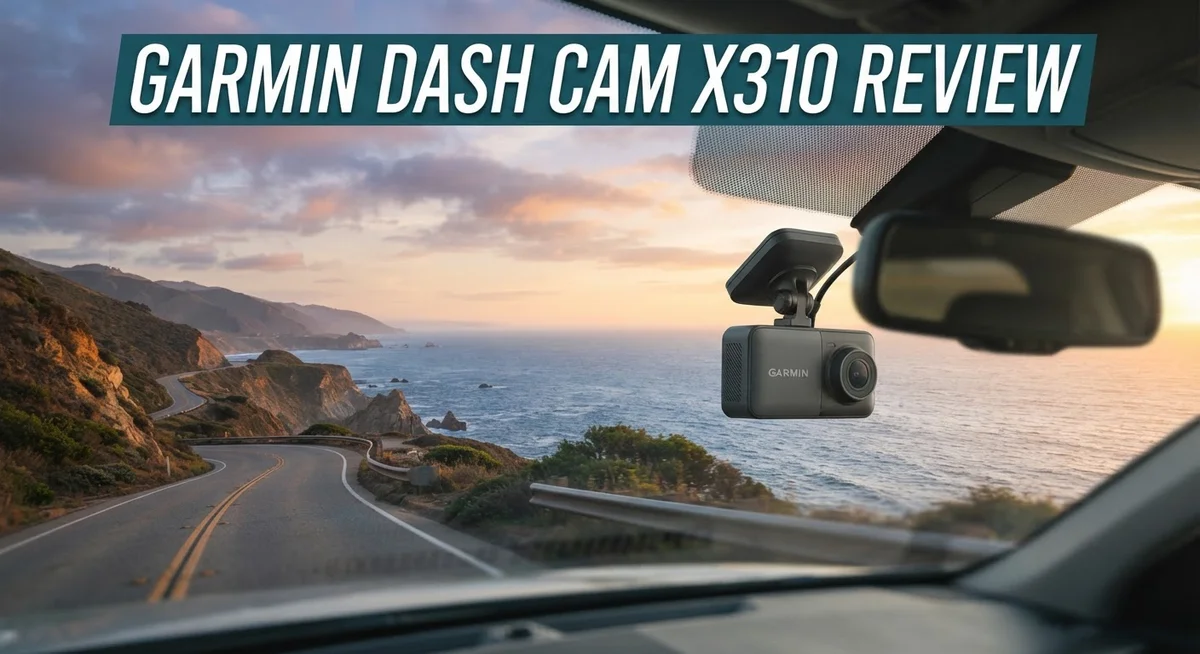
The Garmin Dash Cam X310 proves that size doesn’t limit performance. This camera measures just 2.8 inches wide, 1.7 inches tall, and 0.8 inches deep. You get a device that disappears on your windshield.
The compact body sits low and centered on your glass. It won’t block your view of the road ahead. Many drivers struggle with bulky dash cams that obstruct their sightline. This model solves that problem immediately.
Despite its small footprint, Garmin packed serious technology inside. The touchscreen fits perfectly on the front panel. You can tap it to review clips or adjust settings. The display stays responsive and bright in sunlight. Voice control adds another layer of convenience. You speak commands instead of fumbling with buttons while driving.
The camera’s lightweight design makes installation straightforward. Most people complete setup in under ten minutes. You mount it with the adhesive bracket or suction cup. The cable runs cleanly along your headliner. Cable management becomes easy because the device stays so thin.
Build quality feels solid throughout. The materials resist heat and moisture. Your dash cam won’t warp or crack during summer months. The lens remains protected by a sturdy cover. Garmin clearly focused on durability here.
The 2.8 inch display serves dual purposes. It shows live video while you drive. You can also review footage stored on your microSD card. The screen rotates between portrait and landscape modes. This flexibility helps you find the perfect viewing angle.
One thing to note: the compact size means less internal space. Garmin made smart choices about what features to include. You get the essentials without unnecessary bulk. The OBD-II port connection option keeps wiring minimal. Everything integrates cleanly into your vehicle’s interior.
The X310 appeals to drivers who value discretion and functionality. You want protection without drawing attention. This dash cam delivers exactly that. The small design never feels like a compromise. Instead, it feels like intelligent engineering. Garmin understood what modern drivers actually need.
User Interface and Control Options
The touchscreen display on the X310 makes controlling your dash cam simple and fast. You can tap through menus, adjust settings, and review clips without taking your eyes off the road for long. The 2.8 inch screen sits at a comfortable viewing angle and responds quickly to touches.
Voice control is where this camera really shines. You can start recording, save footage, or change settings just by speaking commands. This feature keeps your hands on the wheel and attention on driving. The voice system recognizes common phrases and rarely misinterprets your requests.
The button layout feels intuitive even if you have never used a Garmin dash cam before. Physical buttons sit on the side and top of the unit. They work as backup controls when you prefer not to use the touchscreen. The menu structure follows a logical flow that most drivers understand quickly.
Wi-Fi connectivity opens up extra control options. You can download footage to your phone, adjust settings remotely, and check camera status from your vehicle. The app connects reliably and transfers files at decent speeds. No need to remove the microSD card every time you want to review footage.
The OBD-II port connection adds convenience to your setup. Once wired, the camera powers on automatically when you start your vehicle. You do not need to flip switches or press buttons to begin recording. This hands-free approach means you never forget to activate the camera.
One small limitation is that the compact size leaves less room for physical controls. Some drivers prefer more buttons and knobs. The touchscreen and voice options make up for this, but it takes a few days to adjust if you come from a different brand.
Overall, the control system balances simplicity with advanced features. New users find it easy to master. Experienced dash cam owners appreciate the voice control and app integration. The X310 puts essential functions within reach without overwhelming you with unnecessary complexity.
Top 3 Alternatives
VIOFO A119 Mini

Last update on 2026-11-03 / Affiliate links / Images from Amazon Product Advertising API Some of the links on this website are affiliate links, which means that at no additional cost to you, I earn a commission if you click through and make a purchase. I only recommend products and services that I believe will add value to my readers. Thank you for your support!
The VIOFO A119 Mini delivers excellent video quality in a compact design. This camera captures 1440p footage at 30fps, giving you clear details of road incidents. The wide 170-degree lens covers most of what happens around your vehicle.
Build quality stands out on this model. It uses a Sony sensor that performs well in daylight and low-light situations. You get reliable footage whether you drive at noon or midnight. The camera mounts easily on your windshield without taking up much space.
Thinkware Q800 Pro

Last update on 2026-11-03 / Affiliate links / Images from Amazon Product Advertising API Some of the links on this website are affiliate links, which means that at no additional cost to you, I earn a commission if you click through and make a purchase. I only recommend products and services that I believe will add value to my readers. Thank you for your support!
The Thinkware Q800 Pro offers dual-channel recording capability. You get both front and interior camera footage simultaneously, which helps capture what happens inside and outside your car. This feature proves valuable for rideshare drivers or fleet operators.
Night vision performance is a strength here. The camera uses advanced sensors to record clear video even on dark roads. The 2K resolution provides sharp images you can use as evidence if needed. Installation is straightforward for most vehicle types.
70mai Dash Cam Pro

Last update on 2026-11-03 / Affiliate links / Images from Amazon Product Advertising API Some of the links on this website are affiliate links, which means that at no additional cost to you, I earn a commission if you click through and make a purchase. I only recommend products and services that I believe will add value to my readers. Thank you for your support!
The 70mai Dash Cam Pro brings smart features to dash cam recording. It connects to your smartphone app, letting you view and download footage remotely. The 1944p resolution captures fine details like license plates clearly.
AI-powered detection helps this camera identify accidents and dangerous driving automatically. The wide 150-degree field of view covers your lane and adjacent traffic. The compact form factor fits behind your rearview mirror without blocking your view. Night recording stays clear thanks to the improved sensor technology.
Safety and Incident Detection Features
The Garmin Dash Cam X310 includes several safety features that work together to protect you on the road. Forward collision warnings alert you when you’re getting too close to the vehicle ahead. Lane departure alerts notify you if you drift out of your lane without signaling. These systems run continuously while you drive, giving you real time feedback.
The camera’s incident detection technology automatically identifies sudden impacts or hard braking events. When an incident occurs, the X310 locks the footage so it won’t be overwritten. This protection means your evidence stays safe if something happens. You can review these recordings later through the touchscreen or your phone.
The 4K Ultra HD video with 140 degree field of view captures clear details of the road. The built in clarity polarizer reduces glare and reflections, which is especially helpful during sunrise or sunset driving. This feature improves visibility when sun glare would normally wash out footage. HDR technology handles bright and dark areas at the same time, so you see the full scene clearly.
The compact size actually works in your favor for safety. The small footprint means the camera stays discreet on your windshield. You won’t have a bulky device blocking your view or distracting you while driving. The low profile design keeps your attention on the road where it belongs.
Voice control adds another safety layer. You can control basic functions without taking your hands off the wheel or eyes off the road. Simply speak commands to start recording, save footage, or adjust settings. This hands free approach reduces driver distraction during critical moments.
The OBD-II port compatibility means you can set up constant power recording. The camera keeps running even when your car is parked, which catches hit and run incidents. This continuous protection works 24/7 to document what happens around your vehicle.
Together, these safety features create a complete protection system. The X310 combines smart detection, clear video, and convenient controls to help you stay safe on every drive.
Installation and Power Options
Getting your Garmin Dash Cam X310 up and running takes just a few minutes. The compact size works in your favor here, making the entire process quick and hassle free.
Windshield Mounting is straightforward. The camera comes with an adhesive mount that sticks securely to your glass. Position it high on the windshield, slightly off center, so it captures the road ahead without blocking your view. The small footprint means it stays out of sight and won’t obstruct your driving experience.
Once mounted, you’ll connect the power cable. The X310 offers two main power options for your setup. First, you can use the traditional 12V car outlet, which works well for temporary setups or testing. Simply plug the cable in and you’re ready to record.
For permanent installation, the OBD-II port connection is the smarter choice. This port sits under your steering wheel and provides constant power to the camera. The X310 automatically starts recording when you turn on your engine and stops when you power down. No manual switching needed. This setup keeps your dashboard clean since the cable runs hidden behind your panels.
The OBD-II connection also enables additional features. Your dash cam can access vehicle data like speed and GPS information. This information gets recorded alongside your video footage, which helps if you ever need evidence for insurance claims or accidents.
Cable Management matters for a clean installation. Run the power cord along your headliner and down the side of your windshield. Most installers tuck it behind trim pieces to keep it invisible. This approach protects the cable from damage and maintains your car’s interior appearance.
The X310 powers on instantly once connected. The touchscreen lights up, and you’ll see the live view from your camera. Wi-Fi connectivity lets you adjust settings from your phone if needed, though the on screen controls work just fine for most drivers.
Battery backup is minimal since the X310 relies on constant power. This isn’t an issue with either power option you choose. Your dash cam simply stops recording when power cuts off, which is normal behavior for this type of device.
Pros and Cons
Pros
- 4K Ultra HD video captures sharp details with a 140° field of view for road coverage
- Compact design fits discreetly on your windshield without blocking your view
- Touchscreen display and voice control make operation quick and intuitive
- Built in clarity polarizer reduces glare and reflections from your windshield
- Incident detection with forward collision and lane departure warnings adds real time safety alerts
Cons
- The 140° field of view is narrower than some competing models on the market
- MicroSD card must be purchased separately for video storage
- Compact size leaves limited space for physical button controls compared to larger units
Who Should Buy It
The Garmin Dash Cam X310 works best for drivers who want professional grade video quality without a bulky camera. You’ll appreciate this model if you spend significant time on the road and need reliable incident documentation.
Fleet managers and rideshare drivers benefit greatly from the X310. The automatic incident detection captures hard braking events and collisions instantly. You don’t need to manually save footage. The forward collision and lane departure warnings provide real time alerts while you drive.
If you own a newer vehicle with an OBD-II port, the X310 becomes even more valuable. You can set up constant power recording without running visible cables through your cabin. This means your camera operates 24/7, even when your car is parked.
Safety conscious commuters find the voice control feature particularly useful. You can adjust settings without taking your eyes off the road. The touchscreen display makes quick adjustments simple during your drive.
The compact design appeals to drivers who dislike large cameras blocking their windshield view. The 4K video quality captures license plates and road details clearly despite the small form factor. You get premium recording capabilities in a discrete package.
However, you should consider alternatives if you need an extremely wide field of view. The 140 degree coverage is solid but narrower than some competitors. You might also want to look elsewhere if you prefer physical buttons over touchscreen controls.
The X310 requires a MicroSD card for storage, so budget conscious buyers should factor in memory card costs separately. This camera suits drivers who prioritize video quality and safety features over the widest possible viewing angle.
Professional drivers and insurance conscious owners will find the incident detection and collision warnings invaluable. The automatic file protection during accidents prevents important footage from being overwritten. This camera protects your interests when accidents occur on the road.
Overall, choose the X310 if you want a compact, intelligent dash cam with strong video performance and active safety monitoring.
Final Verdict
The Garmin Dash Cam X310 stands out as a smart pick for drivers who want clear video without extra bulk on their windshield. Its blend of sharp footage and simple controls makes daily use easy.
This dash cam shines brightest for people who value convenience over raw specs. Voice commands and a touchscreen mean you spend less time fumbling with buttons and more time focused on the road.
If you compare it to rivals like the VIOFO A329S, you’ll notice that model uses a newer sensor for tricky lighting. Drivers who mostly need night clarity might look there first.
For those who want the best low light results specifically, the Rove R2-4K Dual Pro often gets the nod. It handles dark roads with more detail in shadows.
Buyers who want something smaller and simpler could try the NextBase Piqo instead. It skips some features but keeps things basic and easy to carry.
Still, the X310 holds its own for most everyday drivers. Its blend of safety alerts and clean design covers what typical commuters actually need.
Think about how you drive before deciding. Long highway trips benefit from steady recording and instant alerts, both strengths of this camera.
City drivers who deal with tight turns and blind spots might wish for a wider lens. That’s the one trade off worth remembering here.
Overall, this camera fits drivers who prioritize ease of use and dependable footage over having every possible feature. It handles core dash cam duties without fuss.
Choose the X310 if steady performance and simple operation matter most to you. Look at other options only if you need a wider view or specialized night vision beyond what this model offers.
For most day to day driving needs, the Garmin Dash Cam X310 delivers solid, reliable results you can trust on every trip.
Frequently Asked Questions
Does the Garmin Dash Cam X310 record in 4K?
Yes, the X310 captures video in 4K Ultra HD. It also includes HDR technology to handle bright sunlight and shadows better. The 140° field of view lets you see what’s happening in front of your vehicle clearly.
Can I control the X310 with voice commands?
Absolutely. The dash cam responds to voice control, so you don’t need to touch the screen while driving. This keeps your attention on the road. The touchscreen display also works if you prefer manual control.
What memory card do I need for this dash cam?
You’ll need to buy a MicroSD card separately for video storage. The X310 doesn’t come with one included. Make sure to pick a card with good write speeds to handle 4K recording smoothly.
Does the X310 work with older vehicles?
The X310 connects to your vehicle’s OBD-II port for constant power, which most newer cars have. If your vehicle lacks an OBD-II port, you’ll need an alternative power solution. Check your vehicle’s manual to confirm compatibility.
What safety features does the X310 offer?
The camera includes incident detection that activates when it senses an impact. Forward collision warnings alert you if a vehicle ahead stops suddenly. Lane departure warnings notify you if you drift out of your lane. These features work together to keep you safer on the road.

Hello, i’m Ivoria i am the face behind Tech Tracker Blog. I am passionate about my work and love to explore gadgets and share about my experience.