Garmin Dash Cam Tandem Review 2026: Worth the Price Tag?
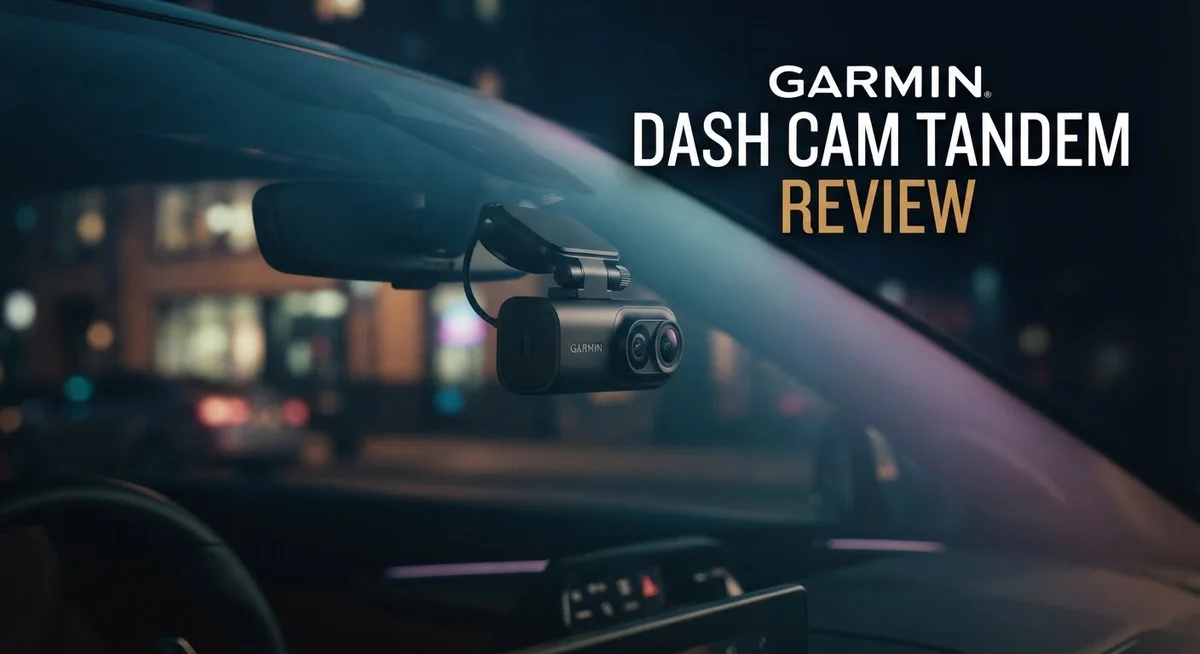
Do you want a dash cam that watches both the road and your cabin? The Garmin Dash Cam Tandem does exactly that. It packs two lenses into one small unit.
This dash cam gives you a front view and a rear view at the same time. The front lens records in sharp 1440p with HDR. It captures license plates and road signs with great clarity.
The interior lens uses NightGlo night vision. It picks up faces clearly, even in low light. This makes it a smart pick for rideshare drivers and families who want extra security.
In a Nutshell
- Sharp front footage: The front lens shoots in 1440p with HDR. Road details stay clear even in bright or dark light.
- Interior quality lags: The cabin camera only records at 720p. It works but feels basic next to the front lens.
- Voice commands that work: You can talk to the cam to save clips or take photos. No fumbling with buttons while driving.
- No screen on the unit: This cam skips a built in display. You rely fully on the Garmin Drive app to view or adjust settings.
- Simple setup: Mounting and wiring take little effort. Most users get it running in minutes without extra tools.
- Strong rivals exist: Options like the Thinkware U3000 or a Garmin 67W plus Mini 2 combo offer similar dual coverage. Compare features before you decide.
Key Features and Specifications
The Garmin Dash Cam Tandem combines two cameras into one compact unit. You get a front lens and an interior lens working together to capture what happens on the road and inside your car.
The front camera records at 1440p with HDR technology. This resolution gives you crisp, detailed footage of the road ahead. The HDR feature helps balance bright sunlight and dark shadows, so you see license plates and road signs clearly even in tricky lighting.
The rear or interior camera operates at 720p. While this is lower than the front lens, it still captures enough detail to identify passengers or monitor your cabin. The 720p resolution works well for most situations, though it does not match the front camera’s sharpness.
NightGlo night vision is built into both lenses. This technology uses advanced light amplification to record clear footage when it is dark outside or inside your car. Facial details remain visible even at night, which matters if you need to identify someone during an incident.
The unit includes GPS functionality that logs your location, speed, and direction. This data helps reconstruct what happened during an accident or incident.
Voice control lets you operate the camera hands free. You can save clips, take photos, or start recording without touching any buttons. The voice commands work reliably in real world driving conditions.
The Garmin Drive app connects your smartphone to the dash cam via Bluetooth and GPS. The app lets you view live footage, adjust settings, and download videos from anywhere. You do not need to remove the memory card or visit your car.
The design stays compact and sleek. The single unit mounts easily on your windshield without blocking your view. Installation takes minutes and requires no professional help.
These specifications make the Tandem useful for drivers who want both road coverage and cabin monitoring. The front video quality satisfies most users, while the interior camera handles basic cabin surveillance. Together, they provide two angles of protection in one small device.


Last update on 2026-11-18 / Affiliate links / Images from Amazon Product Advertising API Some of the links on this website are affiliate links, which means that at no additional cost to you, I earn a commission if you click through and make a purchase. I only recommend products and services that I believe will add value to my readers. Thank you for your support!
Video Quality and Night Vision Performance
The Garmin Dash Cam Tandem delivers impressive front video quality that captures road details with clarity. The 1440p resolution with HDR technology means you get sharp footage even when lighting conditions change quickly. Bright sunlight and dark shadows no longer wash out your video. The front lens handles fast movement well, so cars, license plates, and road signs stay crisp.
The rear interior camera operates at 720p, which is lower than the front. This resolution works fine for identifying passengers or recording cabin activity. However, the step down from 1440p to 720p is noticeable if you compare the two feeds side by side. The interior footage serves its purpose without being exceptional.
Night vision performance is where the Tandem shines. The NightGlo night vision system captures facial details even in low light. Street lamps, moonlight, and ambient light from nearby vehicles help the camera see clearly. You can actually identify people inside your car at night, which matters for security. The front lens also performs well after dark, showing road markings and obstacles.
The dual lens setup means you get two different recording angles simultaneously. The front camera watches the road ahead. The interior lens monitors your cabin and rear passengers. Both cameras record at the same time without slowing down or dropping frames. This continuous dual recording is a major strength.
One limitation appears in interior recording experience. Users report that cabin recording feels “clunky” to manage. Switching between front and interior views through the app takes extra steps. The workflow isn’t as smooth as some competitors offer. Despite this, the actual video quality from the interior lens remains functional for security purposes.
The HDR technology on the front camera really matters during sunrise and sunset drives. These tricky lighting moments normally create glare or dark spots in video. The HDR balances exposure across the frame, so you see more detail everywhere. This feature alone makes a real difference in accident documentation.
Design, Installation, and App Integration
The Garmin Dash Cam Tandem comes in a compact, single unit that houses both front and rear cameras. This design keeps your windshield clean and uncluttered. The device sits flat against your glass without blocking your view of the road.
Installation is straightforward. You mount the unit on your windshield using the adhesive pad or suction cup. The power cable runs down to your car’s 12V outlet or hardwired connection. Most drivers finish setup in under 15 minutes without any special tools.
The unit has no built in display screen. This means you cannot see footage directly on the dash cam itself. Instead, all playback and settings happen through your smartphone.
The Garmin Drive app is the command center for this device. You download it on your phone and connect via Bluetooth and GPS. The app lets you view live footage from both cameras in real time. You can also save clips, adjust settings, and review recordings from past trips.
Voice commands add convenience during drives. You can tell the camera to save a clip or snap a photo without touching your phone. This keeps your hands on the wheel and eyes on the road.
The rear interior camera positioning deserves attention. The Tandem mounts as one unit, so the rear lens points into your cabin. This setup captures what happens inside your vehicle, not behind it on the road. Some drivers find the interior recording experience clunky and annoying to manage. You need to decide if cabin monitoring matters more to you than rear road coverage.
The app syncs your GPS data automatically. It records your speed, location, and direction during each trip. This information proves helpful if you need to reference exactly where an incident occurred.
Overall, the design philosophy prioritizes simplicity and compact form. The app integration works well for most users. The main trade off is losing a dedicated screen, but the smartphone app compensates with full control and easy access to your footage anywhere.
Top 3 Alternatives
VIOFO A139 Pro

Last update on 2026-11-18 / Affiliate links / Images from Amazon Product Advertising API Some of the links on this website are affiliate links, which means that at no additional cost to you, I earn a commission if you click through and make a purchase. I only recommend products and services that I believe will add value to my readers. Thank you for your support!
The VIOFO A139 Pro offers dual-channel recording with excellent video quality. This dash cam captures the front and rear of your vehicle simultaneously. The 4K resolution on the front camera gives you sharp, detailed footage.
Night vision performance stands out as a major strength. You get clear video even in low-light conditions. The wide-angle lens covers most of what happens around your car. Loop recording saves storage space by overwriting old footage automatically.
The interface is straightforward and easy to use. Setup takes just minutes. GPS tracking records your location and speed during drives. The app lets you review footage from your phone whenever you need it.
Nextbase 622GW

Last update on 2026-11-18 / Affiliate links / Images from Amazon Product Advertising API Some of the links on this website are affiliate links, which means that at no additional cost to you, I earn a commission if you click through and make a purchase. I only recommend products and services that I believe will add value to my readers. Thank you for your support!
Nextbase 622GW provides reliable 4K front recording with a solid build quality. This dash cam includes emergency SOS features that alert authorities if you crash. The cloud backup system stores your important footage safely online.
Emergency response capabilities make this model stand out for safety-conscious drivers. You get instant alerts if an incident occurs. The 4K clarity helps capture license plates and road details clearly.
Touchscreen controls make navigation simple. The device connects to WiFi for easy file transfer. Parking mode records when your car is stopped. Voice control lets you start recording without taking your eyes off the road.
70mai Dash Cam Pro

Last update on 2026-11-18 / Affiliate links / Images from Amazon Product Advertising API Some of the links on this website are affiliate links, which means that at no additional cost to you, I earn a commission if you click through and make a purchase. I only recommend products and services that I believe will add value to my readers. Thank you for your support!
The 70mai Dash Cam Pro delivers 2.7K resolution with excellent value. This camera captures wide angles of the road ahead. The compact design fits discreetly behind your windshield.
AI-powered features detect accidents and unusual driving patterns automatically. The system alerts you to potential hazards. Night vision captures clear footage in darkness. Loop recording manages storage efficiently on your memory card.
Setup is quick and simple for most users. The app provides easy access to your video library. GPS functionality records your route and speed. Parking mode protects your vehicle when parked.
Interior Camera Limitations and Usability
The interior camera on the Garmin Dash Cam Tandem operates at 720p resolution. This is a step down from the front lens, which records at 1440p. For cabin monitoring, this resolution captures basic details but lacks the sharpness of higher end alternatives.
Users report that interior recording feels clunky and annoying to manage. The 720p feed works for identifying passengers or documenting cabin events, yet it does not match the clarity you get from the front camera. If you need crisp facial recognition or fine detail capture inside your vehicle, this limitation stands out.
The rear camera placement matters for usability. You mount it on your windshield as part of the single unit design. This positioning means the interior view depends on your windshield angle and vehicle layout. The camera does not swivel or adjust independently, so you cannot customize the cabin monitoring angle after installation.
NightGlo night vision does apply to the interior lens. This helps when recording inside your car at night or in low light. Facial details become visible even in dim conditions, which adds value for security purposes. However, the 720p base resolution still limits how sharp those details appear.
The Garmin Drive app lets you access interior footage on your smartphone. You can review recordings, but the lower resolution becomes more obvious on larger screens. Playback works smoothly, yet the trade off between front and rear quality remains clear.
Interior recording does not offer frame rate options on the Tandem. You get what the system provides without customization. Some users wish for higher resolution or more control over recording settings.
For drivers who prioritize front road coverage and only need basic cabin monitoring, the 720p interior camera suffices. If you depend on sharp interior video for evidence or detailed documentation, consider whether this resolution meets your needs. The Tandem excels at front recording but asks you to accept lower interior quality as part of its compact, single unit design.
Voice Control and Smart Features
Voice control on the Garmin Dash Cam Tandem lets you manage recordings without taking your hands off the wheel. You can trigger manual recordings, adjust settings, and access features using simple voice commands. This hands free approach works well during drives when you need to stay focused on the road.
The voice commands integrate with the Garmin Drive app on your smartphone. Your phone connects to the dash cam via Bluetooth and GPS. This connection means voice commands work reliably as long as your phone stays paired with the device.
Smart features on the Tandem go beyond basic voice control. The built in GPS automatically logs your location data with every recording. This location tracking proves useful if you need to reference where an incident occurred. The GPS data syncs directly to the Garmin Drive app for easy access later.
The NightGlo night vision applies to both the front and rear cameras. This smart technology captures facial details and license plates even in low light conditions. You get clear footage whether you’re driving at night or parked with the interior camera active.
The Garmin Drive app serves as the main hub for all smart features. You can review footage, manage settings, and access GPS data from your smartphone. The app also lets you download videos directly to your phone for insurance claims or evidence purposes.
One consideration is that interior recording management feels less refined than front camera controls. While the app provides access to interior footage, users report the experience as somewhat clunky. The 720p interior resolution also limits how much detail you capture inside the cabin.
For drivers who want convenient voice control and GPS tracking, the Tandem delivers solid performance. The voice commands work reliably during normal driving conditions. The GPS integration means you always know exactly where your footage was recorded. However, expect the interior camera experience to feel less polished than the front recording capabilities.
Pros and Cons
Pros
- Compact single unit design minimizes windshield obstruction and looks sleek in your car
- Front camera delivers sharp 1440p video with HDR for clear footage during bright sunlight and shadows
- NightGlo night vision captures facial details on both front and rear lenses, even in low light
- Voice commands let you control recording without taking your hands off the wheel
- Easy self installation and the Garmin Drive app connects smoothly via smartphone
Cons
- Interior camera maxes out at 720p, which limits detail for cabin monitoring
- Interior recording feels clunky and annoying to manage compared to front camera controls
- No built in display screen means you must use your phone to view footage or adjust settings
- Premium positioning makes this a significant investment for drivers who only need basic cabin coverage
Who Should Buy It
The Garmin Dash Cam Tandem works best for specific driver types who need both front and rear coverage in one compact unit.
You should buy this model if you drive a sedan, coupe, or hatchback where space is limited. The sleek single-lens design fits easily on your windshield without blocking your view. Larger vehicles like SUVs or trucks may benefit more from separate front and rear units.
This camera suits drivers who prioritize front road footage above all else. The 1440p front lens captures sharp details during daytime and challenging lighting. If your main concern is documenting accidents or incidents on the road ahead, the Tandem delivers excellent performance here.
Consider this model if you want basic interior cabin monitoring without needing premium cabin footage. The 720p interior camera handles general security tasks. You can see if someone approaches your parked car or monitor passenger activity during drives. However, if you need crystal-clear facial recognition or detailed cabin video, this rear lens has limitations.
Voice control appeals to drivers who want hands-free operation. You can start, stop, and manage recordings while keeping your eyes on the road. GPS integration lets you track your vehicle’s location and speed automatically.
The Garmin Drive app must work on your smartphone. Make sure your phone has Bluetooth and GPS capabilities before purchasing. You’ll use this app regularly to review footage and adjust settings.
This dash cam fits drivers who appreciate minimal installation hassle. Setup takes just a few minutes without professional help. The app connects smoothly once you pair your phone.
Skip this model if you need a built-in display screen. The Tandem relies entirely on your smartphone for viewing and control. Some drivers prefer standalone screens that don’t depend on phone battery or connectivity.
Finally, buyers who want straightforward, no-nonsense recording will appreciate the Tandem’s approach. It focuses on core features without unnecessary complexity. If you need advanced AI detection, driver alerts, or extensive customization options, other Garmin models may serve you better.
Final Verdict
The Garmin Dash Cam Tandem stands out as a smart choice for drivers who want a clean, single unit solution. It blends strong front camera performance with helpful smart features in one sleek package.
Video quality on the front lens remains a major strength. The HDR support helps capture true colors and details even in tricky lighting.
The rear camera does its job for basic cabin awareness. It won’t replace a dedicated interior monitoring camera, but it adds a helpful layer of security.
Compared to the Thinkware U3000, the Tandem trades some rear camera resolution for a smaller footprint. If space and looks matter most to you, this trade off makes sense.
Drivers who already own other Garmin models, like the 67W or Mini 2, might find those setups offer sharper interior footage. But that comes with two separate units instead of one compact device.
The Tandem fits best for people who value simplicity. You get one unit, one app, and one setup process instead of juggling multiple accessories.
Rideshare drivers and daily commuters will likely appreciate this balance. They get solid front road coverage plus enough interior footage for peace of mind.
Families who share a car might also enjoy the practical design. Kids, pets, or passengers stay lightly monitored without a bulky camera system taking over the dashboard.
If you need premium interior detail for business purposes, look elsewhere. The 720p rear lens limits how much detail you can capture inside the cabin.
For most everyday drivers, though, the Tandem checks the right boxes. It offers strong front performance, useful smart features, and a design that stays out of your way.
Overall, this dash cam suits drivers who want simplicity without sacrificing solid front camera quality. It’s a smart pick if you value a clean setup over separate front and rear units.
Frequently Asked Questions
Does the Garmin Dash Cam Tandem record in 4K?
No, it does not. The front camera shoots at 1440p with HDR, which delivers sharp road footage. The rear interior camera maxes out at 720p. Both resolutions work well for most drivers, but they fall short of 4K standards.
Can I watch videos without a smartphone?
The Tandem has no built-in display screen. You must use the Garmin Drive app on your smartphone to view, manage, or download footage. This design keeps the camera compact and unobtrusive on your windshield.
How does the interior camera perform for cabin monitoring?
The rear camera captures basic cabin activity in 720p. It records what happens inside your vehicle clearly enough to identify people and events. However, users report that managing interior footage feels clunky compared to the front camera controls. If you need premium cabin video quality, this camera may disappoint.
Is voice control reliable?
Yes. Voice commands work well for hands-free operation while driving. You can start, stop, or adjust recording without touching buttons. This feature suits drivers who want to stay focused on the road.
How does the Tandem compare to running two separate cameras?
The Tandem packs both lenses into one compact unit. The Garmin Dash Cam 67W plus Mini 2 setup gives you better rear resolution, but requires two devices and more installation work. The Tandem trades some rear quality for simplicity and a cleaner windshield look. Choose based on whether you prefer one device or higher interior video quality.

Hello, i’m Ivoria i am the face behind Tech Tracker Blog. I am passionate about my work and love to explore gadgets and share about my experience.