INMO GO3 AI Glasses Review: Complete Buyer’s Guide
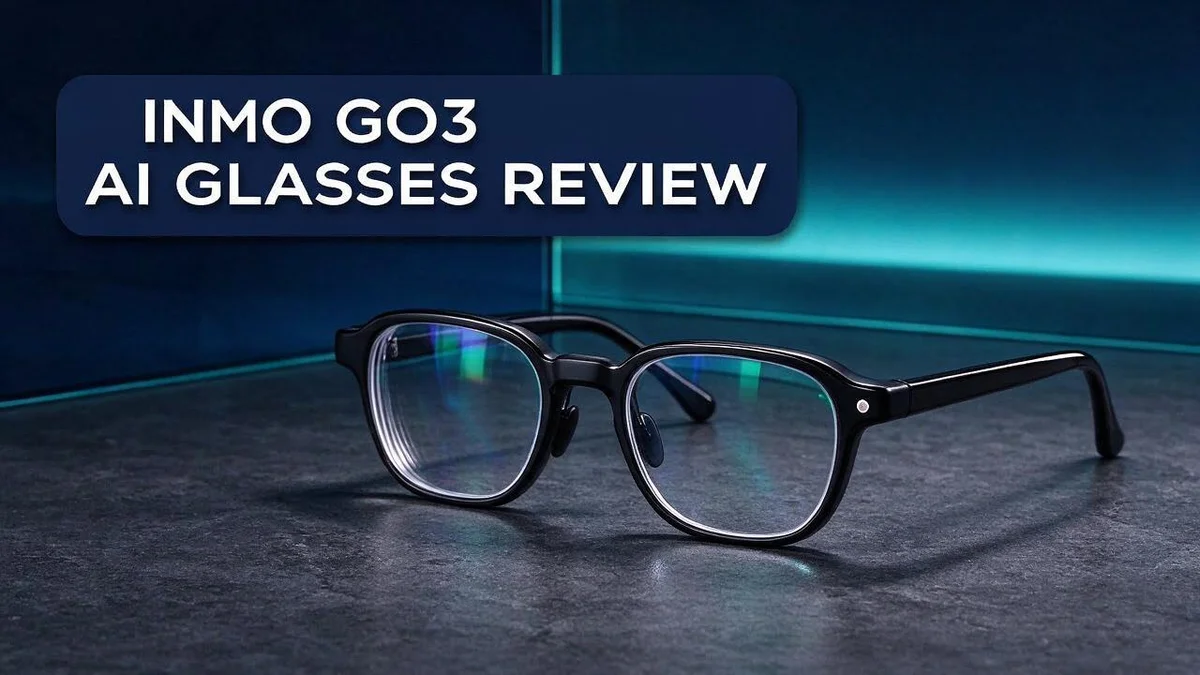
Smart glasses are getting more useful every day. The INMO GO3 AI Glasses put a small display right onto the lens. They look like normal glasses, so you can wear them anywhere.
Imagine reading live subtitles while someone speaks another language. The GO3 shows both the original and translated text on the lens. That makes travel and chats with new friends much easier.
The glasses also act as a voice controlled AI assistant. You can use them hands free. They offer an AI teleprompter, meeting help, and quick voice notes too.
In a Nutshell
- Looks like regular glasses: The GO3 keeps a normal eyewear style, so most people will not notice it is a smart device. You can wear it at work, at school, or on a night out.
- A display on the lens: Helpful information appears right on the lens. You can check details without pulling out your phone.
- An AI teleprompter for speakers: The teleprompter helps you deliver speeches or presentations with more confidence. You can keep your eyes on the room instead of your notes.
- A meeting assistant: The AI meeting assistant supports you during group calls and discussions. You can focus on the conversation while the glasses handle the details.
- Quick voice notes: You can capture ideas on the go and review them later. This saves time when a thought pops up and you have no pen.
- Light and easy to keep charged: The frame feels light for all day wear. The swappable battery lets you keep a spare pack and avoid long waits.
- Rivals to consider: Shoppers often compare the GO3 with the Magic AI Glasses J, the Even Realities G2, and the INMO Air 3, which is its sibling model.
Research on specific drawbacks is limited, so read recent reviews before you decide.
Design and Wearability

Last update on 2026-11-19 / Affiliate links / Images from Amazon Product Advertising API Some of the links on this website are affiliate links, which means that at no additional cost to you, I earn a commission if you click through and make a purchase. I only recommend products and services that I believe will add value to my readers. Thank you for your support!
Comfort matters most when you wear glasses for long periods. A frame that feels right helps you forget you have them on.
Everyday wear is the real test. You might wear the GO3 while walking, typing, or sitting in meetings. Each activity puts a little pressure on the nose and ears.
Balance also plays a big role in comfort. A well balanced pair sits level on the face instead of slipping down during movement.
Watch how the arms rest. The temple pieces should sit snug behind your ears without digging in. Test this during a long sitting session.
Try before you commit. Wear the frame for at least fifteen minutes in a shop or at home. Notice any pressure points before your day gets busy.
Look in a mirror and turn your head slowly from side to side. Check whether the frame shifts or pinches near the nose bridge.
Next, sit down and stand up several times. A stable pair stays put during quick movements, which matters for walking and presenting.
Think about your face shape. Glasses fit people in different ways. A size that suits a friend may not suit you, so compare options carefully.
Prescription wearers need extra care. Ask about lens options before you buy, so the display sits well in your view.
Weight distribution matters as much as total weight. A frame that spreads pressure evenly feels lighter than one that pushes on a single spot. Hold the glasses and notice where the weight feels centered.
Cleaning and daily care also affect wearability. Dirty lenses or loose screws can make even a good frame feel uncomfortable. Check the hinges often and wipe the lenses with a soft cloth.
Overall, the GO3 suits people who want a normal look for everyday use. A comfortable fit lets you enjoy the smart features without distraction.
Finally, consider how often you will wear the glasses. Daily users may value comfort more than style, while occasional users may focus on looks.
Display and Live Translation
Text on the lens is the main draw. Many people pull out a phone to check a translation. The GO3 keeps that information in your line of sight instead.
Eye contact stays with the speaker. You look at the person, not a small screen in your hand. This small change makes conversations feel more natural.
Seeing both versions together helps you check meaning. You can match the original words with the translated words. This makes language practice easier over time.
Think about where you will use the glasses. A lecture hall, a busy cafe, and a quiet office all have different light levels. Test the display in the places you visit most often.
Text size and clarity matter too. Some people find small words hard to read on a tiny lens. Ask for a demo and check that the words stay sharp.
Brightness affects comfort as well. Strong sunlight can wash out the lens. Try the glasses outside for a few minutes before you decide.
Keep the lens clean. Smudges and fingerprints blur the text. Carry a soft cloth and wipe the lens often.
Attention still matters most. Pause the subtitles when you need to focus on a task, like crossing a street or climbing stairs. Your safety comes first.
Compare how each pair places text in your view. Some screens sit low, while others sit higher. Choose the spot that feels least distracting for your eyes.
Sound plays a role too. Pair the glasses with earbuds if the room is loud. Clear audio makes the translated text easier to match with the speech.
Battery life also shapes display use. Long subtitle sessions draw more power. The swappable battery helps you keep going during a full day.
Think about your daily needs. Translation may matter more for travel, while voice notes may matter more for work. Pick the features that fit your routine.
The display makes the GO3 stand out. It turns the glasses into a quiet helper for everyday talks. Give it a fair test before you decide.
AI Teleprompter and Meeting Tools
Script prep makes the biggest difference with any teleprompter. Break your notes into short lines. Short lines are easier to read at a glance and keep your delivery natural.
Run a rehearsal before the real event. Read the script aloud while wearing the glasses. Notice where your eyes drift and adjust the text layout.
Meetings need a different approach. Live talks move fast, and people jump between topics. Keep your focus on the room, and let the glasses handle the details.
Think about who else sits in the room. Some colleagues may not want to be recorded or summarized. Always ask for permission before you turn on any capture feature.
Privacy rules differ by workplace. Check your company policy before you use the glasses in sensitive talks. Clear rules protect you and your team.
Plan for battery use during long sessions. The display and recording features can drain power faster. Carry a spare battery or plan breaks to swap it.
Test the audio and text together. Ask a colleague to sit across from you. Check that they hear you clearly and that your lens text stays easy to read.
Use the tools as a support, not a stage. Your audience cares about your message. The glasses should feel like a light assist that keeps you on track.
Pick the right room for your setup. Quiet rooms make voice commands work better. Noisy halls can confuse the voice assistant and slow your flow.
Seating matters too. Sit where you can face the group and keep a clear view of the screen or table in front of you.
Set a clear goal for each session. Decide if you want notes, a script, or simple support. A clear goal keeps the tools simple and useful.
Review your notes soon after the meeting. Memory fades fast, so read the summary while the details feel fresh. Fix any errors right away so they do not spread.
Small habits make these tools feel natural. Practice a few minutes each day. Soon the glasses will feel like a normal part of your routine.
Top 3 Alternatives
Even Realities G1

Last update on 2026-11-19 / Affiliate links / Images from Amazon Product Advertising API Some of the links on this website are affiliate links, which means that at no additional cost to you, I earn a commission if you click through and make a purchase. I only recommend products and services that I believe will add value to my readers. Thank you for your support!
The Even Realities G1 looks like regular eyewear. That is its biggest strength. Most people will not notice it on the street.
The lenses show small text for messages, calendar alerts, and turn by turn directions. You can read these hints without pulling out your phone. The glasses pair with a companion app for easy setup. They feel light enough for all day wear. Many people like its simple style for work and play.
Brilliant Labs Frame

Last update on 2026-11-19 / Affiliate links / Images from Amazon Product Advertising API Some of the links on this website are affiliate links, which means that at no additional cost to you, I earn a commission if you click through and make a purchase. I only recommend products and services that I believe will add value to my readers. Thank you for your support!
The Brilliant Labs Frame takes a different path. It is an open source pair of smart glasses built for developers and tinkerers. Many users enjoy its flexible design.
You can customize the software and build your own apps. The frame includes a small display and a built in AI assistant. This makes it a good pick for people who love to experiment with new ideas. Developers can also share their projects with others.
Rokid AR Lite

Last update on 2026-11-19 / Affiliate links / Images from Amazon Product Advertising API Some of the links on this website are affiliate links, which means that at no additional cost to you, I earn a commission if you click through and make a purchase. I only recommend products and services that I believe will add value to my readers. Thank you for your support!
The Rokid AR Lite focuses on a bright, clear view for everyday tasks. It shows translations, navigation cues, and phone notifications right in your line of sight. Its display stays easy to see in busy places.
Many people use it while traveling or during quick lookups. It connects to a smartphone, so setup stays simple. Its design aims for comfort during longer sessions. Buyers should check the battery life before a long trip.
Battery and Recording Capabilities
The swappable battery gives you a simple backup plan. Keep one charged spare in your bag. When the first battery runs low, swap it and keep going. Nobody needs to search for an outlet in the middle of a conversation.
Recording adds more than a fun extra. The photo and video features capture what you see from your own point of view. This works well for workshops, trips, or practical tasks. You can review the footage later and spot details you missed.
Plan your storage before each outing. Video files take up space quickly. Clear old clips from the device or move them to a computer after every trip. A little planning keeps the glasses ready for the next moment.
Think about who appears on camera. Some people feel uneasy when a lens points their way. Ask before you film a friend or a stranger. Good manners build trust and keep the mood friendly.
Short clips often work better than long ones. A ten second clip can capture a key moment without filling your storage. Shorter files also share more easily with friends. Keep each recording focused on one main subject.
Charge both batteries the night before. Start each day with full power. Store the spare in a small pouch so it stays clean and dry. Label your pouch if you own more than one pair.
Keep a simple recording routine. Start recording only when something matters. This habit saves storage space and keeps your attention on the people around you.
Run a quick test before the main event. Record a few seconds and play it back. This shows you the framing and the overall view. Fixing problems early saves time later.
Pack a small charging kit for travel. A compact cable and a wall adapter fit in most bags. Check that the cable fits your device first. Pack them with your spare battery. Store it in the same pocket each time. This simple step keeps your glasses ready for long trips.
Pros and Cons
Pros
- The design looks like normal glasses for everyday wear.
- Voice control lets you use the AI assistant without touching the frame.
- Live translation helps you follow conversations in other languages.
- Meeting tools and voice notes help you track key points.
- The frame feels light enough for long days out.
Cons
- Public details about the GO3 remain limited right now.
- Claims that the GO3 beats rival models are not verified yet.
- Translation accuracy may drop in noisy rooms or with strong accents.
- Early buyers have few independent reviews to compare against.
Who Should Buy It
The GO3 suits people who want tech that stays out of the way. Many smart devices demand constant attention from your hands and eyes. This pair aims to keep your focus on the people around you.
Frequent travelers may find it useful. Live subtitles can help you read a menu or follow an announcement in another language. You can glance at the lens instead of digging out a phone. That small change can make busy trips feel much easier.
People who are hard of hearing could explore it as a support tool. Subtitles that appear on the lens may help during group talks or noisy events. It is not a medical device, so speak with a doctor about your specific needs.
Language learners can use the translated text as a study aid. Reading the words while hearing speech may sharpen listening skills over time. Steady practice works better than occasional use, so plan a regular routine.
Shoppers who already use another brand should compare features closely. Rivals such as the Meta Ray-Ban Display and Even Realities G2 offer different tools. Make a list of must-have functions before you decide. Choose the model that fits your habits, not the one with the loudest hype.
Everyday users who want quick answers without a phone will likely enjoy it most. Walking the dog or cooking dinner can make pulling out a phone feel awkward. Voice requests feel more natural in those moments. Simple tasks can happen while your hands stay busy.
Cautious shoppers may prefer to watch launch weeks before they commit. Later updates often fix early issues and add clearer guidance. Waiting a little longer can give you more confidence in your choice.
Your daily habits decide whether it fits you. Ask yourself how often you need translation, notes, or hands-free help. Be honest about your routine. Honest answers make the decision much easier and keep your expectations realistic.
Final Verdict
Our verdict is simple. The INMO GO3 offers a wide feature set in a frame that looks ordinary. It fits people who want useful tools without a bulky gadget.
Think about your daily routine first. Some features matter more to certain people than others. A teacher, a salesperson, or a student may get more from the meeting and note tools.
Try the glasses before you commit. Visit a store if one is nearby. Wear the frame for at least thirty minutes to check comfort and fit. Notice whether the lens display feels clear in bright light.
Check the return policy too. A clear return window gives you time to test the voice commands. It also protects you if the display feels distracting during daily tasks.
Watch for software updates. The feature list may grow as the company adds new functions. Ask the seller how often they release fixes and improvements.
Compare the rivals side by side. Look at the Meta smart glasses, Even Realities G2, Magic AI Glasses J, and INMO Air 3. Write down which features you would use each week.
Keep privacy in mind. Recording in public places or workplaces may break local rules. Ask permission before you film coworkers, friends, or customers.
Be patient with new technology. Early models often reveal small flaws over time. Independent reviews will multiply as more people buy and test the device.
Consider how you plan to use it. Daily commuters may value quick voice prompts while moving between places. Students may prefer the note taking features during long lectures.
Set your expectations clearly. The glasses handle many tasks, but they will not replace a phone. Use them as a helpful extra tool instead.
Here is a quick checklist for buyers. Confirm that your language needs match the translation list. Test the voice controls in a noisy room. Read the warranty terms with care.
Our closing thought is positive but cautious. The INMO GO3 can serve as a helpful companion for curious users. Take your time, test it well, and choose the option that fits your life.
Frequently Asked Questions
Does the GO3 show text on the lens?
Yes, the GO3 has an on-lens display. Subtitles and translated text appear right in your view. Some sources say the first Go models used microLED panels, so check the latest specs before you decide.
Can I record what I see?
Yes, the glasses can capture photos and video from your point of view. This helps you save moments without holding up a phone. Keep the lens clean so your shots stay sharp.
Can I use the teleprompter during a talk?
The AI teleprompter shows your script on the lens, so you can read along while you speak. Practice first so your pace feels natural. This feature may suit presenters, teachers, and anyone who gives speeches.
How long does the battery last?
The battery is swappable, so you can keep a charged spare ready. Swapping takes only a moment. Public battery life numbers are not clear yet, so test the glasses through a full day of use.

Hello, i’m Ivoria i am the face behind Tech Tracker Blog. I am passionate about my work and love to explore gadgets and share about my experience.