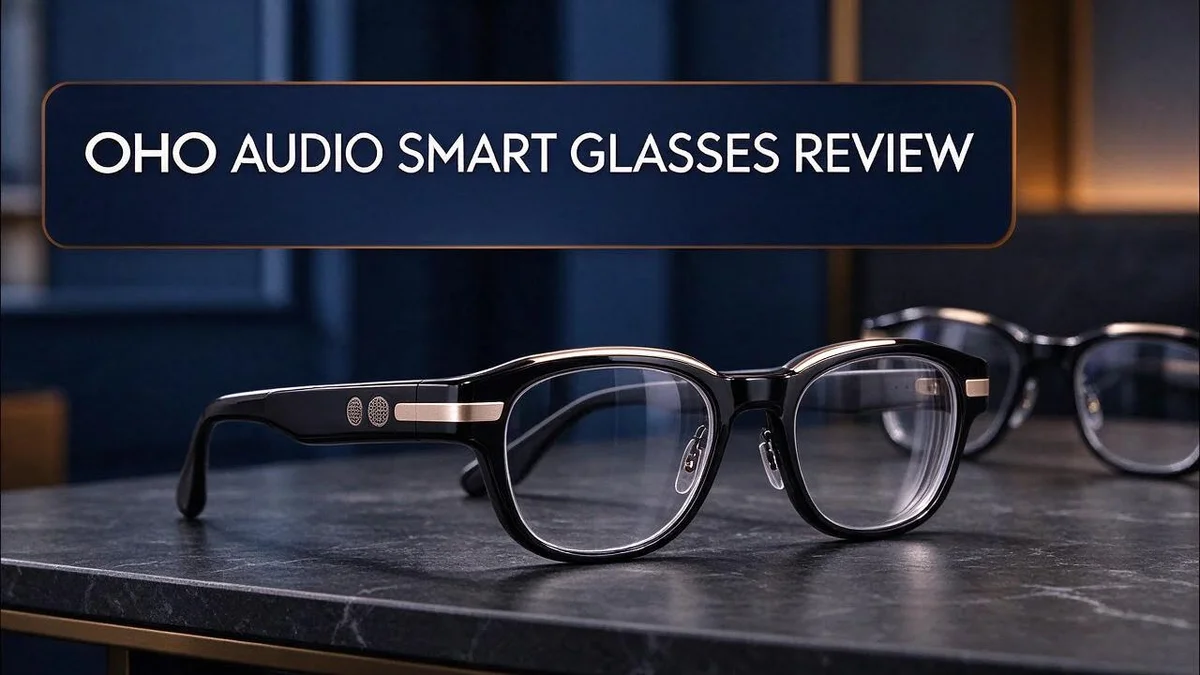
OHO Audio Smart Glasses Review: Open-Ear Audio, 4K Camera and Key Features
Want music on the go without blocking your ears? OHO Audio smart glasses could be the perfect pick for you.
They look like regular sunglasses. Yet they hide Bluetooth 5.2 speakers in the temples and a 4K camera right in the frame.
The open ear design keeps you aware of traffic around you. That makes these glasses handy for walking, cycling, and taking calls.
The lenses offer UV400 protection, and a polarized version is also available. The sound is meant for personal listening, so it will not fill a room.
Ready to see if these shades suit your daily routine? Keep reading to learn about the features, pros, cons, and top rivals.
In a Nutshell
- Easy to use: Setup feels simple for most people. You can start playing music or taking calls within minutes of putting them on.
- Built in camera: The listed 4K camera adds a fun extra to everyday wear. You can capture short clips of your walk or ride without pulling out your phone.
- Bluetooth 5.2 connection: The glasses use Bluetooth 5.2 to link with your phone. This link supports music streaming and phone calls on the go.
- USB C charging: The glasses charge through a standard USB C cable. Keep one handy so you never miss a day out.
- Sound limits: Audio reaches your ears but does not fill a room. Noisy streets or busy spaces may make the sound feel quiet.
- Build quality: The frame feels basic for heavy daily use. Gentle handling helps these glasses last longer over time.
- Other options: JLab JBuds Frames focus on open ear audio alone. Meta, Google, Viture, and Xreal offer different smart glasses styles worth comparing.
Key Features

Last update on 2026-11-17 / Affiliate links / Images from Amazon Product Advertising API Some of the links on this website are affiliate links, which means that at no additional cost to you, I earn a commission if you click through and make a purchase. I only recommend products and services that I believe will add value to my readers. Thank you for your support!
Offline music is a standout feature. The OHO Audio listing points to 128G MP3 Bluetooth, which suggests built in music storage. You can enjoy your songs without your phone nearby.
Storage matters on a long walk. Your phone can stay in a pocket or backpack. You still get your playlist while the phone stays put.
The camera works as a hands free tool. Capture a sunset or a busy street without pulling out your phone. This is handy when your hands are full.
Polarized lenses help with glare. Bright water, wet roads, and snow can throw harsh light into your eyes. A polarized pair cuts that glare for clearer vision.
Podcasts and audiobooks suit open ear speakers well. Spoken word needs less bass, so the sound stays clear. Long walks become a chance to catch up on stories.
Storage helps during travel. Trains, flights, and remote trails often have weak signal. Offline files keep your tunes playing without a stream stopping.
Compare the right category first. Viture and Xreal glasses act as tethered displays for watching video. That is a different job from OHO Audio. The OHO pair fits people who want music, a camera, and simple sun protection in one frame.
Who should consider these glasses. Commuters, runners, and casual riders may like the mix of music and capture. Shoppers who want a full screen experience may prefer another option.
Test the fit before you commit. Try them on in a shop if you can. Check how the frame sits on your nose and ears during a long session.
Check the lens tint for your needs. Bright days call for darker lenses. Cloudy or indoor use may need a lighter tint.
Overall, the features suit active everyday wear. OHO Audio combines listening, capture, and glare protection in one simple frame. Weigh each feature against how you move through your day.
Audio Performance
Audio is where these glasses shine and where they fall short. The speakers sit in the temples, so sound reaches your ears directly. You can hear your music while still hearing the world around you.
Speech comes through clearly. Voices stay easy to follow, even on a busy sidewalk. Spoken content like news updates and lectures sounds sharp because it needs less bass.
Music feels lighter than full headphones. Bass sounds softer than you might expect. Acoustic tracks, pop, and vocal-led songs often sound pleasant. Heavy bass fans may want more punch.
Volume needs careful handling. Open speakers let some sound leak into the air around you. Keep the volume moderate in quiet places like libraries, offices, or trains. People nearby may hear your music.
Outdoor noise changes the experience. Wind, passing cars, and crowd chatter can cover quieter parts of a track. Turn the volume up a notch in these settings. Most people find this balance works well.
A quick test helps. Play a song you know well before a long trip. Listen while you walk, then while you stand still at a crosswalk. This shows you how the sound holds up in your daily routine.
Calls sound clear in most cases. The microphone picks up your voice without much effort. The other person may notice some background noise when you are outside, so find a quiet spot when possible.
Camera and Video Quality
Many buyers want to know how the camera performs before they commit. The listing mentions a 4K camera, but real results depend on light, movement, and how you hold your head.
The camera sits near your eye line, so clips show the world the way you see it. This first person view feels natural for quick trail notes or casual travel clips.
Lighting makes the biggest difference. Bright sunshine gives sharp detail and clear colors. Dim rooms and evening streets can look grainy, so test a short clip before a special event.
Head movement needs care too. Quick turns can make footage look shaky. Walk slowly, and pause for a moment before you hit record.
Lens color also changes the final look. Tinted lenses dim the scene, which can make colors appear darker on screen. Polarized lenses cut glare from water, wet pavement, and glass, so reflections may look less harsh in your clips.
Audio on your videos works differently. The microphone picks up voices well, so talking clips sound clear. Wind, traffic, and crowd noise can cover quieter sounds around you.
Privacy deserves a thought as well. A camera on your face can make other people uneasy. Ask before you film strangers, and check local rules about recording in public places.
Storage fills up fast. Video files take far more space than photos. Keep an eye on free space, and move your clips to a computer or cloud folder often.
Overall, the camera works best for candid moments, not professional shoots. Set your expectations, keep the light in mind, and enjoy the fresh point of view these glasses offer.
Top 3 Alternatives
Ray-Ban Meta


Last update on 2026-11-19 / Affiliate links / Images from Amazon Product Advertising API Some of the links on this website are affiliate links, which means that at no additional cost to you, I earn a commission if you click through and make a purchase. I only recommend products and services that I believe will add value to my readers. Thank you for your support!
Ray-Ban Meta glasses blend classic style with smart features. Many people love the familiar frame shapes. They look like regular eyewear, so you can wear them every day.
The built in camera lets you take photos and record short videos. You can play music through open ear speakers. You can also ask the voice assistant for quick answers while you walk.
Best for: people who want a stylish pair for daily life.
Oakley Meta HSTN

Last update on 2026-11-19 / Affiliate links / Images from Amazon Product Advertising API Some of the links on this website are affiliate links, which means that at no additional cost to you, I earn a commission if you click through and make a purchase. I only recommend products and services that I believe will add value to my readers. Thank you for your support!
Oakley Meta HSTN glasses focus on an active lifestyle. The sporty frame suits running, cycling, and outdoor fun. It stays secure during movement, so you can focus on your workout.
The glasses offer hands free video capture. You can share moments with friends in seconds. Several lens tints also help you see clearly in bright sunlight.
Best for: athletes and outdoor lovers who need a sporty pair.
Huawei Smart Eyewear

Last update on 2026-11-19 / Affiliate links / Images from Amazon Product Advertising API Some of the links on this website are affiliate links, which means that at no additional cost to you, I earn a commission if you click through and make a purchase. I only recommend products and services that I believe will add value to my readers. Thank you for your support!
Huawei Smart Eyewear brings audio and voice control into a light frame. You can listen to music and take calls without pulling out your phone.
Pairing with your phone takes only a few taps. Voice commands help you send messages or check the time. Many users enjoy the simple design and comfortable fit for long days.
Best for: people who want hands free audio in a clean, simple style.
Design and Build Quality
The frame looks like regular sunglasses at first glance. Most people will not notice the tech right away. That makes them easy to wear out in public.
The temples hold the speakers and electronics, so they feel a little thicker than standard arms. Thicker arms can press against the sides of your head after several hours. Check the fit before a long day out. Look for nose pads that sit flat and arms that stay put when you turn your head.
The materials feel light and simple. The hinges need gentle handling. Open and close the arms with both hands, and avoid twisting them when you take the glasses off. Small habits like these protect the frame over time.
Daily care helps the glasses last longer. Store them in a case when you are not wearing them. Wipe the lenses with a soft microfiber cloth, not the hem of your shirt. Keep them away from a hot car dashboard, since heat can warp plastic parts and stress the battery.
Sweat and rain also deserve attention. Dry the frame after a workout or a rainy walk. Keep the charging port clean and dry so the connection stays reliable. A quick wipe after each use prevents grime from building up around the joints.
These glasses suit someone who wants a light, casual pair with a tech bonus. Heavy daily users may prefer a sturdier frame built for rough handling. Think about how often you plan to wear them and where you will take them. That answer will guide whether the build feels good enough for your routine.
Connectivity and Charging
Bluetooth 5.2 sets the foundation for connectivity. This version links the OHO Audio smart glasses to your phone with ease. Pairing takes only a few moments, so you can start listening right away.
Once paired, the glasses reconnect on their own. You do not need to repeat the setup each time you wear them. This saves time on busy mornings when you already feel rushed. Many commuters find this helpful.
For the best link, keep your phone close. Walls, thick bags, and crowded spaces can weaken the signal. A clear path between the glasses and your device helps the audio stay smooth.
Switching between devices needs a little patience. Many people use a phone and a laptop with the same pair. Disconnect one device first, then connect the other. This simple step stops the audio from jumping between screens.
Charging uses a USB C port. Most people already own a cable that fits. You can charge the glasses from a laptop, a wall adapter, or a power bank. Choose the charger you already carry, so you never need an extra accessory.
Plan your charging before a big day out. Plug the glasses in overnight, so they start the day fully ready. Smart glasses use power faster when you run the camera or play audio at high volume.
Battery life depends on your habits. Heavy use drains the battery faster than light listening. Test the glasses on a normal day to learn how long they last for you. This quick trial shows what works best for your routine.
A short setup check saves frustration. Confirm the Bluetooth connection before you leave home. Make sure the glasses sit fully charged. These small steps keep your day simple, and they help you enjoy the tech without worry.
Pros and Cons
Pros
- Easy setup gets most people started in minutes.
- Open ear design lets you hear traffic and people nearby, so walks feel safer.
- UV400 lenses help shield your eyes from harmful sun rays.
- A polarized version cuts glare from roads and water.
- Hands free audio lets you keep your hands free for bags or a coffee.
Cons
- Some listed features, like the 4K camera and 128G storage, come from product titles, so verify them yourself.
- Rival models from Meta and Google may suit people who want more smart features.
- Intense sports or heavy impacts may not suit these casual frames.
- Long daily wear may show the limits of the basic build.
Who Should Buy It
The OHO Audio Smart Glasses suit a certain kind of buyer. They work best for people who want simple tech in a normal pair of sunglasses. No manual or special training is needed.
Earbud fans who dislike plugs in their ears may enjoy these. Some people feel sore after an hour of earbuds. These glasses sit on the face instead, so the ears stay free. They also suit people who want fewer gadgets to carry.
Travelers form another good group. Picture a day in a new city. You can snap a few clips, take a call, or play a podcast without digging through a bag.
Commuters benefit too. Music and calls stay within reach on a crowded train. The frames also work as everyday sunglasses when the sun comes out.
People who often misplace small gadgets may like them as well. Glasses stay on your head, so they are hard to lose during a busy day.
Casual content makers can use the camera for quick moments. Think of a market stroll or a short hike clip. You capture the scene and share it fast.
Gift shoppers may find them useful too. A tech lover who already owns sunglasses can enjoy a simple upgrade without learning a new system.
Who should look elsewhere? Buyers who want big screens or augmented displays should check Viture or Xreal tethered glasses. Those who want rich, room-filling sound may prefer a separate speaker or headphones.
Shoppers who want a full set of smart features might consider Meta or Google models. Anyone who wants only audio could look at the JLab JBuds Frames, which focus purely on sound.
Think about your daily routine first. A clear picture of how you plan to wear and use the glasses makes the decision easier. Choose the pair that fits your life.
Final Verdict
The final verdict is simple. The OHO Audio Smart Glasses make a sensible pick for easy everyday use.
They shine as a quiet companion. You put them on and head out. Nothing about them feels fussy or complicated.
Audio is the biggest trade off. The sound does not fill a room. It works well for podcasts on a walk, but it will not replace headphones for movie night.
Think of the sound as personal rather than powerful. It suits a quiet street far better than a busy train platform.
Build quality is the second thing to consider. The frames feel basic. Treat them as a light daily tool rather than rugged gear for heavy wear.
The camera is a nice bonus. It handles quick moments with ease. Still, take a few test shots before you count on it for something important.
Who gets the most from them? Shoppers who want a simple way to stay connected and aware. Travelers, commuters, and gift buyers often find them handy.
Consider your daily routine first. If you walk, commute, or run errands, these glasses fit right in. If you sit at a desk for hours, a different pick may serve you better.
Fit and comfort matter most. Wear them for a while before a long day out. Comfort tells you more than any spec sheet can.
Our overall take is positive. The glasses deliver a low stress experience. They lack the deep sound and sturdy build of stronger models, yet they handle the core job well.
Think about the long run too. Light use keeps the frames in good shape for longer. Careful handling helps the glasses hold up over time.
Final thought: pick them for comfort, awareness, and easy wear. Skip them if you want booming audio or heavy duty frames.
Frequently Asked Questions
Can I take phone calls with these glasses?
Yes, the speakers sit in the temples and let you hear calls clearly. You still hear the sounds around you. This helps you stay aware of traffic while you talk on the move.
How do I pair them with my phone?
Turn on the glasses and switch on Bluetooth on your phone. Select the glasses from the list of nearby devices. The steps usually take only a minute.
How do I charge the glasses?
They charge with a USB C cable. Plug the cable into a wall adapter or a laptop port. Charge them fully before your first outing.
What if the glasses stop connecting?
Turn off the glasses and your phone’s Bluetooth. Then turn both back on. If the problem continues, forget the device in your Bluetooth settings and pair it again.
Is it okay to record people with the camera?
Be polite and check the local rules first. Many places limit recording in private spaces. Ask people before you film them up close. This keeps your footage fun and respectful.

Hello, i’m Ivoria i am the face behind Tech Tracker Blog. I am passionate about my work and love to explore gadgets and share about my experience.