Samsung Odyssey G6 OLED Monitor Review: Buyer’s Guide
Are you looking for a monitor that makes every game look stunning? The Samsung Odyssey OLED G6 (G60SD) could be the right fit for your setup.
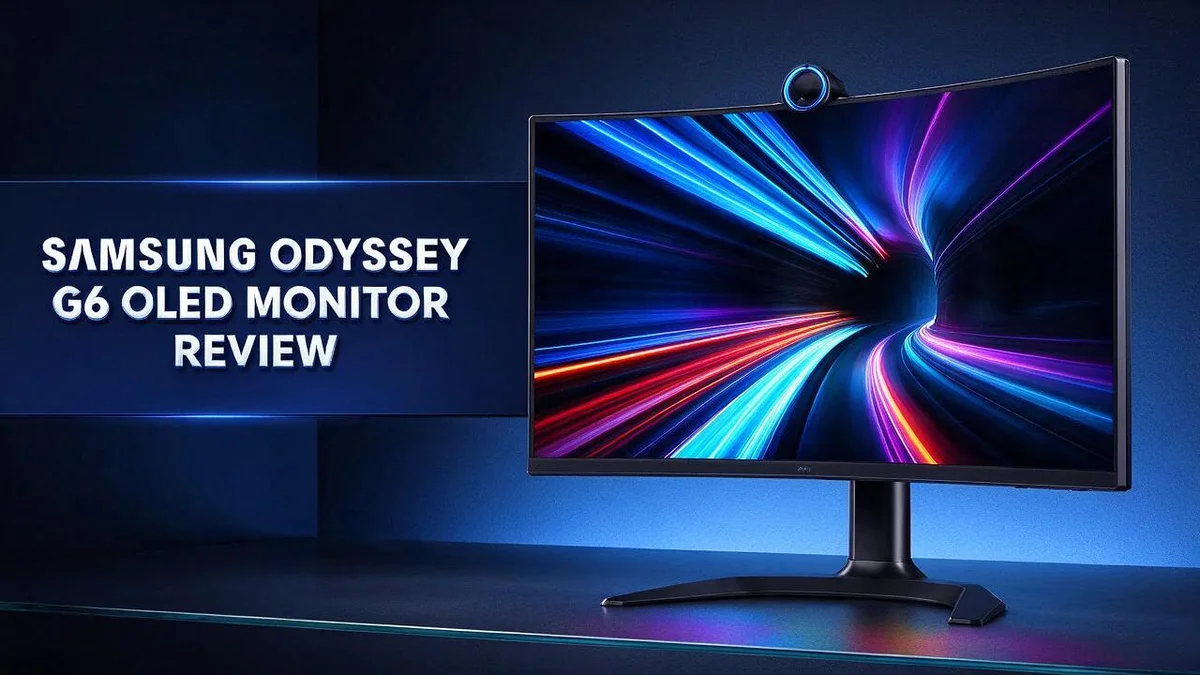
This 27 inch screen uses a QD OLED panel with QHD resolution. It delivers vivid colors and deep blacks that really stand out on screen.
Motion looks smooth, too. The monitor offers a 360Hz refresh rate and a 0.03ms response time. Fast action stays clear, even during intense gaming sessions.
Many gamers praise its strong motion clarity and overall performance. Users also report that the panel gets very bright. A matte anti glare coating helps cut down on reflections in well lit rooms.
Ready to see if this monitor suits your needs? Keep reading for a full look at its features, strengths, and best uses.
In a Nutshell
- Fast refresh rate: The 360Hz refresh rate keeps scenes that move quickly clear and steady. Action games feel fluid and responsive from start to finish.
- Quick response time: A 0.03ms response time means pixels change almost instantly. This helps keep edges sharp during rapid movement and reduces visible blur.
- Matte finish for bright rooms: The matte anti glare coating softens reflections from lamps and windows. Players can stay focused even in sunny spaces.
- Smooth sync support: FreeSync Premium Pro helps prevent screen tearing. It pairs well with compatible graphics cards for steady frame rates during busy action.
- Bright and rich visuals: Typical brightness reaches 250 cd/m² for vivid scenes. The static contrast ratio of 1,000,000:1 gives deep blacks and punchy detail.
- Accurate color options: An sRGB mode delivers accurate colors for editing and everyday tasks. HDR support adds extra depth when you watch movies or play modern games.
Display Quality and Color Accuracy


Last update on 2026-10-27 / Affiliate links / Images from Amazon Product Advertising API Some of the links on this website are affiliate links, which means that at no additional cost to you, I earn a commission if you click through and make a purchase. I only recommend products and services that I believe will add value to my readers. Thank you for your support!
Colors on this monitor look lively and natural. The panel uses QD OLED technology, so each pixel produces its own light. That design helps reds, greens, and blues appear bright and clean.
Black levels also stand out. Dark pixels turn off completely, so shadows look deep instead of gray. The static contrast ratio reaches 1,000,000:1, which gives images real depth.
HDR content shines here. Bright highlights sit right beside inky dark areas. Explosions, neon signs, and sunsets gain a lot of punch on screen.
Many monitors in this class use VA panels. Models like the LG UltraGear and Samsung Odyssey G32A fall into that group. The OLED design gives this screen a clear edge in contrast.
Viewing angles matter too. Colors stay consistent when you sit off to the side. Friends on the couch will see the same vivid picture as you.
Gradients also stay smooth across the screen. Sunsets and dim scenes avoid banding, which keeps the image feeling natural.
Skin tones look natural in portraits and video calls. Warm and cool shades blend smoothly. This helps creators judge their work with more confidence.
Who benefits most? Photo editors and movie fans get the most from this display. Gamers who enjoy cinematic single player games will also love the rich visuals. Anyone who wants vivid, accurate color will feel right at home.
A quick tip for setup: Use the built in sRGB or HDR modes based on your content. Switching between them helps you match colors to your task.
Overall, this panel delivers a stunning picture. Colors feel true, blacks look deep, and highlights glow. For anyone who values image quality, this monitor makes a strong case.
Motion Clarity and Gaming Response
Fast games demand sharp visuals. When enemies sprint across the screen, you need to spot them quickly. This monitor helps you follow that action with ease.
Many players say the image stays clean during hard turns. Racing games and shooters look crisp even when the camera spins fast. User reports often praise this strong motion clarity.
Each pixel lights up on its own. Dark areas stay truly black between frames. Bright objects then stand out against that dark background, so targets pop.
Ghosting shows up as faint trails behind moving objects. OLED panels help reduce this effect. Your eyes see clean edges instead of smeared shapes.
Competitive players care about every frame. Smooth motion gives you a steady view of your crosshair. Quick reactions feel more natural when the picture keeps pace with your hands.
Story games benefit too. Open worlds look fluid when you pan across mountains or busy city streets. Cutscenes also gain a calm, cinematic feel.
Scrolling web pages and watching sports also benefit. Text stays readable when the page moves. Fast passes in football or hockey look sharp instead of blurry.
A quick tip: Your graphics card must push high frame rates to use the full refresh rate. Lower frame rates still look clean, but you lose some of that speed boost.
Try matching your game settings to your hardware. Stable frame rates keep motion looking even from start to finish. Smooth play often matters more than peak numbers.
Setup takes only a few minutes. Open your display settings, check the refresh rate, and confirm it runs at the top setting. This small step gives you the full speed of the panel.
Overall, motion performance makes this monitor a strong pick for gamers who value speed. Every fast scene feels clearer and more controlled.
Design and Build
When you first look at the Samsung Odyssey G6, the 27 inch screen stands out. Its 16:9 shape gives you a wide view for games, videos, and daily work.
A 27 inch size suits most desks. You can place two windows side by side without crowding your workspace.
The screen uses a QHD resolution of 2560 by 1440. This pixel count keeps text and game details sharp at normal desk distances.
Build quality matters because this monitor stays on your desk for hours. A steady base and clean edges help the screen feel solid. Check the stand before you commit to a purchase.
A solid setup also reduces wobble when you type or click quickly.
Height and tilt adjustments add real comfort. Many people want to raise, lower, or angle the screen. A good adjustment range helps you keep your neck relaxed during long sessions.
If the stand supports swivel, turn the screen when others need to see it. Everyone can then view the same scene without awkward leaning.
A wall mount can free up desk space. Check the VESA pattern on the back before you buy an arm. This simple step prevents fit problems later.
Cable management keeps your setup neat. Route power and display cables behind the stand. A tidy back side makes the whole room look cleaner.
Placement also shapes your comfort. Keep the top edge near eye level so your gaze falls slightly downward. Your eyes and shoulders will thank you after a long day.
One helpful step is to set the stand first. Then adjust your chair to match. Small changes can reduce strain during gaming, editing, or streaming sessions.
Overall, the design stays simple and practical. The 27 inch frame, flexible stand options, and mount support make this monitor easy to fit into most spaces.
Top 3 Alternatives
LG UltraGear OLED

Last update on 2026-10-27 / Affiliate links / Images from Amazon Product Advertising API Some of the links on this website are affiliate links, which means that at no additional cost to you, I earn a commission if you click through and make a purchase. I only recommend products and services that I believe will add value to my readers. Thank you for your support!
The LG UltraGear OLED gives gamers a bright and sharp picture. Its fast refresh rate keeps motion smooth during intense matches. Blacks look deep, and colors pop on screen.
Many players also like its clean design and easy setup. The panel responds quickly, which helps in fast shooters and racing games. It suits almost any gaming style.
ASUS ROG Swift OLED

Last update on 2026-10-23 / Affiliate links / Images from Amazon Product Advertising API Some of the links on this website are affiliate links, which means that at no additional cost to you, I earn a commission if you click through and make a purchase. I only recommend products and services that I believe will add value to my readers. Thank you for your support!
The ASUS ROG Swift OLED brings a premium look and feel. It pairs a high refresh rate with a quick response time. Text and games look crisp at its native resolution.
The monitor includes handy features for competitive play. Its stand adjusts easily, so you can find a comfy viewing position. It works well for long gaming sessions at a desk.
Alienware AW2725DF

Last update on 2026-10-27 / Affiliate links / Images from Amazon Product Advertising API Some of the links on this website are affiliate links, which means that at no additional cost to you, I earn a commission if you click through and make a purchase. I only recommend products and services that I believe will add value to my readers. Thank you for your support!
The Alienware AW2725DF focuses on speed and color. It supports a very high refresh rate for ultra-smooth motion. Its QD-OLED panel delivers vivid, rich colors.
Competitive gamers who want top performance will feel right at home. The bold design stands out on any desk. It makes a striking choice for a serious gaming setup.
Ports and Connectivity
The back panel of the Samsung Odyssey G6 holds the ports you need. Take a quick look before you start setup.
Cable choice matters more than many people expect. A high refresh rate needs enough data bandwidth. Use the cable that comes in the box, or a certified DisplayPort cable of good quality.
DisplayPort often works best for PC gaming. It carries high refresh rates at QHD resolution with room to spare. Most graphics cards also include a DisplayPort output, so the connection is simple.
HDMI suits game consoles and streaming devices well. Plug your console into an HDMI port and keep it connected for daily use. You can switch between sources without unplugging anything.
Select the correct input on the monitor. Press the input button on the stand or back panel. Choose the port you used. A black screen often means the monitor is set to the wrong input.
Replace an old cable if the screen flickers. Older or damaged cables can limit the refresh rate. Swap in a new cable and test the connection again.
Cable routing also affects daily comfort. Run the cables behind the stand so the desk stays clear. Leave a little slack near the back so the screen can tilt without pulling on the wires.
If your model includes USB ports, you can use them for a keyboard, a mouse, or a flash drive. Connect the upstream USB cable to your PC first. Then plug your accessories into the monitor.
Audio works through the same cable in many setups. DisplayPort and HDMI both carry sound from your PC or console. If you want more control, check whether the monitor offers a headphone output. Connect your headphones there for quick listening.
Matching each device with the right port takes only a few minutes. Your setup will feel smooth from the first time you power on.
Price and Value
Think about how long a monitor stays useful on your desk. The Samsung Odyssey G6 offers a fast 360Hz refresh rate. That speed gives you room to grow as games get more demanding.
Future-proofing is a big part of its appeal. Many screens reach their limit within a few years. This model leaves headroom for newer titles and faster hardware.
Compare it with other screens in its class. Some similar monitors use VA panels instead. The G6 uses a QD OLED panel, which sets it apart on paper.
The Samsung Odyssey OLED G8 offers a larger 4K screen. Buyers who need more pixels for detailed work may prefer that model. The G6 suits people who want sharp QHD images with top speed.
The matte coating is a quiet bonus. Window light often causes reflections on glossy screens. This finish softens those reflections, so you can use the monitor in a bright room.
OLED panels need some care to last well. Static images, like taskbars or game health bars, can leave marks over time. Simple habits help a lot.
Use a screen saver, hide the taskbar, and vary your content. These small steps protect the panel for years.
Think about your typical day. If you split time between work and play, the matte finish and sRGB mode help with both. Gaming takes the lead, but the screen handles spreadsheets and photos well.
Fast shooter fans get the most from this monitor. Photo editors also benefit from the accurate sRGB mode. Casual users may find the speed more than they need.
In short, the G6 suits people who plan to keep it for years. It offers speed, deep contrast, and a clean matte finish. Weigh those strengths against your screen size and daily tasks.
Pros and Cons
Pros
– Vivid colors and deep blacks make games and movies pop.
– Motion looks smooth thanks to the 360Hz refresh rate.
– The 0.03ms response time keeps fast action clear.
– An accurate sRGB mode helps with photo and design work.
– FreeSync Premium Pro keeps gameplay steady and free from tearing.
Cons
– Text may look less sharp than on a 4K screen.
– The typical brightness of 250 cd/m² may feel dim in very bright rooms.
– The 27 inch size may feel small for large desk setups.
– Some users may want more brightness for HDR content.
Who Should Buy It
If you play games on a PC most days, this monitor deserves a close look. Long sessions feel easier on the eyes when the picture stays smooth and lively.
Movie fans who watch in a dim room also gain plenty here. Dark scenes show subtle detail, so films feel more immersive than they do on a standard LCD screen.
Upgraders coming from an older 60Hz monitor will notice the biggest change. Scrolling, cursor movement, and fast video all look noticeably cleaner on this panel.
Students and home workers with a small corner desk often find the size a good fit. The screen fills the view without crowding the space around it.
Streamers who show gameplay to viewers can use the vivid picture to their advantage. Viewers see bright highlights and deep shadows, which keeps the stream engaging from start to finish.
Families with several players can share this screen during the week. Each person gets a fast, clear picture without buying a second display.
Night owls who game after dark will appreciate how the deep blacks keep the scene focused. Dim rooms suit this panel well, and the glow feels controlled rather than harsh.
Sports fans who watch fast matches also benefit from the smooth motion. Players, balls, and camera pans stay easy to follow during quick plays.
Office workers who type long documents all day may want a different panel. Text can look fine here, yet a standard office monitor often feels more comfortable for hours of reading.
Overall, the right buyer enjoys fast action, deep contrast, and a comfortable matte surface. They also plan to keep the screen for many years and care for it well.
Final Verdict
Our final verdict is simple. The Samsung Odyssey OLED G6 earns a spot on any serious gamer’s shortlist. It pairs a fast panel with a picture that feels alive.
Its quantum dot OLED panel sets it apart from rivals like the LG UltraGear 27GQ50F. That model uses a VA panel instead, so the G6 offers a distinct style.
Check your graphics card first. A 360Hz screen shows its full speed only when your PC can push very high frame rates. Lower frame rates still play well, so the screen stays useful either way.
Look at your cables too. Older HDMI cables may cap the refresh rate. Pick a cable that supports the full bandwidth your monitor needs.
Measure your desk depth. A 27 inch screen sits best about an arm’s length away. Shallow desks may force you to sit too close, which strains the eyes.
The G6 also handles everyday tasks well. Web pages, documents, and video calls look clean at this size. It also works well as a daytime work screen for spreadsheets and writing.
Skip it if you only browse. People who mainly check email or stream video may not need this much speed. A simpler screen can serve them well.
Pair it with the right setup. A stand that tilts and adjusts height helps. Soft backlighting behind your screen cuts eye strain during long sessions.
Competitive players should also test input lag in their own games. Lab numbers help, but real play tells the full story. Test before you commit.
Overall, the G6 rewards gamers who want speed and contrast in one package. Its strengths show most during fast action and dark scenes.
Bottom line: if your PC can keep up, this monitor delivers a striking and fast experience for years. It earns its place on a serious gaming desk. Gamers who play for hours each week will feel the difference most.
Frequently Asked Questions
How does the G6 compare with the LG UltraGear 27GQ50F?
The LG uses a VA panel, while the G6 uses a quantum dot OLED panel. OLED pixels switch off completely, so dark scenes look truly deep and focused. Both models target gamers, so choose based on panel type.
Is the Samsung Odyssey G8 a better pick for a bigger screen?
The G8 is a larger 4K OLED, so it suits people who want more screen space. It also shows sharper text. The G6 fits better on a smaller desk.
Does the matte finish help in a room with windows?
Yes. A matte finish scatters light, so lamp and window glare show less on the screen. The picture stays easier to see during the day.
Can the G6 work as a first OLED monitor?
Yes, it suits people new to OLED. The quantum dot panel delivers vivid colors out of the box. Let the screen rest now and then, and avoid leaving static images like taskbars on screen for long hours.

Hello, i’m Ivoria i am the face behind Tech Tracker Blog. I am passionate about my work and love to explore gadgets and share about my experience.