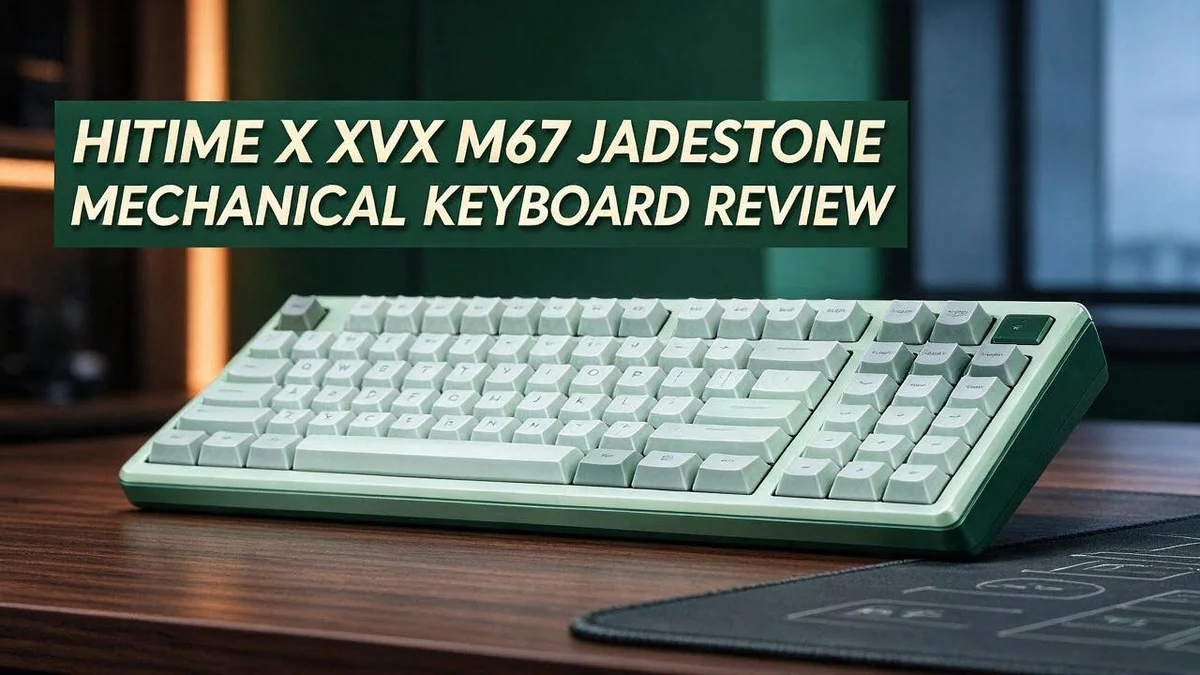
HITIME x XVX M67 JadeStone Mechanical Keyboard Review: Worth It?
Are you searching for a keyboard that sounds smooth and looks sharp? The HITIME x XVX M67 JadeStone might be your next favorite.
It comes in a compact 60% or 65% layout that saves desk space.
You get hot swappable switches, gasket mount construction, and QMK or VIA support. Customizing the board feels simple for beginners and pros.
Many fans love the creamy, thocky sound right out of the box. The vibrant RGB lighting adds a fun glow to any setup.
You can pick a wired model or a wireless version with dual mode USB C and 2.4GHz. Forged carbon and white and black colors give you a style to match your space.
In this review, we take a closer look at how the JadeStone performs every day.
In a Nutshell
- Vibrant RGB lighting brightens every key on the board. The glow looks great in a dim room, so the JadeStone can double as a mood piece on your desk.
- Topographic IMD keycaps give the board a sculpted, layered look. This texture stands out on any desk and draws attention right away.
- Switches rated for 80 million keystrokes come lubed from the factory. That means they feel smooth and steady for years of daily typing.
- Forged carbon and white or black colorways let you pick a style that fits your space. Choose the finish that matches your room, your gear, or your gaming setup.
- Independent reviews are still limited. Most details come from listings, promo videos, and user posts, so read a few fresh reviews before you decide.
- Strong alternatives exist for comparison shoppers. The EPOMAKER X Aula F75 MAX and the AULA F75 are both worth a side by side look before you choose.
Layout and Build Quality
Layout matters a lot when you pick a keyboard. The JadeStone keeps the key cluster tight, so your mouse gets more room to move.
Sources do not agree on the exact layout size. Some list it as a 60 percent board, while others say 65 percent. Check the product page before you order if exact size matters to you.
Build quality is another big talking point. Promotional material praises a solid feel right out of the box. That claim comes from the brand side, so treat it as a starting point.
When you test a board in person, a few simple checks reveal a lot. Press near the corners and listen for creaks. Tap the space bar and note any hollow sound.
A firm, even feel usually signals a well put together board. Loose parts or wobble suggest a weaker frame. Trust what your hands tell you.
The keycap profile also shapes how the build feels in use. Topographic keycaps sit higher than standard caps.
That height can change how your wrists rest on the desk. Give your hands a week to adjust.
Desk setup plays a role too. A compact board fits well on a small desk, a standing desk, or a travel setup that moves between rooms.
Think about your typing habits as well. Heavy typists often prefer a stable base that does not slide. Check whether the bottom pads grip well on your desk.
Finally, consider how long you plan to keep the board. A solid build tends to age better than a flimsy one, so it helps to check early.
Bottom line: the layout suits people who want desk space and a clean look. Build quality looks promising, but hands on testing gives the clearest answer.
Switches and Typing Feel
Switches shape how every key press feels. Your fingers notice the force, the travel, and the exact moment the key responds.
Think about how you type each day. Some people use light strokes. Others press harder. A board that feels calm to one typist can feel tiring to another.
Test the bottom out feel first.
Press a key all the way down and notice where the stroke ends. A soft landing reduces strain during long writing sessions.
A sharp stop can feel crisp, but it may wear on your fingers after hours of use.
Pay attention to the way keys return, too. Release each key slowly and feel the rebound.
A smooth return helps you type quickly without pressing harder than you need to.
Consistency matters just as much. Press several keys in a row. Each one should feel the same.
Uneven keys cause mistakes, especially when you type fast.
Listen for rattle or wobble on the larger keys. Those sounds often come from the stabilizers, not the switches.
Keycap texture changes the experience too.
A slightly textured top can feel grippy under your fingertips. A smooth top may feel quicker but less controlled.
Your space counts as well. A board that sounds fine at home may bother coworkers in a shared office.
Quieter typing suits late night work and calls. Some users enjoy a louder, more active sound, so choose what fits your room.
Give the board a real trial before you decide.
Write a short email, then code or chat for about fifteen minutes. Notice whether your hands feel relaxed or tense. That simple test tells you more than any spec sheet.
Sound and Acoustics
Sound plays a big role in daily typing. Many buyers want a soft and deep tone. Listings describe this board as creamy and thocky.
Keep in mind that sound is personal. What sounds lovely to one typist may feel loud to another.
Your room matters more than most people expect. Hard floors and bare walls reflect noise. Thick rugs and soft curtains help absorb it.
The desk surface also changes the tone. A wooden desk can sound hollow. A desk mat often softens the impact.
A gasket style mount lets the plate flex a little. That flex can soften the harsh pings that some boards make.
Hot swap sockets open another option. You can try different switches later. Each switch type brings a new sound.
Typing speed changes what you hear. Fast typists create a steady rhythm. Slow typists often hear each key more clearly.
Recording and streaming add another layer. A microphone picks up key sounds more than your ears do. Test a short clip before you record.
Shared spaces call for a softer approach. Roommates and coworkers may notice every press. Quiet switches or dampening foam can help.
The best test is a quiet listen in person. Type for a minute at normal speed. Then type a little harder. Notice whether the tone stays even.
Use online sound clips as a rough guide. Listen to a few recordings on headphones and speakers, since each setup shifts the tone.
Keycaps can also shift the tone. Thicker caps often sound deeper than thin ones. Ask yourself which sound you enjoy most.
Ask a friend to listen as well. Someone else may hear a sharp click you miss. Their feedback can help you judge the tone.
Sound matters most when it suits your daily routine. A soft, even tone can make long sessions more pleasant. Choose the sound that fits your space and habits.
Take your time with this choice. A good sound grows on most typists after a few days. Listen again after a week to see how you feel.
Top 3 Alternatives
Keychron K2
No products found.
Looking for a compact option? The Keychron K2 is a great pick for small desks.
It uses a 75 percent layout, so it keeps the arrow keys and function row while saving space. It works with both Mac and Windows systems. You can connect it over Bluetooth or USB-C.
Some versions let you swap switches easily. This lets you change how each key feels.
Ducky One 3

Last update on 2026-10-23 / Affiliate links / Images from Amazon Product Advertising API Some of the links on this website are affiliate links, which means that at no additional cost to you, I earn a commission if you click through and make a purchase. I only recommend products and services that I believe will add value to my readers. Thank you for your support!
Want a keyboard with a premium look? The Ducky One 3 stands out with its clean, sturdy build.
It offers many colorways and PBT keycaps that resist shine over time. Many typists enjoy its smooth, steady feel.
You can pick from several layouts, including full size and tenkeyless. This helps the board fit your workspace.
Royal Kludge RK61
No products found.
New to mechanical keyboards? The Royal Kludge RK61 keeps things simple.
Its 60 percent layout is very small, so it fits easily in a backpack. It supports wireless and wired use, which helps when you move between devices.
Its RGB lights add a fun touch to any desk. It is a friendly choice for travelers and students.
Lighting and Keycap Customization
The RGB lighting is one of the first things you notice. It glows bright under the keycaps. A dim room makes the colors pop even more.
Lighting changes the feel of your desk setup. Some people like a calm glow while they work. Others prefer bold colors during late night gaming sessions.
Software support gives you more control. The board works with QMK and VIA. You can adjust lighting effects and remap keys from a simple app.
Tip: Test the lighting in both a dark room and a bright room. Colors can look very different under daylight or warm lamps.
Think about glow strength at night. Bright LEDs can light up the room and cause eye strain. Lower brightness settings keep the glow gentle.
Keycaps are where the look becomes personal. The board uses IMD keycaps with a topographic style. Because IMD prints the legends into the surface, the markings tend to last longer.
Swapping keycaps opens up plenty of style options. Many owners try different colors, profiles, and materials. Look for a set made for 60 or 65 percent layouts so the keys fit well.
Check the layout before you buy a new set. Some sets include extra keys for arrow clusters. Others only cover the main block, so read the listing closely.
Keycap material also affects the look. Thick PBT keycaps often feel sturdy and resist shine over time. Thin ABS keycaps can feel lighter but may shine sooner.
Keycap choice can match your personality. Retro colors suit a cozy desk. Dark tones with bright legends suit a sleek workstation look.
Try a few themes before you settle on one. Mix the RGB colors with a matching keycap set. A simple color plan keeps the desk neat and easy to read.
Keep the lighting simple for daily use. Bright effects can distract during long writing sessions. A soft single color often works best for focus.
Plan for future upgrades early. Keep the original keycaps in a safe box. You can return to them anytime if a new set does not feel right during regular use.
Pros and Cons
Pros
– Factory lubed switches feel smooth right from the start.
– The 80 million keystroke rating points to long lasting switches.
– Wired and wireless options fit different desk setups.
– Forged carbon and white or black colors suit many styles.
– Promotional sources describe a solid build out of the box.
Cons
– Layout size is listed as 60% or 65%, so check before you buy.
– Most reviews come from listings and promo videos, not long term testing.
– Few independent reviews show how the board holds up over years.
– Rivals like the AULA F75 offer a larger layout with more keys.
Who Should Buy It
This board fits people who like a clean desk. A compact frame leaves more room for a mouse, a notebook, or a mug. Many people find that open space makes work feel calmer. Clean lines also suit minimal desk styles.
Students and first time builders often pick this kind of board. It gives a fun entry point into custom keyboards. Swapping parts teaches new skills without a large commitment.
Programmers and writers often spend hours typing each day. Some typists find a compact layout keeps their hands in a more natural spot.
Travelers who work from cafes or hotels may like the wireless mode. Carrying a board in a bag takes less space, and the cable can stay behind.
Tinkerers who enjoy changing things often love this kind of build. Each small change can shift the mood of the desk. Patience helps, since each step takes a little time.
Buyers who need a full number pad should look elsewhere. A compact frame has no separate number pad, which can slow spreadsheet work.
Gift givers can use this board to surprise a keyboard fan. A clean look makes it easy to unwrap with a smile. Add a short note about why you chose it.
Home office workers often spend long days at one desk. A small footprint can fit a corner desk, a dorm shelf, or a standing desk setup.
Beginners who feel nervous about parts can still enjoy this board. Fear of setup can stop many people from trying custom keyboards. A ready to use board can make the first step feel easier. Online communities can also answer setup questions.
Mechanical keyboard fans who own many boards may add this one to the collection. Each board brings its own feel, so a second or third option can add variety.
Check the layout, your desk space, and your daily tasks. These three points help most buyers choose well.
Think about your daily habits before you commit.
Final Verdict
The HITIME x XVX M67 JadeStone is a fun pick for the right person. It mixes eye catching looks with a flexible setup. Still, it suits some desks better than others.
Our final take is simple. This board suits people who want a compact desk they can shape over time. It also rewards anyone who enjoys testing new switches and keycaps.
Who should buy it? Creative users who value personal style will enjoy the look. Gamers who rely on many macro keys may find the smaller frame limiting.
Hot swap fans get extra fun from this design. Swapping switches without soldering keeps experiments quick and clean. Each test takes only a few minutes. Keep a few spare switches nearby for quick tests.
Who should skip it? People who depend on a dedicated arrow cluster or a full function row may need to adjust.
Those who want a plug and play board with zero setup might prefer a simpler model.
Set your expectations early. Layers and macros take some time to learn. Start with simple layers before you try complex macros. A short practice week helps you build muscle memory faster.
Think about your typing habits, your desk size, and your daily style. A quick check of those three things shows whether this board fits you.
Who gets the most out of it? Writers and coders who type in long bursts often appreciate the tidy footprint. Frequent travelers may enjoy packing a light setup in a small bag.
A quick word on upgrades. Many owners plan new keycaps or switches after a few months. Keep spare parts in mind so the board stays fresh and fun.
Final thoughts. The M67 JadeStone earns a spot on many wish lists. Test it in person if you can, then decide if its compact charm matches your routine.
Bottom line. This board offers personality, flexibility, and a neat compact layout. Read the layout details first, then decide with confidence. Buyers who match its strengths will likely feel happy with it.
Frequently Asked Questions
Does this keyboard sound good when typing?
Many listings describe a creamy, thocky sound that many typists enjoy. Some user posts say it sounds good too. Your desk and typing style will still shape the final sound.
Can I swap the switches later?
Yes, the board supports hot swap. You can pull out the switches and try new ones without soldering. The switches come lubed from the factory, so most people can start typing right away.
Can I customize the lights and keys?
Yes. The board works with QMK and VIA, so you can change key functions and lighting effects through supported software. Start with simple changes, then try more advanced settings once you feel comfortable.
What do the keycaps look like?
The keycaps use IMD printing with a topographic style. The symbols sit in a textured, sculpted surface. This design looks sharp under the RGB lights and gives the board a distinct character.
Does the gasket mount change how it feels?
A gasket mount lets the plate sit on soft pads instead of rigid screws. Many people feel that this setup gives a softer, more flexible response when they type. Try the board in person if you can, since feel is very personal.

Hello, i’m Ivoria i am the face behind Tech Tracker Blog. I am passionate about my work and love to explore gadgets and share about my experience.