How To Fix Smart TV Backlight Bleed From Frame Separation?
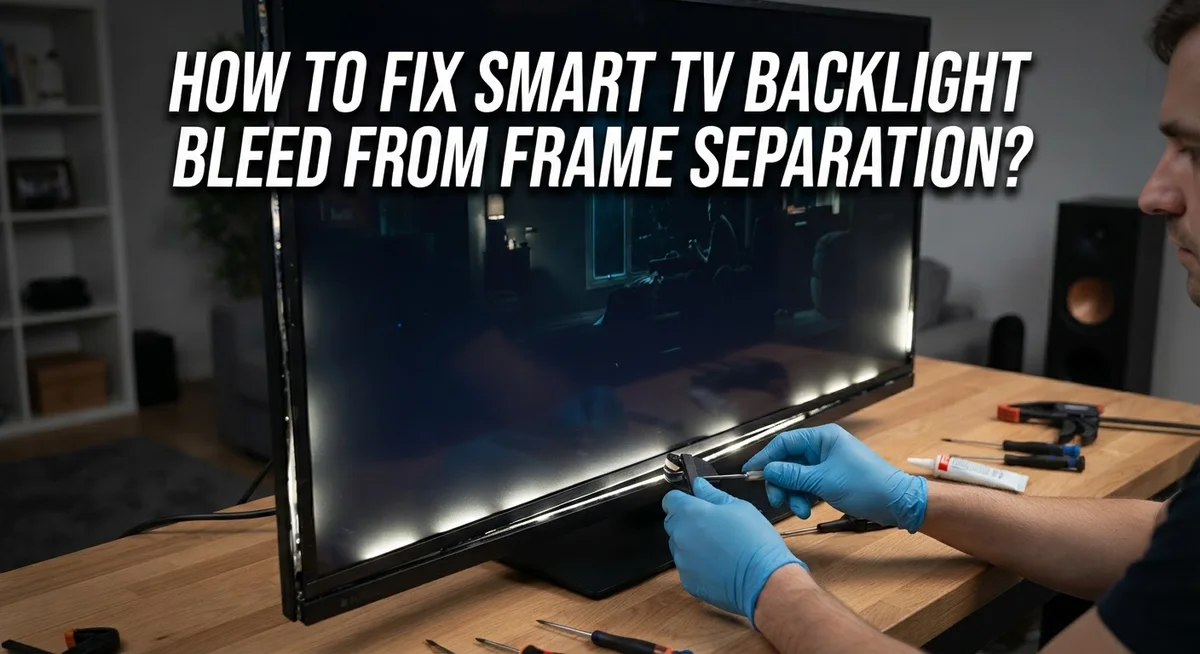
Do you see bright light leaking from the edges of your smart TV screen? This annoying problem is called backlight bleed. It often happens when the TV frame separates slightly from the panel.
This gap breaks the even pressure your screen needs. Light then escapes through the sides or corners. The result is a distracting glow during movies or dark scenes.
The good news is that this issue is very fixable. You do not always need an expensive repair or a new TV.
In a Nutshell
- Check your settings first. Turn off Brightness Optimisation and Adaptive Picture in your TV menu. Software glitches often cause light leaks that look like physical damage.
- Never run your TV at max brightness. High brightness settings put extra strain on the panel. This strain can widen small gaps in the frame.
- Press gently on the screen edges. Use a clean microfiber cloth to apply firm, even pressure. This step helps reseat loose panel layers.
- Look at your wall mount. An uneven mount creates pressure points on one side of the screen. Level mounting helps light distribute evenly again.
- Open the back panel only if needed. Removing the metal sheeting can expose the ribbon cables inside. Handle these parts with care since they are fragile.
- Know when to call a professional. If bleed continues after trying these fixes, the backlight strip may need replacing. A technician can safely handle deeper internal repairs.
What Is Backlight Bleed and Why Frame Separation Causes It
Backlight bleed happens when light escapes from the edges of your TV screen. You see a bright glow or halo around the frame, especially in dark rooms. This light should stay behind the screen, but it leaks out instead.
Frame separation is the main culprit. Your TV has multiple layers. The backlight sits behind the LCD panel. A frame holds everything together. When this frame separates or loses contact with the panel, gaps form. Light finds these gaps and escapes.
Why does frame separation happen? Several reasons cause this problem. Your TV may have been mounted unevenly. One side of the screen gets more pressure than the other. Over time, this creates gaps. Shipping damage can also separate the frame from the panel. Temperature changes inside your home make materials expand and contract. This movement loosens the frame’s grip.
The backlight itself works hard. It pushes light forward constantly. If the frame isn’t holding it tight, that light leaks sideways instead of forward. Think of it like a flashlight with a loose cover. The light escapes everywhere instead of shining straight ahead.
What makes it worse? Running your TV at maximum brightness puts extra stress on the backlight. The brighter it tries to shine, the more light escapes through any available gaps. Your TV’s software can also cause problems. Some settings force the backlight to work harder than necessary.
The good news is that frame separation is usually fixable. Most solutions are simple and don’t require taking your TV apart. Understanding what causes the problem helps you fix it faster and prevent it from happening again.
How to Identify Frame Separation on Your Smart TV
Frame separation happens when the plastic or metal frame holding your TV screen starts to pull away from the panel itself. You can spot this problem by looking for specific signs on your screen.
Start by checking the edges of your display. Look closely at all four sides in a dark room. Bright light leaking from the corners or along the edges is a clear indicator. The light usually appears as a glow that extends inward from where the frame meets the screen.
Pay attention to which edges show the most light. Does one corner glow brighter than the others? This tells you where the frame has separated the most. The uneven light pattern helps you understand the problem’s severity.
Next, examine the bezel area carefully. The bezel is the black plastic border around your screen. Run your fingers gently along this border to feel for gaps or loose sections. You may notice the frame feels slightly loose or moves when you apply gentle pressure.
Look at your TV from different angles. Tilt your head and view the screen from the side. Frame separation becomes more obvious when you’re not looking straight at the screen.
Check if the problem changes with brightness settings. Turn the brightness down significantly. Does the bleed look less noticeable? If yes, frame separation is likely your issue. This confirms the problem is related to how light escapes from loose edges rather than a panel defect.
Finally, examine your wall mount. Is your TV sitting evenly? Uneven mounting pressure on one side causes frame separation over time. Identifying these signs helps you determine whether simple adjustments or professional help is needed.
Step-by-Step Software Fixes to Reduce Backlight Bleed
Software adjustments often fix backlight bleed before you need hardware repairs. Start by accessing your TV’s settings menu and finding the power and energy saving options. Look for Brightness Optimisation and turn it off completely. This feature automatically adjusts your screen brightness based on room lighting, which can intensify backlight bleed.
Next, locate your intelligent or adaptive picture settings. Toggle off Adaptive Picture mode. This setting modifies picture quality automatically, and disabling it reduces strain on your backlight system. Both of these changes work together to decrease the light pressure on your panel edges.
Lower your backlight setting gradually through the display menu. Start by reducing it to 50 percent and observe if the bleed improves. Many users find that operating between 40 and 60 percent brightness eliminates visible bleed entirely. Avoid ever running your TV at maximum brightness, as this forces your backlight to work harder and worsens frame separation issues.
Check if your TV has a local dimming feature and disable it temporarily. This feature controls brightness zones across your screen, which can highlight bleed problems. Turning it off may reveal whether software settings are the real cause.
After making these adjustments, wait 24 hours and observe your screen in a dark room. Software fixes often show results gradually as your TV’s components adjust to new settings. If bleed persists after these steps, your issue likely involves physical frame separation that requires hardware intervention. Document which settings helped and which didn’t. This information proves useful if you need professional service later.
How to Correct Uneven Mounting and Pressure Points
Uneven mounting and pressure points are common reasons your TV’s backlight bleeds at the edges. When your TV sits unevenly on a wall mount, one side of the frame pushes harder against the panel than the other side does. This uneven pressure creates gaps where light escapes.
Start by checking your wall mount carefully. Use a level tool to confirm your TV hangs straight and parallel to the wall. If the mount tilts even slightly, light will leak from the lower or upper edges. Adjust the mount brackets until your TV sits perfectly level.
Next, examine the frame itself for visible gaps. Gently press around all four edges with your finger to feel if any sections separate from the panel. Some areas may feel loose while others feel snug. These loose spots are where backlight bleed happens most.
If you find pressure points, you can apply gentle, even pressure across the entire screen using a soft microfiber cloth. Press firmly but carefully along the edges where you noticed gaps. This temporary fix sometimes helps the frame reseat against the panel.
For a more lasting solution, check if your TV’s back panel has removable metal sheeting. If accessible and you feel comfortable, removing this sheeting can reduce pressure on the frame. However, be careful with ribbon cables inside if you open the back panel.
The key is balancing pressure evenly across your entire screen. Uneven mounting creates stress points that force the frame apart. By ensuring level mounting and even pressure distribution, you reduce the gaps that allow light to escape. Most backlight bleed from frame separation improves significantly once your mount sits perfectly straight.
Safe Physical Adjustments for Minor Frame Gaps
When your TV frame pulls away from the panel, you can make safe physical adjustments to reduce light leaks. These steps help without requiring professional tools or opening internal components.
Start by examining your wall mount. Check that all brackets sit level and flush against the wall. Uneven mounting creates pressure points that force the frame apart. Use a level tool to verify your TV hangs straight. Tighten any loose mounting bolts, but avoid over tightening, which can crack the frame.
Next, inspect the bezel area around your screen. Look for visible gaps between the frame and the panel. If gaps exist on specific sides, your TV may need gentle repositioning. Loosen your wall mount slightly, adjust the TV position to center it better, then retighten everything firmly.
Apply even pressure across the entire screen using a soft microfiber cloth. Press gently from the center outward toward each edge. This technique can help reseat the frame against the panel. Work slowly and avoid sudden force. Repeat this process once weekly to maintain pressure distribution.
Check if your TV’s back panel includes removable metal sheeting. Some models allow you to remove this backing for better airflow and frame flexibility. Disconnect power before attempting this. Remove the sheet carefully and set it aside. This adjustment reduces rigid pressure on the frame edges.
After making physical adjustments, wait 24 hours before evaluating results. Light leaks often improve gradually as the frame settles into its new position. Monitor your screen in a dark room to track progress.
If these adjustments don’t reduce backlight bleed significantly, your TV may need internal component replacement. Contact a repair specialist for professional evaluation and service options.
Common Mistakes That Worsen Backlight Bleed
Many people accidentally make backlight bleed worse by ignoring software settings first. They jump straight to physical fixes when the problem often starts in your TV’s menu. This approach wastes time and can damage your screen unnecessarily.
Operating your TV at maximum brightness is one of the biggest mistakes. High brightness settings force the backlight to work harder, which increases light leakage around the frame edges. Lower your brightness gradually and see if the bleed improves. You might find the problem disappears without any physical work.
Another common error is mounting your TV unevenly on the wall. Uneven mounting creates pressure points that push the frame away from the panel. This separation allows light to escape from behind the bezel. Check your wall mount carefully to ensure it holds the TV level and straight.
Skipping adaptive picture settings is another frequent mistake. Many TVs have intelligent mode or adaptive picture features enabled by default. These features can amplify backlight bleed by adjusting brightness automatically based on what’s on screen. Turning them off often reduces the problem significantly.
People also apply too much pressure when trying to fix frame gaps manually. Excessive force can crack the screen or damage internal components permanently. Use only gentle, even pressure with a soft cloth across the entire screen.
Don’t ignore the basics before attempting repairs. Always check your software settings first, verify your mounting is level, and lower your brightness. These simple steps solve most backlight bleed issues without risk to your TV. Only move to physical adjustments or professional repairs if software changes don’t help after 24 hours of observation.
Troubleshooting When Fixes Don’t Work
Sometimes your TV’s backlight bleed persists even after you’ve tried the common fixes. This happens for specific reasons, and understanding them helps you decide your next steps.
Software adjustments may not solve everything. If you’ve disabled brightness optimization and adaptive picture settings but still see light leaks, the problem likely exists inside your TV. The backlight system itself might be failing. Your LED strips could be wearing out or losing their seal over time.
Physical pressure won’t always work either. Applying gentle force with a microfiber cloth helps only when frame separation is minor. If gaps are wide or the bezel has pulled away significantly, manual adjustments won’t create a lasting fix. The frame may have warped or the adhesive holding components together may have deteriorated.
Age and usage matter greatly. Older TVs develop backlight bleed more frequently because internal components degrade. If your TV has been operating at high brightness levels for years, the LED backlight loses efficiency. This causes uneven light distribution across your screen.
Your mounting setup might need professional evaluation. Even perfectly level mounts can’t fix internal component failures. If your TV was mounted unevenly before, damage may have already occurred inside the panel.
At this point, you have two realistic options. First, you can accept minor backlight bleed if it doesn’t affect your viewing experience significantly. Second, you can contact a professional repair service. They can access internal components safely and replace failing backlight strips or LED arrays.
Don’t attempt internal repairs yourself without proper training. You risk damaging ribbon cables, creating electrical hazards, or voiding any remaining warranty coverage.
Preventing Future Backlight Bleed and Frame Issues
The best way to prevent backlight bleed is to maintain proper mounting practices from the start. Your TV needs even pressure across the entire back panel without any stress points. When you mount your TV, use a level tool to ensure it sits perfectly straight on the wall. Uneven mounting creates pressure zones that force the frame away from the screen panel.
Check your mounting bracket regularly. Loose bolts or hardware can shift over time, causing the frame to separate gradually. Tighten all connections every few months to keep everything secure and stable.
Software settings play a huge role in prevention. Keep your brightness optimization disabled in your TV’s power settings. Leave adaptive picture mode turned off as well. These features can strain your backlight system and contribute to light leaks developing faster.
Avoid running your TV at maximum brightness during normal viewing. Higher brightness levels generate more heat inside the TV, which can weaken the frame seals over time. Use moderate brightness settings that still provide clear picture quality.
Keep your TV in a climate controlled environment. Extreme temperature changes cause materials to expand and contract, which stresses the frame connections. Stable room temperature helps maintain the integrity of all internal seals.
Dust accumulation around the frame edges can trap heat and cause separation. Gently clean around the bezel area monthly with a soft microfiber cloth. This simple maintenance keeps airflow unobstructed and prevents heat buildup.
Finally, handle your remote gently and avoid placing objects against the screen. Physical impacts can shift the frame even slightly, starting the separation process. These prevention steps keep your TV working properly for years without backlight bleed problems.
Final Thoughts
Backlight bleed from frame separation feels frustrating. But most cases have simple fixes.
Start with your software settings. Turn off brightness optimization and adaptive picture first.
These small changes often reduce light leaks quickly. They cost nothing and take just minutes to try.
Physical pressure works too, but only in specific cases. Use a microfiber cloth and apply gentle, even force.
Never press too hard on the screen. This can damage your panel permanently.
Check your mounting setup next. An uneven mount creates pressure points that cause frame gaps.
Your TV should sit level and stable on its bracket or stand. This alone prevents many future problems.
Internal component wear is real. Older TVs experience more backlight issues as parts age naturally.
If software and mounting fixes don’t work, the backlight itself might need replacement. This requires professional help.
Don’t attempt internal repairs yourself unless you have experience. Ribbon cables and internal panels are delicate.
A professional technician can diagnose the exact cause. They also handle backlight replacement safely.
Think about your TV’s age too. Older models develop more frame separation over time.
Regular maintenance matters more than emergency fixes. Check your mount every few months.
Keep your TV away from extreme heat or cold. Climate control protects internal components significantly.
Simple habits prevent most backlight bleed problems. Lower brightness settings, proper mounting, and gentle handling go a long way.
When these steps fail, professional repair remains your best option. It’s worth the investment for a clear, bright picture.
Your TV can serve you well for years with proper care. Small adjustments now save bigger headaches later.
Frequently Asked Questions
Why does my TV have light leaking from the edges?
Light leaks happen when the frame separates from your TV’s main panel. This creates gaps where backlight escapes. Frame separation occurs due to uneven mounting pressure, aging components, or temperature changes. The issue is more common on certain TV models, but it affects many brands over time.
Can I fix backlight bleed without opening my TV?
Yes. Start by disabling brightness optimization in your settings. Go to Settings, then General, then Power and Energy Saving. Turn off Brightness Optimisation. Next, disable adaptive picture mode in your Intelligent Mode Settings. Lower your backlight setting gradually instead of using maximum brightness during normal viewing.
These software changes often reduce light leaks significantly without any hardware work needed.
Does applying pressure to the screen actually help?
Gentle pressure can help, but only in specific situations. Use a soft microfiber cloth and apply firm but careful pressure across the entire screen. This works best when frame separation is minor. Never press too hard, as excessive force damages the panel permanently.
Physical pressure is a temporary solution. It works best alongside software adjustments and proper mounting setup.
When should I call a professional technician?
Call a professional if software adjustments and gentle pressure don’t reduce the backlight bleed. Your TV might need internal component replacement or backlight repair. Technicians can diagnose whether your backlight itself has failed or if frame separation requires professional realignment.
Don’t attempt internal repairs yourself unless you have experience. Professional help ensures your warranty stays valid and prevents accidental damage.
How do I prevent backlight bleed from happening?
Mount your TV level and stable on its bracket. Check your mounting setup regularly for loose connections. Keep your TV in a climate controlled environment to prevent thermal stress. Avoid running brightness at maximum during normal viewing. Clean dust from frame edges regularly, as accumulation traps heat and causes separation.

Hello, i’m Ivoria i am the face behind Tech Tracker Blog. I am passionate about my work and love to explore gadgets and share about my experience.