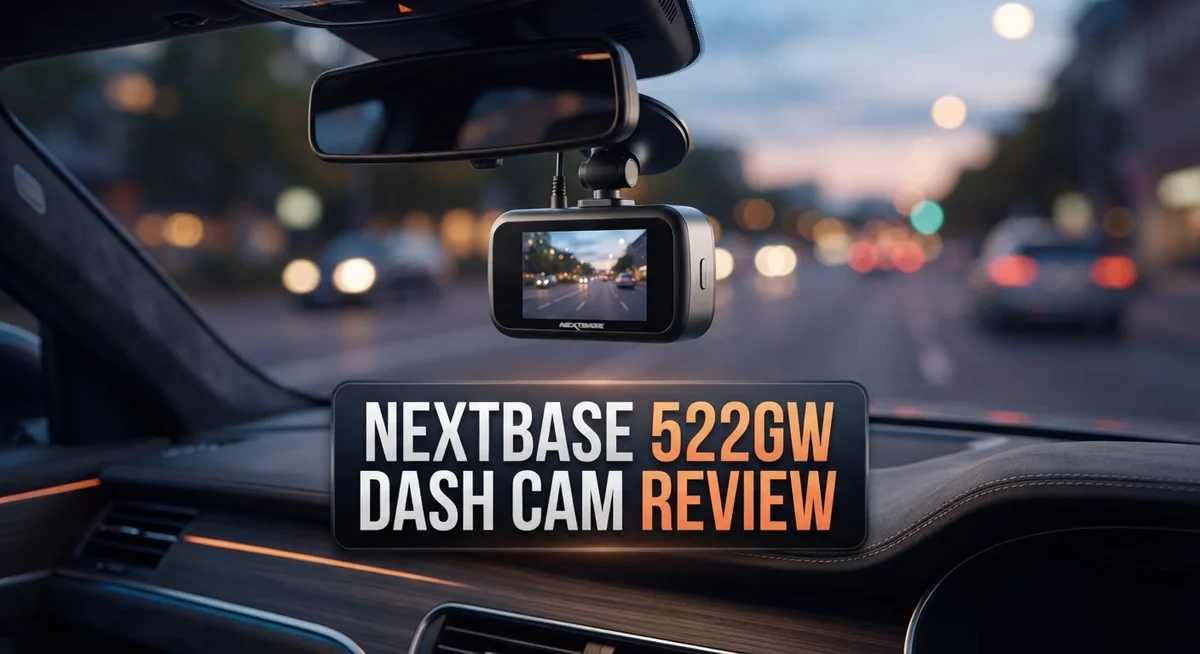
Nextbase 522GW Dash Cam Review: 2K Video Quality, GPS, and Smart Features
Looking for a dash cam that keeps you safe on the road? The Nextbase 522GW might catch your eye. This dash cam offers 1440p QHD resolution. That means sharper footage than most standard cameras.
It also packs a built in polarizing filter. This filter cuts down glare and reflections from windshields. You get GPS, WiFi, and Bluetooth connectivity too. Pairing your phone becomes simple with the companion app.
Alexa voice control adds a nice touch. You can control your camera without touching any buttons. Parking mode and Emergency SOS features round out the package. These tools aim to protect your car even when you’re away.
In a Nutshell
- Video quality holds up well for everyday driving footage, though license plate clarity can suffer in tricky lighting.
- The polarizing filter works as promised. It cuts down glare from windshields and bright sun.
- Smart features make this camera stand out. GPS tracking, Alexa commands, and SOS alerts give you extra peace of mind.
- App reliability is the weak spot. Several users mention the companion app drops connection or acts glitchy.
- Parking mode exists but feels limited. Don’t expect it to catch every incident while your car sits idle.
- This dash cam suits drivers who want smart connectivity and don’t mind occasional app hiccups.
Video Quality and Recording Performance
The Nextbase 522GW captures video in 1440p QHD resolution. This sits between standard 1080p and premium 4K options. Real driving footage looks crisp and clear on most dashboards.
The built-in polarizing filter makes a real difference. It cuts down glare from windshields, wet roads, and direct sunlight. You’ll notice fewer washed out or overexposed scenes during bright afternoon drives.
However, license plate identification presents a challenge. In certain lighting conditions, the plate text becomes blurry or hard to read. This matters if you need clear evidence of other vehicles during an incident. Low light situations and high speeds compound this issue.
The dash cam performs steadily during normal city driving and highway use. Frame rates stay smooth, and colors appear natural. Night vision recording works adequately but shows typical dash cam limitations in very dark conditions.
Video quality varies with lighting. Daytime footage excels. Rainy or shadowy conditions reveal the camera’s constraints. You won’t get cinema-like clarity, but you’ll capture enough detail for insurance claims in most scenarios.
The camera records continuously without major frame drops. Footage loops smoothly when the SD card fills up. Files save properly, and playback works without stuttering.
One drawback emerges in low contrast situations. Distinguishing dark vehicles against dark pavement becomes difficult. Similarly, reading street signs at distance requires decent lighting.
The GPS integration stamps location and speed data onto your footage. This adds context to your recordings. WiFi connectivity lets you review clips on your phone right after recording.
Overall, the 522GW delivers solid everyday recording performance. It handles typical driving scenarios well. The polarizing filter genuinely improves image quality. Just understand that license plate clarity and night vision have real limits. If you need crystal clear plate identification in all conditions, this camera has gaps. For general protection and incident documentation, it performs adequately.

Last update on 2026-10-06 / Affiliate links / Images from Amazon Product Advertising API Some of the links on this website are affiliate links, which means that at no additional cost to you, I earn a commission if you click through and make a purchase. I only recommend products and services that I believe will add value to my readers. Thank you for your support!
Key Features and Smart Connectivity
The Nextbase 522GW brings smart connectivity features that set it apart from basic dash cams. This camera connects to your smartphone through Bluetooth and WiFi, letting you access footage and settings remotely.
Alexa voice control integration is a standout feature. You can use voice commands to start recording, save clips, or check camera status without taking your eyes off the road. This hands-free approach adds genuine convenience during drives.
The GPS functionality does more than just mark your location. It stamps speed data and coordinates onto your video, which proves helpful if you need evidence for insurance claims. The camera automatically records your route, so you always know where footage was captured.
Parking mode rounds out the connectivity package. When your car sits parked, the camera can monitor activity and record if motion is detected. However, users report this feature feels somewhat limited in real-world use. The detection sensitivity and battery drain remain concerns worth considering.
The Emergency SOS feature provides an extra safety layer. If the camera detects a hard impact, it can alert emergency contacts or services, though this depends on proper setup and phone connectivity.
App reliability presents the biggest challenge with this camera’s smart features. Users frequently report connection drops between the camera and their phones. The app sometimes struggles to maintain stable communication, which frustrates owners who rely on remote access.
WiFi connectivity works better than Bluetooth for stable connections, but even WiFi users experience occasional disconnects. Reconnecting requires patience and sometimes a camera restart.
The smart features genuinely enhance your driving experience when they work smoothly. Real-time footage access, voice commands, and impact detection add practical value. The GPS integration alone justifies the smart connectivity approach for many drivers.
The trade-off is clear: you gain powerful features but accept occasional connectivity headaches. If you prioritize smart functions and can tolerate app hiccups, the 522GW delivers. If you want a simple, no-fuss camera, the connectivity complexity might frustrate you.
Design, Build Quality, and Installation
The Nextbase 522GW feels solid in your hand. The build quality reflects attention to detail throughout the design. The camera sits compactly on your windshield without blocking your view.
The unit measures approximately 3.4 inches wide. The black finish resists fingerprints well. The lens cap stays secure during storage. The overall construction uses durable plastic and glass components that withstand daily use.
Installation takes just a few minutes. You mount the camera using the included adhesive pad or suction cup. Most drivers prefer the adhesive option for permanent placement. The cable routes behind your headliner cleanly. You’ll reach your vehicle’s power outlet through existing channels. No drilling or professional installation is needed.
The polarizing filter sits built into the lens. This feature reduces windshield glare and reflection automatically. You don’t need to adjust anything manually. The filter works continuously as you drive. Daytime recordings benefit most from this design choice.
The camera body remains compact and unobtrusive. Your passengers barely notice it’s there. The small profile keeps your sightline clear. The mounting bracket rotates for angle adjustment. You can aim the camera slightly downward or straight ahead. Fine tuning takes seconds before you lock it in place.
Physical buttons control basic functions. The menu system responds quickly to your inputs. The touchscreen display measures 2.7 inches diagonally. The screen brightness adjusts automatically for different lighting conditions. You can navigate settings without removing your eyes from the road for long.
The camera sits flush against your windshield. Wind noise doesn’t affect audio recording. The microphone captures cabin conversations and road sounds clearly. The speaker volume reaches comfortable levels for alerts and notifications.
The unit connects to power through a USB cable. The cable includes a car charger adapter. Battery life without power runs approximately 10 minutes. Continuous power through your vehicle’s electrical system keeps it running indefinitely. The installation remains completely reversible. You can remove the camera without leaving residue behind.
Top 3 Alternatives
VIOFO A119 Mini


Last update on 2026-10-06 / Affiliate links / Images from Amazon Product Advertising API Some of the links on this website are affiliate links, which means that at no additional cost to you, I earn a commission if you click through and make a purchase. I only recommend products and services that I believe will add value to my readers. Thank you for your support!
The VIOFO A119 Mini captures excellent 1600p video quality with a compact design. This camera fits discreetly behind your rearview mirror. It records clear footage during day and night driving. The sensor performs well in low light conditions. You get a wide 170-degree field of view. The build quality feels solid and professional. Installation takes about 15 minutes. The camera stores footage on a microSD card. Loop recording automatically overwrites old files when the card fills up. Many drivers appreciate the simple menu system.
Thinkware U1000

Last update on 2026-10-07 / Affiliate links / Images from Amazon Product Advertising API Some of the links on this website are affiliate links, which means that at no additional cost to you, I earn a commission if you click through and make a purchase. I only recommend products and services that I believe will add value to my readers. Thank you for your support!
Thinkware U1000 offers 2K resolution with dual recording capabilities. You can add a rear camera for complete coverage. The system includes cloud connectivity for remote viewing. Parking mode activates automatically when your car stops. The camera detects motion and records incidents while parked. GPS functionality logs your route and speed data. The night vision performs impressively in dark conditions. Emergency recording protects footage when accidents happen. The interface shows real-time video on your phone. Installation requires professional setup for the best results.
70mai Dash Cam Pro

Last update on 2026-10-06 / Affiliate links / Images from Amazon Product Advertising API Some of the links on this website are affiliate links, which means that at no additional cost to you, I earn a commission if you click through and make a purchase. I only recommend products and services that I believe will add value to my readers. Thank you for your support!
The 70mai Dash Cam Pro delivers 1944p resolution with excellent color accuracy. The ultra-wide 140-degree lens captures multiple lanes. Night vision uses advanced sensors for clarity. The camera includes built-in GPS for location tracking. WiFi connectivity lets you view footage instantly on your smartphone. The compact form factor blends seamlessly with your windshield. Loop recording manages storage efficiently. The system starts recording automatically when you turn on your vehicle. Parking mode offers optional 24-hour protection. Setup takes just a few minutes without special tools.
App Reliability and Software Experience
The Nextbase 522GW’s app experience sits at the heart of its smart features. Unfortunately, app reliability emerges as the most significant weakness users encounter with this dash cam.
Connection stability represents the primary frustration. Users report that the app frequently drops connections to the camera, even when WiFi and Bluetooth are available. You might pair your phone successfully one moment, then find yourself disconnected the next. This inconsistency undermines the convenience that smart connectivity promises.
WiFi connections prove more stable than Bluetooth, but neither option guarantees seamless performance. If you prioritize wireless connectivity, WiFi delivers better results overall. However, even WiFi users experience occasional disconnections that interrupt your workflow. This pattern suggests underlying software issues rather than hardware limitations.
The app’s core functions work well when the connection holds steady. You can review footage, access GPS data, and manage parking mode settings without major problems. The interface itself feels intuitive and responsive. Once connected, the experience feels smooth and functional.
The disconnect problem becomes most frustrating during critical moments. When you need to quickly access footage after an incident, connection delays waste precious time. You might struggle to establish a link when you need it most. This reliability gap conflicts directly with the dash cam’s emergency features.
Software updates have addressed some issues over time, but problems persist for many users. The app receives regular improvements, yet connection stability remains inconsistent across user reports. This suggests the developers continue working on the underlying problems without complete resolution.
Consider the app experience as occasional rather than constant. Some users report fewer issues than others, possibly due to phone model compatibility or network conditions. Your mileage will vary based on your specific setup.
If smart connectivity ranks high on your priorities, approach this camera with realistic expectations. The features exist and function well during stable connections. However, plan for periodic frustration when the app loses its link. For users who rarely use the app and prefer basic recording, this limitation matters far less. Your usage patterns will determine whether app reliability becomes a dealbreaker or merely an occasional inconvenience.
Parking Mode and Safety Features
The Nextbase 522GW includes a dedicated parking mode that activates when your vehicle is stationary. This feature records video if motion or impact is detected around your car. The camera draws power from your vehicle’s battery during parking, so you’ll need a hardwired installation for continuous protection.
Parking mode works best when properly configured through the app. You can adjust sensitivity levels to avoid false triggers from passing traffic or moving branches. Lower sensitivity settings help preserve your battery and storage space. Higher sensitivity catches more potential incidents but may record unnecessary clips.
The Emergency SOS feature adds another layer of protection. If the camera detects a sudden impact, it can automatically alert emergency services or designated contacts. This function works when your phone has an active connection to the camera. The system marks critical footage so you won’t accidentally delete important recordings.
License plate capture remains a weak point for parking mode footage. The 1440p resolution struggles to clearly identify plates at certain angles or distances. This limitation matters if you need definitive evidence of hit and run incidents. Daytime parking recordings perform better than low light scenarios.
The GPS functionality enhances parking mode by logging your vehicle’s exact location. This data helps you remember where you parked and provides context for any incidents. The timestamp and location combination creates a complete incident record.
Real world testing shows mixed results with parking mode reliability. Some users report consistent recording and proper event detection. Others experience battery drain issues or missed recordings during critical moments. The app connection problems mentioned earlier can affect parking mode setup and review.
Consider parking mode as an added safety feature rather than a complete theft deterrent. It works best as part of a broader vehicle security strategy. Combine it with visible deterrents and parking in well lit areas. The feature provides valuable evidence if an incident does occur, but it won’t prevent all problems.
Pros and Cons
Pros
- Captures clear 1440p video quality that handles most driving situations well
- Built in polarizing filter cuts down glare and reflections on your windshield
- Packed with smart features like GPS, Alexa voice control, and Emergency SOS alerts
- Bluetooth and WiFi connectivity let you pair the camera with your phone easily
- Compact design stays unobtrusive on your dashboard
Cons
- App connection drops frequently, making reliable smartphone control frustrating and unpredictable
- License plate identification falls short in parking mode footage due to resolution limits
- No 4K recording option available, which some drivers prefer for maximum detail
- Software reliability issues persist even after updates, affecting overall user experience
Who Should Buy It
The Nextbase 522GW works best for drivers who value smart connectivity and want a straightforward dash cam experience. You’ll appreciate this camera if you regularly use your phone to check footage or adjust settings on the go.
Fleet managers and rideshare drivers benefit from the GPS logging feature. Your vehicle’s location gets recorded with every trip, which helps with route tracking and incident documentation. The Emergency SOS button adds peace of mind during stressful driving situations.
This camera suits you if you prioritize glare reduction. The built in polarizing filter makes a real difference on sunny days or when driving near water. Your windshield reflections won’t ruin your footage quality.
You should buy the 522GW if you already own Alexa devices. Voice control integration lets you access basic functions hands free, which keeps your attention on the road. This feature works smoothly for most users.
However, skip this camera if app reliability matters most to you. Connection drops happen frequently, and some users report frustrating disconnects during important moments. If you need constant smartphone access to your dash cam, look elsewhere.
Don’t choose the 522GW if license plate clarity is your top concern. The 1440p resolution struggles to capture readable plate numbers, especially in parking mode footage. Night time parking recordings show this limitation even more clearly.
You should avoid this model if you demand 4K recording. The camera maxes out at 1440p, which some drivers find limiting for maximum detail. If ultra high resolution matters for your needs, consider alternatives.
This camera isn’t ideal for users who want a complete theft deterrent system. Parking mode works as an added safety feature, but it shouldn’t be your only protection. Real world testing shows mixed reliability results.
The 522GW fits drivers who accept its limitations and want a decent mid range dash cam with smart features. You’ll get solid video quality for normal driving, useful connectivity options, and helpful safety features. Just manage your expectations around app performance and parking mode capabilities.
Final Verdict
The Nextbase 522GW stands as a solid mid tier choice for drivers who want smart features bundled into one device. It blends decent video clarity with useful connectivity options.
Its strengths are clear. The polarizing filter handles glare well. Smart integrations like Alexa add real convenience for daily drivers.
Still, some drawbacks hold it back from being a top pick for everyone. The app connection issues can test your patience. Resolution limits during parking mode remain a genuine concern for evidence collection.
Think about your main priority before deciding. If smart connectivity and voice control matter most, this camera delivers well. If crisp parking footage and flawless app pairing are non negotiable, you might feel let down.
We see this dash cam as a dependable companion for everyday commuting and road trips. It won’t replace a dedicated security system, but it adds a useful safety layer.
Drivers who want simple setup and smart voice commands will likely enjoy this model. Those chasing flawless detail in every frame may want to look elsewhere.
The verdict comes down to expectations. Accept its quirks, and the 522GW rewards you with steady performance and modern features. Expect perfection, and you may find gaps that frustrate you.
In short, this dash cam fits drivers who value smart functionality over raw specs. It suits people who already use Alexa devices and want their dash cam to feel connected.
For those who prioritize theft deterrence or crisp license plate capture above all else, consider pairing this camera with another security layer. The 522GW alone won’t cover every scenario.
Overall, the Nextbase 522GW earns a cautious recommendation. It offers real value through its feature set, even though some reliability issues linger. Choose it if you want convenience and decent quality without chasing the newest 4K trend. Skip it if you need flawless app performance or theft proof footage every time.
Frequently Asked Questions
Does the Nextbase 522GW record in 4K?
No, the 522GW records at 1440p (2K QHD) resolution instead. This means you get solid video quality for most situations, but not the maximum detail that 4K offers. If ultra high resolution is essential for your needs, you may want to explore other options.
Can I use this dash cam with Alexa?
Yes, the 522GW integrates with Alexa voice control. You can give voice commands to manage certain functions hands free. This feature works well if you already own Alexa devices in your home or car.
Why do users report app connection problems?
Many owners experience frequent app disconnections when pairing the camera with their smartphone. The connection drops can be frustrating when you want to review footage or adjust settings remotely. Before buying, consider whether you need reliable app access for your use case.
Does the polarizing filter really reduce glare?
Yes, the built in polarizing filter helps cut down glare and reflections on your windshield. This feature works particularly well during bright daylight or when driving toward the sun. It’s one of the 522GW’s strongest points for everyday driving.
Is parking mode effective for catching thieves?
Parking mode activates when your car is stationary and records motion events. However, users note that license plate identification becomes difficult in parking mode footage due to resolution limits. The feature works, but don’t expect crystal clear plate captures. It offers basic protection rather than comprehensive theft deterrence.

Hello, i’m Ivoria i am the face behind Tech Tracker Blog. I am passionate about my work and love to explore gadgets and share about my experience.