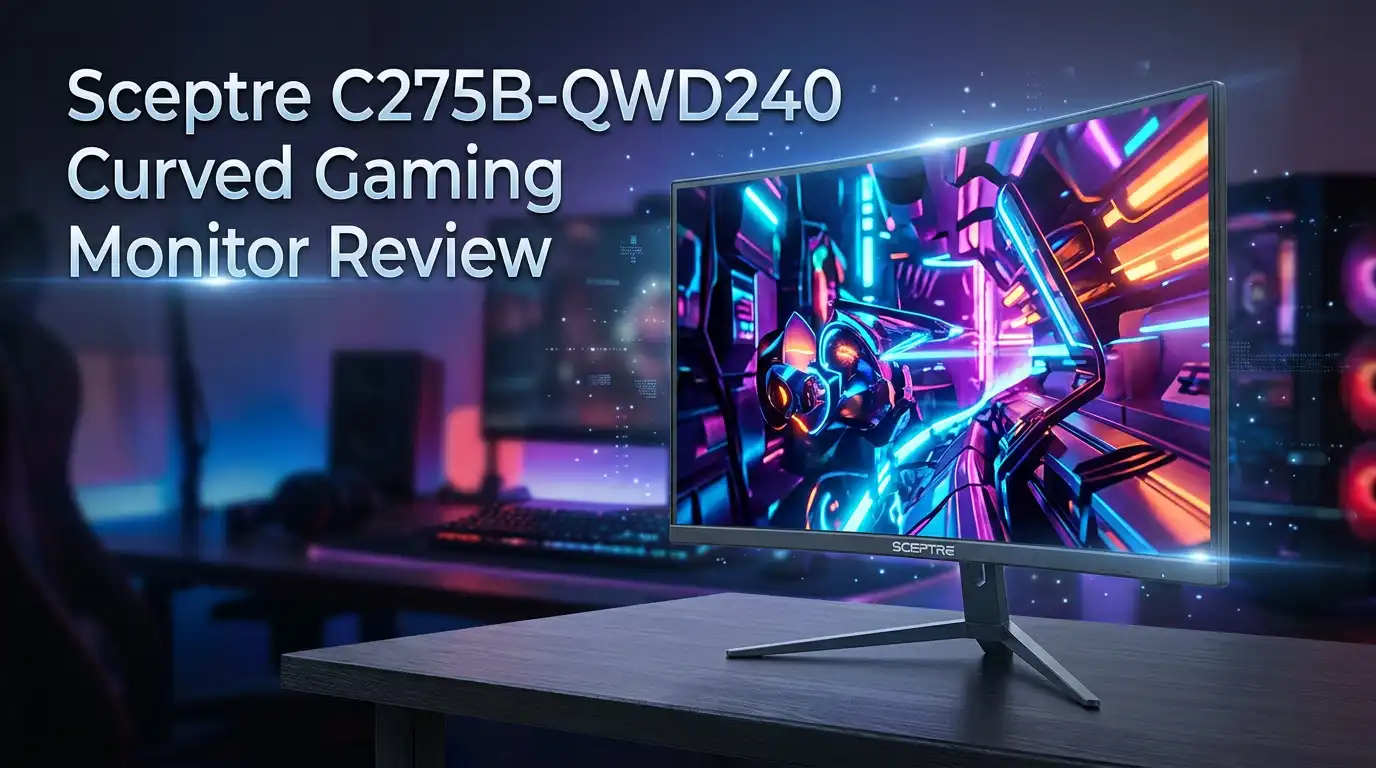
Sceptre C275B-QWD240 Curved Gaming Monitor Review
Gamers want speed. They want smooth visuals. The Sceptre C275B-QWD240 delivers both in one sleek package.
This 27 inch curved monitor brings a 1500R curve to your desk. It wraps the screen around your view. Every game feels more real.
The star feature is the 240Hz refresh rate. It beats 92% of monitors on the market today. Fast paced games look buttery smooth with zero lag.
In a Nutshell
- Smooth gameplay: The 240Hz refresh rate makes fast action look crisp. Your games will feel more responsive on screen.
- Immersive curve: The 1500R curvature wraps the display around your view. This pulls you deeper into every scene.
- Clean looks: An edgeless design gives this monitor a modern feel. It sits nicely on any desk setup.
- Connection options: You get three HDMI ports and one DisplayPort. This means you can hook up multiple devices without swapping cables.
- Resolution tradeoff: This screen sticks to 1080p Full HD. That is lower than some rivals at this size, so sharpness takes a small hit.
- Sync limits: It only supports FreeSync, not G-Sync. Nvidia card owners may notice this gap.
Key Features
The Sceptre C275B-QWD240 packs several standout features that appeal to competitive gamers. Let’s explore what sets this monitor apart from the crowd.
Speed is the main draw here. The 240Hz refresh rate delivers incredibly smooth motion during fast paced games. Your screen updates 240 times every single second, which means less blur and faster response to your inputs. This matters most in shooters, fighting games, and racing titles where split second reactions count.
The curved design goes beyond just looks. A 1500R curvature means the screen wraps around your field of vision. This creates a more immersive experience because your eyes don’t have to work as hard to track action across the display. You feel more connected to what’s happening on screen.
Connectivity is solid. Three HDMI ports let you plug in multiple devices without swapping cables constantly. The DisplayPort gives you another option for newer graphics cards. This flexibility matters if you switch between a console, PC, and streaming device.
The edgeless bezel design keeps distractions away from your peripheral vision. Less frame means more screen real estate for your games. It also gives your desk setup a cleaner, more professional appearance.
However, some tradeoffs exist. The 1920×1080 resolution stays at Full HD, which is lower than many 27 inch competitors. Text and fine details won’t be as sharp compared to 1440p or 4K alternatives. If you sit close to your monitor, you might notice the pixel grid.
The AMD FreeSync Premium support eliminates screen tearing when your frame rates dip. Just note that this only works with AMD graphics cards. NVIDIA users won’t benefit from this sync technology.
The bottom line: This monitor excels at delivering speed and smoothness for gamers who prioritize performance over pixel density. The curved display and multiple ports add practical value to your gaming setup. It’s a solid choice if you want fast, fluid gameplay without compromising too much elsewhere.


Last update on 2026-10-23 / Affiliate links / Images from Amazon Product Advertising API Some of the links on this website are affiliate links, which means that at no additional cost to you, I earn a commission if you click through and make a purchase. I only recommend products and services that I believe will add value to my readers. Thank you for your support!
Design and Build
The Sceptre C275B-QWD240 focuses on form and function working together. The curved panel sits at 1500R, which means it wraps around your eyes in a gentle arc. This design pulls you into the action instead of making you stare at a flat screen.
The physical build feels solid without being heavy. The stand supports the monitor firmly on your desk. You can adjust height and tilt to find your perfect viewing angle. The back panel uses a simple black finish that blends into most setups.
The bezel design keeps things clean. Thin edges on three sides mean less plastic frames your view. Only the bottom bezel sits thicker to house the controls and branding. This approach lets the curved display take center stage without visual clutter.
The monitor measures 27 inches diagonally, which fits most desk spaces well. It is not so large that it dominates your workspace, yet big enough to showcase the curve’s benefits. The 1500R curvature feels natural once you sit down and start playing.
Build materials appear durable for a gaming monitor at this level. The plastic construction keeps weight manageable. Metal accents around the stand add a touch of class. The overall impression is that Sceptre built this to last through years of gaming sessions.
Port placement sits on the back and sides for easy access. You get three HDMI inputs and one DisplayPort connection. This layout keeps cables organized without forcing you to reach awkwardly behind the monitor.
The curved design also serves a practical purpose beyond looks. Your eyes track motion more naturally when the screen curves toward you. This reduces eye strain during long gaming marathons. The 27 inch size paired with the curve creates an immersive viewing experience without requiring a massive desk footprint.
Overall, the design balances style with usability. Sceptre did not overcomplicate things here. The curved panel, thin bezels, and smart port placement all work together to create a monitor that gamers actually want to look at and use daily.
Display Quality and Resolution
The display quality on the Sceptre C275B-QWD240 centers on speed and clarity working together. This monitor delivers fast refresh rates that matter most for competitive gaming. Every frame appears smooth and responsive during intense action sequences.
The 1920×1080 Full HD resolution provides crisp visuals for most gaming scenarios. Text stays sharp. Images render with good detail. Colors display accurately across the screen. The panel technology ensures consistent color reproduction from different viewing angles.
Brightness and contrast perform well for a curved gaming monitor. The screen gets bright enough for lit rooms without causing eye strain. Blacks appear deep and rich. Highlights pop without washing out. This balance keeps gameplay looking natural rather than washed out or overly dark.
The curved display adds something special to image quality beyond just the numbers. Your eyes focus more easily on the center of the screen. The 1500R curvature means less head movement is needed to take in the entire display. This reduces fatigue during long gaming sessions. The immersive effect makes games feel more engaging and immediate.
Response time speeds on this monitor stay fast. Pixel transitions happen quickly, which means no ghosting or blur during rapid motion. This matters most in fast paced shooters and racing games where milliseconds count. You’ll notice cleaner motion compared to slower monitors.
One tradeoff exists with resolution at this screen size. A 27 inch display at 1080p means pixel density sits lower than some competitors. If you sit very close to the screen, you might notice individual pixels. Most gamers viewing from normal distances won’t see this as a problem.
The panel handles brightness consistency well across the full display area. Corner brightness matches the center brightness. This means colors stay accurate whether you’re looking at the edges or middle of the screen.
Overall display performance strikes a strong balance between speed and visual quality. The monitor excels at delivering smooth, responsive gaming experiences. For competitive players who value frame rates and motion clarity, this display hits the right marks. The curved design enhances the viewing experience without compromising picture quality.
Top 3 Alternatives
ASUS VP28UQG Gaming Monitor

Last update on 2026-10-23 / Affiliate links / Images from Amazon Product Advertising API Some of the links on this website are affiliate links, which means that at no additional cost to you, I earn a commission if you click through and make a purchase. I only recommend products and services that I believe will add value to my readers. Thank you for your support!
The ASUS VP28UQG brings 4K resolution and 1ms response time to competitive gaming. This 28-inch display handles fast-paced action without motion blur. The monitor uses DisplayPort and HDMI connections for flexible setup options.
Gamers appreciate the AMD FreeSync support that reduces screen tearing. The display covers 90% of the DCI-P3 color space, making it suitable for both gaming and creative work. You get solid color accuracy right out of the box.
The stand offers height, tilt, and swivel adjustments. This flexibility helps you find your ideal viewing angle. The monitor also includes a picture-by-picture mode for multitasking.
BenQ EW2880U Monitor

Last update on 2026-10-23 / Affiliate links / Images from Amazon Product Advertising API Some of the links on this website are affiliate links, which means that at no additional cost to you, I earn a commission if you click through and make a purchase. I only recommend products and services that I believe will add value to my readers. Thank you for your support!
The BenQ EW2880U targets professionals and casual gamers alike with its 4K IPS panel. The 28-inch screen delivers accurate colors and wide viewing angles. You’ll see consistent image quality even when viewing from the side.
This monitor emphasizes eye comfort features like flicker-free technology and low blue light mode. Extended gaming sessions feel less fatiguing on your eyes. The USB-C port provides both video signal and power delivery, simplifying cable management.
The built-in speakers and USB hub add convenience. You can connect peripherals directly to the monitor. The design feels premium with its minimalist aesthetic.
LG 27GP850 Curved Gaming

Last update on 2026-10-23 / Affiliate links / Images from Amazon Product Advertising API Some of the links on this website are affiliate links, which means that at no additional cost to you, I earn a commission if you click through and make a purchase. I only recommend products and services that I believe will add value to my readers. Thank you for your support!
The LG 27GP850 features a curved 27-inch VA panel optimized for immersion. The 1ms response time keeps up with competitive shooters and fast action games. The 165Hz refresh rate provides smooth motion without stuttering.
The curved screen pulls you into the action. This design reduces eye strain during long gaming marathons. NVIDIA G-Sync compatibility eliminates tearing and stuttering for GeForce users.
The monitor includes DisplayPort and HDMI inputs. Height and tilt adjustments let you customize your setup. The dark VA panel delivers deep blacks and high contrast.
Connectivity and Ports
The Sceptre C275B-QWD240 offers solid connectivity options that keep your gaming setup flexible and future-ready. You get three HDMI ports and one DisplayPort, which means you can connect multiple devices without constantly unplugging cables.
This port selection matters for gamers who switch between different sources. Your console, PC, and streaming device can all stay plugged in at once. You simply switch inputs when you want to change what you’re playing. The back panel placement keeps cables organized and out of sight.
The DisplayPort connection deserves special attention here. DisplayPort handles the 240Hz refresh rate smoothly, ensuring you get every frame your graphics card sends. This matters when you’re pushing high frame rates in competitive games. HDMI ports work well too, though some older HDMI versions cap out at lower refresh rates.
AMD FreeSync Premium support adds another connectivity advantage. Your graphics card and monitor communicate constantly to sync refresh rates. This eliminates screen tearing without the need for G-Sync, which requires Nvidia graphics cards. If you’re running an AMD GPU, this feature works seamlessly with your system.
The port layout itself shows practical thinking. Everything sits on the rear and side panels, so cables don’t clutter your desk space. You can access ports easily when setting up or adding new devices. Cable management stays clean throughout your gaming area.
One thing to note: the monitor handles 240Hz through multiple connections. Whether you use HDMI or DisplayPort, you maintain that smooth performance. This flexibility means you’re not locked into one specific setup.
The connectivity package here supports modern gaming without forcing you into expensive upgrades. Your existing cables likely work fine. If you’re adding new devices later, the multiple ports give you room to grow. This forward-thinking approach keeps the monitor relevant as your gaming setup evolves over time.
Gaming Performance and Refresh Rate
The Sceptre C275B-QWD240 delivers impressive frame rates that matter most for competitive gaming. This monitor pushes 240Hz, which means your games run at up to 240 frames per second. That’s a significant advantage over standard 60Hz or 144Hz displays.
What does 240Hz actually mean for your gameplay? Your screen refreshes 240 times every single second. This creates smoother motion and reduces the blur you see when objects move quickly across the screen. Fast-paced shooters and racing games benefit enormously from this speed.
The refresh rate works hand in hand with the fast response time. When your graphics card sends new frames rapidly, the monitor displays them without delay. You get a direct connection between your input and what appears on screen. This responsiveness matters for competitive players who need every advantage.
AMD FreeSync Premium support adds another performance layer. This technology syncs your monitor’s refresh rate with your graphics card’s output. When your frame rates fluctuate during intense gaming moments, FreeSync eliminates screen tearing. Your visuals stay smooth even when performance dips slightly.
The 1500R curved design also impacts how you experience these frame rates. The curve pulls the screen closer to your peripheral vision. Fast motion feels more natural because your eyes track movement more easily. The immersive effect combines with the high refresh rate to create engaging gameplay.
One practical consideration: achieving 240Hz requires proper hardware. Your graphics card needs to produce enough frames to take full advantage. Lower end graphics cards might not reach 240 frames per second in demanding titles. However, the monitor stands ready for when your system can deliver those frames.
The combination of 240Hz refresh rate and curved design makes this monitor particularly strong for action games. You get the speed that competitive gamers demand plus the immersive viewing experience that enhances every gaming session. This balance between raw performance and user experience defines what makes this monitor stand out in the gaming monitor market.
Pros and Cons
Pros
- 240Hz refresh rate puts this monitor ahead of most competitors in the gaming space
- 1500R curved design wraps around your field of vision for an immersive experience
- Edgeless design option keeps distractions minimal during intense gaming sessions
- Three HDMI ports plus one DisplayPort give you flexibility to connect multiple devices
- Fast response time keeps motion smooth and sharp during rapid action sequences
Cons
- 1080p resolution feels lower than other 27 inch monitors, which can impact fine detail clarity
- Screen size tops out at 27 inches, limiting immersion for players who want larger displays
- AMD FreeSync only means G-Sync users cannot take advantage of this monitor’s adaptive refresh features
Who Should Buy It
This monitor works best for specific types of gamers. If you play competitive shooters or fast paced action games, the 240Hz refresh rate matches your needs perfectly. You’ll notice smoother motion during intense combat moments.
Competitive esports players benefit most from this setup. Games like CS2, Valorant, and Apex Legends reward high refresh rates. Your reaction time improves when your screen updates 240 times per second.
Console gamers with AMD graphics cards find real value here. The FreeSync Premium support eliminates screen tearing during gameplay. Your visuals stay smooth without stuttering or artifacts.
Budget conscious gamers appreciate the curved design at this price point. You get an immersive 1500R curve without spending extra money on premium options. The edgeless design keeps your focus on the action.
This monitor suits players who prioritize performance over resolution. You don’t need 4K clarity for competitive gaming. Fast frame rates matter more than pixel perfect detail in most esports titles.
Streamers and content creators with AMD setups work well with this monitor. Multiple HDMI ports let you connect capture cards and gaming devices simultaneously. The DisplayPort handles high frame rate feeds without lag.
However, skip this monitor if you play single player story games exclusively. You won’t use the 240Hz advantage in slower paced titles. A standard 60Hz or 144Hz monitor serves that purpose fine.
Casual gamers benefit less from this purchase. The high refresh rate makes the biggest difference during competitive multiplayer sessions. Story driven games don’t demand 240Hz performance.
Players wanting larger screens should look elsewhere. At 27 inches, this size limits immersion for some users. If you prefer 32 inch or 34 inch displays, competitors offer those dimensions.
Graphics card requirements matter too. Your PC needs strong AMD or compatible hardware to reach 240Hz consistently. Budget systems might struggle hitting these frame rates in demanding games.
The 1080p resolution works fine for competitive gaming but feels limiting if you value visual detail. High resolution enthusiasts prefer 1440p or 4K alternatives.
Overall, this monitor targets competitive gamers with AMD systems who want smooth, fast gameplay without overspending.
Final Verdict
The Sceptre C275B-QWD240 earns its place among solid gaming monitors. Its 240Hz refresh rate and curved screen create a setup built for speed and focus. This monitor delivers where it counts most.
Smooth gameplay stays the main selling point here. Fast paced titles like shooters and racing games feel natural on this display. Your reflexes get matched by screen performance that keeps pace.
Think about your gaming habits before buying. Do you play ranked matches often? Does your PC or console support AMD FreeSync? These questions help decide if this monitor fits your setup.
Picture quality takes a backseat to speed on this display. Gamers who care more about sharp detail than fast response might feel limited. That tradeoff defines this monitor’s identity.
Compare this to the Xiaomi G34WQi, which offers a larger screen and sharper resolution. That option suits players who want visual detail over raw speed. Your choice depends on what matters more to your gaming style.
This Sceptre model does not try to be everything. It focuses on one job and does it well. Speed and response time define its purpose.
New gamers building their first setup often benefit from simple choices like this. You get clear strengths and clear limits. No guesswork needed about what this monitor does best.
Long term use also feels steady. The build handles daily gaming sessions without major complaints. Durability matches its performance promise.
Final thought: choose this monitor if speed drives your gaming choices. Skip it if resolution or screen size matter more to you. Either way, you know exactly what you are getting.
This monitor earns its spot through focused design, not broad appeal. It serves a specific gamer well. That clarity makes the decision easier for shoppers who know their priorities.
Frequently Asked Questions
Does this monitor work with PlayStation 5 and Xbox Series X?
Yes, it works with both consoles. The three HDMI ports connect easily to PlayStation 5 and Xbox Series X. However, you’ll only get the full 240Hz benefit with a PC. Console gaming on this monitor still feels smooth, but you’re limited to 60Hz or 120Hz depending on your game and console settings.
Can I use this with an NVIDIA graphics card?
You can connect it, but you won’t access G-Sync technology. This monitor features AMD FreeSync Premium instead. NVIDIA users still get a solid gaming experience with the 240Hz refresh rate. Your gameplay stays smooth, though you miss the adaptive sync benefits that G-Sync provides.
Is 1080p resolution bad for a 27 inch screen?
It’s a trade-off. At 27 inches, 1080p shows less detail than 1440p or 4K displays. Text and small objects appear slightly softer. For competitive shooters and fast action games, this matters less. If you play story driven games or do detailed work, you might notice the difference. The curved design helps reduce the impact of lower resolution.
What games perform best on this monitor?
Competitive games shine here. Titles like Valorant, CS2, and Apex Legends feel incredibly responsive at 240Hz. Racing games and fighting games also benefit from the fast refresh rate. Single player story games work fine too, but they don’t take full advantage of the 240Hz capability.
How does the 1500R curve compare to flat monitors?
The 1500R curve wraps around your field of vision more than a flat screen. Your eyes travel less distance to see the edges. This creates a more immersive feel during gaming. The curve also reduces glare from side angles. Most gamers find curved designs feel more natural for extended play sessions.

Hello, i’m Ivoria i am the face behind Tech Tracker Blog. I am passionate about my work and love to explore gadgets and share about my experience.