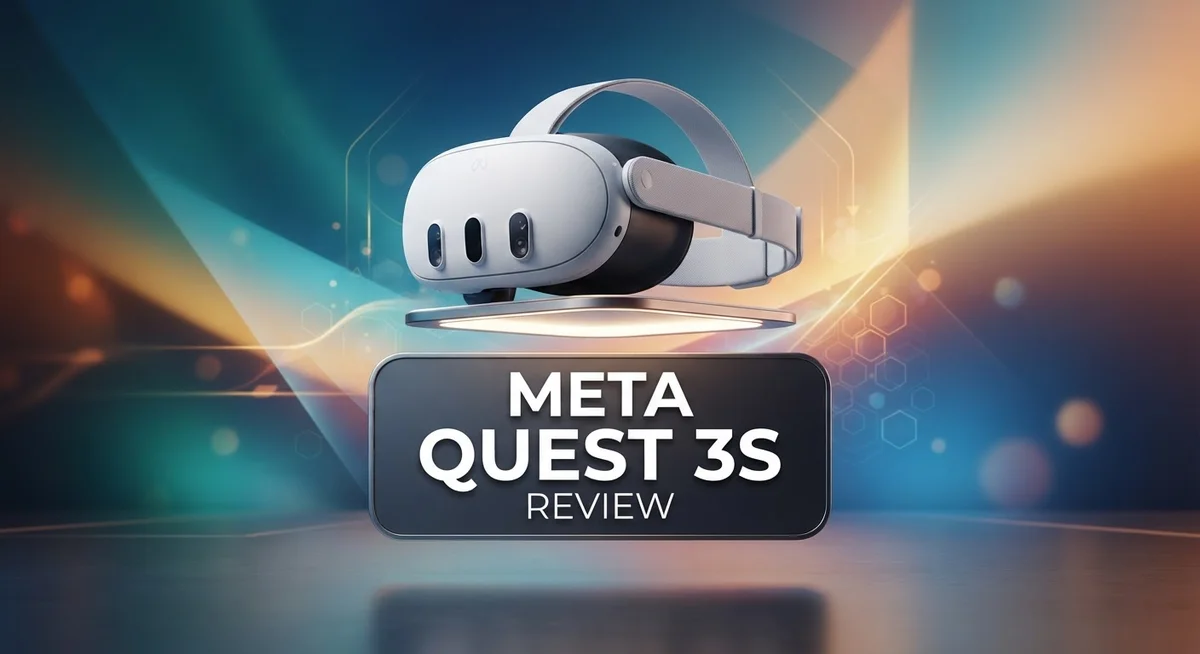
Meta Quest 3S Review: Features, Performance, and VR Experience
The Meta Quest 3S brings virtual reality to your living room without any wires. This standalone headset packs a powerful XR2 chip and a stunning 4K+ infinite display. You get sharp visuals and smooth performance right out of the box.
Meta unveiled this headset on September 25, 2024. It builds on the success of the Quest 2 with better graphics and smarter features. Gamers and casual users alike will notice the difference.
Full color passthrough is one of the biggest highlights here. You can see your real surroundings clearly while wearing the headset. This makes mixed reality experiences feel natural and fun.
In a Nutshell
- Powerful internals: The XR2 chip drives smooth graphics and handles demanding VR apps with ease.
- Sharp visuals: A 4K+ infinite display delivers crisp detail for games and movies alike.
- Smart features: You get immersive 3D audio, an adjustable IPD wheel for custom fit, and handy remote desktop functionality.
- Easy to use: The intuitive UI and built in tutorials make setup simple, even for first time users.
- Comfort concerns: Some users find extended sessions uncomfortable, and battery life can limit longer play.
- Power habits: It sips power on standby but draws more juice during active use.
Key Features and Specifications
The Meta Quest 3S packs impressive hardware into a lightweight package. At its core sits the XR2 chip, which powers smooth performance across games and apps. This processor handles demanding graphics without lag, so your VR experience stays fluid and responsive.
The display technology sets this headset apart from older models. You get a 4K+ infinite display that renders sharp details whether you’re reading text or exploring detailed game worlds. The pancake lenses keep the overall design thin and light, which many users appreciate during shorter sessions.
One standout feature is the full color passthrough camera system. Unlike older VR headsets that show only grayscale, this lets you see your real room in full color while wearing the headset. You can check on your surroundings without removing the device, making mixed reality experiences feel natural and intuitive.
Audio quality matters for immersion. The Meta Quest 3S includes immersive 3D audio that places sounds around you in three dimensional space. Games and movies feel more engaging when you can hear effects coming from above, below, or behind you.
Fit customization is another practical feature. The adjustable IPD wheel lets you dial in the perfect distance between the lenses for your eyes. This adjustment makes a real difference in image clarity and comfort, especially if you wear glasses.
The headset also includes remote desktop functionality. You can stream your PC screen into VR, which opens up possibilities for productivity or playing PC games in a virtual environment.
Battery life remains a limitation during extended play sessions. The internal battery drains faster when you’re actively gaming compared to lighter activities. Some users report discomfort after wearing the headset for long periods, so taking breaks is recommended.
Power consumption during active use is higher than standby mode, but the low standby draw means your headset won’t drain quickly if you leave it idle. These specifications combine to create a capable standalone VR system that balances performance with practical everyday features.


Last update on 2026-10-18 / Affiliate links / Images from Amazon Product Advertising API Some of the links on this website are affiliate links, which means that at no additional cost to you, I earn a commission if you click through and make a purchase. I only recommend products and services that I believe will add value to my readers. Thank you for your support!
Display Quality and Visual Performance
The display quality on the Meta Quest 3S sets a new standard for standalone VR headsets. You get a 4K+ infinite display that delivers exceptionally sharp visuals across your entire field of view. This means text stays crisp, game environments look detailed, and movies feel immersive without the screen door effect you might notice on older models.
The pancake lens technology plays a huge role here. These lenses bend light in a clever way, which keeps the headset compact while maintaining excellent image clarity. You won’t sacrifice visual quality just because the device is slim and lightweight.
Color accuracy matters when you’re exploring virtual worlds. The full color passthrough system lets you see your real environment in natural hues, not grayscale. This makes mixed reality experiences feel genuinely blended with your actual surroundings. Whether you’re playing a game that overlays digital objects on your living room or checking on real world activity without removing the headset, the colors stay true to life.
The XR2 chip powers all these visuals smoothly. Games render at high frame rates, which keeps motion feeling fluid and natural. You won’t experience stuttering or lag during fast paced action sequences. This performance directly impacts how immersive your experience feels.
Contrast and brightness levels are solid for both dark caves and bright outdoor scenes in games. Your eyes won’t strain as much compared to lower resolution headsets. The display handles fast motion well, so sports games and action titles look smooth rather than blurry.
One thing to note: visual comfort depends partly on your IPD (interpupillary distance). The adjustable IPD wheel lets you customize the lens spacing to match your eyes perfectly. Proper alignment means sharper focus and less eye fatigue during longer sessions.
The infinite display concept means you get consistent quality across the entire viewing area. There’s no sweet spot where clarity drops off at the edges. This makes the whole experience feel more natural and engaging, whether you’re reading text, watching films, or exploring detailed game worlds.
Design, Comfort, and Ergonomics
The Meta Quest 3S feels light on your head. The headset weighs just enough to stay secure without causing neck strain during shorter sessions. Weight distribution matters, and Meta designed this unit so pressure spreads evenly across your forehead and the back of your head.
The straps adjust easily. You can loosen or tighten them with one hand, which makes putting on and taking off quick. The front-facing design means your nose gets breathing room, so you won’t feel suffocated during gameplay.
Comfort during extended wear presents a real consideration. Some users report discomfort after wearing the headset for more than an hour straight. The padding around your eyes feels soft initially, but prolonged contact can cause irritation for certain face shapes. Taking breaks every 45 minutes helps avoid this issue.
The adjustable IPD wheel is a game changer. Your interpupillary distance (the space between your pupils) affects how sharp everything looks. This headset lets you dial in the perfect fit, which improves both clarity and comfort. You simply rotate the wheel until text appears crisp and the image feels natural to your eyes.
Ventilation keeps things cool during active play. Air flows around the headset rather than trapping heat against your face. This prevents the common problem of fogging that plagues other VR devices.
The front panel sits close to your face without touching it. This design choice reduces pressure points and makes longer sessions more bearable. However, people with larger heads or wider faces may find the fit tighter than expected.
Padding quality plays a supporting role in comfort. The foam material feels durable and maintains its shape after repeated use. You can remove and clean these pads, which keeps hygiene standards high during frequent sessions.
Overall, the Meta Quest 3S handles short to moderate gaming sessions well. Extended marathon sessions may require occasional breaks for most users. The ergonomic features work together to create a balanced experience that prioritizes accessibility without sacrificing stability during movement.
Top 3 Alternatives
Apple Vision Pro

Last update on 2026-10-18 / Affiliate links / Images from Amazon Product Advertising API Some of the links on this website are affiliate links, which means that at no additional cost to you, I earn a commission if you click through and make a purchase. I only recommend products and services that I believe will add value to my readers. Thank you for your support!
PlayStation VR2

Last update on 2026-10-18 / Affiliate links / Images from Amazon Product Advertising API Some of the links on this website are affiliate links, which means that at no additional cost to you, I earn a commission if you click through and make a purchase. I only recommend products and services that I believe will add value to my readers. Thank you for your support!
HTC Vive XR Elite

Last update on 2026-10-18 / Affiliate links / Images from Amazon Product Advertising API Some of the links on this website are affiliate links, which means that at no additional cost to you, I earn a commission if you click through and make a purchase. I only recommend products and services that I believe will add value to my readers. Thank you for your support!
Passthrough Cameras and Mixed Reality Capabilities
The passthrough camera system on the Meta Quest 3S represents a significant leap forward for mixed reality. Full color passthrough lets you see your real environment while wearing the headset. This feature works flawlessly in most lighting conditions.
What makes this different from older models? The Quest 3S delivers vibrant, detailed color feeds instead of grayscale views. You can see your living room, your hands, and nearby objects with clarity. This intuitive approach means you don’t have to remove the headset to check on your surroundings.
The practical benefits are real. You can play games that blend virtual elements into your actual space. Imagine placing a virtual puzzle on your coffee table or battling creatures across your bedroom floor. The color passthrough makes these experiences feel natural and engaging.
Mixed reality opens new gameplay possibilities. Apps can anchor virtual objects to real surfaces. You interact with digital content while staying aware of physical obstacles. This prevents accidental collisions and makes longer sessions feel safer.
The camera quality also supports remote desktop functionality. You can use the headset to work on your computer from anywhere in your home. The passthrough feed lets you navigate your physical space while accessing digital tools.
One consideration: passthrough performance depends on lighting. Bright daylight produces excellent results. Dim rooms show slightly reduced clarity, though the system still performs well.
The XR2 chip processes all this camera data efficiently. It blends real and virtual seamlessly without noticeable lag. You get smooth, responsive mixed reality experiences.
This technology also enhances social interaction. You can see other people in your space without removing the headset. Friends and family become part of your virtual environment instead of disappearing from view.
The passthrough cameras fundamentally change how you use VR. It’s no longer an isolated experience. Mixed reality capabilities create a bridge between digital and physical worlds. Whether you’re gaming, working, or exploring creative apps, the full color passthrough keeps you connected to reality while immersed in virtual spaces.
Battery Life and Power Management
The Meta Quest 3S runs on a single charge that typically lasts between two to three hours during active gameplay. This timeframe works well for casual gaming sessions and social VR experiences. Heavy users might notice the battery depletes faster when running demanding games or streaming content.
The XR2 chip manages power consumption intelligently. During gameplay, the processor balances graphics quality with battery drain. When you’re browsing menus or watching videos, power usage drops noticeably. This smart scaling helps extend your playtime without sacrificing visual quality.
Standby mode is where the Meta Quest 3S truly shines. The headset draws minimal power when idle, so your device won’t lose significant charge if you leave it sitting for days. This low standby consumption means you can pick up your headset whenever you want without worrying about a dead battery.
Charging takes roughly two hours from zero to full capacity. The USB C port charges quickly and reliably. Many users keep their headset plugged in overnight for convenience. Having a second battery or power bank nearby makes sense for extended play sessions away from outlets.
Heat management ties directly to battery performance. The ventilation system keeps internal components cool during use. Overheating can reduce battery efficiency, but the Quest 3S design prevents this issue effectively. The cooling vents work quietly in the background.
Battery limitations remain a real consideration for marathon gaming sessions. If you plan to play for four or five hours straight, you’ll need to recharge midway. This doesn’t make the headset less capable. It simply reflects the current state of VR technology. Most users find the battery life adequate for their typical gaming patterns.
The power management system also protects your battery’s long term health. The headset stops charging at one hundred percent to prevent degradation. This extends the battery’s lifespan significantly over years of use.
Understanding these battery dynamics helps you plan your VR sessions effectively. Short bursts work perfectly with standard battery life. Longer experiences require strategic charging breaks or backup power solutions.
Pros and Cons
Pros
- Color passthrough cameras deliver vibrant, intuitive mixed reality without grayscale limitations
- 4K+ infinite display with pancake lenses keeps visuals sharp across your entire view
- XR2 chip handles graphics and camera processing smoothly for seamless performance
- Minimal standby power consumption means your device stays ready without draining the battery
- Remote desktop functionality works reliably thanks to the full-color camera system
Cons
- Extended wear sessions can feel uncomfortable for some users despite the adjustable straps and padding
- Active gameplay drains the battery in two to three hours, limiting marathon gaming without recharging
- Higher power consumption during use generates heat that requires good ventilation management
Who Should Buy It
The Meta Quest 3S works best for specific types of users. Let’s explore who gets the most value from this headset.
Casual gamers and entertainment seekers find the Quest 3S perfect for their needs. The color passthrough cameras let you stay aware of your surroundings while playing. You can glance at your living room without removing the headset. This feature makes mixed reality games feel natural and engaging.
Content creators and professionals benefit from the remote desktop functionality. You can control your computer from anywhere in your home. The full-color camera system captures clear video for streaming or content production. The adjustable IPD wheel ensures comfortable viewing during long work sessions.
VR newcomers appreciate the intuitive UI and built-in tutorials. The learning curve is gentle. Setup takes minutes, not hours. You’ll understand the controls quickly and start enjoying experiences right away.
Social VR enthusiasts love how the 3D audio and mixed reality features enhance multiplayer interactions. Friends feel more present when you can see their avatars in your real space. The immersive sound design makes conversations feel natural and engaging.
Graphics enthusiasts will notice the improved visuals compared to older models. The 4K+ infinite display delivers sharp, vibrant images. The XR2 chip handles demanding games smoothly without stuttering or lag.
The Quest 3S may not suit everyone equally. Extended gaming marathoners should know that active gameplay drains the battery in two to three hours. You’ll need breaks or access to a charger. Some users report discomfort during longer wear sessions, though the adjustable straps help.
If you value convenience and don’t need enterprise-level features, the Quest 3S delivers solid performance. The color passthrough creates intuitive mixed reality experiences that feel natural. The pancake lenses maintain visual clarity across your entire field of view.
Competitive gamers seeking cutting-edge performance should compare this against the Meta Quest 3 and other premium options. Your specific needs determine whether this headset matches your expectations.
Final Verdict
The Meta Quest 3S stands out as a strong choice in the standalone VR space. It brings sharp visuals and smart features together in one headset.
Compared to the original Quest 3, this model holds its own. You get similar core technology without missing major functionality.
The Pico 4 Ultra offers a different experience, but the Quest 3S wins on software support and app variety. Meta’s ecosystem gives users more content to explore.
Apple Vision Pro sits in a different category entirely. It targets professionals with enterprise needs, while the Quest 3S focuses on accessible entertainment and everyday use.
Who should consider this headset? Anyone new to VR will find it welcoming. The setup process feels simple, and you won’t need technical expertise to get started.
Comfort remains a valid concern for some users. If you plan long sessions, test the fit before committing to extended use.
The overall build quality feels solid for its category. Meta clearly focused on core VR experiences rather than chasing every advanced feature.
Software updates continue to roll out regularly. This means your headset gets better over time, not worse. New features and games keep expanding what you can do with it.
Should you buy the Meta Quest 3S? If you want a straightforward VR experience without extra complexity, this headset delivers well. It handles gaming, entertainment, and basic productivity tasks smoothly.
Those needing professional grade tools or enterprise features might look elsewhere. The Vision Pro or specialized headsets could serve those specific needs better.
For most everyday users, though, the Quest 3S checks the right boxes. It combines ease of use with solid performance in a single package.
This headset works well as an entry point into VR or as a reliable upgrade from older models. It balances practical features with genuine fun, making it a worthwhile addition to your tech collection.
Frequently Asked Questions
Does the Meta Quest 3S work well for beginners?
Yes, it does. The headset comes with intuitive tutorials that walk you through everything step by step. New users appreciate how easy it is to navigate the menu and start playing games. The full-color passthrough cameras also help you see your real surroundings, so you feel more confident moving around.
How long does the battery last during gameplay?
Expect two to three hours of active gaming on a single charge. This is a real limitation if you want marathon sessions. You’ll need to plan charging breaks for extended play. Standby mode uses very little power, so your headset stays ready between sessions.
Is the Meta Quest 3S comfortable for long wear?
Some users report discomfort during extended sessions. The adjustable straps and padding help, but the headset’s weight can feel noticeable after an hour or two. If you plan shorter gaming bursts (30 to 60 minutes), comfort is less of an issue. Longer sessions may require breaks.
Can I use the Meta Quest 3S for work tasks?
Absolutely. The remote desktop functionality lets you access your computer or laptop from the headset. This works smoothly thanks to the full-color camera system. Content creators and professionals find this feature useful for specific workflows. It’s not a replacement for a traditional monitor, but it adds flexibility.
How does the Meta Quest 3S compare to older Quest models?
Graphics are noticeably better than the Quest 2. The display shows sharper details, and games run smoother. The color passthrough is a major upgrade over the original Quest 3. Software support remains strong, so you get regular updates that improve performance over time.

Hello, i’m Ivoria i am the face behind Tech Tracker Blog. I am passionate about my work and love to explore gadgets and share about my experience.