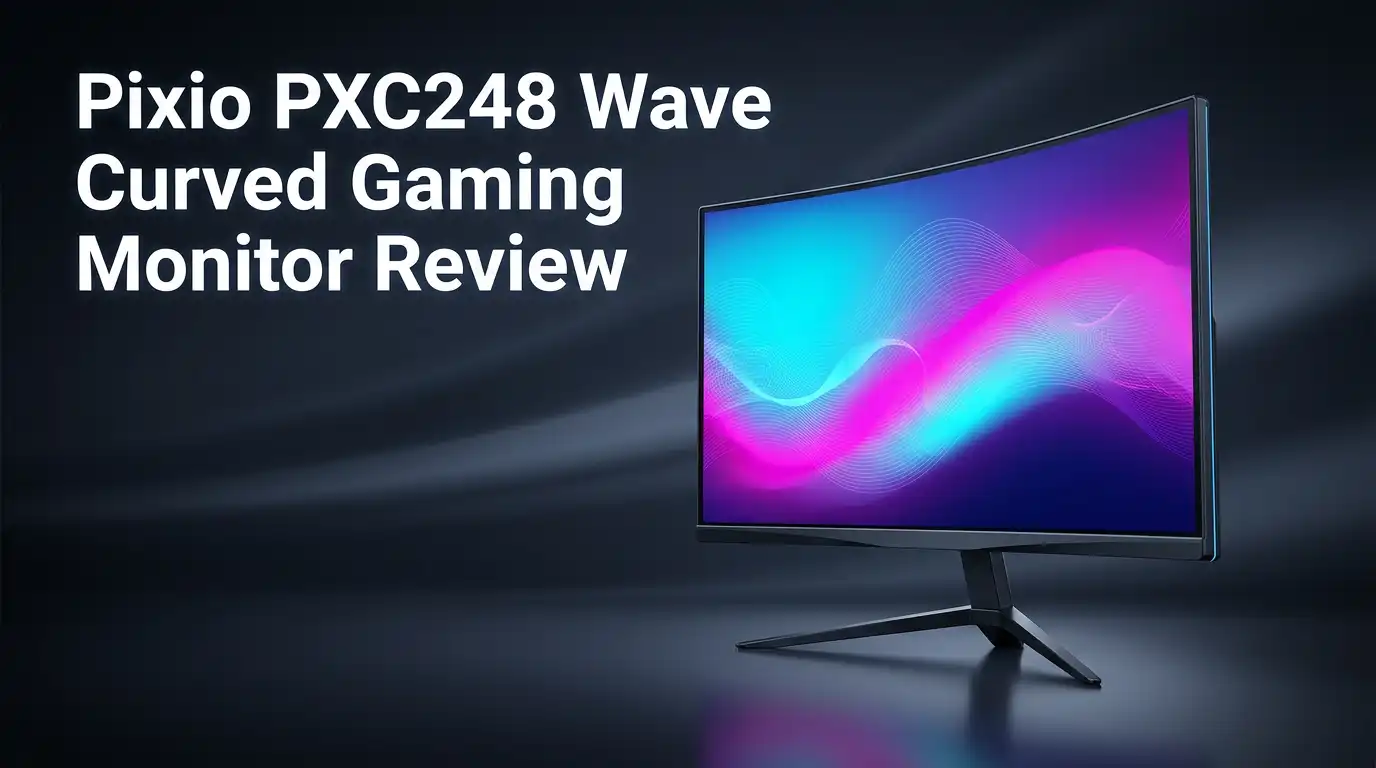
Pixio PXC248 Wave Curved Gaming Monitor Review
Looking for a smooth gaming experience without breaking the bank? The Pixio PXC248 Wave might be your answer.
This 24 inch curved monitor packs a punch. It offers a 200Hz refresh rate and 1ms response time. Gamers who want fast, fluid visuals will feel right at home.
The 1500R curve wraps the screen around your view. This design pulls you deeper into every game. Combined with Adaptive Sync and HDR support, the PXC248 Wave delivers clear, responsive gameplay.
In a Nutshell
- 200Hz Refresh Rate: Your games feel fluid and fast. Motion stays clear during action packed scenes.
- 1ms Response Time: Ghosting stays low. Fast moving objects look sharp and clean.
- Fast VA Panel: This panel type balances color depth with quick pixel transitions. You get rich visuals without lag.
- Adaptive Sync Support: Screen tearing becomes less of an issue. Your gameplay stays smooth even during intense moments.
- HDR Support: Bright scenes and dark shadows show more detail. Contrast feels more lifelike.
- Compact 24 inch Size: This monitor fits tight desk setups well. It suits users who prefer a focused view without a bulky screen.
Display Quality and Curved Panel Design
The curved panel design of the Pixio PXC248 Wave creates a genuinely immersive viewing experience that flat monitors simply cannot match. The 1500R curve radius wraps the screen around your line of sight, pulling your eyes toward the center naturally. This means less head movement and reduced eye strain during long gaming sessions.
VA panels excel at delivering deep blacks and high contrast ratios. The Pixio PXC248 Wave uses this panel technology to produce rich colors that pop on screen. When you’re playing dark atmospheric games, shadows retain detail instead of turning into murky blobs. Bright explosions and special effects also shine without washing out the image.
The 24 inch size pairs perfectly with the curved design. Smaller screens benefit more from curvature than larger ones because the entire panel stays within your natural viewing angle. You won’t need to turn your head to see the edges clearly. This size also makes the monitor easy to position at the correct distance from your eyes.
Response time matters for competitive gaming, and the 1ms GTG rating keeps up with fast action games. Whether you’re playing shooters or fighting games, pixel transitions happen almost instantly. The combination of fast response time and 200Hz refresh rate eliminates most visual lag you’d notice during gameplay.
HDR support adds another dimension to the display quality. Supported games show expanded brightness ranges that standard monitors cannot display. A sunset looks more realistic. Rain reflects light more naturally. Dark caves reveal hidden details without looking artificially brightened.
The curved VA panel also benefits everyday tasks beyond gaming. Web browsing feels more comfortable thanks to the reduced viewing angles. Video watching becomes more engaging when the screen curves around you. Office work becomes less fatiguing because the entire panel sits at roughly the same distance from your eyes.
The overall display quality represents a solid balance between performance and practicality. The curved design isn’t just a gimmick—it genuinely improves how the monitor feels to use day after day.

Last update on 2026-10-23 / Affiliate links / Images from Amazon Product Advertising API Some of the links on this website are affiliate links, which means that at no additional cost to you, I earn a commission if you click through and make a purchase. I only recommend products and services that I believe will add value to my readers. Thank you for your support!
Gaming Performance and Refresh Rate
The Pixio PXC248 Wave delivers consistent frame rates that matter in competitive gaming. At 200Hz, this monitor refreshes the image 200 times per second. Your eyes see smoother motion compared to standard 60Hz or 144Hz displays. Fast paced shooters and racing games feel noticeably more responsive.
The 1ms GTG response time keeps ghosting minimal. Moving objects stay sharp and clear. You won’t see blurry trails behind fast moving targets. This speed matters when milliseconds decide wins and losses.
VA panels bring a specific advantage here. They transition pixels quickly while maintaining excellent contrast. Dark scenes show deep blacks without losing shadow detail. Bright explosions and sunlit environments pop on screen. This balance helps you spot enemies in dim corners while handling bright moments without washout.
Adaptive Sync technology reduces screen tearing. Your monitor syncs with your graphics card output. The image stays smooth even when frame rates fluctuate. Whether you use NVIDIA or AMD hardware, this feature smooths gameplay transitions.
HDR support adds another layer to gaming performance. Highlights become brighter and shadows show more gradation. Games designed with HDR look noticeably better. Explosions feel more impactful. Sunsets display richer colors. You experience the game as developers intended.
The 1500R curve radius wraps the screen around your natural line of sight. This positioning reduces eye strain during long sessions. Your focus stays centered on the action. The immersive effect helps you react faster to on screen events.
Performance consistency matters across different game genres. Esports titles run smooth and responsive. Story driven games showcase the HDR benefits. Indie games feel polished on this panel. You get a versatile monitor that handles whatever you play.
The combination of refresh rate, response time, and panel technology creates a capable gaming tool. You won’t experience stuttering or lag from the monitor itself. Your gaming performance depends on your graphics card, but this display delivers every frame without compromise. The curved design adds comfort during extended play sessions.
Build Quality and Ergonomics
The Pixio PXC248 Wave excels in physical construction and user comfort. The monitor uses a sturdy VA panel mounted in a solid frame that resists wobbling during intense gaming sessions.
The 1500R curve radius wraps around your viewing area naturally. This curved design reduces neck strain because your eyes don’t need to travel as far across the screen. The curve also pulls peripheral vision into the display, making games feel more engaging without feeling forced.
The stand offers essential adjustment options for personalized setup. You can tilt the monitor up and down to match your eye level. Height adjustment lets you position the screen at your preferred distance from your face. Swivel functionality helps you angle the display toward your seating position, which matters when you share desk space or need quick repositioning.
Build materials feel solid throughout. The plastic bezels are thick enough to prevent flexing when you accidentally bump the monitor. The base footprint remains compact, so you won’t lose valuable desk real estate even with the curved design.
Cable management sits behind the monitor with a dedicated routing system. This keeps your desk looking clean and prevents cables from tangling with your keyboard and mouse setup. The back panel includes ports positioned for easy access without awkward reaching.
The monitor weighs enough to feel substantial without becoming difficult to move if you need to relocate your setup. The curved panel doesn’t add excessive weight that strains your desk or mount arm.
Ergonomic considerations extend beyond adjustments. The 24 inch screen size means you can view the entire display without moving your head excessively. Sitting at a normal distance from your desk, the curved panel sits within your natural focus range, reducing eye fatigue during long gaming marathons or work sessions.
The overall build quality suggests this monitor can handle years of regular use. No creaking sounds emerge when you adjust the stand or move the monitor slightly. The construction prioritizes durability without unnecessary bulk, making it a practical choice for gamers who value both performance and longevity in their setup.
Top 3 Alternatives
ASUS ROG Strix Curved


Last update on 2026-10-23 / Affiliate links / Images from Amazon Product Advertising API Some of the links on this website are affiliate links, which means that at no additional cost to you, I earn a commission if you click through and make a purchase. I only recommend products and services that I believe will add value to my readers. Thank you for your support!
The ASUS ROG Strix Curved delivers exceptional performance for competitive gamers. This monitor features a curved panel that wraps around your vision. You get fast refresh rates and minimal input lag. The color accuracy stays solid throughout gaming sessions.
The stand offers full ergonomic adjustments. You can tilt, swivel, and height-adjust to find your perfect position. RGB lighting on the back adds style to your setup. The build quality feels premium and durable.
MSI Optix MAG Curved

Last update on 2026-10-23 / Affiliate links / Images from Amazon Product Advertising API Some of the links on this website are affiliate links, which means that at no additional cost to you, I earn a commission if you click through and make a purchase. I only recommend products and services that I believe will add value to my readers. Thank you for your support!
The MSI Optix MAG Curved brings serious gaming credentials to your desk. This curved display uses AMD FreeSync technology to eliminate screen tearing. You’ll notice smooth gameplay across various titles.
The panel brightness reaches impressive levels. You can see details clearly even in bright rooms. The refresh rate matches competitive standards for fast-paced games. The monitor includes a gaming-focused OSD menu that’s easy to navigate.
LG UltraGear Curved Gaming

Last update on 2026-10-23 / Affiliate links / Images from Amazon Product Advertising API Some of the links on this website are affiliate links, which means that at no additional cost to you, I earn a commission if you click through and make a purchase. I only recommend products and services that I believe will add value to my readers. Thank you for your support!
The LG UltraGear Curved Gaming monitor combines style with substance. This curved beast offers outstanding contrast and deep blacks. The display supports NVIDIA G-Sync for tear-free gaming experiences.
The response time is lightning-fast, perfect for shooters and action games. The curved design reduces eye strain during long sessions. LG includes useful gaming features like a crosshair overlay and black stabilizer. The monitor comes with a solid warranty and reliable customer support.
Each option brings different strengths. ASUS excels in ergonomics and RGB customization. MSI focuses on brightness and AMD compatibility. LG emphasizes contrast quality and NVIDIA support. Your choice depends on which features matter most to your gaming style.
Connectivity and Features
The Pixio PXC248 Wave offers solid connectivity options that keep your setup flexible and future ready. You get multiple input ports that accept different cable types from your gaming PC or console.
DisplayPort and HDMI connections give you the freedom to swap between devices without constantly plugging and unplugging cables. The DisplayPort connection shines when you want to maximize that 200Hz refresh rate with compatible graphics cards. HDMI works great if you’re connecting older systems or gaming consoles that don’t support DisplayPort yet.
The monitor includes a USB hub built into the stand. This means you can plug in your keyboard, mouse, or other peripherals directly into the monitor instead of reaching behind your PC tower. It saves desk space and reduces cable clutter around your workspace.
Audio connectivity rounds out the feature set. You get a headphone jack on the monitor itself, which beats having to reach around your desk to find your PC’s audio ports. Some gamers appreciate this convenience during long gaming sessions.
The Adaptive Sync feature works with compatible graphics cards from both major manufacturers. This technology eliminates screen tearing by syncing the monitor’s refresh rate with your GPU’s output. You’ll notice smoother visuals in fast paced games where frame rates fluctuate.
HDR support opens up richer colors and brighter highlights in games that support this technology. Modern titles increasingly include HDR options, so this feature keeps the monitor relevant as games evolve. The VA panel’s strength with contrast ratios pairs well with HDR’s expanded color range.
The monitor’s curved design works seamlessly with all these connectivity features. Cable management stays organized behind the panel, so you won’t see messy wires from your gaming position. This clean setup helps you focus on your games rather than the equipment around you.
Overall, the Pixio PXC248 Wave packs enough connectivity to handle modern gaming setups while keeping your desk organized and functional.
Value for Money
The Pixio PXC248 Wave stands out because it packs genuine gaming performance into a compact 24 inch package. You get a 200Hz refresh rate paired with a 1ms response time, which are specs typically found in monitors that cost significantly more.
The 1080p resolution works well on a 24 inch screen. Text stays sharp, and games run at higher frame rates since your graphics card doesn’t need to push as many pixels. This matters if you play competitive shooters or fast paced titles where every frame counts.
VA panel technology gives you deeper blacks compared to IPS alternatives. The contrast ratio means darker scenes in games actually look dark instead of washed out. This adds real visual depth without requiring premium pricing.
The curved design isn’t just about looks either. The 1500R curve wraps around your natural viewing angle, so your eyes don’t work as hard during long gaming sessions. You’re looking at the same distance across the entire screen, which reduces eye fatigue.
Build quality feels solid throughout. The stand offers tilt, swivel, and height adjustments. Cable management sits neatly behind the monitor. These features usually appear on pricier models, but Pixio included them here.
Connectivity gives you flexibility too. DisplayPort and HDMI ports let you switch between devices without constant unplugging. The USB hub built into the stand adds practical value for connecting peripherals.
HDR support opens doors to richer colors in compatible games. Adaptive Sync works with both NVIDIA and AMD graphics cards, so you’re not locked into one ecosystem. Screen tearing disappears, and gameplay feels smoother.
You’re not paying extra for features you don’t need. This monitor skips unnecessary extras and focuses on what gamers actually use. The 24 inch size keeps your desk from feeling cramped while the curved panel still delivers immersion.
What you’re really getting is a no nonsense gaming monitor that delivers on the fundamentals. Performance, build quality, and practical features align well. The Pixio PXC248 Wave offers genuine capability without unnecessary frills.
Pros and Cons
Pros
- Delivers smooth 200Hz performance that keeps fast paced games feeling responsive and fluid
- The 1500R curve wraps your view naturally without feeling forced or gimmicky
- 1ms response time eliminates ghosting and blur during competitive play
- VA panel produces deeper blacks and stronger contrast than flat IPS screens
- Works as both a gaming display and general productivity monitor without compromise
Cons
- 1080p resolution means less screen detail compared to 1440p or 4K alternatives
- 24 inch size limits your field of view during immersive gaming sessions
- Limited competitor options in this exact category make direct comparisons harder to find
Who Should Buy It
The Pixio PXC248 Wave works best for gamers who play fast paced titles. You need smooth performance during competitive matches. This monitor delivers 200Hz refresh rates and 1ms response times. Your aim will feel sharper. Your movements will look fluid.
If you play esports games like CS2, Valorant, or Overwatch 2, this monitor fits your needs perfectly. The high refresh rate keeps up with your quick reflexes. The curved design pulls you into the action without distraction.
Content creators and streamers benefit from this monitor too. The VA panel produces deep blacks and strong contrast. Your videos will look more professional during editing. The USB hub on the stand keeps your workspace organized. You can connect multiple devices without cable clutter.
General productivity users should consider this option as well. The curved screen reduces eye strain during long work sessions. You can multitask between applications smoothly. The 1080p resolution displays text clearly at 24 inches. The stand adjusts to your preferred viewing angle.
This monitor isn’t ideal for everyone though. If you need maximum detail for photo editing or 3D work, you might want higher resolution options. Professionals working with precise colors should explore alternatives. The 24 inch size feels small if you sit far from your desk.
Console gamers using PlayStation 5 or Xbox Series X should note the Adaptive Sync support. Your games will run smoother with compatible graphics settings. The curved design enhances console gaming immersion.
Budget conscious buyers appreciate what this monitor offers. You get genuine 200Hz performance without unnecessary features. The build quality feels solid. The stand provides full adjustability. Nothing feels cheap or flimsy.
If you want a monitor that handles gaming, streaming, and everyday work without compromise, the Pixio PXC248 Wave fits the bill. You get smooth performance, good build quality, and curved immersion. Your gaming sessions will feel responsive and engaging. Your productivity work will feel comfortable throughout the day.
Final Verdict
The Pixio PXC248 Wave earns its spot as a solid pick for anyone chasing smooth gameplay. It brings speed, clarity, and comfort together in one package.
This monitor shines brightest for players who value reaction time over pixel density. Fast refresh rates and quick response times matter more than resolution in competitive settings.
First time curved monitor buyers will appreciate how easy this screen is to adjust to. The transition from flat to curved feels natural within minutes of use.
Eye comfort stands out as an underrated benefit here. Long gaming sessions feel less tiring thanks to the way the curve reduces eye strain.
Setup takes only a few minutes. You get a straightforward experience with no complicated software or confusing menus to deal with.
For multitaskers who split screen time between work and play, this monitor handles the switch smoothly. Windows snap into place nicely across the curved display.
Anyone upgrading from an older 60Hz or 75Hz monitor will notice a dramatic difference right away. The jump to 200Hz changes how games feel, not just how they look.
That said, buyers who prioritize sharp detail in movies or design work might want to look elsewhere. This screen focuses on speed, not pixel perfection.
Think about your main use case before deciding. Pure gaming? This monitor fits well. Heavy photo editing or 4K content? Maybe not your best match.
Overall, the Pixio PXC248 Wave delivers exactly what it promises. It gives gamers a fast, smooth, and comfortable viewing experience without unnecessary extras.
Who should buy this monitor:
– Esports players wanting quick response times
– Streamers needing a reliable secondary display
– Anyone switching from flat to curved screens for the first time
Who might skip it:
– Users needing 1440p or 4K for detailed work
– Buyers wanting a larger screen for cinematic viewing
If speed and comfort top your list, this monitor checks those boxes well. It’s a smart choice for gamers who want performance without complications.
Frequently Asked Questions
Does the Pixio PXC248 Wave work with console gaming?
Yes, it does. The monitor includes Adaptive Sync support, which works with PlayStation 5 and Xbox Series X. You’ll get smoother frame delivery on console games. The 1ms response time keeps action sharp during fast paced gameplay.
Console gamers benefit from the curved design too. It creates an immersive experience without taking up much desk space.
Can I use this monitor for work and streaming?
Absolutely. The PXC248 Wave handles both gaming and productivity without compromise. Streamers appreciate the 200Hz refresh rate for smooth gameplay capture. The VA panel delivers strong contrast, which looks good on camera.
Split screening between work apps and game windows works smoothly. You can multitask between spreadsheets, chat platforms, and your game without lag or visual issues.
What’s the difference between this curved monitor and a flat one?
The 1500R curve radius wraps around your field of view. Flat screens feel more distant by comparison. Curved displays reduce eye strain because every part of the screen sits at roughly the same distance from your eyes.
The VA panel on the PXC248 Wave produces deeper blacks than flat IPS screens. This creates stronger contrast and more dramatic visuals in dark game scenes.
Is 1080p resolution a problem for gaming?
It depends on your priorities. At 1080p, you get fewer pixels than 1440p or 4K displays. However, the 200Hz refresh rate compensates for this. Fast paced esports players usually prefer smooth motion over sharp detail.
If you play CS2, Valorant, or Overwatch 2, reaction time matters more than pixel density. The PXC248 Wave delivers that speed. Buyers who prioritize sharp detail in movies or design work should look elsewhere.
How quickly can I set this monitor up?
Setup takes only a few minutes. The stand attaches easily. Cables connect without confusion. First time curved monitor buyers will adjust quickly to the screen angle.

Hello, i’m Ivoria i am the face behind Tech Tracker Blog. I am passionate about my work and love to explore gadgets and share about my experience.