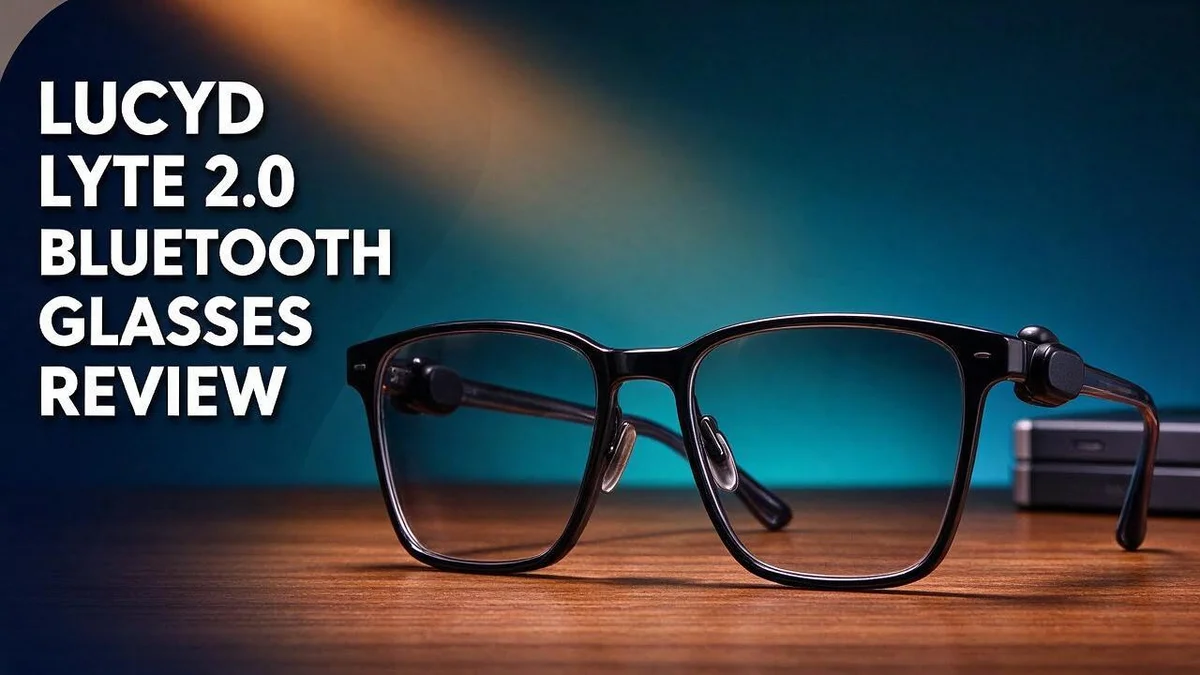
Lucyd Lyte 2.0 Bluetooth Glasses Review: The Ultimate Guide
Tired of pulling out your phone for every call? The Lucyd Lyte 2.0 Bluetooth Glasses offer a simpler way to stay connected.
These glasses focus on audio only. They have no camera and no display. Instead, open ear speakers deliver calls, music, and podcasts over Bluetooth.
Dual noise reducing microphones help your voice come through clearly. The glasses also work with a voice assistant on iOS and Android.
You can add prescription lenses, and they charge with a standard 5 V USB cable. Smart glasses promise convenience, but not every pair delivers.
Read on to see what these glasses do well and who they suit best. We will also share a few points to consider before you decide.
In a Nutshell
-
Easy phone connection: The glasses pair with your phone over Bluetooth. They work with both iOS and Android, and you can reach your voice assistant without touching your phone.
-
Music and podcasts: Open ear speakers play your audio while you stay aware of your surroundings. You can listen during walks, commutes, or workouts.
-
Early industry recognition: Forbes called these the first smart glasses of their kind. That attention shows they stand out in a new product category.
-
Comfort feedback: One Reddit user said the Starseekers, another Lucyd model, felt like real glasses rather than all plastic. Comfort matters for everyday wear.
-
Read reviews carefully: A Reddit thread titled “Beware of Lucyd Eyewear” raises concerns. The reason is not clear, so check recent feedback before you decide.
-
Other options: Shoppers can also compare NIMO, which uses binocular display smart glasses. Lucyd’s Millennia model is another option from the same brand.
Open-Ear Sound Quality

Last update on 2026-11-19 / Affiliate links / Images from Amazon Product Advertising API Some of the links on this website are affiliate links, which means that at no additional cost to you, I earn a commission if you click through and make a purchase. I only recommend products and services that I believe will add value to my readers. Thank you for your support!
Open ear sound feels different from what you hear with earbuds. The speakers sit in the arms of the glasses and aim sound at your ears without sealing them shut. This design keeps your ears free for everyday life.
Quiet places bring out the best audio. Your home, office, or a calm park gives the sound room to shine. Busy streets can hide softer details, so turn the volume up a little when traffic gets loud.
Bass lovers may notice a lighter low end. Open ear designs rarely produce the deep thump of sealed headphones. Pop, acoustic, and vocal tracks often sound clear and natural.
Volume level affects privacy. Sound can leak out at higher settings, so people nearby may hear a bit of your music. Keep the volume moderate on quiet trains or in shared offices.
Call quality depends on your surroundings. Try a short test call before an important meeting. Ask the other person how you sound in a noisy room.
Outdoor listening brings extra challenges. Wind and passing cars can compete with the audio. Open ear designs let you hear footsteps and approaching traffic, which helps you stay safe when you walk or jog.
Spoken content handles noise well. Podcasts and audiobooks rely on voice clarity, so they often suit open ear sound. Dense music with heavy drums may feel less full.
Some people may find these glasses comfortable for long sessions. Nothing presses into your ear canal, so your ears may feel less tired after hours of listening. Comfort varies, so test the fit for yourself.
Try a simple checklist. Play a song you know well, then play a spoken podcast. Listen for clarity, balance, and leakage. Adjust the volume until the sound feels right for you.
Your own ears set the final verdict. Sound preference varies from person to person. Spend a few minutes testing before you decide how well these glasses fit your listening habits.
Overall, the open ear design trades some bass depth for awareness and comfort. Many listeners find that trade worth it.
Comfort and Fit on the Face
Comfort matters just as much as sound. You will wear these glasses for hours, so the fit needs to feel right from the start.
Start with the nose bridge. Check that the frame rests on your nose without sliding down. A snug fit keeps the glasses steady when you turn your head or nod during a call.
Look at the temples. The arms should wrap around your ears gently. If they press too hard, a short wear test will show you the problem quickly.
Adjust the arms carefully. Many frames allow small bends at the temples. Bend them slowly and check the fit after each change.
Think about weight. Heavier frames can tire your ears and nose over time. Lighter frames often feel easier during a long workday or a commute.
Consider warm days. Heat and sweat can make any frame feel sticky. Look for a grip that stays secure when your skin feels warm.
Prescription lenses change the feel. Stronger lenses add extra weight and thickness. Ask your optician about lens options before you finish your order.
Choose the right size for your face. Frame width, bridge size, and temple length all matter. Compare these measurements with your current glasses before you decide.
Test the fit in a mirror. Wear the glasses for ten minutes and watch how they sit. Check that the frame stays level and does not tilt to one side.
Plan a short trial period. Wear them around the house before you head out. This step shows pressure points early. Early checks save frustration later.
Give your face time to adjust. New glasses can feel strange for a few days. Regular use helps the frame settle into a natural feel.
Notice how the frame feels at the end of the day. Some people feel mild pressure after many hours. Take short breaks to rest your face and ears.
Prescription Lens Compatibility
Many people wear prescription glasses every day. They want to know if smart frames can match their needs. The good news is that the Lucyd Lyte 2.0 is prescription ready.
Ready does not mean every lens will fit. Your optician should confirm that the frame holds your exact prescription. Ask about lens shape, size, and thickness before you buy.
Start by gathering your latest prescription. Write down your sphere, cylinder, and axis numbers. Also note your pupillary distance, which any optical shop can measure for you.
Single vision lenses are the simplest choice. They correct one distance, such as reading or driving. Many people with a basic prescription find this style easy to manage.
Progressive lenses need more care. They blend several distances into one lens. Frames with a deeper lens area usually suit this style better.
Frame choice matters for lens size. Some styles leave less room for thick lenses. A wider frame often gives the lenses more space to sit well.
Bring the glasses to an optician for a test fit. Ask them to check the balance with your lenses inserted. A trained eye can spot problems that a quick online check might miss. Wear them for a few minutes at the shop.
Smart features need a closer look too. Ask the brand whether a lens change affects the speaker area or the charging port. A short message to support can save you time.
Keep your lens records. Write down the lens type, the shop name, and the date. Good records make future upgrades much smoother.
Recheck your prescription yearly. Eyes change over time, so old numbers may no longer fit well. Update your records whenever your eye doctor gives you new numbers.
Clear vision supports clear sound. When you see well, you feel more at ease on calls. Comfort and sight work together for the best daily experience.
Top 3 Alternatives
Ray-Ban Meta


Last update on 2026-11-19 / Affiliate links / Images from Amazon Product Advertising API Some of the links on this website are affiliate links, which means that at no additional cost to you, I earn a commission if you click through and make a purchase. I only recommend products and services that I believe will add value to my readers. Thank you for your support!
Ray-Ban Meta glasses look like classic frames. Most people wear them every day without feeling out of place. You can capture photos and short videos with the built-in camera. You can also listen to music and take calls through the open-ear speakers.
Hands-free voice commands let you send messages or ask questions quickly. These glasses suit anyone who wants smart features without a bulky look. They fit well for commuting, travel, and casual outings.
Amazon Echo Frames

Last update on 2026-11-19 / Affiliate links / Images from Amazon Product Advertising API Some of the links on this website are affiliate links, which means that at no additional cost to you, I earn a commission if you click through and make a purchase. I only recommend products and services that I believe will add value to my readers. Thank you for your support!
Amazon Echo Frames focus on voice help. They work with Alexa, so you can check the weather, set reminders, or control smart home devices. The frames stay light, which makes them comfortable for long days.
Discreet audio plays through small speakers near your ears. Other people hear very little, so your private replies stay private. These frames make a practical choice for daily tasks and quick answers.
Bose Frames Tempo

Last update on 2026-11-19 / Affiliate links / Images from Amazon Product Advertising API Some of the links on this website are affiliate links, which means that at no additional cost to you, I earn a commission if you click through and make a purchase. I only recommend products and services that I believe will add value to my readers. Thank you for your support!
Bose Frames Tempo target people who love fitness and music. The sport-style design stays secure during runs, walks, or bike rides. Sound comes through directional speakers that aim audio toward your ears.
Water resistance helps the frames handle sweat and light rain. Many runners and gym goers enjoy the fit and easy controls on the arm. These frames shine for active listeners who want clear audio on the move.
Calling, Microphones, and Voice Assistant
Making calls with the Lucyd Lyte 2.0 feels natural. The glasses connect to your phone over Bluetooth. Calls then come through the open ear speakers, so you can hear the other person without blocking the sounds around you.
Two microphones work together to pick up your voice. The pair uses dual noise reducing microphones to focus on your speech. This helps the person on the other end hear you more clearly.
Why does mic placement matter? Microphones near your mouth capture more of your voice and less background noise. Since the frame sits on your face, your voice stays close to the mics during every call.
Your phone still plays a key role. Keep the phone connected and charged so the link stays steady. A weak connection can cause dropped words, so check the Bluetooth status before an important call.
The voice assistant works on both iOS and Android devices. You can ask your phone to place calls, send messages, or open apps. Speak in a clear, normal voice and let the assistant respond.
Give the assistant short, direct commands. Phrases like “call Sarah” or “set a timer” work best. Simple words help the assistant understand you faster and reduce repeated tries.
Hands free use changes daily routines. You can answer a call while you cook, walk the dog, or carry groceries. Your hands stay free, and your attention stays on the task in front of you.
Turn on spoken confirmations if your phone offers them. Audio replies let you know a command worked without looking at a screen. This feature suits people who want quick feedback during busy moments.
Remember that the glasses have no screen. You hear prompts and replies, but you cannot read them on the frames. Plan your voice commands around sound alone, and keep your questions short.
Test calls before you rely on them for work or family plans. Call a friend in a quiet room, then try a busy street. Ask your caller how you sound, and adjust your habits from their feedback.
Overall, calling works well for people who want quick, hands free conversations. The microphones and voice assistant handle everyday needs with ease. Practice a few commands, and you will feel comfortable with the process in no time.
Charging and Everyday Use
Charging the Lucyd Lyte 2.0 is simple. The glasses use a standard 5 V USB charger. Most people already own one at home.
You can plug them into a laptop, a wall adapter, or a power bank. Keep a cable in your bag for quick top ups.
Start each busy day with a full charge. This helps if you plan long calls or hours of music.
Charging habits matter more than most people expect. Plug them in overnight on a bedside table. Morning routines feel easier that way.
Store the glasses in a soft case when you are not wearing them. Coil the cable loosely so it does not bend at the port.
Everyday use fits into normal routines. You can listen to podcasts while you cook or walk the dog. The open ear speakers let you hear audio without earbuds.
Errands also feel lighter with audio playing. Your hands stay free for shopping bags or a stroller. Music can make a short walk feel fun.
Commutes are a great time to use them. Take calls on the train or listen to a favorite playlist on the bus. Keep your phone nearby so the connection stays steady.
Work days bring a different rhythm. Many people take calls at a desk, then step outside for fresh air. The glasses move with you from room to room.
Build a simple routine for best results. Charge at the same time each night. Pick one spot near your desk or bed. Good habits stop surprises before they happen.
Test a full day before relying on them for important work. Notice how long the charge lasts during your normal habits. Adjust your charging plan based on what you see.
Weekend trips need a little planning too. Pack the charging cable and a wall adapter. Your glasses stay ready for music on the road.
Pros and Cons
Pros
– Open ear speakers let you hear traffic and people around you.
– Forbes called it the first smart glasses of its kind.
– It works as everyday glasses that can take prescription lenses.
– A Reddit user said the Starseekers felt like real glasses, not all plastic.
– Less screen time is needed for audio tasks.
Cons
– No camera means no photos or video.
– No display means no on screen information.
– Polarized lenses and ChatGPT are not confirmed for the 2.0 model.
– A Reddit thread titled “Beware of Lucyd Eyewear” raises brand doubts.
Who Should Buy It
The Lucyd Lyte 2.0 suits people who already wear glasses every day. If you need frames anyway, this option adds audio without another gadget to carry.
Earbuds do not work well for everyone. Some people feel pressure or soreness after long hours. These glasses rest on your face instead, so your ears stay free.
Remote workers often fit this profile well. You can handle phone calls while you refill your water or sort the mail. Your hands stay free for the tasks that matter.
Students and busy parents may also benefit. You can review recorded lectures while you walk across campus. You can also hear a school update while you fold laundry or drive to practice.
Shoppers who want a camera or a screen should look elsewhere. This model offers neither feature. Buyers who need directions on a display will want a model with a built in screen instead.
Bright sun shoppers may want to think twice. If you mainly need sunglasses for beach trips or ski days, this may not be your first pick. A dedicated pair of sunglasses may serve those days better.
Careful buyers should also plan their purchase. Check the return policy and read recent owner reviews before you order. Not all glasses fit every face, so trying a pair in person helps when you can.
In short, this pair fits daily glasses wearers who want hands free audio. It suits people who do not need cameras or screens. Buyers who want strong sun protection or visual information should explore other options first.
Final Verdict
The Lucyd Lyte 2.0 works best for one clear type of buyer. It suits someone who wants audio without changing how they look. Think of it as everyday glasses with a sound tool built in.
Many buyers judge a product by its feature list alone. That approach can miss the real experience. Wear the frames for a full afternoon. Notice how the weight feels on your nose and ears. Comfort decides whether you keep wearing them.
Your prescription also matters. The frames accept Rx lenses, so your optician can fit the lenses to your eyesight. Ask the store about lens options before you buy.
Sound quality deserves a test too. Play a podcast and a favorite song. Listen for clear voices and steady volume. Open ear speakers sit near your ears, so test how loud they feel in quiet rooms and busy streets.
Compare the Lucyd models side by side. The Starseekers and Millennia offer different styles and feature sets. Check which lenses and frame shapes each model supports before you choose.
Check the return policy too. A clear return window protects you if the fit feels wrong. Read the terms on the seller page and save your receipt.
Read recent reviews with care. Look for patterns, not single complaints. Brand doubts deserve a fair check. Search for support answers and warranty details from the company.
Your final checklist is simple. Pick these if you already wear glasses daily and want calls and music without earbuds. Skip them if you need a camera or a screen. Test comfort, sound, and lens options before you commit.
The research also leaves some gaps. Cons and exact specs for the 2.0 model are not fully listed. Treat the missing details as questions to ask the seller. That habit leads to a smarter purchase.
Take your time and trust your own comfort test.
Frequently Asked Questions
Does the Lucyd Lyte 2.0 work with iOS and Android?
Yes, it works with both iPhone and Android phones. It connects to your phone over Bluetooth. Once paired, you can take calls and play music through the frames. The built in voice assistant also helps you control audio without pulling out your phone.
How do you charge the Lucyd Lyte 2.0?
The glasses charge through a standard 5 V USB connection. Most USB cables and wall adapters you already own should work. Charge them before a long trip so the battery does not run low mid day.
Will people hear me clearly on calls?
The glasses use dual noise reducing microphones to pick up your voice. These mics aim to filter some background sound, so your caller can hear you more easily. Very loud places, like busy construction sites, may still make calls harder.
Who should skip this pair?
Skip these if you want complete silence around your ears. Open speakers let some outside sound through, so they work better in calm settings. People who do not wear glasses regularly may also find the frames less useful. Think about your daily routine before you decide.

Hello, i’m Ivoria i am the face behind Tech Tracker Blog. I am passionate about my work and love to explore gadgets and share about my experience.