Meta Quest 3S Review: The Ultimate Guide
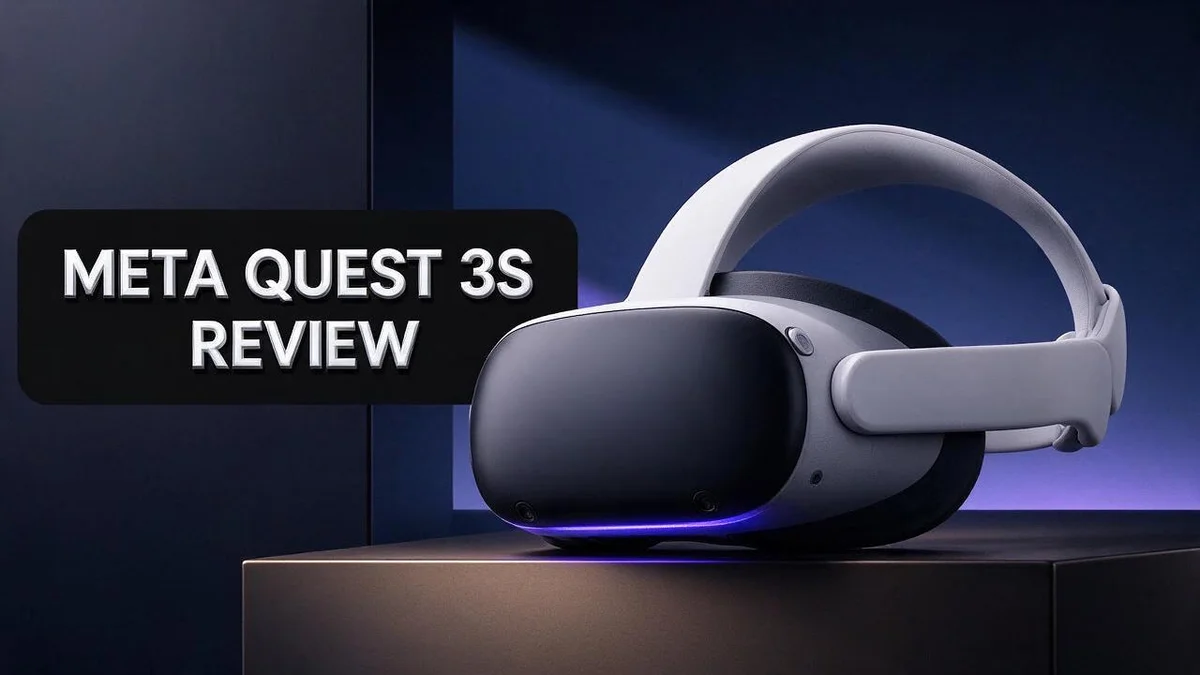
Are you ready for a fresh way to play? The Meta Quest 3S might be your next favorite headset. Meta’s Reality Labs unveiled it on September 25, 2024. It brings serious VR power into a light package.
The headset weighs about 300 grams. That light build helps during longer play sessions. Full color passthrough lets you see your surroundings clearly. Enhanced haptics add a satisfying touch to every action.
Performance stands out too. Graphics look strong, and the game library keeps growing. However, the lenses and fixed IPD positions limit image quality for some users. Is it the right choice for you? Keep reading to see how it performs in real use.
In a Nutshell
- Standalone freedom: You do not need a PC or console to get started. Just put on the headset, pick a game, and start playing right away.
- Strong performance: Games and mixed reality apps run smoothly on the hardware. Graphics look sharp for a headset in this class, so gameplay feels immersive.
- Large game library: A wide catalog gives you plenty of choices. Action fans, puzzle lovers, and fitness players all find titles they enjoy.
- Fixed eye spacing: The headset uses three set positions to match your eyes. Quest 3 offers continuous adjustment, which helps some users find a sharper view.
- Lens and comfort limits: The optical setup carried over from Quest 3 caps image quality. Some users also say comfort can suffer during long sessions.
- Best for: Players who want a light, capable headset for games and mixed reality at home. Shoppers who need top image quality may want to compare other options.
Design, Weight and Comfort


Last update on 2026-11-23 / Affiliate links / Images from Amazon Product Advertising API Some of the links on this website are affiliate links, which means that at no additional cost to you, I earn a commission if you click through and make a purchase. I only recommend products and services that I believe will add value to my readers. Thank you for your support!
Meta designed the Quest 3S with comfort in mind. The shape feels simple, and the headset rests close to your face without heavy pressure.
Good balance makes a big difference. The weight spreads across your head, so the load feels more even than you might expect.
The head strap does most of the work. Tighten the back band first, then adjust the top strap to lift the front off your eyes. Take a moment to find the spot that feels right.
Glasses wearers should check the space before settling in. Some frames fit well inside the headset, while others press against the lenses. Try a few positions to see what works for your face.
Heat can build up during intense sessions. The face padding may feel warm after a long game. Short breaks let fresh air move around your face.
Many players also test different face covers. A softer cover can change how the headset feels against your skin, so it is worth trying a few options.
Sweat can affect comfort, so wipe the cushion after each session. Clean padding keeps the headset feeling fresh and helps it last longer.
Long sessions test any headset. Plan a break every thirty minutes or so, and stretch your neck between rounds. Your body will thank you later.
Sound and light leaks can also change comfort. If outside light gets in, you may feel distracted. Adjust the fit until the edges sit snugly around your eyes.
Head shapes vary a lot from person to person. Take time to test the fit with each person who shares the headset.
Setting it up takes only a few minutes. Adjust the strap, check the fit, then run a quick test in the menu. A good fit sets the tone for every session.
Display and Optics
Clear visuals shape how much you enjoy the Meta Quest 3S. The screen shows plenty of detail, but it does not match the sharpness of its bigger sibling.
The headset has a lower display resolution than Quest 3. This means small text and distant objects can look softer. You may notice it most in menus and fine game details.
Fresnel lenses sit between your eyes and the screen. They focus light in a thin, compact way. This design helps keep the headset light on your face.
Lens design also affects the edges of the view. Details near the sides can look less crisp than the center. Many players accept this tradeoff for the lighter build.
Try each eye spacing setting to find your clearest picture. Because the headset has three fixed positions, one setting often looks sharper than the others. Take a minute to test them before you play.
Pixel density also plays a role. Packing fewer pixels into the same space makes each one more visible. Some users notice a faint grid pattern when they look closely at bright areas.
Games with bright scenes and dark backgrounds show the display well. Dark areas can look rich, while very bright scenes may lose some detail. Mixed reality views also benefit from a steady and natural look.
Movies and streaming apps offer a large viewing area. Text in most apps reads clearly at a normal distance. Small subtitles may still need a closer look, especially during fast action.
Good lighting in your room helps too. Bright windows or lamps can cause glare on the lenses. Close the curtains or move the lamp to reduce reflections and keep the picture clean.
Cleaning the lenses matters just as much. Use a soft microfiber cloth and avoid harsh sprays. Smudges can blur the view and make a sharp screen look dull.
Overall, the display works well for most home play. Players who want the sharpest picture may look at Quest 3. For casual games and mixed reality use, the Quest 3S delivers a clear and enjoyable view.
Mixed Reality and Passthrough
The Meta Quest 3S uses full color passthrough to show your room. Colors look natural, so your furniture and walls feel familiar. You can reach for a drink without removing the headset.
Mixed reality apps place virtual objects in your space. A game might put a robot on your coffee table. Your sofa can become a platform for a puzzle or a target for a quick challenge.
The headset scans your room during setup. It learns where walls, floors, and furniture sit. Those details help digital items stay in the right spots.
Room setup matters a lot. Clear the floor before you start. Move loose cables, rugs, and small toys away from your play area. A tidy space keeps you safe.
Mixed reality works best in good light. Bright lamps and daylight help the cameras track the room. Dim corners can make objects jitter or drift.
Reflective surfaces can confuse the sensors. Mirrors, glass tables, and shiny screens may throw off the view. Covering them or moving them out of play helps.
Clean the front cameras with a soft cloth. Smudges can blur the view of your room. Wipe them gently before each session.
Switching between real and virtual views feels quick. You can move from a game to your living room in seconds. This helps when someone walks in or asks a question.
Safety tips keep your session fun. Set a clear boundary before you move. Watch for pets, kids, and furniture edges near your path.
Passthrough also helps in shared spaces. You can spot a family member walking by. Pause your game and step back when someone needs you.
Overall, mixed reality feels fun and practical. It turns your home into a playground. Give it a few sessions, and your room will feel like a new place to explore.
Top 3 Alternatives
Looking for a different headset? These three options offer strong alternatives to the Meta Quest 3S. Each one brings its own strengths. Read on to find the best fit for your needs.
Meta Quest 3

Last update on 2026-11-24 / Affiliate links / Images from Amazon Product Advertising API Some of the links on this website are affiliate links, which means that at no additional cost to you, I earn a commission if you click through and make a purchase. I only recommend products and services that I believe will add value to my readers. Thank you for your support!
The Meta Quest 3 is a popular choice for mixed reality fans. It offers full color passthrough, so you can see your room while you play.
Many players enjoy its large library of games, fitness apps, and entertainment options. It runs on its own, so you do not need a computer.
Apple Vision Pro

Last update on 2026-11-24 / Affiliate links / Images from Amazon Product Advertising API Some of the links on this website are affiliate links, which means that at no additional cost to you, I earn a commission if you click through and make a purchase. I only recommend products and services that I believe will add value to my readers. Thank you for your support!
The Apple Vision Pro focuses on sharp screens and fine detail. Users can browse the web, watch movies, and work across several windows at once.
Its eye and hand tracking lets you control apps with simple gestures. There are no controllers to hold. It works best for people who already use Apple devices like the iPhone and Mac.
PlayStation VR2
Last update on 2026-11-23 / Affiliate links / Images from Amazon Product Advertising API Some of the links on this website are affiliate links, which means that at no additional cost to you, I earn a commission if you click through and make a purchase. I only recommend products and services that I believe will add value to my readers. Thank you for your support!
The PlayStation VR2 is built for gamers who own a PlayStation 5. It offers eye tracking and haptic feedback that make games feel more immediate.
Many titles support its bright display and smooth motion. Games feel natural when you move your head and hands. It is a great choice for players who want deep, console style virtual reality.
Gaming Library and Software
The game library is one of the headset’s biggest strengths. Players can explore action, puzzle, sports, and adventure titles. Many of these games come from the same Meta Store used by other Quest models.
The software runs on Meta’s Horizon OS. The menus stay simple and easy to use. You can browse, download, and launch games without any extra setup.
Performance holds up well for most modern titles. Smooth frame rates make fast games feel natural. Bright scenes and detailed worlds run without much trouble. Some demanding games may need lower graphics settings in busy areas.
Fitness apps give the headset extra daily use. Boxing, rhythm, and workout programs keep you moving. Sessions can be short or long, depending on your goals. Many people use them as a regular exercise routine.
Independent studios also bring fresh ideas. Smaller developers often release creative experiments here. These titles offer unusual gameplay that you may not find elsewhere.
Multiplayer options add plenty of social fun. Friends can join you in shared worlds and team matches. Voice chat lets everyone talk during play, which makes sessions feel lively.
Software updates arrive on a regular basis. Meta often adds new features and fixes bugs over time. Keeping the system current helps every app run smoothly.
Not every title supports every feature. Some older games may lack newer controls or modes. Reading the store page before downloading helps you choose wisely.
Storage fills up faster than you expect. The 128GB version holds a good number of games. Large downloads add up quickly, so remove apps you no longer play.
Quest 3 owners can continue their library here. Downloads link to your Meta account. This makes switching between devices easy.
In short, the software keeps the fun going. You get a wide range of games and useful apps. The experience feels simple, social, and active.
Value and Price Comparison
Choosing a VR headset often comes down to how you plan to use it. The Meta Quest 3S fits many needs, but it helps to see how it stacks up against its closest rivals.
The Meta Quest 3 remains the best standalone option in Meta’s lineup. It offers a sharper display and continuous eye spacing adjustment. Shoppers who want the most detail should look there first.
The PlayStation VR2 serves a different crowd. It suits anyone who already owns a PS5 and loves console gaming.
The Meta Quest Pro targets PC VR fans. It connects to a computer, so it suits players who want powerful virtual worlds run by a desktop setup.
The Meta Quest 2 belongs to the previous generation. It still runs many titles, but newer features are missing.
Each rival serves a clear audience. The Quest 3S sits in the middle, offering standalone freedom without giving up too much detail.
The Quest 3S stands out for one simple reason. It needs no PC or console to run. You charge it, set it up, and play right away. That freedom suits families, travelers, and people in small apartments.
Compromises still exist, so be honest with yourself. The optical stack carried over from the Quest 3 limits image quality. Fixed eye spacing may not match every face.
Think about your daily habits before you commit. Someone who wants sharp visuals might prefer the Quest 3. Some users also find comfort lacking during long sessions.
Ask yourself three quick questions. Do you own a PC or PS5? Do you want sharper visuals or a lighter setup? Your answers point to the best fit.
Beginners often find the Quest 3S easy to start with. Serious enthusiasts may want a model with higher display detail. Either way, choose the headset that fits your routine.
Pros and Cons
Pros
- The light build of about 300g feels easy on your head.
- Full color passthrough lets you see your room in true color.
- Enhanced haptics add a real physical feel to your moves.
- The action button makes quick choices simple.
- No PC or cables needed, so you can play anywhere.
Cons
- Some users find comfort lacking during longer sessions.
- Three fixed eye spacing positions may not suit every face.
- Lower display resolution than the Quest 3 means less sharp detail.
- Memory specs differ between listings, so check the details first.
Who Should Buy It
Families and roommates often get the most out of this headset. Everyone in the house can take a turn, so one device serves the whole group.
Gift shoppers should also take a close look. A headset makes a memorable present for teens, couples, or grandparents who enjoy new tech. Setup stays simple, so the surprise lasts longer than the wrapping paper. Recipients can start playing within minutes of unboxing.
Frequent movers also benefit from the design. You can carry the headset from the living room to a spare bedroom without packing extra gear.
Shared living spaces work well for this model too. Roommates can agree on set times, which keeps the peace and keeps everyone happy.
Visual perfectionists should think twice. If crisp detail matters most, consider other headsets before you decide.
Curious people who want a fresh hobby can start small. Try a few short sessions each week, then judge how much you enjoy it.
Parents with young players need to plan screen time. Set clear limits, and check the age ratings of games before each session.
Older adults may enjoy gentle movement games. Light workouts and puzzle titles offer a fun way to stay active at home. Sessions can stay short and calm.
Office workers who want a break from screens might enjoy quick relaxing sessions. Short sessions fit into busy schedules easily.
Honest answers matter most here. Ask who will use the headset, where it will sit, and how often it will come off the shelf.
Match the headset to your routine. Think about your free hours, your space, and your comfort limits. A good fit feels natural, not forced.
Final Verdict
The Meta Quest 3S gives newcomers a clear and simple way into virtual reality. It works well as a first headset for gamers, explorers, and curious families.
Think about how you plan to use it during the first few months. If you want plenty of games to try, this headset gives you a lot to explore. If you mostly want to watch videos, a dedicated screen may serve you better.
Set your expectations before you commit. Sharp text and fine detail matter a lot to some people. If that describes you, look for a model with a higher resolution display.
Try the headset on in person whenever you can. Your face shape, head size, and whether you wear glasses all change the experience. A short trial period also helps you see how the headset feels after a longer session.
The Quest 3S shines in casual play and light movement games. It may not satisfy someone chasing the sharpest visuals on the market. Be honest about your goals.
Plan your first week before you start. Pick two or three experiences you want to try first. Keep early sessions short. A gradual start helps new users avoid fatigue and keeps the fun going.
In the end, this headset is a strong starting point for many people. It can be a pleasant surprise for newcomers who want easy setup and plenty of things to do.
Frequently Asked Questions
Is the Meta Quest 3S easy for beginners to learn?
Yes, most first timers find it simple. The menus guide you step by step. Start with short tutorials to learn the controls.
How long should my first session last?
Short sessions work best at the start. Try 20 to 30 minutes at a time. Take breaks to rest your eyes and let your body adjust.
Can I use the Meta Quest 3S for light exercise?
It can support gentle workouts. Dance and rhythm games keep you moving without heavy strain. Stop if you feel dizzy or tired. Always drink water during active play.
Do I need a large room to play?
A clear floor space helps most. Move chairs and tables away from your play area. Some games need room to step and reach. Check your space before each session.

Hello, i’m Ivoria i am the face behind Tech Tracker Blog. I am passionate about my work and love to explore gadgets and share about my experience.