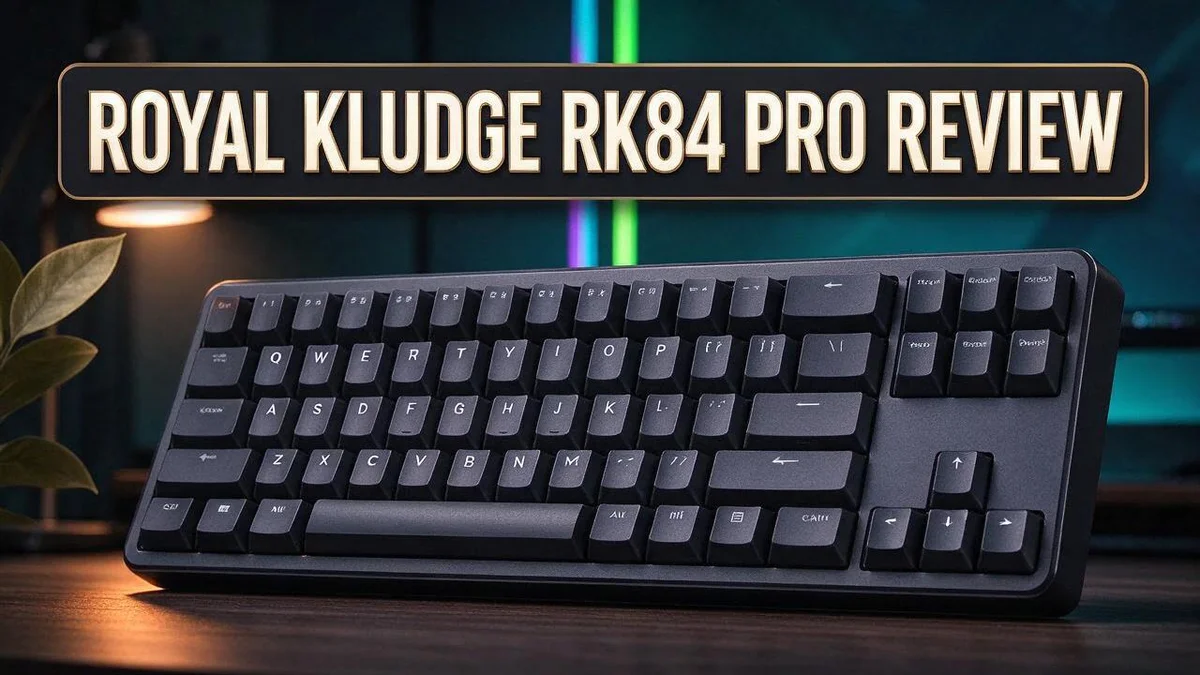
Royal Kludge RK84 Pro Review: Live Up To The Hype?
Looking for a keyboard that saves desk space and still feels great to type on? The Royal Kludge RK84 Pro could be the right pick. It uses a 75% layout that keeps the arrow keys and drops the numpad.
This keyboard connects in three ways. You can use Bluetooth, a 2.4GHz wireless link, or a USB-C cable. Switching between a laptop, a phone, and a desktop feels simple.
Many people also like the hot swap sockets, which let you change switches without soldering. The detachable frame and built in USB hub add more flexibility. It also works with Windows, Mac, Android, Chromebook, and iOS.
In this review, we look at the design, typing feel, connectivity, and software. We also compare it with popular rivals. By the end, you will know if this board fits your daily work or gaming setup.
In a Nutshell
-
Compact 75% layout: The keyboard packs 84 keys into a layout with no numpad. Your mouse sits closer to your hand, so your wrist stays in a more natural position during long sessions.
-
Metal body in the Pro version: The Pro model uses an aluminum case. This adds extra weight, so the board stays planted on your desk while you type fast.
-
Gateron switches: The Pro version includes Gateron switches. Many typists enjoy their smooth response, and the keys feel steady under light and heavy presses.
-
Built in USB hub: Three extra ports sit right on the board. You can connect a mouse or a flash drive without reaching behind your computer.
-
Large internal battery: The big battery supports longer wireless sessions. When it runs low, you can switch to a wired cable and keep working.
-
Short wireless range: The 2.4GHz connection reaches only a short distance. Place your receiver close to the keyboard for the most stable typing.
Build Quality and Design

Last update on 2026-10-27 / Affiliate links / Images from Amazon Product Advertising API Some of the links on this website are affiliate links, which means that at no additional cost to you, I earn a commission if you click through and make a purchase. I only recommend products and services that I believe will add value to my readers. Thank you for your support!
Build quality matters a lot when you type all day. The Royal Kludge RK84 Pro feels solid right out of the box. Most of the weight sits in the base, so it stays put on your desk.
Think about how the keyboard feels under your hands. The top plate looks clean, and the edges feel smooth. You will not find sharp corners that dig into your wrists. Try resting your palms on it for a minute. You will notice how smooth the surface feels.
The detachable frame adds a unique touch. You can remove it to change the look or reach the inner parts. Many users find this handy when they want a fresh style.
The keycaps deserve a closer look. Reports suggest they use a sturdier material than typical plastic. The letters should resist shine and wear better over time.
Stability is another strength. Rubber feet grip the desk, so the board rarely slides during fast typing. Your hands stay focused on the words, not the keyboard.
Stabilizers on the larger keys also feel steady. Spacebar presses land without wobble. This small detail makes a big difference when you write long emails.
Cable setup deserves a mention too. The cable exits cleanly from the back, so it does not tangle easily. Your workspace looks neat even on a busy day.
Now compare this with rivals. Keychron is known for a premium build and a refined typing feel. The RK84 Pro takes a different path. It focuses on sturdy parts and practical design instead of luxury finishes.
The layout also helps your desk look tidy. Without a numpad, the mouse sits closer to your body. Many people find this more comfortable during long sessions.
Gamers may compare it with full size boards like the Corsair K70 RGB Pro or Razer BlackWidow V4 Pro. Those models offer more keys. The RK84 Pro focuses on saving desk space instead.
Overall, the build feels dependable. The frame feels firm, the keys sit well, and the design stays simple. It is a solid choice for daily use.
Typing Feel and Switches
The switches sit under every key and shape how each press feels. They decide how much force you need and how the key responds. Good switches make typing feel easy instead of tiring.
Smooth keys keep your fingers relaxed. Many typists prefer a steady press with little wobble. Strong keys can slow you down after a few hours. The RK84 Pro offers a balanced feel for long writing sessions.
Linear, tactile, or clicky? Linear switches press down smoothly with no bump. Tactile switches add a small bump that signals each press. Clicky switches add a sharp sound along with that bump.
Sound matters too. A quieter board suits shared offices or late night work. Louder switches can feel satisfying, but they may bother people nearby. Think about where you type before you choose.
Your typing style also shapes the best choice. Fast typists often like light force and short travel. Heavy typers may want a firmer press that feels solid.
Actuation point is another useful idea. This is the spot where a key registers a press. A shorter actuation point can help fast typists, while a deeper point may feel more forgiving for beginners.
Bottoming out means pressing a key all the way down. Some people feel that impact in their fingers after long days. A softer landing can reduce that strain, so consider this when you test a board.
Many people also notice sound changes with different switch lubes. Lubed switches often feel smoother and quieter. This tweak is a fun way to learn about keyboard feel.
A short test helps most people decide. Type a paragraph, then type a few lines of numbers or code. Notice which keys feel tiring and which feel light.
Your preferences may shift over time. What feels great today may feel different after months of use. Stay open to trying new feels as your habits change.
Overall, the typing feel suits people who want a balanced everyday board. Test a few keys first to see if the feel matches your hands.
Connectivity and Wireless Range
Switching between devices feels simple. Most setups use a key combo to move between modes. You can jump from a laptop to a tablet in seconds.
The 2.4GHz receiver gives the steadiest link for daily desk work. Bluetooth fits phones and tablets that need a little more freedom.
Placement matters more than many people expect. Keep the receiver in clear view of your keyboard. Metal desks, thick walls, and nearby routers can weaken the signal.
If you use a laptop stand or a monitor arm, test the link from that exact spot. Small changes in position can shift the signal.
Wired mode removes most worries about range. Plug in the USB C cable and the board starts right away. Many gamers prefer this option for quick, reliable input.
Battery life changes with the connection you choose. Bluetooth often uses less power, so it suits longer sessions away from a charger.
The backlight also drains the battery quickly. Lower the brightness or turn it off to stretch each charge. Look for a sleep setting in the software if you step away often.
Charge the board through the USB C port during quiet hours. A full charge helps the wireless modes run longer between sessions.
Platform support adds more flexibility. The board works with Windows, Mac, Android, Chromebook, and iOS. Each system may treat certain modifier keys a little differently, so check your settings after pairing.
Pairing takes only a moment. Put the board into pairing mode with its connection key. Then select the keyboard name from your device list.
Keep phones, speakers, and wireless mice a short distance from the receiver. This simple step can prevent random drops during busy work.
Keep a spare cable in your bag. A short cable makes travel setups tidy and simple.
A quick test shows the real limit. Sit in your normal chair and type a few sentences. Move around the room while you type. Pick the mode that stays steady in your space.
Top 3 Alternatives
Keychron K8 Pro
No products found.
A Keychron K8 Pro gives you a wireless option with a compact 84 key layout. It supports Bluetooth and USB, so you can switch between devices with ease.
Many typists enjoy its hot swap sockets. You can try different switches without any soldering, which makes customizing simple.
Its clean design fits well on almost any desk. The low profile keys also feel comfortable during long writing sessions.
Akko 3084 Pro
No products found.
The Akko 3084 Pro offers a full size feel in a tenkeyless frame. It removes the number pad, which gives your mouse more room to move.
Its gasket style mount creates a soft and bouncy typing feel. Many gamers and writers enjoy this smooth response during fast sessions.
The sturdy build keeps the board stable on your desk. You can count on it for daily use at work or at home.
Redragon K552 Kumara

Last update on 2026-10-28 / Affiliate links / Images from Amazon Product Advertising API Some of the links on this website are affiliate links, which means that at no additional cost to you, I earn a commission if you click through and make a purchase. I only recommend products and services that I believe will add value to my readers. Thank you for your support!
The Redragon K552 Kumara is a simple wired keyboard for beginners. It uses an 87 key layout that many people find easy to learn.
You plug it in and start typing right away. No extra software setup is needed for basic use.
Its sturdy frame and red backlight make it a fun choice for home use. It works well for students and casual gamers alike.
Software and Customization
Software is where you shape the RK84 Pro to fit your habits. Programmable settings let you change how each key behaves. Good setup saves time every single day.
Think about your daily tasks before you program anything. Writers may want quick access to punctuation. Gamers may prefer keys that sit close to the left hand.
Start by remapping keys you rarely touch. Caps Lock is a popular choice, since many people never need it. Swap it for Escape or a shortcut you use often.
Macros let one press trigger a chain of actions. You might use one for copy and paste, or for opening a favorite app. Keep your first macros simple so you can test them easily.
Media keys and hotkeys also deserve a look. The board already includes dedicated controls for volume and playback. Remap any extra hotkey to open a tool you use daily.
Lighting adds a personal touch too. The blue backlight can usually be adjusted for brightness and effects. Choose a calm setting for office work and a bolder one for evening play.
Profiles help you switch between setups fast. One profile can cover writing, while another suits coding or gaming. Save each profile with a clear name so you never guess which one is active.
Be honest about the software limits. Reviewers feel the software still has room to grow. Some menus may feel slow or confusing at first. Take your time and save your changes often.
Test each change for a few days. Some shortcuts feel great at first but annoy you later. Keep what works and remove the rest.
Setup steps can differ by device. Windows, Mac, Android, Chromebook, and iOS users should read the guide for their system. A quick check now prevents frustration later.
Write down your favorite changes before you reset anything. A short list makes it easy to rebuild your setup. Your keyboard will feel more like yours within a few days.
Pros and Cons
Pros
- Wired and wireless options give you flexibility at your desk.
- The hot swap feature lets you change switches without soldering.
- The Pro model has a sturdy aluminum body.
- A built in USB hub adds three extra ports.
- It works with Windows, Mac, Android, Chromebook, and iOS.
Cons
- The 2.4GHz range is short, so keep the receiver close.
- The software still needs improvement for deeper customization.
- Reviewers say the design feels dated next to newer boards.
- Keychron offers a more premium build and typing feel.
Who Should Buy It
Some people will enjoy this board more than others. The RK84 Pro fits best with a few clear types of users.
Desk space matters a lot. People with a crowded desk often want a smaller board. The 75% layout drops the numpad, so the mouse can sit closer to the keys. This gives your wrist more room and keeps your workspace tidy.
Spreadsheet fans may need a different board. If your daily work involves long columns of numbers, the missing numpad will slow you down. In that case, a full size board may serve you better.
Programmers and writers often find the extra keys useful. Arrow keys, navigation keys, and function row shortcuts stay within easy reach. Long typing sessions feel more comfortable when the keys you need are close.
Hobbyists who like to tinker get plenty to explore. The detachable frame invites curiosity about custom builds. Enthusiasts can also use the Gateron switches as a starting point for learning.
Frequent travelers appreciate the compact size. A smaller board slides into a backpack more easily. It pairs well with a laptop for a neat setup in a hotel room or coffee shop.
Owners of a smaller model may want more keys. Someone using the RKG68 might miss the arrow keys and function row. The RK84 Pro adds those keys while keeping a compact footprint.
Competitive gamers should compare options first. Players who want a full size gaming feel may prefer boards like the Corsair K70 RGB Pro or the Razer BlackWidow V4 Pro. Casual players who want a compact desk can still enjoy it.
Think about your daily habits before you decide. Take a moment to picture your typical day at the desk. If the layout matches how you work, this board can feel like a strong match for your setup.
Final Verdict
The Royal Kludge RK84 Pro is a solid pick for the right buyer. It may not suit everyone, but it earns a strong spot on many desks.
Think of this board as a playground for curious typists. It rewards people who enjoy testing ideas and fine tuning their setup.
Who will feel at home? People who switch between a laptop, tablet, and desktop each day may appreciate the setup.
The three connection modes help them move between devices with less fuss.
Who should look elsewhere? Gamers who want a full size board with a dedicated numpad may prefer a different style.
Buyers who want a fully polished feel out of the box should test it in person first.
The bottom line. This board packs a lot of hands on fun into a compact frame.
Its build, connection options, and layout make it a strong contender for hobbyists and everyday users alike.
Our final take. If you want a compact board that grows with your interests, the RK84 Pro deserves a close look.
Take time to test the software, pick your favorite connection mode, and see how the keys feel under your fingers.
A little planning can lead to a keyboard you enjoy for years.
Think about your next step. Start with a clear list of tasks you do most often. Compare that list with the keyboard’s layout and features before you commit.
Give it a fair trial. Use the board for at least one full week of work. Notice how your wrists feel, how quickly your fingers settle, and whether the layout feels natural.
Keep your expectations realistic. No keyboard fits every need. This one shines in some areas and asks for patience in others.
Ask friends who type all day, since their feedback can help you decide.
A short test drive often reveals more than any spec sheet.
Final words. The RK84 Pro offers a flexible, fun path into custom keyboards for many users.
Frequently Asked Questions
Can I swap the switches later?
Yes, you can. The board uses hot swap sockets, so you can pull out a switch and push in a new one. No soldering is needed. This makes it easy to try different switch feels over time.
What makes the Pro version different?
User reports point to a few upgrades. The Pro model reportedly uses Gateron switches. It may also have upgraded keycaps, likely made from PBT plastic. Keycap material can change how the keys sound and feel.
Does the keyboard have a backlight?
Yes, it has a blue backlight. The glow helps you type in dim rooms. Hotkeys and media keys also sit on the board, so you can control music without opening another app.
How long does the battery last?
The research does not list an exact runtime. The board has a sizable internal battery, but battery life depends on how you use it, including backlight use and connection mode. Check recent user reviews for real world results.
Can I remap the keys?
Yes, you can. The board works with programmable software that lets you change key functions. The software still has room to grow, so expect some limits.

Hello, i’m Ivoria i am the face behind Tech Tracker Blog. I am passionate about my work and love to explore gadgets and share about my experience.