GEEKOM GeekBook X14 Pro Laptop Review 2026: Worth It?
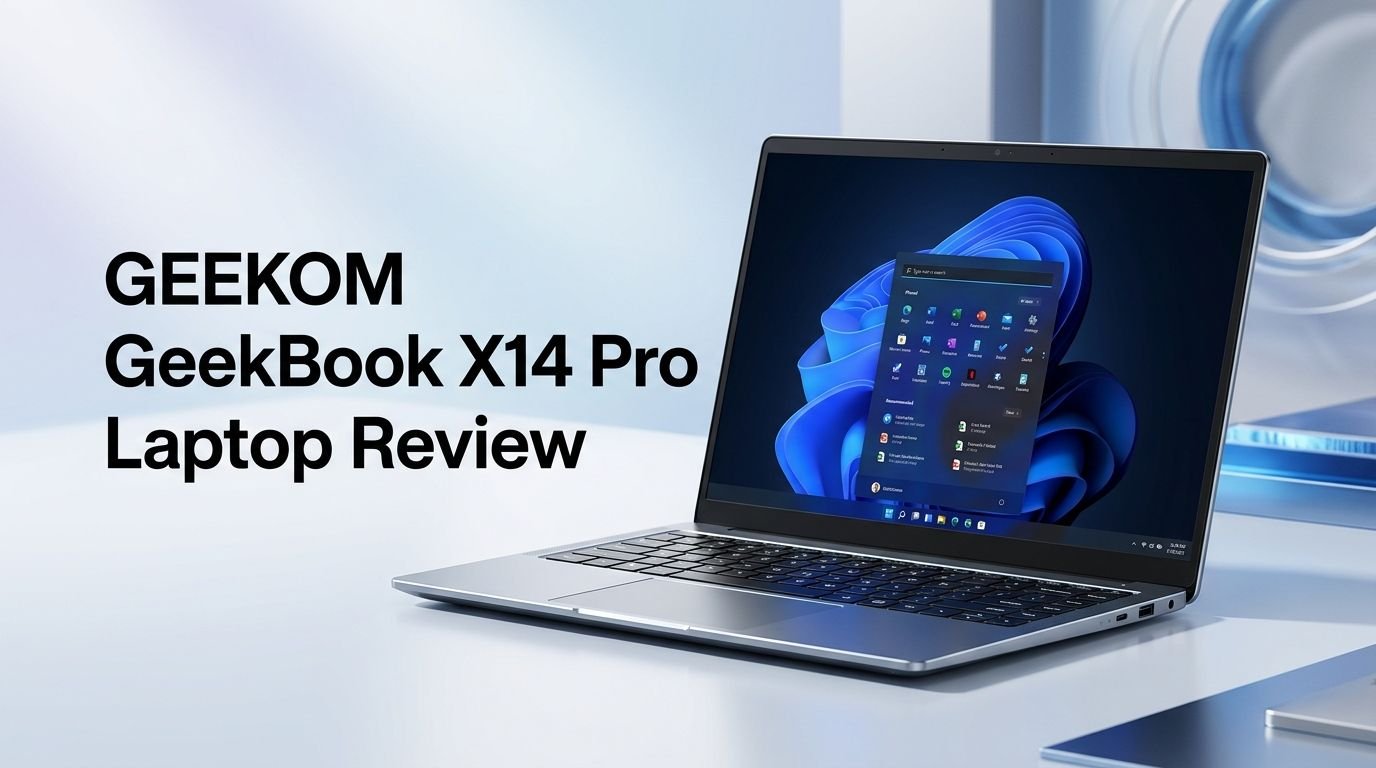
Are you looking for a lightweight laptop with a stunning OLED display that does not burn a hole in your wallet? The GEEKOM GeekBook X14 Pro might be the answer. This laptop marks GEEKOM’s bold entry from the mini PC space into the laptop market.
It packs an Intel Core Ultra 9 185H processor, a gorgeous 2.8K 120Hz OLED panel, 32GB of fast LPDDR5x RAM, and a massive 2TB SSD. All of this sits inside an all metal body that weighs just 2.2 pounds.
At a starting price of around $999 for the Core Ultra 5 model and $1,299 for the Core Ultra 9 version, it competes directly with laptops from ASUS, Lenovo, and Samsung.
Key Takeaways:
- The 14 inch 2.8K OLED display running at 120Hz is the standout feature. It delivers deep blacks, vivid colors with 100% DCI P3 coverage, and sharp detail that rivals laptops costing twice the price. Content creators and media consumers will love this screen.
- Performance from the Intel Core Ultra 9 185H is solid for productivity tasks. The 16 core, 22 thread processor handles multitasking, office work, and light creative projects with ease. However, thermal throttling under sustained heavy loads pulls back peak performance.
- 32GB of LPDDR5x RAM and a 2TB NVMe SSD come standard on the top tier model. This is a generous amount of memory and storage at this price point. You will not need to upgrade anytime soon.
- The laptop weighs just 2.2 pounds and measures 0.7 inches thick. The all metal magnesium alloy chassis feels premium and is among the lightest in its class. It is extremely easy to carry around all day.
- Battery life reaches roughly 8 to 10 hours for mixed use. The 72Wh battery is decent, but the OLED panel and powerful processor prevent it from matching Apple’s MacBook Air endurance. Charging is fast at 65W through USB C.
- The trackpad and speakers are weak points. Several reviewers noted ghost inputs on the trackpad and tinny, mediocre speaker quality. These drawbacks can affect the daily user experience for those who rely on them.

Last update on 2026-06-03 / Affiliate links / Images from Amazon Product Advertising API Some of the links on this website are affiliate links, which means that at no additional cost to you, I earn a commission if you click through and make a purchase. I only recommend products and services that I believe will add value to my readers. Thank you for your support!
GEEKOM GeekBook X14 Pro: Design and Build Quality
The GEEKOM GeekBook X14 Pro makes a strong first impression. Its magnesium alloy chassis gives it a sleek, premium feel. The Titanium Gray finish looks modern and professional. It does not attract fingerprints as easily as glossy plastic laptops.
The laptop measures just 0.7 inches thick and weighs approximately 2.2 pounds (1 kg). This makes it one of the lightest all metal 14 inch laptops available right now. You can slip it into a backpack or briefcase and barely notice the extra weight.
Build quality is solid overall. The lid has minimal flex, and the hinge opens smoothly with one hand. The bottom panel is clean with ventilation grilles for airflow. GEEKOM clearly spent time making this laptop look and feel like a premium product, especially given its price point.
The overall footprint is compact. It does not take up much desk space. If you travel often or work from coffee shops, this laptop fits easily on small tables. The slim profile also makes it look elegant during meetings or presentations.
Display Quality: The 2.8K OLED Star of the Show
The display is the crown jewel of the GeekBook X14 Pro. GEEKOM uses a 14 inch OLED panel with 2880 x 1800 resolution and a 120Hz refresh rate. Colors pop with 100% DCI P3 coverage, and the contrast ratio is essentially infinite thanks to OLED’s true black levels.
Brightness peaks at around 450 nits, which is enough for indoor use and moderately bright environments. It may struggle a bit under direct sunlight, but that is a common OLED trade off. The glossy finish enhances color vibrancy but also adds some reflections.
Text rendering at this resolution is exceptionally crisp. Scrolling feels smooth at 120Hz. Watching movies, editing photos, and browsing the web on this display is a genuinely enjoyable experience. The panel supports HDR True Black 500, which adds depth to supported content.
For creative professionals who need accurate color reproduction, this display delivers. It competes with OLED panels found on the ASUS Zenbook 14 OLED and Samsung Galaxy Book4 Pro. At this price, this screen quality is hard to beat.
Processor Performance: Intel Core Ultra 9 185H
The top configuration of the GeekBook X14 Pro ships with the Intel Core Ultra 9 185H. This is a 16 core, 22 thread processor built on Intel’s Meteor Lake architecture. It includes 6 Performance cores, 8 Efficiency cores, and 2 Low Power Efficiency cores.
For everyday productivity, this chip performs well. Multitasking with dozens of browser tabs, office applications, and streaming apps runs smoothly. The processor also handles light photo editing and video trimming without issues.
Under sustained heavy workloads like long rendering tasks, reviewers observed thermal throttling. The thin and light chassis limits cooling capacity. One reviewer from KitGuru found that manual repasting of thermal compound boosted sustained performance by about 13%. This suggests the factory thermal paste application could be better.
Single core performance is competitive with other Intel Ultra 9 laptops in this price range. Multi core scores fall slightly below thicker, better cooled competitors. If you need consistent peak performance for professional video editing or 3D rendering, a thicker workstation class laptop would serve you better.
Top 3 Alternatives for GEEKOM GeekBook X14 Pro
1. ASUS Zenbook 14 OLED (2024)

Last update on 2026-10-07 / Affiliate links / Images from Amazon Product Advertising API Some of the links on this website are affiliate links, which means that at no additional cost to you, I earn a commission if you click through and make a purchase. I only recommend products and services that I believe will add value to my readers. Thank you for your support!
2. Lenovo Slim 7 OLED 14 Inch Laptop

Last update on 2026-10-04 / Affiliate links / Images from Amazon Product Advertising API Some of the links on this website are affiliate links, which means that at no additional cost to you, I earn a commission if you click through and make a purchase. I only recommend products and services that I believe will add value to my readers. Thank you for your support!
3. Samsung Galaxy Book4 Pro 14 Inch

Last update on 2026-10-18 / Affiliate links / Images from Amazon Product Advertising API Some of the links on this website are affiliate links, which means that at no additional cost to you, I earn a commission if you click through and make a purchase. I only recommend products and services that I believe will add value to my readers. Thank you for your support!
Memory and Storage: 32GB RAM and 2TB SSD
The GeekBook X14 Pro comes with 32GB of LPDDR5x RAM clocked at 7467MHz. This is soldered to the motherboard, so you cannot upgrade it later. However, 32GB is more than enough for most users in 2026. It handles heavy multitasking, virtual machines, and large spreadsheets with ease.
The 2TB M.2 PCIe Gen4 NVMe SSD is a welcome inclusion at this price. Many competing laptops offer only 512GB or 1TB at similar price points. Read and write speeds are fast. Boot times are quick, and large file transfers complete in seconds.
The SSD is user replaceable, which is a nice touch. If you ever need more storage or want to swap in a faster Gen5 drive, you can do so without much hassle. This is a practical advantage over laptops with fully soldered storage.
For the Core Ultra 5 model, GEEKOM offers a 32GB RAM and 1TB SSD configuration at a lower price. Both models provide excellent value for the storage and memory you receive.
Keyboard and Trackpad Experience
The keyboard on the GeekBook X14 Pro is backlit and offers decent travel for a thin laptop. Key presses feel responsive, and the layout is standard with no awkward key placements. Typing long documents or emails feels comfortable.
However, the trackpad is a notable weakness. Multiple reviewers reported issues with ghost inputs and inconsistent palm rejection. The cursor sometimes jumps or registers unintended clicks during normal use. This can be frustrating during extended work sessions.
If you plan to use an external mouse, the trackpad issue becomes less of a concern. But for a laptop marketed as a portable machine, the trackpad experience matters. GEEKOM may address this through firmware updates, but as of early 2026, it remains a drawback.
The fingerprint reader is integrated into the power button. It works quickly and reliably for Windows Hello login. This adds a layer of convenience and security for daily use.
Battery Life and Charging Speed
The GeekBook X14 Pro packs a 72Wh battery. GEEKOM claims up to 16 hours of battery life. Real world usage tells a different story. Most reviewers report 8 to 10 hours of mixed use, including web browsing, document editing, and light media playback.
The OLED display and the power hungry Core Ultra 9 processor consume more energy than their LCD and lower tier counterparts. If you lower the screen brightness and stick to lighter tasks, you can push closer to 12 hours. Heavy workloads drain the battery faster.
Charging happens through USB C at 65W. The laptop charges from empty to around 50% in about 30 minutes. Full charge takes roughly 90 minutes. KitGuru’s review noted that the laptop can actually accept up to 100W charging from compatible chargers, which is faster than the listed spec.
The included 65W USB C charger is compact and easy to carry. You do not need a bulky power brick. This adds to the laptop’s overall portability.
Port Selection and Connectivity
The GeekBook X14 Pro offers a reasonable port selection for a thin laptop. You get 2x USB4 Type C ports, 1x USB 3.2 Gen1 Type A port, 1x HDMI 2.0 port, and a 3.5mm audio jack.
The two USB4 ports support Thunderbolt level data transfer speeds and display output. You can connect external monitors, docks, and fast storage devices. Both USB C ports also support charging, so you can plug in from either side.
The inclusion of a full size USB A port is appreciated. Many ultra thin laptops drop USB A entirely. This lets you connect older peripherals like flash drives and mice without a dongle.
HDMI 2.0 supports external displays up to 4K at 60Hz. For presentations and dual monitor setups, this works well. Wi Fi 6E and Bluetooth 5.4 provide fast and stable wireless connections.
Speaker and Audio Quality
The speakers on the GeekBook X14 Pro are disappointing. Several reviewers describe the sound as tinny and lacking bass. At higher volumes, some distortion creeps in. The speaker system supports DTS:X Ultra processing, but it does not fully compensate for the hardware limitations.
For casual video calls and light media consumption, the speakers are acceptable. They get the job done at moderate volume levels. But if you enjoy watching movies or listening to music without headphones, you will want an external speaker or a good pair of earbuds.
The 3.5mm headphone jack provides a reliable wired audio option. Bluetooth 5.4 also connects well to wireless earbuds and headphones. For most users, pairing the laptop with quality headphones is the best audio solution.
This is an area where GEEKOM could improve in future models. A laptop with this level of display quality deserves better speakers to match the visual experience.
Webcam and Microphone Performance
The GeekBook X14 Pro includes a 1080p Full HD webcam positioned above the display. Image quality is clear enough for video calls on Zoom, Teams, and Google Meet. Colors look natural, and the camera handles indoor lighting reasonably well.
Low light performance is average. The image gets grainy in dimly lit rooms, but this is common across most laptop webcams. A physical privacy shutter is not included, which some security conscious users may miss.
The dual array microphone picks up voice clearly during calls. Background noise suppression works at a basic level. For professional recording or podcasting, you will still want a dedicated external microphone.
Overall, the webcam and microphone setup is adequate for everyday video conferencing. It does not stand out, but it gets the job done without major complaints.
Thermal Performance and Fan Noise
Thin laptops always face a cooling challenge. The GeekBook X14 Pro is no exception. Under light loads like web browsing and document editing, the laptop stays cool and quiet. The fans rarely spin up during normal tasks.
Under heavy workloads like extended benchmarks or rendering, temperatures climb and the fans become audible. Thermal throttling kicks in to protect the components. Surface temperatures on the keyboard area stay manageable, but the bottom of the laptop can get warm.
KitGuru’s teardown revealed that the factory thermal paste was not applied ideally. Repasting with high quality thermal compound improved sustained performance by about 13%. This is worth noting for power users who want maximum output.
For typical office and creative work, thermal performance is acceptable. The laptop handles bursts of heavy work well. It is the sustained, long duration heavy loads where the thin chassis becomes a limiting factor.
Software and Windows 11 Pro Experience
The GeekBook X14 Pro ships with Windows 11 Pro pre installed. This gives you access to features like BitLocker encryption, Remote Desktop, and Hyper V. Business users and IT professionals will appreciate the Pro license out of the box.
Bloatware is minimal. GEEKOM does not load the system with unnecessary third party apps. The Windows experience feels clean and snappy from the first boot. Updates install smoothly, and driver support is solid for all hardware components.
Intel’s AI Boost features are available through the Core Ultra processor. The integrated NPU supports Windows AI tasks and compatible applications. As AI powered tools grow in Windows, this processor is ready to handle them.
One concern raised by some reviewers involves BitLocker activation. The recovery key may not be automatically backed up if you skip Microsoft account setup. Users who prefer local accounts should manually save their BitLocker key to avoid lockout situations.
Who Should Buy the GEEKOM GeekBook X14 Pro?
This laptop is ideal for students, professionals, and content consumers who want a lightweight machine with a stunning display. If you prioritize screen quality and portability over raw sustained performance, this laptop delivers excellent value.
Frequent travelers will love the 2.2 pound weight and slim profile. The 72Wh battery provides enough juice for most flights and workdays. The compact charger is easy to pack alongside the laptop.
Budget conscious creatives who need accurate color reproduction for photo editing or design work will benefit from the OLED display. The 32GB RAM and 2TB storage provide ample room for project files and applications.
This laptop is not the best choice for heavy video editors, 3D modelers, or gamers who need sustained high performance. The thermal constraints of the thin chassis limit long duration heavy workloads. Users who depend heavily on the trackpad without an external mouse may also find the experience frustrating.
GEEKOM GeekBook X14 Pro: Pricing and Value
Last update on 2026-06-28 / Affiliate links / Images from Amazon Product Advertising API Some of the links on this website are affiliate links, which means that at no additional cost to you, I earn a commission if you click through and make a purchase. I only recommend products and services that I believe will add value to my readers. Thank you for your support!
The Core Ultra 5 model with 32GB RAM and 1TB SSD starts at around $999. The Core Ultra 9 model with 32GB RAM and 2TB SSD is priced at about $1,299. Both models are available on Amazon and GEEKOM’s official website.
At these prices, the GeekBook X14 Pro undercuts many competitors. The ASUS Zenbook 14 OLED with similar specs costs more. The Samsung Galaxy Book4 Pro 14 also carries a higher price tag. GEEKOM’s aggressive pricing gives it a clear advantage in the budget premium segment.
The inclusion of 32GB RAM, a 2TB SSD, and a 2.8K OLED panel at $1,299 is genuinely impressive. You would typically pay $1,500 or more for this combination from established brands. The value proposition is one of the strongest selling points of this laptop.
Occasional discount codes and promotions on GEEKOM’s website can bring the price down further. Keep an eye out for seasonal sales on Amazon for additional savings.
Pros and Cons Summary
The GEEKOM GeekBook X14 Pro gets a lot right for its first laptop. The stunning 2.8K OLED display is a visual treat. The lightweight all metal build feels premium. The generous 32GB RAM and 2TB SSD at this price point is rare. The Intel Core Ultra 9 185H delivers solid productivity performance. USB4 connectivity and fast charging round out a strong feature set.
On the flip side, the trackpad ghost input issue is a real annoyance. The speakers sound tinny and lack depth. Thermal throttling under sustained loads limits performance in demanding scenarios. The OLED panel’s brightness could be higher for outdoor use. Battery life, while decent, falls short of GEEKOM’s claimed 16 hours.
Overall, this laptop earns a strong recommendation for the right buyer. If you value display quality, portability, and specs per dollar, it is one of the best options available right now. Just be prepared to use an external mouse and headphones for the best experience.
Final Verdict: Should You Buy the GeekBook X14 Pro?
The GEEKOM GeekBook X14 Pro is a remarkable first laptop from a brand known for mini PCs. It proves that GEEKOM can compete in the laptop market. The combination of a beautiful OLED screen, powerful Intel processor, and premium build quality at an aggressive price makes it hard to ignore.
The weaknesses are real but manageable. The trackpad and speakers need improvement. Thermal performance could be better with improved paste application. These are areas GEEKOM can fix in future revisions or firmware updates.
For the price, you get more display, more RAM, and more storage than almost any competitor offers. If that value proposition appeals to you, the GeekBook X14 Pro is absolutely worth considering. It earns a solid 7 out of 10 rating based on current reviews.
Frequently Asked Questions
Is the GEEKOM GeekBook X14 Pro good for students?
Yes, it is an excellent choice for students. The lightweight design at just 2.2 pounds makes it easy to carry between classes. The 32GB RAM handles multitasking with ease. The OLED display makes reading and studying comfortable. Battery life of 8 to 10 hours covers a full school day.
Can the GEEKOM GeekBook X14 Pro handle video editing?
It can handle light to moderate video editing in applications like Adobe Premiere Pro or DaVinci Resolve. The Intel Core Ultra 9 185H and 32GB RAM provide enough power for 1080p editing. For sustained 4K editing or heavy rendering, the thermal throttling in this thin chassis may slow things down.
Does the GEEKOM GeekBook X14 Pro have a touchscreen?
No, the standard GeekBook X14 Pro does not include a touchscreen. The 14 inch 2.8K OLED display is a traditional non touch panel. This helps keep the weight low and the price competitive.
Can you upgrade the RAM on the GeekBook X14 Pro?
No, the 32GB LPDDR5x RAM is soldered to the motherboard. You cannot upgrade or replace it after purchase. However, 32GB is plenty for most use cases in 2026. The SSD is replaceable if you need more storage in the future.
How does the GeekBook X14 Pro compare to the MacBook Air M3?
The GeekBook X14 Pro offers a better display with its 2.8K OLED panel versus the MacBook Air’s LCD. It also provides more RAM (32GB vs 8GB base) and more storage (2TB vs 256GB base) at a similar or lower price. The MacBook Air wins on battery life, trackpad quality, and ecosystem integration. Your choice depends on whether you prefer macOS or Windows and which trade offs matter more to you.
Is the GEEKOM GeekBook X14 Pro worth buying in 2026?
Yes, it offers one of the best value propositions for a thin and light laptop in 2026. The OLED display, 32GB RAM, 2TB SSD, and Intel Core Ultra 9 processor at around $1,299 is very competitive. The trackpad and speaker issues are worth noting, but they do not erase the overall value this laptop provides.

Hello, i’m Ivoria i am the face behind Tech Tracker Blog. I am passionate about my work and love to explore gadgets and share about my experience.