Google TV Streamer 4K Review: Features, Performance, and Verdict
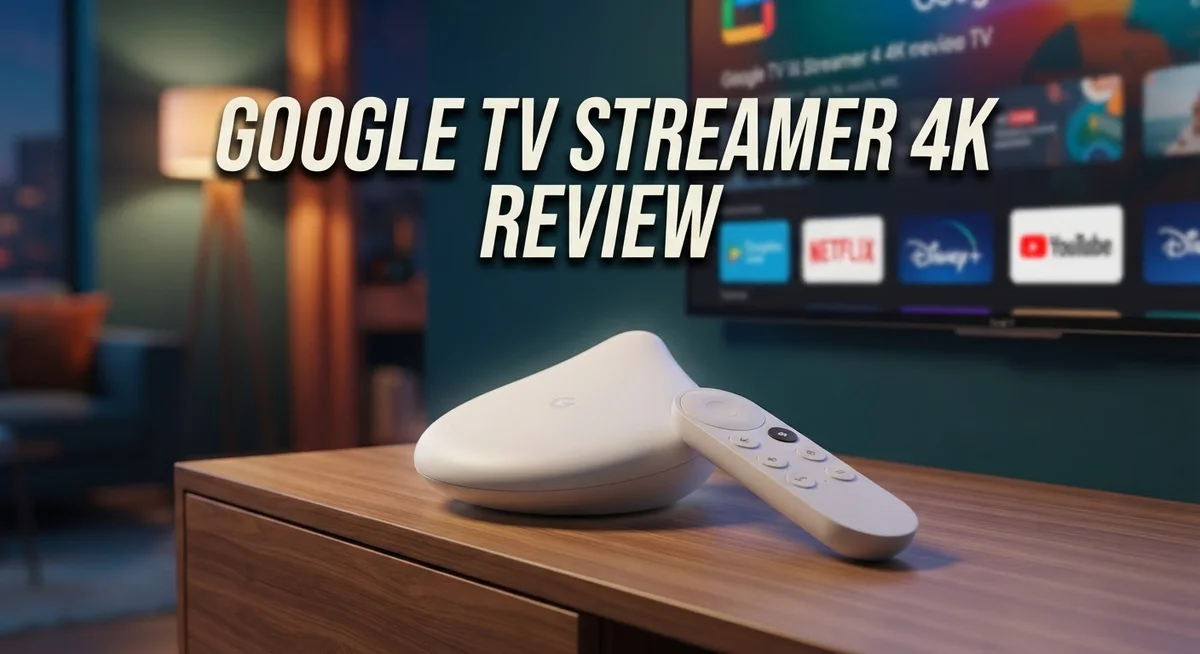
Google TV Streamer 4K is Google’s newest streaming device. It replaces the old Chromecast lineup with a bigger, bolder box.
This device brings smart home control and streaming together. It works as a Thread border router and supports Matter devices too.
You get sharp 4K visuals with Dolby Vision and HDR10+. Streaming feels smooth, and the interface responds fast.
In a Nutshell
- Performance feels zippy. Apps open fast. Menus load without lag. This device handles daily streaming tasks with ease.
- The built in Thread border router adds real value. It connects smart home devices using the Matter standard. This turns your streamer into a smart home hub too.
- Cloud gaming works well on this device. You can stream games without extra hardware. This adds entertainment value beyond simple streaming.
- One drawback stands out. The device has only one HDMI port. This limits connectivity options for complex home theater setups.
- Another limitation involves app access. Third party app installation stays limited. You get fewer customization options compared to other streaming boxes.
- Compared to rivals like Nvidia Shield TV and Chromecast with Google TV, this device holds its own. It competes well against the Onn Google TV and Xiaomi Mi Box S too.
Overall, this streamer balances smart features with solid performance. Some connectivity limits exist. Still, it delivers a strong package for most households.
Key Features
The Google TV Streamer 4K packs impressive connectivity features that matter for modern living rooms. You get a single HDMI port, Ethernet connection, and USB-C power input. Wi-Fi support ensures wireless streaming works smoothly without cable clutter.
Smart home integration stands out as a major strength here. The built-in Thread border router transforms this device into a central hub for your connected home. Matter support means you can control smart lights, locks, and sensors directly from your TV interface. This dual functionality eliminates the need for a separate smart home hub in many households.
The remote deserves special attention. Google redesigned it with a “Find My Remote” feature that actually works. You press a button on your phone, and the remote beeps to help you locate it. This simple addition saves frustration when the remote disappears between couch cushions.
AI assistant capabilities have expanded significantly. Google Assistant remains your primary voice control option. Gemini AI now works alongside it to handle more complex requests and tasks. You can ask questions, control playback, and manage smart home devices with natural conversation.
Performance feels noticeably snappy across apps and menus. Navigation happens instantly without stuttering or delays. Streaming apps load quickly, and switching between content feels seamless. This speed makes everyday use genuinely enjoyable rather than frustrating.
The device supports advanced video formats that matter for quality. Dolby Vision delivers stunning contrast and brightness. HDR10 and HDR10+ provide excellent color depth on compatible content. These features ensure you see every detail directors intended.
Cloud gaming capabilities open new entertainment possibilities. Games stream directly to your TV without needing expensive hardware. Performance remains stable on a solid internet connection.
One practical limitation exists. The single HDMI port restricts how many devices you can connect simultaneously. You may need an HDMI switcher if you have multiple sources like gaming consoles or soundbars. This constraint affects users with complex entertainment setups more than casual streamers.


Last update on 2026-10-23 / Affiliate links / Images from Amazon Product Advertising API Some of the links on this website are affiliate links, which means that at no additional cost to you, I earn a commission if you click through and make a purchase. I only recommend products and services that I believe will add value to my readers. Thank you for your support!
Design and Build Quality
The Google TV Streamer 4K features a sleek, modern design that sits flat and compact beneath your television. Google completely reimagined the physical form compared to older models. The device measures roughly 4.3 inches wide and feels substantial without being bulky.
The build quality impresses right away. The matte finish resists fingerprints and dust effectively. The construction feels premium, using durable plastic materials that withstand daily handling. You won’t feel cheap materials here.
Connectivity options exist, though limited in one key area. The device includes a single HDMI port for your TV connection. You also get an Ethernet port for wired internet if your Wi-Fi struggles. USB-C powers the device through a included adapter. Wi-Fi 6 support ensures fast wireless speeds when you need them.
The remote itself deserves attention in this design conversation. Google completely redesigned it for comfort and functionality. The buttons feel responsive under your thumb. The “Find My Remote” feature uses Bluetooth to locate your remote when it goes missing behind couch cushions. This practical addition saves frustration during viewing sessions.
Heat management works quietly in the background. The device runs cool even during extended streaming sessions. No fans mean silent operation, which matters for living room environments.
The physical footprint stays small enough for media consoles and shelves. It doesn’t dominate your entertainment setup. The black color blends seamlessly with most TV stands and equipment.
One design consideration stands out. The single HDMI port means you cannot connect multiple devices simultaneously. If you own a soundbar, gaming console, and cable box, you’ll need an HDMI switcher to manage everything.
The Thread border router integration adds invisible functionality to the physical design. This smart home feature works without extra hardware or clutter. The antenna sits inside the device, requiring no external setup.
Overall, the design balances form and function effectively. The device looks modern and feels well-built. The compact size works for most living rooms. The remote improvement shows Google listened to user feedback about practical features that matter daily.
Performance and Streaming Experience
The Google TV Streamer 4K delivers smooth, responsive performance that makes streaming feel effortless. Apps load quickly, and menu navigation happens without lag or stuttering. You’ll notice the difference immediately when scrolling through your content library or switching between services.
Streaming quality shines across all major platforms. Netflix, YouTube, Disney+, and Prime Video all run beautifully on this device. The 4K resolution with Dolby Vision support means your favorite shows and movies look stunning. HDR content truly pops with vibrant colors and deep blacks that enhance your viewing experience.
The device handles multiple simultaneous connections without breaking a sweat. Wi-Fi performance remains strong, even in rooms farther from your router. If you prefer a wired connection, the Ethernet port gives you stable, consistent speeds for uninterrupted streaming.
Cloud gaming opens new possibilities for entertainment. Services like Xbox Cloud Gaming and GeForce Now run smoothly on this streamer. You can play demanding games without owning expensive hardware, making it a versatile entertainment hub beyond traditional streaming.
One practical consideration matters here. The single HDMI port means you’ll need to choose between this device and other equipment. If your TV has limited HDMI inputs, you might need a switcher or hub to connect everything you want.
The remote’s responsiveness contributes significantly to the overall experience. Commands register instantly, and voice control through Google Assistant or Gemini AI works reliably. Finding content feels natural and quick rather than frustrating.
Heat management stays quiet and effective during extended viewing sessions. The device runs cool without producing noticeable fan noise. This matters for placement on shelves or inside entertainment consoles where airflow might be limited.
Overall, performance and streaming feel polished throughout daily use. The device handles everything from casual browsing to demanding cloud gaming. Whether you’re watching your favorite series or exploring new content, this streamer keeps up without compromise.
Top 3 Alternatives
Apple TV 4K

Last update on 2026-10-23 / Affiliate links / Images from Amazon Product Advertising API Some of the links on this website are affiliate links, which means that at no additional cost to you, I earn a commission if you click through and make a purchase. I only recommend products and services that I believe will add value to my readers. Thank you for your support!
Apple TV 4K works great if you own other Apple devices. The interface feels smooth and fast. You get access to Apple’s services like Apple TV+, Apple Music, and Apple Arcade built right in.
The remote is simple to use. It has a touchpad that lets you swipe through menus easily. Picture quality is excellent, especially if you watch 4K content. The device supports Dolby Vision and Atmos sound.
One thing to know: Apple TV 4K works best within the Apple ecosystem. If you use iPhones, iPads, or Macs, everything connects seamlessly. AirPlay lets you stream content from your Apple devices directly to your TV.
Roku Ultra

Last update on 2026-10-22 / Affiliate links / Images from Amazon Product Advertising API Some of the links on this website are affiliate links, which means that at no additional cost to you, I earn a commission if you click through and make a purchase. I only recommend products and services that I believe will add value to my readers. Thank you for your support!
Roku Ultra offers tons of streaming apps. You can find almost any service you want on this device. The interface is clean and organized, making it easy to find what you want to watch.
This device gives you real control. You can customize your home screen and add your favorite apps to the top. Roku’s remote has a built-in microphone for voice search. The picture quality is strong for 4K content.
Roku Ultra works with any brand of TV. You don’t need to stick with one ecosystem. The setup process is quick and straightforward.
Amazon Fire TV Cube

Last update on 2026-10-23 / Affiliate links / Images from Amazon Product Advertising API Some of the links on this website are affiliate links, which means that at no additional cost to you, I earn a commission if you click through and make a purchase. I only recommend products and services that I believe will add value to my readers. Thank you for your support!
Amazon Fire TV Cube is unique because it has Alexa built in. You can control your TV with voice commands. Ask Alexa to play movies, adjust volume, or turn on other smart home devices.
The device streams 4K content with good quality. It supports Dolby Vision and Atmos. You get fast performance with smooth navigation. The remote works from far away, even through walls.
Fire TV Cube integrates well with Amazon services. Prime Video comes ready to use. If you have other Alexa devices at home, this fits perfectly into your setup.
Smart Home and Google Assistant Integration
Google Assistant integration on the Google TV Streamer 4K goes beyond basic voice commands. You can control lights, thermostats, and cameras directly from your couch using simple voice requests.
The Gemini AI layer adds intelligence to your search and content discovery. Ask complex questions, and the device understands context better than older voice assistants. You get smarter recommendations based on what you actually watch.
The Thread border router feature works quietly in the background. It strengthens your smart home network by creating a mesh connection with compatible devices. Your smart home devices respond faster and more reliably because of this integration.
Matter support means future compatibility with new smart home products. You won’t need to replace this device when you upgrade other gadgets. The ecosystem grows with you as new manufacturers adopt Matter standards.
Voice control extends to streaming itself. Tell the assistant what you want to watch, and it searches across multiple apps simultaneously. No more clicking through menus or remembering which service has which show.
The remote includes a dedicated Google Assistant button for quick access. Press it anytime to ask questions, control smart home devices, or search for content. The button placement feels natural during normal viewing.
You can set routines that combine multiple actions. Say “Good night,” and the device can dim lights, lock doors, and switch to a sleep timer. These automations save time and add convenience to daily routines.
The Google Home app lets you manage everything from your phone. You control the streamer and all connected smart home devices from one central location. Changes sync instantly across your devices.
Integration feels seamless because Google owns both the streaming hardware and the smart home ecosystem. Apps communicate with each other without friction. Your entertainment and home automation work as one unified system rather than separate tools fighting for attention.
Connectivity, Setup, and App Ecosystem
Getting the Google TV Streamer 4K ready takes just a few minutes. The setup process feels straightforward from the moment you unbox it.
You’ll connect the device to power via USB-C. Then plug it into your television using the single HDMI port. The device walks you through the rest on screen.
Wi-Fi connection happens next. The streamer picks up your network and asks for your password. Ethernet is also available if you prefer a wired connection for more stable streaming.
Once online, you sign into your Google account. The device syncs your preferences, apps, and watchlist instantly. Your streaming experience personalizes right away.
The app ecosystem on Google TV runs deep. You get access to thousands of apps through the Google Play Store. Netflix, Disney Plus, Amazon Prime Video, YouTube, and Hulu all install without friction.
Google’s app curation works quietly in the background. The home screen learns what you watch. Recommendations appear based on your habits and preferences. Content discovery feels natural rather than forced.
Installation of third-party apps has some limits. You can’t sideload apps as freely as on some competitors. However, the official app store covers most popular streaming services you’ll actually use.
The remote pairs automatically during setup. No manual codes needed. Its responsiveness makes navigating menus and typing passwords feel easy.
Voice search integrates seamlessly into the experience. You can speak app names, movie titles, or search terms directly into the remote. The Google Assistant button sits right on the remote for quick access.
Casting from your phone or tablet works flawlessly. Any Android device or iPhone can push content to the streamer. This flexibility extends your entertainment options beyond the built-in apps.
The Matter support means smart home devices pair smoothly. Thread connectivity creates a mesh network in your home. Future smart home products will work with this infrastructure automatically.
Overall, connectivity and setup remove barriers between you and your content. The Google ecosystem integration makes everything communicate smoothly.
Pros and Cons
Pros
- Sleek design with fast, responsive performance that feels smooth during daily streaming
- Acts as a Thread border router and Matter hub for smart home device compatibility
- Strong Google ecosystem integration with Gemini AI for smarter content discovery
- Remote includes “Find My” feature and dedicated Google Assistant button for convenient access
- Supports 4K resolution with Dolby Vision, HDR10, and HDR10+ for excellent picture quality
Cons
- Single HDMI port limits your ability to connect multiple devices simultaneously
- Third-party app installation has restrictions compared to some competing streaming devices
- Limited physical connectivity options beyond the one HDMI and Ethernet ports
Who Should Buy It
The Google TV Streamer 4K works best for people who want a complete smart home and streaming solution in one device. You should buy it if you already use Google products like Nest cameras, smart speakers, or Google Home. The Thread border router feature means your smart home devices connect faster and more reliably.
This streamer fits perfectly if you care about picture quality. The 4K resolution with Dolby Vision and HDR10+ support delivers stunning visuals on compatible TVs. Cloud gaming fans will appreciate the capable hardware that handles games smoothly.
The Google TV Streamer 4K shines for people who value simplicity. Setup takes minutes, and everything integrates without extra steps. You don’t need to juggle multiple apps or remotes. The Gemini AI helps you find shows faster by understanding what you actually want to watch.
The improved remote with “Find My” feature appeals to anyone who loses remotes frequently. The dedicated Google Assistant button lets you search and control your TV with voice commands instantly.
Skip this device if you need multiple HDMI ports for gaming consoles, soundbars, and other equipment. The single HDMI connection becomes a real problem when you want to connect several devices. You’ll need an HDMI splitter or switcher, which adds extra expense and complexity.
This streamer isn’t ideal if you prefer sideloading apps or installing software from unknown sources. Third party app installation has real limitations compared to some competitors. Android TV enthusiasts who want complete customization might feel restricted.
Budget conscious buyers should compare it with the Onn Google TV option first. That alternative costs less but sacrifices the smart home hub features and premium design.
Families who use multiple Google accounts will love the personalized recommendations for each person. Parents appreciate parental controls that prevent kids from accessing inappropriate content.
The Google TV Streamer 4K becomes a must have if you’re building a connected home. It serves double duty as both your entertainment hub and your smart home command center.
Final Verdict
The Google TV Streamer 4K earns its spot as a top choice for most households. It blends smart home control with sharp streaming quality in one neat package.
Cloud gaming support adds extra value here. You can stream games without extra hardware, which makes this device more than just a media player.
This streamer suits people who already own Google devices. Your phone, speakers, and smart displays work together without extra setup steps.
Power users with large home theater setups might want to look elsewhere. The single HDMI port still limits multi device connections, especially for gamers who need to switch between consoles and soundbars often.
If you want more raw power, the Nvidia Shield TV offers stronger hardware. It costs more but handles demanding apps and games with ease.
Those who want something simpler can check the Chromecast with Google TV. It skips the smart home hub features but still streams in 4K.
The Google TV Streamer 4K sits comfortably between these two options. It offers more than a basic streamer but stays simple enough for daily use.
Xiaomi Mi Box S 4K remains a solid pick for buyers who want flexibility with third party apps. Google’s device keeps tighter control over installations, so sideloaders might prefer Xiaomi’s approach.
In the end, this device delivers where it matters most. Picture quality stays sharp, performance stays smooth, and smart home integration feels effortless.
Choose this streamer if you want a true hub for your entertainment and smart home devices. Skip it only if you need multiple ports or heavy customization options.
For most households, the Google TV Streamer 4K checks every important box. It mixes convenience, quality, and smart features into one reliable package that fits right into daily life.
Frequently Asked Questions
Can I connect multiple devices to the Google TV Streamer 4K?
The device has one HDMI port. This means you can plug in your TV directly, but you cannot connect a soundbar, gaming console, and streamer all at the same time. You’ll need an HDMI switcher or hub if you want multiple devices running simultaneously. Most people solve this by using the TV’s built-in apps or connecting devices through other ports on their television.
Does this streamer work with smart home devices?
Yes. The Google TV Streamer 4K includes Thread border router and Matter support. It acts as a smart home hub, so you can control compatible lights, locks, thermostats, and cameras from one place. This feature works best if you already own Google Home devices or other Matter-compatible equipment. Setup happens automatically when you connect the streamer.
What’s the difference between this and the regular Chromecast with Google TV?
The Google TV Streamer 4K offers faster performance and smart home functionality. The older Chromecast model is simpler and more basic. This new version includes Gemini AI for smarter content suggestions and a better remote with the “Find My” feature. If you want just a streaming device without smart home features, the Chromecast works fine. If you want everything in one box, this streamer is the better choice.
Can I sideload apps or install software from unknown sources?
Installation options are limited compared to other streaming devices. Google restricts third party app installation for security reasons. You can download apps from the Google Play Store, but sideloading isn’t straightforward. If installing custom software matters to you, devices like the Nvidia Shield TV offer more flexibility.

Hello, i’m Ivoria i am the face behind Tech Tracker Blog. I am passionate about my work and love to explore gadgets and share about my experience.