ASUS ROG GM700 Gaming Desktop vs Alienware M16 in 2026
When you compare gaming systems in 2026, you face a significant choice between a powerful desktop computer and a premium mobile gaming solution. The ASUS ROG GM700 gaming desktop and the Alienware M16 represent two different approaches to gaming power.
One offers a stationary fortress of performance with unlimited upgrade potential. The other delivers gaming capability you can move from room to room. This detailed comparison helps you decide which system fits your gaming lifestyle and budget.
Both machines include top graphics cards, fast processors, and impressive displays. The real question is whether you need maximum desktop power or gaming portability. Let me guide you through every important difference and feature so you can make the right choice.
Key Takeaways
- This comparison breaks down the main points you need to know. The ASUS ROG GM700 gaming desktop provides superior raw power with current generation NVIDIA RTX 5070 graphics, multiple processor options including AMD Ryzen 9, and a spacious full tower design that supports quad cooling fans.
- The Alienware M16 gaming laptop offers portability with a compact 16-inch display, weighs only 5.75 pounds, and features Intel Core Ultra processors paired with NVIDIA RTX 4070 graphics.
- Desktop gaming delivers significantly more power for the same price point and allows complete component upgrades. Laptop gaming gives you mobility, a built-in display, and keyboard without requiring a separate monitor or peripherals.
- The price difference favors the desktop with the ROG GM700 starting around $1,899 to $2,500 depending on configuration, while the Alienware M16 R2 ranges from $1,349 to $2,299 for similar performance tiers.
- Storage and memory range from 512GB to 4TB on the Alienware versus 1TB to 2TB on the ROG. Your choice depends on whether you prioritize portability or maximum gaming performance in a single package.
Design and Form Factor Differences
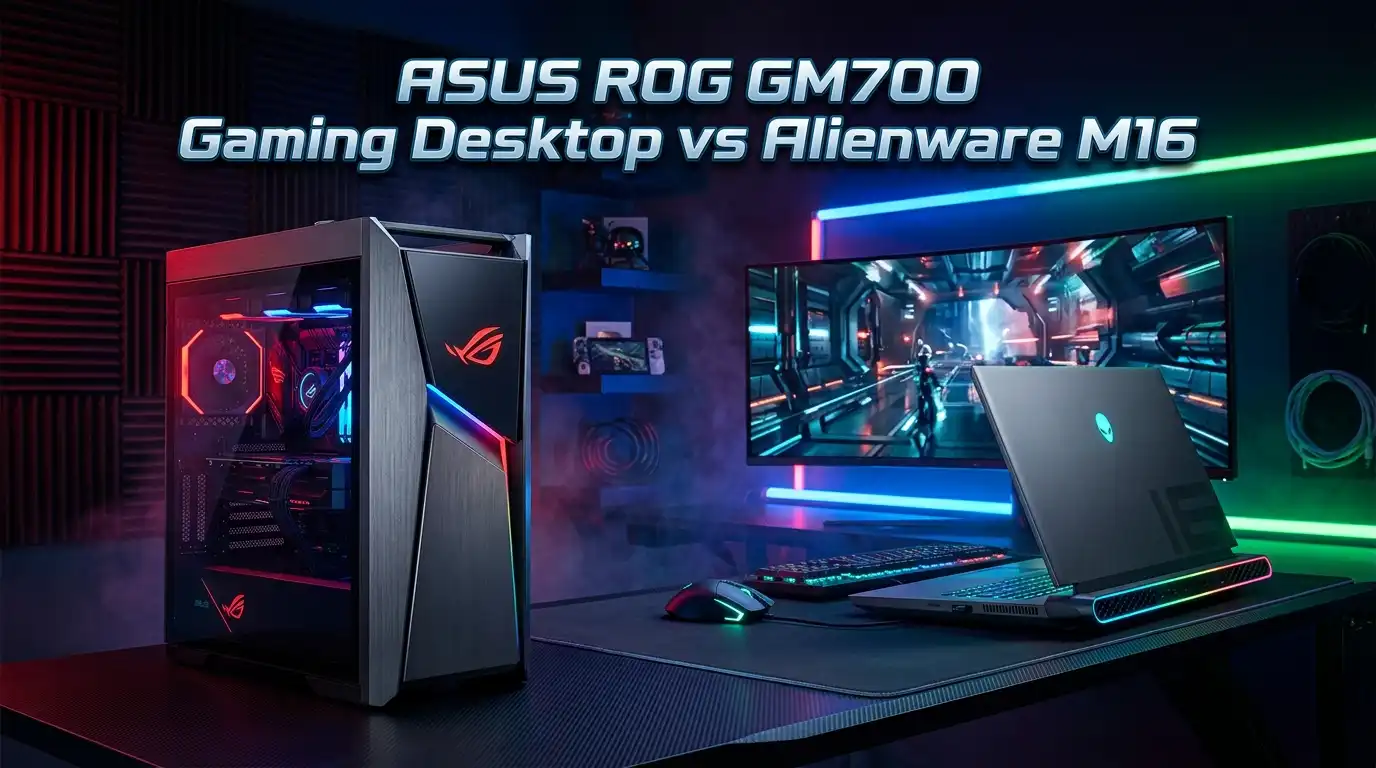
The ASUS ROG GM700 and Alienware M16 take completely different approaches to gaming system design. The ROG GM700 uses a full tower desktop chassis measuring 58 liters in capacity. This large case accepts triple slot graphics cards, houses four case fans for cooling, and accommodates liquid cooling systems.
The design features an asymmetric ROG front panel with geometric shapes that work in gaming rooms and professional spaces alike. The case weighs substantially more than a laptop, but provides excellent airflow and component accessibility.
The Alienware M16 R2 uses a compact aluminum chassis that weighs just 5.75 pounds. The 16-inch QHD plus display with 2560 by 1600 resolution sits embedded in the laptop frame.
The machine measures only 0.93 inches thick, making it portable enough to carry between rooms or travel with ease. The portable design trades some cooling flexibility for dramatic weight savings and mobility.
Processing Power and CPU Specifications
The ASUS ROG GM700 offers multiple processor choices that you can select based on your budget and needs. The system supports AMD Ryzen 7 9800X3D with 8 cores and 16 threads, the Ryzen 9 9950X3D with 16 cores and 32 threads, and Intel Core Ultra processors.
The desktop’s bigger power supply and cooling system support these processors running at full performance continuously. The AMD Ryzen 9 9950X3D processor provides exceptional gaming and streaming capability when you multitask.
The Alienware M16 R2 includes Intel Core Ultra 7 155H or Intel Core Ultra 9 185H processors. These mobile processors run at lower temperatures and power consumption compared to desktop chips.
The Core Ultra 7 155H offers 16 cores with speeds reaching 4.8 GHz while the Core Ultra 9 185H reaches 5.1 GHz. Mobile processors deliver strong performance in a power efficient package designed for laptop battery life.
Graphics Card Comparison and Gaming Performance
The ASUS ROG GM700 comes with NVIDIA GeForce RTX 5090, RTX 5080, RTX 5070 Ti, or RTX 5070 graphics cards depending on your configuration.
These next generation Blackwell architecture GPUs provide cutting edge gaming performance for 2026 titles. The RTX 5090 GPU delivers extreme gaming power, while the RTX 5070 offers excellent performance at more affordable pricing. The desktop’s powerful power supply supports the newest graphics technology without limitations.
The Alienware M16 R2 features NVIDIA GeForce RTX 4050, RTX 4060, or RTX 4070 graphics cards. The RTX 4070 mobile GPU provides solid 1440p gaming performance and handles modern games at high settings.
The mobile graphics solutions consume less power and generate less heat than their desktop counterparts. These mobile graphics chips prioritize efficiency and thermal management within the laptop’s compact chassis.

Last update on 2026-08-04 / Affiliate links / Images from Amazon Product Advertising API Some of the links on this website are affiliate links, which means that at no additional cost to you, I earn a commission if you click through and make a purchase. I only recommend products and services that I believe will add value to my readers. Thank you for your support!
Pros and Cons of the Alienware M16 R2
The Alienware M16 R2 gaming laptop delivers genuine benefits alongside some compromises. The main advantages include portability that lets you game anywhere, an included display and keyboard eliminating extra purchases, a slim profile fitting into bags and backpacks, and sufficient power for modern gaming at high settings.
The QHD plus 240Hz display provides smooth motion and sharp graphics. The trackpad and keyboard integrate seamlessly for productivity tasks.
The disadvantages include limited upgrade potential once purchased since most components remain soldered to the motherboard, thermal throttling during extended gaming sessions due to cooling constraints, battery life limitations requiring frequent charging when using gaming graphics, and premium pricing for components that cost less in desktop form. The smaller speakers and single power supply limit expandability.
Display Technology and Visual Experience
The ASUS ROG GM700 desktop does not include a display, so you select your own gaming monitor. This flexibility lets you choose a screen matching your preferences and budget. You can pair the desktop with ultra-wide curved monitors, high refresh rate competitive displays, or 4K resolution screens depending on your needs and graphics card capability.
The Alienware M16 R2 includes a 16-inch QHD plus panel with 2560 by 1600 native resolution and 240Hz refresh rate. The display uses anti-glare coating, reaches 300 nits brightness, and covers 100 percent sRGB color space.
The NVIDIA G-SYNC technology synchronizes the display refresh rate with GPU output, eliminating screen tearing during gaming. The included display saves money and provides immediate portability without connecting external monitors.
Memory and Storage Options
The ASUS ROG GM700 supports DDR5 memory running at speeds up to 6000MHz with AEMP II overclocking capability. You can configure the system with 32GB, 64GB, or more memory depending on your multitasking and content creation needs. Storage options include 1TB or 2TB PCIe Gen 4 SSDs with upgrade capability to PCIe Gen 5 for future expansion. The desktop’s larger case and power budget allow maximum memory installation without thermal concerns.
The Alienware M16 R2 offers DDR5 5600 MT/s memory in configurations ranging from 8GB to 64GB capacity. Most users select 16GB or 32GB for gaming and productivity tasks. Storage includes 512GB, 1TB, 2TB, or 4TB PCIe NVMe Gen 4 SSDs, with RAID 0 options available for fast transfer speeds. The laptop’s memory upgrade path depends on your specific configuration since some models use soldered RAM.

Last update on 2026-08-04 / Affiliate links / Images from Amazon Product Advertising API Some of the links on this website are affiliate links, which means that at no additional cost to you, I earn a commission if you click through and make a purchase. I only recommend products and services that I believe will add value to my readers. Thank you for your support!
Pros and Cons of the ASUS ROG GM700 Desktop
The ASUS ROG GM700 gaming desktop delivers substantial advantages for stationary gaming setups. The main benefits include powerful next generation graphics cards delivering maximum gaming performance, exceptional upgrade potential allowing CPU, GPU, and memory changes, superior cooling performance from quad fan setup and optional liquid cooling, large internal volume accommodating future expansion, and better long-term value through component upgrades rather than complete replacement. The desktop delivers more performance per dollar compared to laptops.
The disadvantages include complete lack of portability requiring a dedicated gaming space, need for separate monitor and peripherals adding to total system cost, larger physical footprint consuming significant desk space, and requirement for proper ventilation around the case. The desktop requires wall outlet power connection and cannot function unplugged.
Cooling and Thermal Performance
The ASUS ROG GM700 implements a sophisticated cooling strategy using four case fans in a tri-front-intake and single rear-exhaust configuration. The system includes a hidden air intake behind the front panel, drawing fresh air from the case sides to maximize fan efficiency.
You can choose between traditional air cooling or a 240mm AIO liquid cooler for CPU temperature management. The large 58-liter case volume provides excellent airflow with minimal obstruction and reduces fan noise through natural circulation patterns.
The Alienware M16 R2 uses more compact cooling with limited internal space for heatsinks and fans. The machine employs Cryo-tech cooling technology and typical laptop design with intake vents and exhaust ports.
Intensive gaming sessions can increase internal temperatures significantly, sometimes triggering thermal throttling that reduces processor and graphics performance to manage heat. The laptop’s smaller cooling solution represents a trade-off accepting slightly higher temperatures to maintain the portable form factor.
Connectivity and Port Selection
The ASUS ROG GM700 desktop includes comprehensive rear panel connectivity with multiple USB 3.2 ports, Thunderbolt compatibility options, and audio connectors. The exact port configuration depends on your selected motherboard and GPU options.
You gain flexibility connecting multiple monitors, gaming peripherals, external storage, and networking equipment simultaneously. Additional USB 2.0 headers internally support front panel connections and future expansion possibilities.
The Alienware M16 R2 includes limited but functional ports including two USB 3.2 Type-A ports with PowerShare capability, Thunderbolt 4.0 ports with DisplayPort output, HDMI 2.1 video output, RJ45 Ethernet port, headset jack, and MicroSD card reader.
The RTX 4070 includes dedicated DisplayPort output on one USB-C port. The laptop’s fewer ports reflect the necessity of fitting connectivity into a thin chassis while maintaining portability.
Software and Control Features
The ASUS ROG GM700 includes ASUS Armoury Crate software for real-time component monitoring, RGB lighting control through Aura Sync technology, and game profile management with automatic optimization.
The system supports Aura Creator for custom RGB effects across compatible peripherals, creating synchronized lighting across your entire gaming station. Armoury Crate provides exclusive game deals and library management. The desktop supports Windows 11 Pro operating system.
The Alienware M16 R2 includes Alienware Command Center software with game library organization, profile based performance tuning, and AlienFX RGB lighting customization.
The Killer Wireless card integrates with the system software for network optimization. The laptop runs Windows 11 Home or Pro depending on your configuration. Both systems provide manufacturer specific software for performance optimization and customization.
Audio and Multimedia Experience
The ASUS ROG GM700 supports Dolby Atmos spatial audio technology creating balanced multidimensional sound across the full audio spectrum.
The system includes audio presets optimized for gaming, video, and music listening modes, allowing customization for specific content types. The desktop accommodates high-end gaming headsets through multiple audio ports and supports surround sound systems for complete entertainment experiences.
The Alienware M16 R2 includes stereo speakers with combined 4-watt output and Dolby Atmos support. The integrated microphone array provides dual array recording for video conferencing and content creation. The RTX 4070 supports AI enhanced video upscaling through NVIDIA technology. The laptop’s integrated audio provides convenient built-in sound without requiring external speakers.
Price Analysis and Value Proposition
The ASUS ROG GM700 pricing ranges from approximately $1,899 for RTX 5070 configurations to $3,500 plus for RTX 5090 top tier models.
The mid-range RTX 5070 Ti configuration typically costs $2,400 to $2,800 depending on processor selection. The Intel Core Ultra configurations offer slightly lower pricing than Ryzen options. Extended warranties and support packages add additional costs beyond base system pricing.
The Alienware M16 R2 starts at $1,349 for entry level RTX 4050 configurations and reaches $2,299 for maxed RTX 4070 systems with 64GB memory.
Most popular configurations with RTX 4070 and 32GB memory run $1,899 to $2,099. The portable package and included display justify the premium relative to pure performance numbers. Performance per dollar favors the desktop, but the laptop price includes portability and display value.
Gaming Performance at Different Resolution Settings
The ASUS ROG GM700 with RTX 5070 Ti GPU achieves exceptional gaming performance at all resolution settings. At 1440p resolution, most modern games run above 100 FPS at high settings with RTX ray tracing enabled.
At 2160p ultra high definition, the same configurations deliver 60 to 80 FPS in demanding titles. The RTX 5090 model achieves extreme frame rates exceeding 200 FPS at competitive settings.
The Alienware M16 R2 with RTX 4070 achieves solid 1440p gaming performance delivering 60 to 120 FPS in modern games at high settings with ray tracing. At the laptop’s native QHD resolution of 2560 by 1600, you achieve approximately 80 to 100 FPS in optimized titles.
Less demanding esports games reach 150 to 240 FPS on the 240Hz display. The desktop’s performance advantage increases dramatically in demanding AAA games at high resolution with maximum graphics settings.
Upgrade Path and Future Proofing
The ASUS ROG GM700 provides excellent long-term value through comprehensive upgrade potential. You can replace the graphics card, processor, CPU cooler, memory, and storage with newer components as prices decrease and technology advances.
The desktop’s large power supply and cooling potential supports next generation hardware release. Most users extend their desktop gaming systems through component upgrades over 5 to 7 years.
The Alienware M16 R2 offers limited upgrade capability once purchased. The memory may be upgradeable in some configurations while storage SSD replacement remains possible.
The processor, graphics, and motherboard integrate permanently into the chassis. Upgrading requires purchasing an entirely new laptop. The desktop model favors long-term ownership while the laptop requires eventual complete replacement.
Warranty and Customer Support Services
The ASUS ROG GM700 includes a standard 1-year limited warranty covering manufacturer defects and malfunctions. Extended warranty options extend protection to 3 to 5 years. ASUS provides online support resources, driver downloads, and customer service assistance. ROG products receive priority status in support queues.
The Alienware M16 R2 offers multiple warranty options including basic 1-year coverage and extended protection plans reaching 5 years. Dell Premium Support adds on-site service, technical assistance, and hardware diagnostics.
Accidental damage protection options cover drops, spills, and physical damage incidents. Both manufacturers provide comprehensive support with paid plans adding value for expensive systems.
Use Cases and Ideal User Profiles
The ASUS ROG GM700 suits competitive gamers seeking maximum performance in a dedicated gaming room, content creators requiring powerful rendering capabilities and multitasking, esports players demanding consistent frame rates and response times, and users preferring upgrade flexibility and long-term ownership. The desktop excels for users with dedicated gaming spaces and performance as top priority.
The Alienware M16 R2 appeals to gaming enthusiasts valuing portability for LAN parties, college dorms, and frequent travel, business professionals requiring gaming capability alongside productivity, casual gamers preferring all-in-one solutions without cable clutter, and content creators requiring mobile workstation capability. The laptop excels for users prioritizing mobility and convenience over maximum performance.
Frequently Asked Questions
Can I upgrade components in the ASUS ROG GM700 after purchase?
Yes, the ASUS ROG GM700 supports excellent upgrade potential. You can replace the graphics card, processor, memory, storage drives, power supply, and CPU cooler with newer components as technology advances. The spacious case design and professional grade motherboard support future generation hardware. Most components use standard slots and connections allowing easy swaps without specialized tools.
What is the weight and portability of the Alienware M16 R2?
The Alienware M16 R2 weighs 5.75 pounds maximum with all components installed. This weight makes it easily portable for carrying in backpacks, laptop bags, or briefcases. The 0.93 inch thickness allows fitting into standard laptop compartments. The integrated power adapter adds approximately 1 pound to your carrying load for travel.
Which system provides better value for gaming on a budget?
The ASUS ROG GM700 provides superior value per gaming performance dollar, especially when comparing RTX 5070 configurations at approximately $1,899. The Alienware M16 R2 offers better value when portability factors into your purchase decision since the integrated display and keyboard eliminate peripheral expenses. Budget considerations depend on your usage priorities and existing equipment.
Do I need a monitor, keyboard, and mouse to use the ASUS ROG GM700?
Yes, the ASUS ROG GM700 desktop requires separate peripherals since it includes only the computer tower. You need a monitor for display, keyboard for input, and mouse for navigation. Most gaming desktop owners invest in quality peripherals matching their performance level. Budget for monitor, keyboard, and mouse costs alongside the desktop system price.
How does the Alienware M16 R2 perform during extended gaming sessions?
The Alienware M16 R2 maintains solid performance during typical 2 to 3 hour gaming sessions. Longer play periods may trigger thermal throttling reducing processor and graphics performance as cooling systems work harder. The RTX 4070 mobile GPU manages efficiently, but internal temperatures rise compared to desktop solutions. Placing the laptop on a cooling pad improves thermal performance during marathon sessions.
Which system handles streaming and gaming simultaneously better?
The ASUS ROG GM700 with higher tier processors like the Ryzen 9 9950X3D handles simultaneous streaming and gaming with minimal performance impact. The desktop’s superior cooling and power delivery maintains full performance during multitasking. The Alienware M16 R2 can stream gameplay, but performance may decrease slightly due to CPU load limitations in the mobile form factor.
Does the Alienware M16 R2 include software for game optimization?
Yes, the Alienware M16 R2 includes Alienware Command Center software managing game profiles, performance settings, and RGB lighting. The system includes built-in game optimization features that automatically adjust settings for recognized titles. Additionally, NVIDIA GeForce Experience provides game optimization and driver management for the RTX 4070 graphics.
What storage capacity should I choose for gaming?
For gaming, minimum 512GB SSD provides basic functionality for typical library storage. Most gamers select 1TB to 2TB capacity allowing 20 to 40 modern games on the system. The ASUS ROG GM700 supports 2TB standard storage with PCIe Gen 4 technology providing fast loading. The Alienware M16 R2 offers up to 4TB storage capacity in RAID 0 configuration for users with massive game libraries.

Hello, i’m Ivoria i am the face behind Tech Tracker Blog. I am passionate about my work and love to explore gadgets and share about my experience.