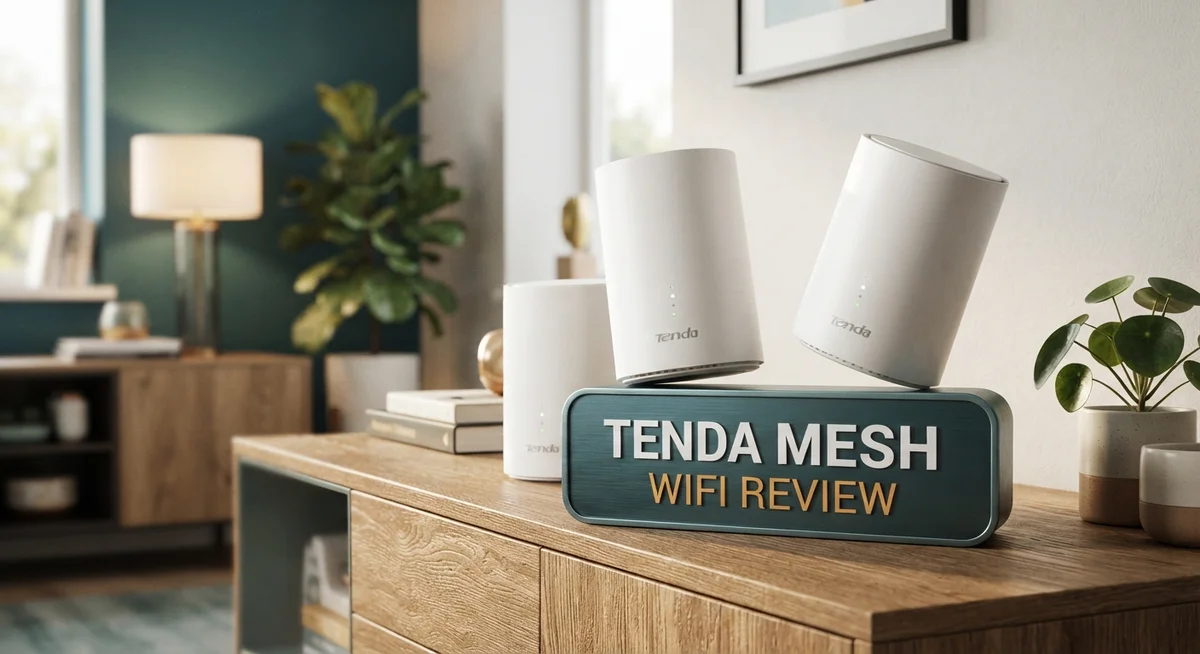
Tenda Mesh WiFi System Review 2026: Worth the Splurge?
Do you have dead zones in your home? Slow WiFi in the bedroom or backyard? Tenda Mesh WiFi promises to fix that.
This system uses smart technology to spread strong internet signal everywhere. The MW6 model covers up to 6,000 square feet. That means every room gets fast, stable coverage.
Tenda mesh systems use AC1200 dual band speed. They also include Wave 2.0 MU-MIMO and beamforming tech. This helps multiple devices connect at once without lag.
In a Nutshell
- Coverage power: The 3 node kit covers up to 6,000 sq ft. This works well for homes with 4 to 6 bedrooms.
- Smart connections: It uses MU MIMO and beamforming tech. This helps send signal directly to your devices instead of spreading it everywhere.
- Family friendly features: You get a guest mode for visitors. Parental controls help you manage screen time too.
- The app problem: Many users report the companion app disconnects randomly. This can be annoying during setup or daily checks.
- Missing smart tools: There is no QoS or device priority mode. You cannot tell the system to boost your work laptop over other gadgets.
- Random drops: Some users see connection drops lasting up to 20 minutes. This happens more often during heavy usage.
- Compared to rivals: Brands like ASUS and Netgear Orbi offer smarter access points. Tenda keeps things simple but basic.
Coverage and Range Performance
The Tenda MW6 mesh system spreads WiFi across your entire home without leaving gaps. A 3-node kit covers up to 6,000 square feet, which works well for most houses and apartments.
Each node acts as a relay point. When you move from one room to another, your device stays connected. The system uses MU-MIMO technology to send data to multiple devices at once. This means your phone, laptop, and tablet all get strong signals simultaneously.
Beamforming is another key feature here. Instead of broadcasting WiFi in all directions equally, the system focuses the signal toward your devices. This approach reduces wasted power and keeps connections more stable in the rooms where you actually spend time.
Real world performance shows the system handles medium-sized homes well. Users report that dead zones disappear when nodes are placed strategically. Upstairs bedrooms, basements, and outdoor patios typically get reliable coverage. The AC1200 dual-band speeds work on both 2.4GHz and 5GHz frequencies, giving flexibility for different devices.
However, some limitations exist. The system struggles with very large homes or buildings with thick walls. Dense concrete or metal structures can block the signal more than drywall. Users in multi-story homes sometimes need to position nodes more carefully to maintain consistent speeds.
Seamless roaming keeps your connection smooth as you move. Your phone switches between nodes automatically without dropping the signal. This works better than traditional single routers where you might experience brief pauses.
The range performance sits in the middle tier compared to competitors. ASUS and Netgear systems offer stronger penetration through obstacles. Amazon eero Pro delivers slightly faster speeds in larger spaces. Linksys Velop provides comparable coverage at similar distances.
For typical households with standard layouts, the Tenda system delivers solid range. You get WiFi in most corners of your home. The real strength comes from eliminating frustrating dead zones rather than pushing extreme distances. If your home exceeds 6,000 square feet or has unusual construction, you may need additional nodes or a different system altogether.

Last update on 2026-10-17 / Affiliate links / Images from Amazon Product Advertising API Some of the links on this website are affiliate links, which means that at no additional cost to you, I earn a commission if you click through and make a purchase. I only recommend products and services that I believe will add value to my readers. Thank you for your support!
Setup and User Interface
Getting your Tenda mesh system up and running takes just a few minutes. The physical setup is straightforward. You unbox the nodes, plug them in, and let them boot up.
The mobile app walks you through each step. You download the Tenda app, create an account, and scan a QR code on the main router. The app then guides you to add the satellite nodes one by one. Most users complete this in under 10 minutes without technical knowledge.
The main dashboard shows your network status at a glance. You see which devices connect to each node and signal strength across your home. The interface uses simple icons and clear labels. Menus are organized logically, so finding settings does not require hunting through multiple screens.
Guest mode setup is quick and useful. You can create a separate network for visitors in seconds. They get internet access without seeing your main network or connected devices. This feature appears right on the home screen for easy access.
Parental controls are available through the app. You can set time limits for specific devices and block certain websites. The controls work across all nodes simultaneously. However, the interface feels basic compared to premium competitors.
The app experience has a notable weakness. Users frequently report connection drops between the app and router. Sometimes the app shows offline status even when the network runs fine. Reconnecting requires closing and reopening the app. This inconsistency frustrates users who want reliable remote management.
Network settings are accessible but limited. You cannot adjust transmit power or change WiFi channels manually in most cases. The system handles these tasks automatically, which simplifies things but removes customization options.
The web interface provides an alternative to the app. You access it by typing the router’s IP address into a browser. This method proves more stable for most users. The web dashboard mirrors the app layout, so switching between them feels natural.
Overall, the setup process is genuinely easy for beginners. The ongoing interface works well for basic tasks. The app reliability issue is the main frustration point for regular users.
Network Features and Technology
Tenda’s mesh WiFi system uses AC1200 dual band technology to deliver speeds across your home. The system combines 2.4 GHz and 5 GHz bands. This split lets you run multiple devices without slowing down.
The MW6 model includes Wave 2.0 MU MIMO support. MU MIMO means multiple devices can send and receive data at the same time. Your phone, laptop, and tablet all get their own data streams instead of waiting in line.
Beamforming is another core feature here. This technology focuses the WiFi signal directly toward your devices. Instead of broadcasting in all directions, the router aims its power where you need it most.
The 3 node system covers up to 6,000 square feet. Each node acts as a relay point for other devices. This setup works well for medium sized homes and apartments with standard layouts.
Seamless roaming keeps your connection stable as you move between rooms. Your device switches from one node to another without dropping the call or video stream. The transition happens in the background without interruption.
Guest mode lets you create a separate network for visitors. They get internet access without seeing your main devices. Setup takes just seconds through the mobile app.
Parental controls are built into the system. Parents can manage screen time and block certain websites. These controls work across all connected devices in your home.
However, the system has some limitations. There is no QoS feature to prioritize certain devices or apps. You cannot set which devices get the fastest speeds. The access point intelligence is also limited compared to premium brands.
The web interface provides an alternative to the mobile app. You can access network settings from any web browser. Basic tasks like password changes and guest mode setup work smoothly through both interfaces.
For typical households, Tenda’s technology stack handles everyday streaming, browsing, and video calls. The real world performance sits in the middle tier of mesh systems currently available.
Top 3 Alternatives
TP-Link Deco Mesh


Last update on 2026-10-17 / Affiliate links / Images from Amazon Product Advertising API Some of the links on this website are affiliate links, which means that at no additional cost to you, I earn a commission if you click through and make a purchase. I only recommend products and services that I believe will add value to my readers. Thank you for your support!
ASUS AiMesh System

Last update on 2026-10-18 / Affiliate links / Images from Amazon Product Advertising API Some of the links on this website are affiliate links, which means that at no additional cost to you, I earn a commission if you click through and make a purchase. I only recommend products and services that I believe will add value to my readers. Thank you for your support!
Netgear Orbi WiFi

Last update on 2026-10-17 / Affiliate links / Images from Amazon Product Advertising API Some of the links on this website are affiliate links, which means that at no additional cost to you, I earn a commission if you click through and make a purchase. I only recommend products and services that I believe will add value to my readers. Thank you for your support!
Reliability and Connection Stability
Tenda’s mesh WiFi system delivers solid stability for everyday use in medium-sized homes. The AC1200 dual-band technology works across your space without major interruptions. Most users experience consistent connections when moving between rooms thanks to seamless roaming.
However, reliability does have some weak spots. Random disconnections occur occasionally, and a few users report outages lasting up to 20 minutes. These incidents are not frequent, but they happen often enough to notice. The app connectivity struggles more than the actual WiFi signal itself.
The system lacks Quality of Service (QoS) controls. This means you cannot prioritize certain devices or applications over others. If someone streams 4K video while another person works from home, the system treats both equally. This limitation affects stability during peak usage times in busy households.
Wave 2.0 MU-MIMO technology helps the system handle multiple devices at once. Beamforming focuses the signal toward your devices rather than broadcasting everywhere. These features work together to keep connections stable when several people use the network simultaneously.
The 3-node setup covers up to 6,000 square feet effectively. Each node acts as a relay point, which means your signal stays strong throughout your home. Dead zones disappear in typical layouts. You move from one room to another without dropping the connection.
Connection stability improves when you position nodes correctly. Place them in central locations rather than corners or closets. Distance between nodes matters too. Keep them within reasonable range of each other for optimal performance.
The web interface provides access to basic stability settings. You can restart the system or check connection logs through your computer. This alternative to the app helps when the mobile version acts up.
For streaming, video calls, and browsing, the Tenda system performs reliably. It handles standard household demands without frequent issues. Gamers and heavy users might encounter occasional lag during peak times, but casual users rarely notice problems. The system maintains connection integrity across your entire home consistently.
Parental Controls and Security
Tenda’s mesh WiFi system includes parental controls built into the mobile app. You can monitor what your children access online and set restrictions based on their age and needs. The feature lets you block specific websites and apps with just a few taps.
The parental control setup happens through your main dashboard. You create profiles for each child and assign rules to their devices. The system makes it easy to pause internet access during homework time or bedtime.
One strength here is the guest network mode. You can create a completely separate WiFi network for visitors without them accessing your main network. This keeps your personal devices and files protected while still offering hospitality to guests.
However, Tenda’s security features have some gaps. The system lacks Quality of Service (QoS) controls, which means you cannot prioritize certain devices or activities. This becomes noticeable when multiple family members stream video simultaneously.
The web interface provides an alternative way to manage parental settings if the app gives you trouble. Some users prefer this option because it feels more stable than the mobile experience. You can access the same controls through either platform.
Tenda does offer basic encryption for your network. Your WiFi connection uses standard security protocols to protect data traveling between devices and the router. Guest mode adds another layer by keeping visitors on a separate connection entirely.
For typical households, these parental controls handle everyday monitoring needs. They work well if you want simple website blocking and usage time limits. Families looking for advanced security features like malware protection or intrusion detection may need additional tools.
The system performs best when you combine parental controls with good device management practices. Keep your node placement strategic for better coverage, which helps maintain stable connections for all family members. This stability supports the parental control features by ensuring consistent monitoring and access management throughout your home.
Pros and Cons
Pros
- Eliminates WiFi dead zones across medium to large homes with its 3-node coverage system
- Setup process is simple and fast, even for users new to mesh networks
- Seamless roaming keeps your connection stable as you move between rooms without dropping
- Guest mode lets visitors connect without accessing your main network
- Parental controls and basic encryption come built into the system for everyday protection
Cons
- Mobile app connectivity drops randomly, forcing you to use the web interface instead
- No Quality of Service controls means you cannot prioritize devices or bandwidth usage
- Connection drops can last up to 20 minutes, disrupting streaming or work sessions
- Limited access point intelligence results in basic network management features compared to premium competitors
Who Should Buy It
The Tenda Mesh WiFi system works best for homeowners with medium to large spaces who want straightforward network coverage without technical complexity. If you live in a home with 4 to 6 bedrooms, this system eliminates WiFi dead zones effectively.
First time mesh network users find the setup process refreshingly simple. You don’t need advanced technical knowledge to get online. The system connects quickly, and roaming between rooms happens without dropped connections.
Families with basic parental control needs benefit from the built-in monitoring features. You can restrict access for children through the mobile app or web interface. The guest network mode keeps visitors separated from your main network, which adds a layer of convenience.
This system suits people who prioritize coverage over advanced features. You get Wave 2.0 MU-MIMO technology that handles multiple devices simultaneously. However, if you need Quality of Service controls or device priority settings, this isn’t the right choice for you.
Streaming enthusiasts and remote workers should consider alternatives. Connection drops lasting up to 20 minutes disrupt video calls and work sessions. The system performs reliably for casual browsing and standard streaming, but unreliable app connectivity creates frustration when you need quick adjustments.
Buyers who value simplicity over customization find real value here. The web interface provides basic stability settings without overwhelming options. You won’t spend hours configuring advanced parameters.
This mesh system works poorly for households with strict bandwidth demands. Without QoS controls, you cannot prioritize important devices or tasks. Heavy online gamers or households with multiple simultaneous video streams should explore other options.
People who accept occasional technical hiccups and prefer the web interface over mobile app management will have better experiences. If you want a no-fuss solution for a medium to large home with straightforward connectivity needs, this system delivers. However, reliability concerns and missing advanced controls make it less suitable for power users or those who demand maximum uptime.
Final Verdict
The Tenda Mesh WiFi system delivers solid coverage for most homes. It solves common WiFi problems without much fuss. This makes it a practical pick for everyday use.
Compared to competitors like ASUS ZenWiFi or Netgear Orbi, Tenda focuses on core coverage rather than extra features. You get strong signal spread but fewer smart controls. That tradeoff defines this entire system.
Amazon eero Pro and Linksys Velop offer smarter app experiences and better device management. If those features matter to you, they might suit your needs better. Tenda keeps things simple instead.
This system works best for people who want dependable coverage without constant fine tuning. It fits homes where basic internet use dominates daily activity. Heavy streaming or gaming setups may feel the limits faster.
The app issues remain the biggest drawback. Random disconnections and limited smart controls can frustrate tech savvy users. Casual users often notice these problems less.
Think about your household’s internet habits before deciding. If you mostly browse, stream occasionally, and want easy setup, this system delivers real value. If you need constant high speed multitasking across many devices, look elsewhere.
Overall, the Tenda Mesh WiFi system earns its place among solid mesh options. It handles the fundamentals well. It stumbles a bit with advanced features and app stability.
Our final take: choose this system if you want simple, reliable coverage without complicated setup. Skip it if you need advanced network management tools or guaranteed app performance.
For most homes, this mesh system solves the real problem. It kills dead zones and keeps connections smooth as you move around. That alone makes it worth considering for many buyers.
Weigh your specific needs against its strengths and weaknesses. The right choice depends on how you use your internet daily. This system rewards simplicity over customization every time.
Frequently Asked Questions
Does Tenda Mesh WiFi work with my existing router?
No, the Tenda system replaces your current router entirely. You’ll need to unplug your old setup and install the Tenda nodes instead. The good news? The setup process takes just a few minutes. You connect the main node to your modem, then position the other nodes around your home. The system automatically syncs them together without complicated configuration steps.
Can I use just one Tenda node, or do I need all three?
You can start with fewer nodes, but the system performs best with all three units. A single node gives you basic coverage. Two nodes extend range further. Three nodes deliver the full 6,000 square feet of coverage that Tenda advertises.
If you live in a smaller space, you might only need two. Test the coverage in your home first before deciding.
What happens if the app stops working?
The app connection issues are real and frustrating. When this happens, switch to the web interface instead. You can access all the same settings through your browser on any device connected to the network. It’s less convenient than the mobile app, but it works reliably when the app fails.
Is this system secure for my family?
Yes, basic security features come built in. The system includes encryption and guest mode for visitors. Parental controls let you monitor and restrict access for children.
However, this system lacks advanced security tools. If your household has strict privacy or bandwidth demands, you might want to explore other options.
How does Tenda compare to ASUS or Netgear mesh systems?
Tenda focuses on simple coverage without extra features. ASUS ZenWiFi and Netgear Orbi offer more advanced controls and smarter app experiences. Linksys Velop and Amazon eero Pro provide better device management.
Choose Tenda if simplicity matters most to you. Choose competitors if you want more customization options.

Hello, i’m Ivoria i am the face behind Tech Tracker Blog. I am passionate about my work and love to explore gadgets and share about my experience.